Is It Ok to Use Hdmi to Vga Adapter
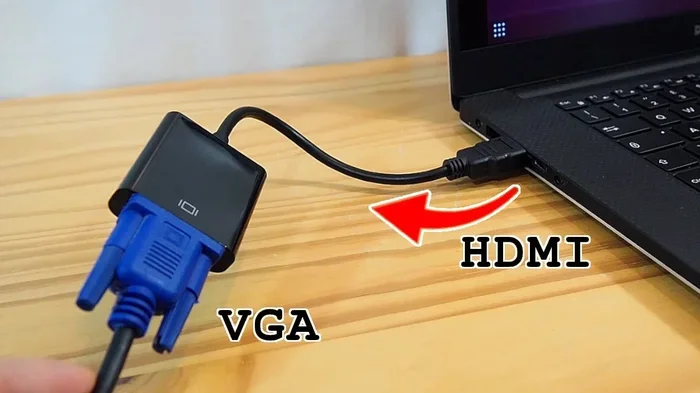
Using an HDMI to VGA adapter is generally safe and works well for connecting newer devices to older displays. These adapters convert digital HDMI signals to analog VGA output, making them useful for legacy setups. However, you need to pick the right type and check for compatibility to avoid issues.
So you have a shiny new laptop with only HDMI output, but your monitor or projector only has VGA input. It is a common problem. And the first thing most people ask is: is it ok to use an HDMI to VGA adapter? The short answer is yes. These adapters are widely used, safe, and do the job in most situations. But there are a few things you should know before you buy one.
In this guide, we will walk you through everything you need to know about HDMI to VGA adapters. We will cover how they work, when to use them, common problems, and how to pick the right one. Whether you are setting up a home office, connecting to a classroom projector, or using legacy devices in a workspace, this article has you covered.
Key Takeaways
- HDMI to VGA adapters are safe: They work reliably for most setups without damaging your devices.
- Choose between active and passive adapters: Active adapters need external power, while passive ones do not.
- Signal quality may vary: Expect some loss in resolution compared to a direct HDMI connection.
- Audio may not transfer: VGA only carries video, so you may need a separate audio cable.
- Check compatibility first: Not all devices work perfectly with every adapter type.
- Use adapters for legacy devices: They are great for connecting old monitors and projectors to modern laptops.
📑 Table of Contents
What Is an HDMI to VGA Adapter?
An HDMI to VGA adapter is a small device that converts a digital HDMI signal into an analog VGA signal. HDMI stands for High-Definition Multimedia Interface. It carries both video and audio in a digital format. VGA stands for Video Graphics Array. It is an older analog standard that only carries video.
These adapters are commonly used to connect modern laptops, desktops, and media players to older monitors, projectors, and displays. Many offices and schools still use VGA projectors and screens. So the HDMI to VGA adapter fills the gap between old and new technology. Think of it as a translator between two different languages.
The adapter itself is usually a small dongle or box. You plug it into your HDMI port on one end and connect a VGA cable to the other end. Some models also include a 3.5mm audio jack for sound output. This is important because VGA does not carry audio on its own.
How Does an HDMI to VGA Adapter Work?
Understanding how an HDMI to VGA adapter works helps you pick the right one. The process is called signal conversion. Your device sends a digital video signal through the HDMI port. The adapter converts that digital signal into an analog signal that a VGA display can understand.
Active vs Passive Adapters
There are two main types of adapters you should know about:
- Passive adapters: These are simple and cheap. They do not need any external power. They work when your source device can send an analog signal on its own. Many older laptops and desktops support this natively.
- Active adapters: These have a built-in chip that does the digital-to-analog conversion. They often need power from a USB port. Active adapters work with almost any device that has an HDMI output.
Most modern adapters you will buy are active types. This is because most new devices do not output analog signals directly. If you are unsure which type you need, an active adapter is the safer choice. It works with more devices and gives better results.
Signal Conversion Process
The signal conversion process happens inside the adapter chip. The digital signal from your HDMI port is decoded and then re-encoded as an analog signal. This analog signal travels through the VGA cable to your display. The display then renders the image on screen.
One thing to keep in mind is that this conversion can cause a slight loss in picture quality. The digital-to-analog conversion is not perfect. But for everyday use like presentations, office work, and browsing, the difference is barely noticeable. If you are a gamer or need pixel-perfect image quality, a direct digital connection is always better.
Is It Safe to Use an HDMI to VGA Adapter?
Yes, it is safe. Using an HDMI to VGA adapter will not damage your computer, monitor, or any other device. The adapter does not alter the power output from your device. It only changes the signal type. There is no risk of electrical damage or short circuits when using a standard adapter.
However, there are a few safety tips to keep in mind:
- Buy adapters from reputable brands. Cheap knockoff adapters may use poor-quality components.
- Do not force cables into ports. Plug them in gently and make sure they fit properly.
- Check that your adapter is compatible with your device before purchasing.
- Avoid using adapters in wet or humid environments.
As long as you follow these basic guidelines, your adapter will work safely for years. Think of it the same way you think about using a USB adapter or a USB adapter. They are simple tools that bridge the gap between different connection types.
When Should You Use an HDMI to VGA Adapter?
There are many situations where an HDMI to VGA adapter comes in handy. Let us look at the most common use cases.
Connecting to Older Monitors
Many offices and homes still have older monitors with VGA inputs. These monitors work fine, but newer computers do not have VGA ports. An HDMI to VGA adapter solves this problem easily. You can keep using your old monitor without buying a new one.
This is a great way to save money and reduce electronic waste. Instead of replacing a perfectly good monitor, just add an adapter. It is a simple solution that works well for everyday tasks like word processing, web browsing, and email.
Using Adapters with Projectors
Projectors in classrooms, conference rooms, and home theaters often have VGA inputs. If your laptop or streaming device only has HDMI, you need an adapter to connect. A projector connection through an HDMI to VGA adapter is quick and reliable.
For best results, use a high-quality VGA cable alongside your adapter. This ensures a clear and stable image on the projected screen. If you need audio as well, make sure your adapter has a built-in audio output or use a separate audio cable.
Gaming and Media Use
Can you use an HDMI to VGA adapter for gaming? Yes, but with some limitations. The analog VGA signal does not support the same high resolutions and refresh rates as digital HDMI. For casual gaming, it works fine. But for competitive gaming or high-refresh-rate displays, you will notice a difference.
Input lag can also be slightly higher with adapters. This is because of the conversion process. For fast-paced games, this might be noticeable. For puzzle games, strategy games, and retro gaming, an adapter works perfectly well.
Common Problems and How to Fix Them
Even though HDMI to VGA adapters are simple devices, you might run into some issues. Here are the most common problems and how to solve them.
No Signal or Black Screen
If your display shows nothing, do not panic. This is the most common issue and usually easy to fix. Try these steps:
- Check that all cables are firmly connected.
- Make sure your adapter is properly seated in the HDMI port.
- Try a different VGA cable to rule out a faulty cable.
- Check your display settings on your computer and make sure the output is set correctly.
- If using an active adapter, make sure it is powered through USB.
In most cases, a loose connection is the culprit. Unplug everything and plug it back in firmly. This simple step fixes the problem more often than not.
Audio Issues
Since VGA only carries video, you will not get sound through the VGA cable alone. If you need audio, you have a couple of options:
- Use an adapter that has a built-in 3.5mm audio jack.
- Connect a separate audio cable from your device to your speakers or headphones.
- Use Bluetooth speakers or a wireless audio solution.
Many people forget about the audio part when setting up their display. Make sure you plan for sound before you start your presentation or movie session. A good camera adapter setup guide can also help you understand how different adapter types handle signal routing.
Poor Picture Quality
If your image looks fuzzy or blurry, there are a few things to check:
- Make sure your VGA cable is not damaged or too long. Longer cables can degrade signal quality.
- Check your display resolution settings. VGA typically works best at lower resolutions like 1024×768 or 1920×1080.
- Try a different adapter if the picture quality remains poor.
Remember that analog signals are more susceptible to interference than digital ones. Keep your VGA cables away from power cables to reduce interference and improve picture quality.
Tips for Choosing the Right Adapter
Not all HDMI to VGA adapters are the same. Here are some tips to help you choose the right one for your needs.
What to Look For
- Adapter type: Go with an active adapter for the best compatibility with modern devices.
- Build quality: Look for metal housings and well-made connectors. They last longer and provide better signal transfer.
- Audio support: If you need sound, pick an adapter with a 3.5mm audio output.
- Resolution support: Make sure the adapter supports your desired resolution, such as 1080p or 4K.
- Brand reputation: Stick with well-known brands or read reviews before buying.
Recommended Brands
Some trusted brands in the adapter space include brands like Cable Matters, UGREEN, and Sabrent. These brands offer reliable adapters with good customer support. While you do not need to buy the most expensive option, avoid the cheapest no-name brands. They often have poor signal quality and break easily.
When shopping, compare a few options and read user reviews. Pay attention to comments about durability and signal quality. A good adapter should last for years without any issues.
Final Verdict
So, is it ok to use an HDMI to VGA adapter? Absolutely. These adapters are safe, affordable, and do a great job of bridging the gap between modern and legacy displays. Whether you are in a classroom, an office, or a home setup, an HDMI to VGA adapter is a practical and reliable solution.
The key is to choose the right type of adapter for your needs. Go with an active adapter for the best compatibility. Make sure your cables are in good condition. And always plan for audio if your setup requires sound.
With the right adapter and a little setup knowledge, you can connect almost any device to almost any display. Do not let outdated ports hold you back. An HDMI to VGA adapter is a small investment that solves a big problem.
Frequently Asked Questions
Can I get audio through an HDMI to VGA adapter?
Standard VGA cables do not carry audio. However, many HDMI to VGA adapters come with a built-in 3.5mm audio jack. You can plug this into your speakers or headphones to get sound. If your adapter does not have an audio output, use a separate cable from your device to your audio system.
Will an HDMI to VGA adapter work with 4K resolution?
Most HDMI to VGA adapters max out at 1080p resolution. VGA is an analog standard and does not support 4K. If you need 4K output, you should use a display that has an HDMI or DisplayPort input. For older displays, 1080p is the sweet spot for an HDMI to VGA setup.
Do I need to install drivers for an HDMI to VGA adapter?
Most HDMI to VGA adapters are plug-and-play. You do not need to install any drivers. Simply plug the adapter into your HDMI port, connect a VGA cable, and your computer should detect the display automatically. If it does not, check your display settings and make sure the output is enabled.
Can I use an HDMI to VGA adapter for gaming?
Yes, but with limitations. VGA supports lower resolutions and refresh rates compared to digital connections. For casual and older games, an adapter works fine. For competitive or high-performance gaming, a direct digital connection is recommended. You may also notice slightly higher input lag with an adapter.
Are active adapters better than passive adapters?
Active adapters are generally better for modern devices. They have a built-in chip that handles digital-to-analog conversion. Passive adapters rely on your source device to output an analog signal, which most new devices cannot do. Unless you have an older device that supports analog output, go with an active adapter.
How long can my VGA cable be without losing quality?
VGA cables can run up to about 15 feet without significant quality loss. Beyond that, the analog signal starts to degrade. If you need a longer cable, consider using a higher-quality cable or adding a signal booster. Keep your cable runs as short as possible for the best picture quality.
=== CONCLUSION ===
Using an HDMI to VGA adapter is a simple, safe, and effective way to connect modern devices to older displays. These adapters are perfect for offices, classrooms, and home setups where legacy equipment is still in use. As long as you choose the right type and follow basic setup tips, you will have a reliable connection every time.
Remember to check for audio needs, pick an active adapter for the best compatibility, and invest in good-quality cables. With these steps, your HDMI to VGA adapter will serve you well for years to come. Do not let incompatible ports stop you from getting the display setup you need.