Is It Better to Use Hdmi Arc or Optical
HDMI ARC offers better audio quality, supports Dolby Atmos, and sends audio both directions, while optical cables are simpler and more widely compatible. Both connections have their strengths depending on your setup. This guide breaks down everything you need to choose the right one for your home theater.
When you are setting up a home theater or upgrading your TV sound, the cable you choose matters a lot. Two popular options are HDMI ARC and optical cable. Both carry audio from your TV to a soundbar or receiver, but they work very differently. One offers better sound quality and smart features, while the other keeps things simple and reliable.
If you have ever wondered which connection is better for your setup, you are in the right place. This guide covers everything from audio quality to compatibility. By the end, you will know exactly which cable fits your needs. Let us break it down in a way that is easy to follow.
Key Takeaways
- HDMI ARC supports higher bandwidth: It can carry lossless audio formats like Dolby Atmos and DTS:X that optical cannot.
- Optical cables are more universal: They work with almost any audio device regardless of brand or age.
- HDMI ARC allows two-way audio: Your TV can send audio to your soundbar and receive controls back through the same cable.
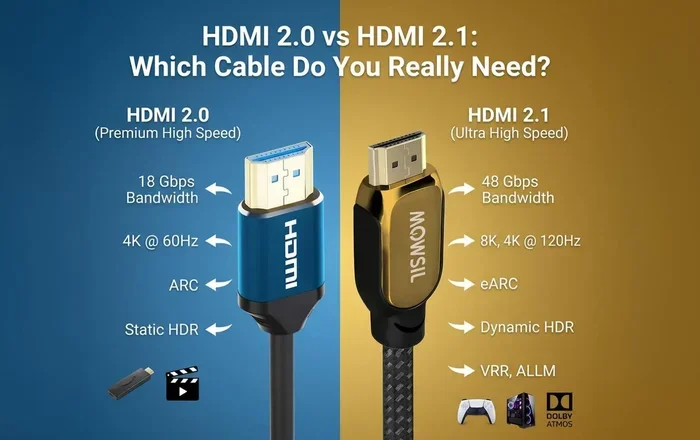
- eARC is the newer upgrade: It fixes many limitations of standard HDMI ARC and is worth considering for modern setups.
- Your choice depends on your gear: Check what your TV and speakers support before buying a cable.
- Price is similar: Both HDMI ARC and optical cables are affordable and easy to find.
📑 Table of Contents
What Is HDMI ARC?
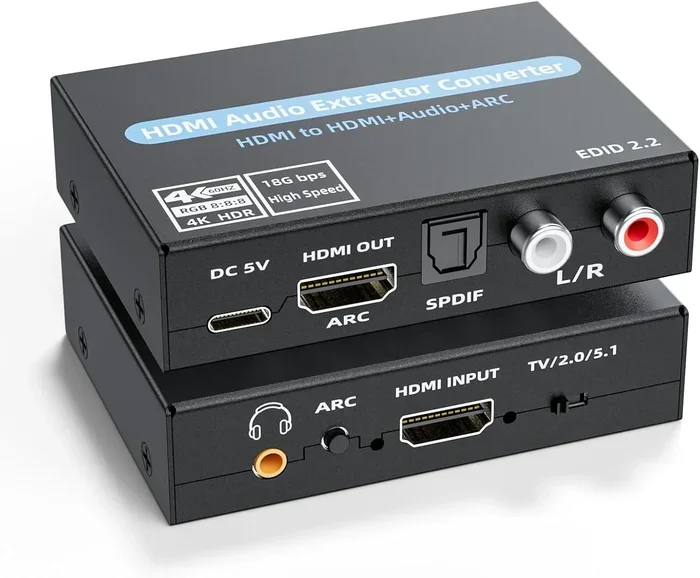
HDMI ARC stands for Audio Return Channel. It is a special feature built into HDMI cables that lets audio travel in both directions. This means your TV can send sound to your soundbar or receiver, and your soundbar can send control signals back to your TV. It is a two-way street, and that changes everything about how your system works.
Most modern TVs and soundbars made after 2014 support HDMI ARC. You just need one HDMI cable to handle both video and audio. That cuts down on cable clutter and makes your setup cleaner. It also means you can use your TV remote to control the volume of your soundbar.
How HDMI ARC Works
HDMI ARC uses the same HDMI port your TV already has for video. When you connect a soundbar using an HDMI cable and enable ARC in your TV settings, the audio flows through that single cable. Your TV receives video from a cable box or streaming stick and sends the audio to your soundbar at the same time. This is called the audio return channel, and it is incredibly convenient.
The real magic happens with CEC, or Consumer Electronics Control. This feature lets your TV remote talk to your soundbar. So when you press volume up on your TV remote, the soundbar listens. You do not need two remotes sitting on your coffee table. It is a small thing that makes a big difference in daily use.
What Is an Optical Cable?
An optical cable uses light to carry audio signals between devices. It is also called a TOSLINK cable or S/PDIF cable. You plug one end into your TV and the other into your soundbar or receiver. The connection is simple and does not rely on HDMI at all.
Optical cables have been around for a long time. They are found on almost every TV, soundbar, and receiver made in the last 20 years. If you have an older setup or a budget soundbar, there is a good chance it uses optical. The cable itself is thin and flexible, which makes it easy to route behind your furniture.
How Optical Audio Works
When your TV sends audio through an optical cable, it converts the signal into pulses of light. Those light pulses travel through a tiny glass fiber inside the cable. Your soundbar or receiver converts the light back into an audio signal. This process is very reliable and immune to electrical interference from other cables nearby.
Optical cables support standard audio formats like Dolby Digital and DTS 5.1 surround sound. They do not support the newer lossless formats like Dolby Atmos or DTS:X. This is the biggest limitation of optical compared to HDMI ARC. But for basic surround sound, optical gets the job done very well.
HDMI ARC vs Optical: Key Differences
Now let us compare these two connections side by side. Each has strengths and weaknesses, and the right choice depends on what you care about most.
Audio Quality Comparison
HDMI ARC supports much higher audio bandwidth than optical. This means it can carry uncompressed and lossless audio formats. If you watch movies with Dolby Atmos or DTS:X, HDMI ARC is the only way to get that full surround experience through a single cable. Optical cables cap out at compressed 5.1 surround, which still sounds great but lacks the depth of lossless formats.
For music listening, HDMI ARC also has the edge. It can pass through high-resolution audio formats that audiophiles appreciate. If you care about the full range of sound from your ceiling speakers or a quality soundbar, HDMI ARC gives you more options.
Bandwidth and Features
The bandwidth difference is significant. HDMI ARC can handle much more data than optical. This is why it supports advanced audio formats and video pass-through at the same time. Optical cables have a fixed, lower bandwidth that limits what they can carry.
HDMI ARC also supports features that optical simply cannot. These include:
- Two-way audio control through CEC
- Lip sync correction to keep audio and video in sync
- Auto device detection when you turn things on
- Multi-channel uncompressed audio for richer sound
Optical cables do none of these things. They are a simple, one-way audio pipe. That simplicity is actually a plus in some situations, which we will talk about below.
Compatibility
When it comes to compatibility, optical cables win. Almost every audio device ever made supports optical input. Even very old TVs and budget soundbars include an optical port. If you have an older setup or are mixing equipment from different eras, optical is the safe choice.
HDMI ARC is newer and not supported on older devices. Some budget TVs and soundbars still lack HDMI ARC ports. Before you choose, check the back of your TV and soundbar to see what connections are available. If both devices support HDMI ARC, you are in great shape. If not, optical is your fallback.
Ease of Use
Setting up an optical connection is straightforward. Plug it in, select the optical input on your soundbar, and you are done. There are no settings to toggle on most TVs. It just works.
HDMI ARC setup is slightly more involved. You usually need to go into your TV settings and enable ARC manually. Some TVs also require you to set the HDMI port to ARC mode. Once it is set up, though, it works just as easily as optical. The extra setup step is worth it for the features you gain.
When to Choose HDMI ARC
You should pick HDMI ARC if any of these situations apply to your setup. It is the better choice for most modern home theater systems, and here is why.
You want the best audio quality. If you are watching movies or shows with Dolby Atmos, HDMI ARC is the only way to get that full experience through a single cable. The higher bandwidth means your soundbar receives every detail the format has to offer. Optical would compress that audio and lose some of the richness.
You want fewer remotes and cables. HDMI ARC lets you control your soundbar with your TV remote. It also carries video signals, so you might not need as many cables running to your TV. This is great if you want a clean, minimalist setup behind your entertainment center.
You have a modern TV and soundbar. If both your TV and soundbar were made in the last five years, they almost certainly support HDMI ARC. Take advantage of the features built into your gear. There is no reason to settle for less when your equipment is already capable of more.
You plan to upgrade to eARC. Enhanced ARC (eARC) is the latest version of HDMI ARC. It supports even more audio formats and fixes some of the lip sync issues that plague standard ARC. If your TV supports eARC, choosing an HDMI ARC cable now means you are ready for future upgrades.
When to Choose Optical
Optical cables still have a place in today’s audio world. Here are the situations where they make the most sense.
You have older equipment. If your TV or soundbar is from several years ago, it might not have HDMI ARC. Optical has been around for decades and works on virtually every device. When compatibility is your top concern, optical is the foolproof option.
You want a simple, no-fuss setup. Optical cables do not require any settings changes. There is no ARC toggle, no CEC configuration, and no troubleshooting if audio does not come through. Just plug and play. For people who want things to work immediately without fuss, this is a real advantage.
You only need basic surround sound. If you are happy with Dolby Digital 5.1 and do not need Dolby Atmos or lossless audio, optical delivers great quality. Many people cannot tell the difference in everyday listening. For casual movie watching and TV shows, optical is more than enough.
You have electrical interference issues. Optical cables use light, not electrical signals. This means they are completely immune to interference from power cables, power strips, or other electronic devices nearby. If you have a messy cable run and hear buzzing or humming, switching to optical can solve the problem instantly.
Common Mistakes to Avoid
Even with the right cable, people make mistakes that hurt their audio experience. Here are the most common ones and how to avoid them.
Not enabling ARC in your TV settings. This is the number one issue people face. You can plug in an HDMI ARC cable perfectly, but if ARC is not turned on in your TV menu, audio will not flow to your soundbar. Always check your TV settings after connecting.
Using the wrong HDMI port. Not all HDMI ports on your TV support ARC. Look for the port labeled ARC or eARC. If you plug into the wrong port, you will not get the two-way audio feature. Check your TV manual if you are unsure which port to use.
Using a low-quality HDMI cable. A cheap or damaged HDMI cable can cause audio dropouts or sync issues. Use a certified high-speed HDMI cable to ensure reliable performance. The cable itself is inexpensive, so there is no reason to save money here.
Ignoring your soundbar’s settings. Some soundbars have multiple input options and default to the wrong one. Make sure your soundbar is set to receive audio from the HDMI ARC input, not optical or Bluetooth. This is a quick fix that people often overlook.
Expert Insights
Audio engineers and home theater specialists generally agree on one thing: HDMI ARC is the better choice for most people today. The audio quality, features, and convenience it offers are hard to beat. Optical is still useful, but it is increasingly seen as a backup option rather than a primary connection.
When choosing between connections for your speakers, consider the full picture. The higher or lower ohms better speakers debate is separate from your cable choice, but both affect your final sound. A great cable with mismatched impedance will still sound off, so make sure your speaker 4 or 8 ohm speakers better choice aligns with your amplifier or receiver specs as well.
For those building a complete audio setup, the cable is just one piece of the puzzle. The quality of your source, the placement of your speakers, and the room acoustics all play a role. HDMI ARC gives you the best foundation to build on, especially if you are investing in quality audio gear like ceiling speakers worth it for a full immersive experience.
Final Verdict
So which connection is better? For most people in 2024 and beyond, the answer is HDMI ARC. It offers superior audio quality, supports the latest formats, and provides convenient features like remote control integration and two-way communication. If your TV and soundbar both support it, HDMI ARC is the clear winner.
That said, optical cables are not obsolete. They remain a reliable, simple, and widely compatible option. If you have older gear or just need basic surround sound, optical will serve you well. The best choice is the one that matches your equipment and meets your needs.
Take a moment to check your devices. Look at the ports on the back of your TV and soundbar. If you see HDMI ARC, use it. If not, optical is your best bet. Either way, you are one cable away from a better audio experience.
Frequently Asked Questions
Can I use both HDMI ARC and optical at the same time?
Most devices do not allow both connections to be active simultaneously. If you plug in an HDMI ARC cable, the optical output on your TV usually disables automatically. You should pick one connection and stick with it for the best results.
Does HDMI ARC support Dolby Atmos?
Yes, standard HDMI ARC supports Dolby Atmos. However, for the best Dolby Atmos experience, look for eARC (enhanced ARC) on your TV. eARC has higher bandwidth and handles Atmos more reliably than standard ARC.
Can I use a regular HDMI cable for HDMI ARC?
Yes, any standard HDMI cable works for HDMI ARC. You do not need a special or expensive cable. Just make sure it is a decent quality cable that is not damaged or overly long, as signal issues can occur with very long or poor-quality cables.
Why is my audio not working with HDMI ARC?
The most common reason is that ARC is not enabled in your TV settings. Go to your TV’s audio or HDMI settings and turn on HDMI ARC or CEC. Also make sure you are using the correct HDMI port on your TV that supports ARC.
Is optical audio better than HDMI ARC for music?
No, HDMI ARC is better for music. It supports higher resolution audio formats and can carry uncompressed audio. Optical is limited to compressed formats, which means less detail in your music. If audio quality matters to you, HDMI ARC is the way to go.
Do I need a special soundbar for HDMI ARC?
Your soundbar needs to have an HDMI ARC port, which most modern soundbars include. Check the back or side of your soundbar for an HDMI port labeled ARC. If it only has optical input, you will need to use an optical cable instead.