How to Choose a Cpu
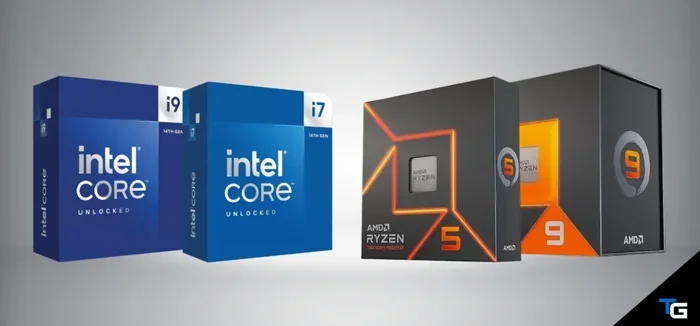
Choosing the right cpu is one of the most important decisions you will make when building or upgrading a computer. Your processor affects everything from gaming performance to everyday multi-tasking. This guide breaks down all the key factors — including clock speed, cores, socket type, and budget — so you can confidently pick the best cpu for your needs without confusion.
picking a processor can feel overwhelming. There are so many numbers, names, and specs on the box. But here is the good news. Choosing the right cpu does not have to be complicated. This guide walks you through every important factor in plain language. You will learn what matters and what to ignore. By the end, you will know exactly which processor fits your needs and budget.
A cpu, or central processing unit, is the brain of your computer. It handles every task you throw at your system. Whether you are browsing the web, editing video, or playing a game, the processor is working hard behind the scenes. That is why making a smart choice matters so much. The wrong processor can bottleneck your entire system. The right one makes everything feel fast and smooth.
Key Takeaways
- Know Your Needs: Match your cpu choice to your actual use case, whether it is gaming, office work, or creative tasks.
- Clock Speed and Cores Matter: Higher clock speed means faster single-core performance, while more cores handle multi-tasking and heavy workloads better.
- Check Compatibility First: Always verify socket type and motherboard support before buying any processor.
- Budget Wisely: You do not need the most expensive cpu to get great performance for everyday use.
- Consider the Whole System: A great cpu needs to pair well with your ram, storage, and gpu for the best experience.
- Think About Future Upgrades: Choosing a platform with a clear upgrade path saves money in the long run.
📑 Table of Contents
Understand What a Cpu Does
Before you shop, it helps to understand the basics. The cpu processes instructions from every program you run. It calculates, thinks, and tells other parts of your computer what to do. Think of it like a manager in a busy office. The better the manager, the smoother everything runs.
Clock Speed: The Heartbeat of Your Processor
Clock speed is measured in gigahertz, or GHz. It tells you how many cycles your processor can complete per second. A higher clock speed generally means faster performance. For example, a cpu at 4.5 GHz will complete tasks quicker than one at 3.0 GHz. But clock speed is not the whole story. It is just one piece of the puzzle.
Cores and Threads: The Multi-Tasking Powerhouses
Modern processors have multiple cores. Each core can handle its own set of tasks. More cores mean better multi-tasking. If you run many programs at once, more cores help a lot. Threads are like virtual cores. They let each physical core handle two tasks at the same time. A processor with 8 cores and 16 threads is great for heavy workloads.
Match the Cpu to Your Use Case
Different people need different processors. A gamer has different needs than a student. A video editor needs something else entirely. The key is to match your cpu to what you actually do. Here is a simple breakdown of use cases and what to look for.
For Everyday Tasks and Office Work
If you mostly use your computer for email, web browsing, and documents, you do not need a top-tier processor. A budget cpu with 4 cores and a moderate clock speed will handle these tasks easily. You will save money and still get a smooth experience. Look for processors in the mid-range price bracket for the best value.
For Gaming
Gamers need a strong single-core performance. Most games rely heavily on clock speed. A cpu with at least 6 cores and a high boost clock is a solid starting point. You also need to think about pairing your processor with a graphics card. Matching your cpu and gpu correctly ensures neither component holds the other back. A balanced system delivers the best gaming experience.
For Content Creation and Heavy Workloads
Video editing, 3D rendering, and programming benefit from many cores. The more cores your cpu has, the faster these tasks complete. Look for processors with 12 cores or more if you work with heavy creative software. These processors cost more but deliver serious performance gains for professional workloads.
Check Compatibility Before You Buy
Nothing is more frustrating than buying a cpu and finding out it does not fit. Compatibility is critical. You need to check a few things before you spend your money.
Socket Type
Every processor fits a specific socket on the motherboard. Intel and AMD use different sockets. Even within the same brand, sockets change between generations. Always check your motherboard manual or manufacturer website to confirm the supported socket type. Buying a processor with the wrong socket means it will not work at all.
Motherboard Chipset
The chipset on your motherboard also matters. It determines which features are available. Some chipsets support overclocking, while others do not. If you want to push your cpu beyond its default speed, you need a chipset that allows it. Check compatibility lists on the motherboard manufacturer’s website to be safe.
Budget and Value: Spending Smart
You do not need to spend a fortune to get a great processor. There are excellent options at every price point. The trick is knowing where to spend and where to save.
Budget Processors
Budget cpu options are perfect for everyday users. They handle web browsing, office apps, and light gaming with ease. You can find solid processors for under $150 that deliver excellent value. These chips may not win benchmarks, but they get the job done without breaking the bank.
Mid-Range Processors
Mid-range processors offer the best balance of price and performance. They handle gaming, photo editing, and multi-tasking comfortably. Most people will find a mid-range cpu meets all their needs. This is the sweet spot for most buyers.
High-End and Enthusiast Processors
Top-tier processors are for users who need maximum performance. They come with many cores, high clock speeds, and advanced features. These chips are ideal for professional creators and hardcore gamers. But for most people, they are overkill. You pay a premium that you may not actually need.
Think About the Full System
A great processor works best when paired with the right components. Your cpu does not exist in isolation. Every part of your system affects overall performance.
Ram and Multi-Tasking
Your processor and ram work together closely. If your system is low on memory, even the best cpu will slow down. Make sure you have enough ram for your tasks. If you need to get more ram on your laptop, it is a simple and affordable upgrade that makes a big difference. A balanced system with a good processor and sufficient ram delivers the smoothest experience.
Storage and Boot Times
Fast storage complements a strong processor. An ssd reduces load times and makes your system feel snappy. Pairing a good cpu with an ssd is one of the easiest ways to improve your computer. The combination makes everything from booting up to opening apps feel instant.
Common Mistakes to Avoid
Many buyers make avoidable mistakes when choosing a processor. Here are the most common ones and how to skip them.
- Buying the most expensive option: The priciest processor is not always the best choice for your needs.
- Ignoring compatibility: Always check socket type and motherboard support before purchasing.
- Focusing only on clock speed: Core count and architecture matter just as much.
- Overlooking cooling needs: A powerful cpu generates more heat. Make sure your cooler can handle it.
- Skipping future-proofing: Choose a platform that allows for upgrades down the road.
Quick Tips for Choosing the Right Cpu
- Define your primary use case before shopping.
- Check your motherboard compatibility first.
- Compare benchmark scores for real-world performance data.
- Set a budget and stick to it.
- Read reviews from trusted sources to understand real-world performance.
- Consider the entire system, not just the processor alone.
Final Thoughts
Choosing a cpu does not have to be stressful. Focus on what matters for your specific needs. Check compatibility, set a realistic budget, and think about the whole system. A well-chosen processor makes your computer feel fast and responsive for years to come. Take your time, do your research, and you will find the perfect fit. The right processor is out there waiting for you.
Frequently Asked Questions
What is the most important thing to consider when choosing a cpu?
Your use case matters most. A gamer needs high clock speed and strong single-core performance, while a content creator benefits from many cores. Match your cpu choice to what you actually do every day. This single decision will guide all your other choices.
How many cores do I really need?
For everyday tasks, 4 cores are plenty. Gamers should aim for 6 to 8 cores. Content creators and professionals often benefit from 12 cores or more. The right number depends entirely on your workload and how many programs you run at the same time.
Is Intel or AMD better for choosing a cpu?
Both brands offer excellent processors at different price points. Intel often leads in single-core performance, while AMD excels in multi-core workloads. The best choice depends on your specific needs and budget. Compare benchmarks for your exact use case rather than picking a brand blindly.
Do I need to buy a new motherboard with a new cpu?
Not always, but often yes. Different processor generations use different sockets. If your current motherboard supports the new processor’s socket and chipset, you may not need to replace it. Always check compatibility before making a purchase to avoid unnecessary costs.
Can I upgrade my cpu later without replacing everything?
It depends on your motherboard and socket. If your motherboard supports a newer generation of processors with the same socket, you can upgrade just the cpu. This is why choosing a platform with a clear upgrade path is smart for future-proofing your system.
How much should I spend on a cpu?
Budget processors under $150 handle everyday tasks well. Mid-range options between $150 and $300 cover gaming and productivity nicely. High-end processors above $300 are for professionals and enthusiasts. Spend based on what you need, not on the highest number you can find.
=== CONCLUSION ===
Choosing the right cpu comes down to understanding your needs and doing a little homework. You now know what clock speed, cores, and compatibility mean for your purchase. You also know how to avoid common mistakes and get the best value for your money. A thoughtful choice today saves frustration tomorrow. Apply what you have learned here and you will build or upgrade a system that performs exactly how you want it to.