How to Choose a Cpu Cooler
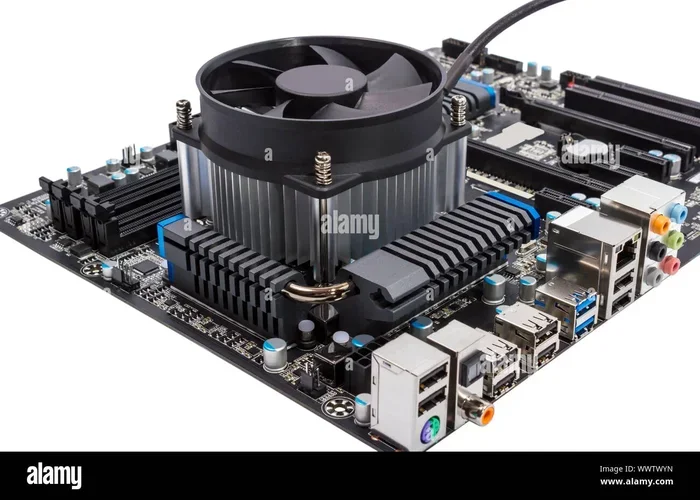
Choosing the right CPU cooler is one of the most important decisions you can make for your PC build. Whether you prefer an air cooler or a liquid cooler, this guide walks you through everything you need to know about cooling performance, socket compatibility, fan size, and budget considerations. By the end, you will know exactly which CPU cooler is the best fit for your system.
Your CPU works hard every single day. It processes instructions, runs applications, and handles multitasking without breaking a sweat. But all that work generates heat. Too much heat can slow your system down, cause crashes, or even damage your processor over time. That is exactly why picking the right CPU cooler matters so much. Whether you are building a new PC or upgrading an existing one, this guide will help you make a smart choice.
A CPU cooler keeps your processor at a safe operating temperature. Without proper cooling, your CPU will thermal throttle, which means it slows itself down to avoid overheating. Nobody wants that. The good news is that there are plenty of options out there at every price point. From simple stock coolers to powerful aftermarket coolers, you can find something that works for your needs and budget.
In this article, we will break down everything you need to know. We will cover the different types of coolers, what to look for in terms of compatibility and performance, and how to avoid common mistakes. By the time you finish reading, you will feel confident choosing the best cooling solution for your setup. Let us get started.
Key Takeaways
- Air coolers are affordable and reliable: They work great for most builds and are easy to install.
- Liquid coolers offer superior cooling: Best for high-performance CPUs and overclocking setups.
- Socket compatibility matters: Always check that the cooler supports your CPU socket type.
- Fan size and speed affect noise: Larger fans move more air at lower RPM, meaning quieter operation.
- Budget plays a big role: You do not need to spend a fortune to get solid cooling performance.
- Thermal paste is essential: Proper application makes a real difference in heat transfer.
- Case clearance is often overlooked: Make sure your cooler fits inside your PC case before buying.
📑 Table of Contents
Types of CPU Coolers
Not all coolers are created equal. There are two main categories that dominate the market. Understanding the differences between them is the first step in making the right choice.
Air Coolers
Air coolers use a combination of a metal base plate, heat pipes, and a fan to move heat away from the CPU. The heat pipes transfer thermal energy to a large metal block called a heatsink. Then the fan blows air across the heatsink to dissipate the heat into the surrounding environment.
Air coolers are the most popular choice for PC builders. They are reliable, affordable, and easy to install. Most come with a stock cooler included when you buy a processor, but aftermarket air coolers offer much better performance.
Here are some key benefits of air coolers:
- Lower cost: Most air coolers are budget-friendly and offer excellent value.
- Simple design: Fewer moving parts means fewer things can go wrong.
- Easy installation: You can mount most air coolers in under 20 minutes.
- No maintenance: There is no liquid to worry about leaking or replacing.
- Good durability: A quality air cooler can last the entire lifespan of your PC.
The main downside to air coolers is size. Large tower coolers can be tall and may not fit in smaller cases. They can also block access to other components on the motherboard, which matters if you plan to install additional RAM or use certain motherboard slots. If you are unsure about component compatibility, you might want to check out our guide on how to match a CPU and GPU to make sure all your parts work together seamlessly.
Liquid Coolers (AIO and Custom Loops)
Liquid coolers use a liquid-based system to transfer heat away from the CPU. The most common type is the AIO (All-in-One) cooler. It comes pre-filled with coolant and sealed from the factory. An AIO setup includes a radiator, fans, a water block, and tubing filled with coolant.
The water block sits on top of the CPU and absorbs heat. The coolant carries that heat through the tubing to the radiator, where the fans blow it away. This process is much more efficient than air cooling alone.
Here is why many enthusiasts prefer liquid cooling:
- Superior cooling performance: Liquid coolers handle extreme heat much better than air coolers.
- Quieter operation: Fans can run at lower speeds because the radiator is often placed away from the CPU.
- Compact footprint: The radiator can be mounted on the top or front of your case, saving space around the CPU socket.
- Aesthetic appeal: Many AIO coolers come with RGB lighting and sleek designs that look great in a transparent case.
The trade-off is cost and complexity. Liquid coolers are more expensive, and there is a small risk of leaks over time. Custom loop coolers offer the best performance but require significant knowledge and maintenance. For most users, an AIO cooler strikes the perfect balance between performance and simplicity.
Compatibility: What You Need to Check
Before you buy any cooler, you need to make sure it works with your system. Compatibility issues are the number one reason people return coolers. Taking five minutes to check specs can save you a lot of headaches.
CPU Socket Compatibility
Every CPU has a specific socket type. Intel and AMD use different sockets, and even within each brand, socket types change from generation to generation. For example, Intel uses LGA 1700 for its 12th, 13th, and 14th generation processors, while AMD uses AM5 for its latest Ryzen CPUs.
Always double-check that the cooler you want to buy supports your specific socket. Most cooler manufacturers list compatible sockets on the product page. If the cooler does not list your socket, it probably will not fit.
Case Clearance
This is a step many people forget. Your cooler needs physical space inside your PC case. Tall air coolers can block access to RAM slots, especially if you have multiple sticks installed. Before purchasing, check the cooler height against your case maximum CPU cooler height specification.
For laptop users, cooling is a different challenge entirely. Laptops have limited space for heat dissipation, and upgrading your RAM can sometimes help improve overall thermal management by reducing system strain. If you are working with a laptop, our guide on how to upgrade the RAM of a laptop can help you free up resources and improve system performance alongside your cooling solution.
Radiator and Fan Size
If you are going with a liquid cooler, you need to consider radiator size and fan placement. Common radiator sizes include 120mm, 240mm, 280mm, and 360mm. A 240mm radiator is a popular choice for most builds. It offers excellent cooling without being too bulky.
Make sure your case has mounting points for your chosen radiator size. Most modern cases support 240mm and 360mm radiators on the top or front, but you should always verify this before purchasing.
Cooling Performance and TDP
Understanding TDP (Thermal Design Power) is essential when choosing a cooler. TDP measures how much heat your CPU generates under load. A higher TDP means your CPU produces more heat and needs a stronger cooler to keep temperatures in check.
For example, a standard office CPU with a TDP of 65 watts will stay cool with a basic air cooler. But a high-end gaming CPU with a TDP of 125 watts or more will need a much more powerful cooling solution. Here is a simple way to think about it:
- Low TDP (under 65W): A basic air cooler or even a stock cooler will work fine.
- Medium TDP (65W to 95W): A mid-range air cooler handles this easily for most users.
- High TDP (105W and above): You will want a high-end air cooler or a 240mm AIO liquid cooler at minimum.
- Extreme TDP (over 150W for overclocked CPUs): Consider a 280mm or 360mm liquid cooler for the best results.
Keep in mind that TDP is not the only factor. Real-world temperatures depend on your case airflow, ambient room temperature, and the quality of your thermal paste. Applying a good layer of thermal paste between the CPU and the cooler base plate ensures efficient heat transfer. If you skip this step or use too little paste, your temperatures will be higher than they should be.
Noise Levels and Fan Speed
Cooling performance means nothing if your PC sounds like a jet engine. Noise is an important factor that many people overlook when choosing a cooler.
Fan speed is measured in RPM (revolutions per minute). Higher RPM means more airflow but also more noise. Look for coolers that offer variable fan speed control. This allows the fans to spin faster when the CPU is under heavy load and slow down when it is idle. The result is a quieter system that still cools effectively.
Larger fans are generally quieter than smaller fans because they can move the same amount of air at a lower RPM. A 140mm fan will almost always be quieter than a 120mm fan running at the same speed. If noise is a concern for you, prioritize coolers with larger fan sizes.
Some liquid coolers come with pump noise as well. The pump circulates coolant through the system, and some pumps can be audible. High-quality AIO coolers use quiet pumps that are barely noticeable. Reading reviews before buying can help you identify which models run the quietest.
Budget Considerations
You do not need to spend a fortune to get excellent cooling. There are great options available at every budget level.
Here is a rough breakdown of what you can expect at different price points:
- Under $30: Basic air coolers that handle standard workloads and light gaming. These are perfect for budget builds.
- $30 to $70: Mid-range air coolers with better heatsinks, larger fans, and improved thermal performance. This is the sweet spot for most users.
- $70 to $150: High-end air coolers and entry-level AIO liquid coolers. These handle demanding workloads and moderate overclocking with ease.
- $150 and above: Premium AIO coolers and custom loop setups. These are designed for enthusiasts, overclockers, and workstation builds that push hardware to its limits.
Remember that the most expensive cooler is not always the best choice for your situation. If you are not overclocking your CPU and you use your PC for everyday tasks, a budget air cooler will serve you perfectly. Spend more only if your workload demands it.
Common Mistakes to Avoid
Even experienced builders sometimes make mistakes when choosing a CPU cooler. Here are a few pitfalls to watch out for:
- Ignoring case compatibility: A cooler that looks great on paper might not fit in your case. Always check dimensions before buying.
- Skipping thermal paste: The cooler will not perform well without proper thermal paste application. Some coolers come with paste included, but not all do.
- Overlooking RAM clearance: Large tower coolers can interfere with RAM installation. Check the cooler height and RAM slot clearance.
- Buying more cooler than you need: A 360mm radiator is overkill for a budget CPU. Match your cooler to your actual cooling needs.
- Neglecting cable management: Poor cable routing can block airflow and reduce cooling efficiency. Plan your cable management before installing the cooler.
Taking the time to avoid these mistakes will save you money and frustration. It will also ensure that your system runs at its best from day one.
Expert Tips for Optimal Cooling
Want to squeeze every bit of performance out of your cooling setup? Here are some expert tips that make a real difference:
- Clean your cooler regularly: Dust buildup on fans and radiators reduces airflow. Clean your cooler every few months with compressed air.
- Apply thermal paste correctly: A pea-sized drop in the center of the CPU works for most coolers. Do not spread it manually unless the cooler manufacturer recommends it.
- Optimize your case airflow: Make sure you have both intake and exhaust fans working together. Good airflow keeps cool air flowing in and hot air flowing out.
- Monitor your temperatures: Use free software like HWMonitor or Core Temp to keep an eye on your CPU temperatures. If they climb too high, it might be time to reapply thermal paste or adjust fan curves.
- Consider undervolting: Reducing your CPU voltage slightly can lower temperatures significantly without sacrificing performance. This is a great trick for advanced users.
These small steps add up over time. Your CPU will run cooler, quieter, and last longer if you take a proactive approach to thermal management.
Final Thoughts
Choosing the right CPU cooler does not have to be overwhelming. Start by understanding your CPU’s TDP and your budget. Then decide between an air cooler and a liquid cooler based on your performance needs and case compatibility. Check all the specs, read some reviews, and you will find the perfect cooler for your build.
Remember, cooling is not just about keeping numbers low on a temperature monitor. It is about protecting your investment and ensuring your system runs smoothly for years to come. A good cooler gives you peace of mind, quieter operation, and better long-term performance. Take your time, do your research, and make a choice you will be happy with.
Frequently Asked Questions
Do I need a CPU cooler if my processor comes with a stock cooler?
Most Intel and AMD processors come with a basic stock cooler that is enough for everyday use. However, if you plan to game, edit video, or overclock your CPU, an aftermarket cooler will provide much better performance and lower temperatures. Stock coolers are fine for light workloads but may struggle under heavy use.
How often should I replace thermal paste on my CPU cooler?
Thermal paste typically lasts between two and five years before it starts to lose effectiveness. If you notice your CPU temperatures climbing over time, reapplying thermal paste can make a big difference. It is a simple process that takes just a few minutes and costs very little.
Can I use an air cooler and a liquid cooler interchangeably?
Yes, you can swap between air and liquid coolers as long as they are compatible with your CPU socket and case. Just make sure to remove the old cooler carefully, clean the surface, apply fresh thermal paste, and install the new cooler following the manufacturer’s instructions.
Is liquid cooling better than air cooling for gaming?
Liquid cooling generally provides better thermal performance than air cooling, especially for high-end gaming CPUs that generate a lot of heat. However, a quality air cooler can handle most gaming setups just fine. Liquid cooling becomes more important if you are overclocking or using a processor with a very high TDP.
Do I need to worry about RAM clearance with large CPU coolers?
Yes, large tower air coolers can block access to RAM slots, especially the slots closest to the CPU. If you plan to install multiple RAM sticks, check the cooler specifications for RAM clearance before buying. Some coolers offer low-profile designs that work well with tall RAM modules.
How do I know if my laptop needs a better CPU cooler?
If your laptop frequently overheats, shuts down unexpectedly, or feels very hot to the touch during normal use, the cooling system may not be adequate. Using a laptop cooling pad can help, and making sure your laptop has enough free RAM to handle your workload efficiently can also reduce thermal stress. You might find our guide on how to get more RAM on a laptop helpful for improving overall system performance and reducing heat buildup.
=== CONCLUSION ===
Choosing the right CPU cooler is all about understanding your needs and matching them to the right product. Whether you go with an air cooler or a liquid cooler, make sure it fits your socket, your case, and your budget. Pay attention to TDP ratings, fan noise, and thermal paste quality. These small details make a huge difference in how well your system runs. Take the time to do your research, follow the tips in this guide, and your processor will stay cool and perform its best for years to come.