What Is a File Header
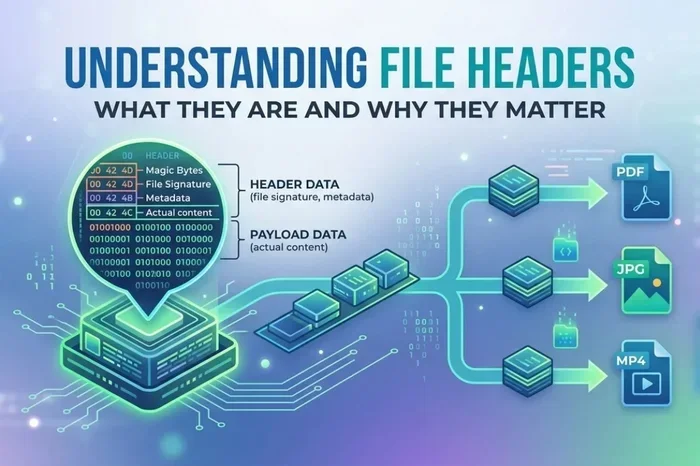
A file header is a small block of data at the very beginning of a file that tells your computer what kind of file it is and how to read it. Think of it like the cover page of a book, but for your laptop. Without a file header, your laptop would not know how to open, display, or use any file properly.
A file header is one of those behind-the-scenes things that makes your laptop work smoothly every single day. You never see it, but it is there in every file you open, save, or share. It is the small chunk of data sitting right at the top of a file that gives your computer the clues it needs to understand what kind of file it is and how to read it.
If you have ever wondered why a photo opens in your image viewer or why a Word document launches in Microsoft Word, the answer starts with the file header. This tiny piece of information is like a secret code that your laptop reads before it does anything else with the file. Without it, your laptop would have no idea what to do with the data inside.
In this guide, we will break down everything you need to know about file headers. We will look at how they work, why they matter, and what happens when things go wrong. By the end, you will see just how important this little piece of data really is for your daily laptop use.
Key Takeaways
- File headers identify file types: They act as a label that tells your laptop what kind of file it is dealing with.
- Every file has one: Whether it is a photo, document, or video, each file starts with a header that holds key information.
- File headers help with file parsing: Your laptop reads the header first to understand how to process the rest of the data.
- Corrupted headers cause problems: A damaged file header can make a file unreadable or unusable on your laptop.
- You can view file headers: With simple tools or built-in apps, you can peek at the header data on your laptop.
- RAM plays a role: When your laptop opens a file, it loads the header data into memory for quick processing.
📑 Table of Contents
What Is a File Header?
A file header is the very first set of bytes in a file. These bytes sit at the very start of the data and give your laptop a preview of what the file contains. Think of it like the label on a jar. Before you open the jar, the label tells you what is inside. A file header does the same thing for your computer.
Every file on your laptop has a header. Whether it is a simple text file, a high-resolution image, or a large video, the header is always there. It contains information like the file type, the file format, and sometimes even the size of the file. This is what allows your laptop to know which program to use to open a file.
How File Headers Identify File Types
One of the main jobs of a file header is file identification. When your laptop sees a header, it reads a few special bytes called the magic number or file signature. This signature is unique to each file type. For example, a JPEG image file starts with the bytes FF D8 FF, while a PDF file starts with %PDF. These tiny signatures tell your laptop exactly what kind of file it is dealing with.
This process is called file parsing. Your laptop reads the header, checks the signature, and then knows which program or codec to use. Without these signatures, your laptop would not be able to tell a photo from a music file or a document from a spreadsheet. The file extension you see in the file name helps too, but the header is the real identifier that your laptop trusts most.
How Does a File Header Work?
When you double-click a file on your laptop, a lot happens in a split second. Your laptop first reads the header bytes at the start of the file. These bytes tell the system what kind of data is stored inside and how it should be read. This is the first step in file reading and file processing.
The header also holds metadata, which is data about the data. For example, an image file header might contain the image width, height, color depth, and the date it was created. A music file header might include the artist name, album title, and track number. All of this information lives in the header before you even open the file.
The Role of RAM in File Header Processing
When your laptop opens a file, it loads the header data into memory so it can be read quickly. This is where the RAM on a laptop comes into play. Your laptop uses RAM as a temporary workspace to hold the header information and any data it needs to process right away. Without enough RAM, your laptop would struggle to open files quickly, especially large ones like videos or high-res images.
Understanding what RAM is good for in a laptop helps you see why file headers matter so much. RAM handles the quick reading and processing of header data every time you open a file. If your laptop has enough RAM, this process happens smoothly and fast. If your RAM is low or not compatible with your laptop, opening files can become slow or even cause errors.
File Headers and Data Structure
Every file follows a specific data structure. The header is just the beginning of that structure. After the header comes the actual content of the file, which could be text, pixels, audio samples, or any other kind of data. The header tells your laptop where the content starts and how to interpret it.
Some file formats use a simple header. Others use a more complex structure with multiple sections. For example, a file compression format like ZIP has a header that lists all the files inside the compressed folder. This is why your laptop can show you the contents of a ZIP file without fully extracting it. The header gives your laptop a map of what is inside.
Common Types of File Headers
Different file types have different headers. Here are some of the most common ones you will encounter on your laptop every day.
Image File Headers
Image files like JPEG, PNG, and GIF all have their own unique headers. A JPEG header starts with FF D8 FF and tells your laptop that it is dealing with a compressed image. A PNG header starts with 89 50 4E 47 and signals a lossless image format. These headers tell your laptop how to decode the image data so you can see the picture on your screen.
Document File Headers
Documents like PDFs and Word files also have headers. A PDF header starts with %PDF and tells your laptop to use a PDF reader. A DOCX file uses a more complex header structure because it contains XML data inside. These headers help your laptop choose the right program to open the document and display it correctly.
Audio and Video File Headers
Audio files like MP3 and WAV have headers that store information about the sample rate, bitrate, and channel count. Video files like MP4 and AVI have even more complex headers because they store data about video codec, resolution, frame rate, and audio tracks. These headers are what allow your media player to know exactly how to play the file.
Why File Headers Matter for Your Laptop
File headers might seem like a small technical detail, but they have a big impact on how your laptop works. Here is why they matter so much.
File integrity: A healthy file header means the file is complete and can be read properly. If the header is damaged or missing, your laptop may not be able to open the file at all. This is one of the most common reasons a file becomes corrupted.
File organization: Headers help your laptop keep files organized. When you search for files by type, your laptop looks at the header to confirm what kind of file it is. This is why your laptop can sort photos, documents, and videos into different folders automatically.
File sharing and compatibility: When you send a file to someone else, the header travels with it. The receiving laptop reads the header to know how to open the file. If the header is stripped or changed during transfer, the file may not open correctly on the other laptop.
Before working with any file tools or editors, make sure your laptop setup is ready. Check that what RAM is compatible with my laptop so your system can handle file processing without slowdowns or errors.
How to View a File Header on Your Laptop
You can actually look at a file header yourself if you want to. It is easier than you might think. Here are a few simple ways to do it on your laptop.
Using a Hex Editor
A hex editor is a tool that lets you see the raw binary data in a file. You can open any file in a hex editor and look at the very first bytes. Those first bytes are the file header. Some popular free hex editors include HxD for Windows and Hex Fiend for Mac. Just open a file and look at the top of the window to see the header bytes in hexadecimal format.
Using Command Line Tools
If you are comfortable with the command line, you can use built-in tools to view file headers. On Windows, you can use the certutil command to dump the hex data of a file. On Mac or Linux, you can use the xxd or hexdump commands. These tools show you the raw header data without needing any extra software.
Using File Info Tools
Some file properties dialogs show you basic header information. Right-click a file, select Properties, and look at the Details tab on Windows. You may see things like the file type, date created, and other metadata that comes from the header. On Mac, you can use the Get Info window or the Terminal to view similar details.
Common File Header Problems and How to Fix Them
Sometimes file headers get damaged or lost. When this happens, your laptop cannot read the file properly. Here are some common problems and what you can do about them.
Corrupted File Headers
A corrupted header happens when the first few bytes of a file get changed or erased. This can occur during a bad download, a sudden power loss, or a storage error. When the header is corrupted, your laptop may show an error message saying the file is damaged or cannot be opened.
To fix a corrupted header, you can try opening the file in a different program that supports the same file format. Some file repair tools can also rebuild damaged headers. If the file is very important, you might want to use a dedicated file recovery tool.
Missing File Extension
Sometimes a file loses its extension but the header is still intact. In this case, your laptop might not know which program to use. You can often fix this by looking at the header data and renaming the file with the correct extension. For example, if the header starts with FF D8 FF, you know it is a JPEG file and should end in .jpg.
Wrong File Extension
Occasionally, a file has the wrong extension but the header is correct. This means the file is actually a different type than what the name suggests. For example, a file named image.txt might actually be a JPEG image if the header matches a JPEG signature. Renaming the file with the correct extension can often fix this problem.
Final Thoughts on File Headers
A file header is a small but mighty part of every file on your laptop. It identifies the file type, holds important metadata, and guides your laptop through the process of reading and displaying the file. Without file headers, your laptop would not know how to open a single file.
The next time you open a photo, a document, or a music file, remember that a tiny header at the start of that file made it all possible. It is a quiet but essential part of how your laptop handles data every day. Understanding file headers gives you a better picture of how your files work and why they sometimes act up when the header gets damaged.
Take a moment to appreciate this small piece of data. It might be invisible, but it is one of the most important parts of how your laptop reads, organizes, and uses files. Keep your laptop healthy with enough RAM and proper file management, and your file headers will keep doing their job without you ever needing to think about them.
Frequently Asked Questions
What is a file header in simple terms?
A file header is the first few bytes of data at the top of a file. It acts like a label that tells your laptop what kind of file it is and how to read it. Without a header, your laptop would not know how to open the file.
Can a damaged file header be fixed?
Yes, in many cases a damaged file header can be repaired. You can try opening the file in a different program that supports the same format. There are also file repair tools available that can rebuild or replace damaged header data. If the file is very important, a dedicated file recovery tool may help.
Do all files have a file header?
Yes, virtually every file has a header. Whether it is an image, document, audio file, or video, the header is the first piece of data in the file. It is what allows your laptop to identify and process the file correctly.
What is the difference between a file header and a file extension?
A file extension is the part of the file name that comes after the dot, like .jpg or .pdf. A file header is the actual data inside the file that identifies its type. The extension can be changed or removed, but the header stays with the file data and is what your laptop really trusts.
How does RAM affect file header processing?
When your laptop opens a file, it loads the header data into RAM for quick processing. If your laptop does not have enough RAM or the RAM is not compatible, opening files can become slow or cause errors. Having the right amount of RAM ensures smooth file header processing.
Why do some files fail to open even though the header looks correct?
This can happen if the file content after the header is damaged or incomplete. The header tells your laptop what kind of file it is, but if the rest of the data is corrupted, the file still may not open. In such cases, the file may need repair or recovery using specialized tools.