What Is Fakepath in File Uploads
Fakepath in file uploads is a browser security feature that replaces your real local file path with a fake one like C:\fakepath\filename. This prevents websites from seeing where files are stored on your device. Understanding fakepath helps users and developers stay safe during file uploads.
Have you ever uploaded a file on a website and noticed the path shown in your browser starts with C:\fakepath\? You might have thought something was wrong with your computer. That fake path is actually a built-in browser security feature called fakepath. It keeps your real file location hidden from websites. In this article, we will break down exactly what fakepath is, why browsers use it, and why it matters for your online safety.
File uploads are a normal part of browsing the web. Whether you are attaching a resume to a job application or uploading a photo to social media, your browser handles the file transfer behind the scenes. The fakepath in file uploads is one of the quiet security mechanisms that makes this process safer for you. Let us dive into how it works and why you should care.
Key Takeaways
- Fakepath is a security feature: Browsers replace real file paths with a fake path to protect your privacy.
- You will see C:\fakepath\ in your browser: This is normal and not an error or virus.
- Developers must handle fakepath correctly: Server-side code needs to extract just the filename, not rely on the full path.
- Fakepath prevents path traversal attacks: It stops malicious websites from learning your file system structure.
- Your real file path stays hidden: No website can access your actual directory or folder structure through a file input.
- Laptop RAM and browser performance matter: Handling file uploads smoothly depends on your system resources, and having good RAM in your laptop helps with file processing tasks.
- Always validate uploads server-side: Fakepath alone is not enough; developers need additional security checks.
📑 Table of Contents
What Is Fakepath in File Uploads?
When you click a file upload button on a website, a file picker dialog opens. You navigate to the file you want to upload and select it. The browser then shows the file name in the input field. But here is the catch: the browser does not show the full real path to that file. Instead, it shows something like C:\fakepath\document.pdf or C:\fakepath\photo.jpg.
This fake path string replaces your actual file system location. Your real path might be something like C:\Users\John\Documents\Work\document.pdf. The browser strips all of that away and substitutes the fakepath prefix. This is not a bug. It is intentional browser behavior designed to protect users.
How the File Input Element Works
Every file upload on the web uses an HTML element called <input type=”file”>. When a user selects a file, the browser sets the value of this input to the file name. However, for security reasons, the browser only allows the file name and the fake path to be exposed. The actual client-side file path is never passed to the website or JavaScript code running on the page.
This means that even if a website tries to read the value of the file input using JavaScript, it will only get the fake path string. The browser enforces this rule across all major browsers including Chrome, Firefox, Safari, and Edge. It is one of the simplest but most effective privacy protections built into modern web browsing.
Why Do Browsers Use Fakepath?
The main reason browsers use fakepath is privacy protection. Without this feature, any website you visit could potentially see the exact folder structure on your computer. This would be a serious security and privacy risk. Let us look at the key reasons in more detail.
Preventing File System Information Leakage
Your file system structure can reveal a lot about you. If a website could see that your files are stored in C:\Users\JohnDoe\Personal\Taxes\, it learns your username, your folder naming habits, and potentially sensitive information about your life. Fakepath prevents this leakage by replacing the real path with a generic prefix.
This is especially important for web application security. Attackers often try to gather information about a user’s system to plan further attacks. By hiding the real path, browsers remove one potential source of reconnaissance data.
Stopping Path Traversal Attacks
A path traversal attack happens when a malicious actor tries to access files outside the intended directory by using special characters like ../ in file paths. If websites could see real file paths, they might be more vulnerable to these kinds of attacks. The fakepath prefix adds a layer of defense by ensuring that the path received by the server is always a sanitized, non-revealing string.
Standardizing Browser Behavior
Before fakepath became standard, different browsers handled file paths differently. Some showed the full path, while others showed partial paths. This inconsistency created security gaps. The HTML5 specification now requires browsers to use a fake path, creating a consistent and secure experience across all platforms. This standardization makes it easier for developers to build secure file upload features.
Common Fakepath Examples and What They Mean
Seeing C:\fakepath\ for the first time can be confusing. Here are some common examples of what you might see and what they actually mean.
| What You See in Browser | What It Means |
|---|---|
| C:\fakepath\resume.pdf | The file name is resume.pdf. The real location is hidden. |
| C:\fakepath\image001.png | A PNG image file. The browser replaced the real path. |
| C:\fakepath\DSC_0042.jpg | A JPEG photo from a camera. The fakepath prefix is applied. |
| C:\fakepath\spreadsheet.xlsx | An Excel file. No real directory info is exposed. |
No matter what file type you upload, the browser will always prepend the fakepath string. This is consistent across all file types and all browsers. It is a universal privacy safeguard.
Some older browsers might show slightly different formats, but the principle remains the same. The goal is always to hide the local file path from the website. If you ever see a fake path in your browser, there is no need to worry. It is working exactly as designed.
How Developers Handle Fakepath in Web Applications
If you are a developer, understanding fakepath is essential for building secure file upload features. The fake path string cannot be used directly to locate a file on the server or the client. Developers must handle it correctly to avoid security issues and ensure smooth functionality.
Extracting the Filename Safely
When a file is uploaded, the server receives the file name from the fake path string. The correct approach is to extract only the file name using string manipulation functions. For example, in most programming languages, you would use a function that splits the path by the backslash or forward slash and takes the last segment.
Never trust the full path value from a file input. Always sanitize the file name and validate the file type on the server side. The fakepath prefix is just a starting point. Additional validation ensures that the uploaded file is safe and matches what the user intended to upload.
Server-Side Validation Is Essential
Relying solely on fakepath is not enough for security. Developers should implement multiple layers of validation:
- Check the file extension: Ensure the uploaded file has an allowed extension.
- Verify the MIME type: Confirm the file type matches its extension.
- Limit file size: Set maximum file size limits to prevent abuse.
- Scan for malware: Use antivirus scanning on uploaded files when possible.
- Store files securely: Save uploaded files outside the web root directory.
Good file upload security practices go hand in hand with understanding how fakepath works. The browser handles the path hiding, but the developer must handle everything else.
Security Implications of Fakepath
While fakepath is a valuable security feature, it is not a complete security solution on its own. Understanding its role in the broader security landscape helps both users and developers stay safe.
What Fakepath Protects Against
Fakepath primarily protects against information disclosure. It stops websites from learning about your file system structure, your username, and your folder organization. This reduces the attack surface available to potential hackers.
It also helps prevent certain types of cross-site scripting (XSS) attacks where an attacker might try to inject malicious code using file path strings. By sanitizing the path to just a fake prefix and filename, the browser removes potentially dangerous characters and patterns.
What Fakepath Does Not Protect Against
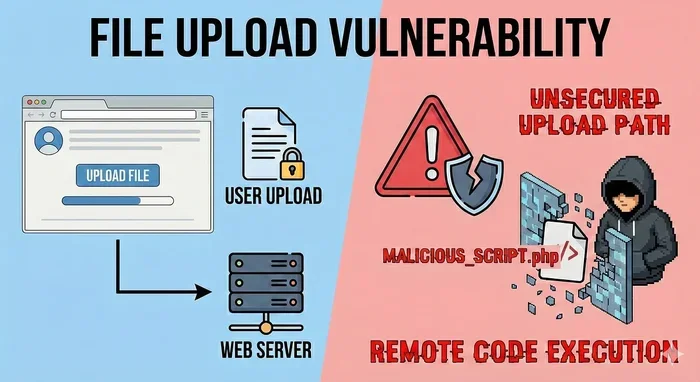
Fakepath is not a magic shield. It does not protect against all file upload vulnerabilities. For example, it does not prevent a user from uploading a malicious file. It does not stop a server from mishandling the uploaded file. And it does not replace the need for proper server-side validation.
Users should also understand that fakepath only hides your path during the upload process. Once the file is on the server, its security depends on how the server handles it. Using a laptop with sufficient RAM and a secure browser helps ensure that file uploads are processed safely and efficiently.
Best Practices for Users
As a regular browser user, there are simple steps you can take to stay safe during file uploads:
- Only upload files to trusted websites. Look for HTTPS and a valid privacy policy.
- Check file types before uploading. Do not upload executable files unless absolutely necessary.
- Keep your browser updated. Modern browsers have the latest fakepath protections built in.
- Use antivirus software. This adds an extra layer of protection for any files you download or upload.
- Do not panic over fakepath strings. They are normal and expected in every modern browser.
Fakepath and Browser Compatibility
The fakepath feature works consistently across all major modern browsers. Chrome, Firefox, Safari, Edge, and Opera all implement the fake path prefix in their file input handling. This consistency is a result of the HTML5 standard that defines how file inputs should behave.
Older browsers, particularly Internet Explorer versions before Edge, sometimes handled file paths differently. Some older versions might have exposed partial real paths. However, as browser technology has evolved, the fakepath standard has become universal. If you are using a modern browser, you can rely on fakepath protection every time you upload a file.
Mobile browsers also implement fakepath. Whether you are uploading a file from a laptop or a mobile device, the browser will hide your real file path. The user experience might vary slightly depending on the device, but the underlying security principle remains the same.
Why Understanding Fakepath Matters
Understanding fakepath in file uploads empowers you as both a user and potentially a developer. As a user, knowing that fakepath is normal and intentional prevents unnecessary worry when you see it in your browser. As a developer, properly handling fakepath strings is a fundamental part of building secure web applications.
The next time you upload a file and see that familiar C:\fakepath\ prefix, you will know exactly what it is and why it is there. It is your browser quietly doing its job to keep your file system information private and secure.
File uploads are a core part of the modern web experience. From submitting forms to sharing photos, we upload files constantly. The fakepath in file uploads mechanism is one of the many invisible security features that make this process safer. By hiding your real file path, your browser protects your privacy and reduces the risk of information leakage to malicious websites.
Remember that fakepath is just one layer of security. Always practice good web hygiene by using trusted websites, keeping your browser updated, and validating uploads properly on the server side. With these habits in place, you can upload files with confidence knowing that your browser has your back.
Frequently Asked Questions
Is the C:\fakepath\ prefix a sign of a virus or malware?
No, the fakepath prefix is completely normal and safe. It is a standard browser security feature that hides your real file path. Every modern browser uses it for all file uploads. You do not need to be concerned when you see it.
Can a website bypass fakepath and see my real file path?
No, modern browsers enforce the fakepath restriction at the browser engine level. Websites and JavaScript cannot access the real file path through standard web APIs. This is a core browser security feature that has been in place for many years.
Does fakepath affect file upload speed or performance?
No, fakepath has no impact on upload speed or performance. It only changes how the file path is displayed in the browser. The actual file data is uploaded normally. Your laptop RAM and internet connection are the main factors that affect upload speed.
Do all browsers show the same fakepath format?
Most modern browsers show C:\fakepath\ as the prefix. However, the exact format may vary slightly between browsers. The key point is that all major browsers hide the real file path and replace it with a fake prefix for security.
What should developers do when they receive a fakepath string on the server?
Developers should extract only the file name from the fakepath string using string functions. Never use the full path value to access files on the server. Always validate the file type, size, and name on the server side before processing the upload.
Can fakepath prevent all file upload security risks?
No, fakepath only protects against file path information leakage. It does not prevent malicious file uploads, malware transmission, or server-side vulnerabilities. Developers must implement additional security measures like file type validation, size limits, and antivirus scanning for comprehensive protection.
=== CONCLUSION ===
The fakepath in file uploads is a simple but powerful security feature that every browser user benefits from daily. It hides your real file location, protects your privacy, and adds a layer of defense against information leakage. Whether you are uploading a resume, sharing photos, or submitting documents, your browser silently works to keep your file system details private.
For developers, understanding how to handle fakepath strings correctly is essential for building secure web applications. For everyday users, knowing that fakepath is normal and intentional removes confusion and builds confidence in the browsing experience. Stay informed, stay safe, and let your browser do its job.