What Is a Cd Drive
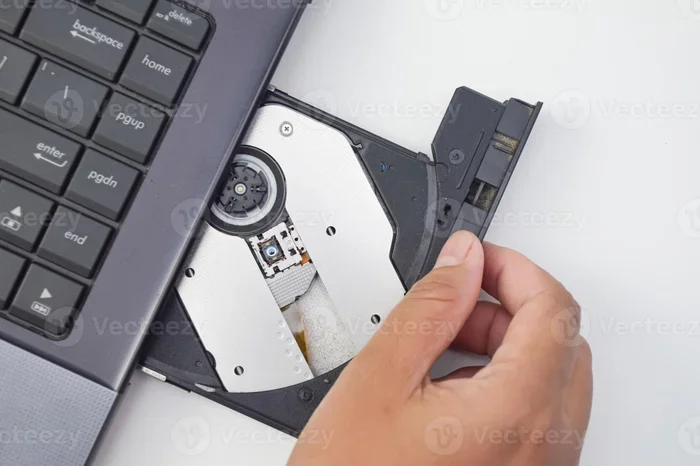
A CD drive is a hardware device that reads and writes data on compact discs using laser technology. It has been a core part of computing for over 30 years and still serves practical purposes today. Whether you need to play music, install software, or back up files, understanding your options helps you make the right choice.
A CD drive is a hardware device that reads and writes data on compact discs using laser technology. It has been a staple in computers for decades, helping users access music, software, and files stored on discs. The term CD drive covers several types, including CD-ROM, CD-R, and CD-RW drives. Each type handles data differently, but they all rely on the same basic principle of light and reflection. In this guide, you will learn exactly how a CD drive works, the different kinds available, and whether you still need one today.
If you have ever wondered what a CD drive actually does, you are not alone. Many people still use computers that have one, but fewer people know how it really works. A CD drive is one of the oldest data storage tools in computing history. It lets you play music CDs, install software from discs, and even burn your own discs. Even though cloud storage and USB drives have taken over in many ways, the CD drive still holds a place in both old and new computers.
Key Takeaways
- A CD drive reads and writes data on compact discs using laser technology. It has been a core part of computing for over three decades.
- There are several types of CD drives, including CD-ROM, CD-R, CD-RW, and combo drives, each with different capabilities for disc reading and recording.
- CD drives are still useful for playing music, installing software from discs, and creating physical backups of important files offline.
- Modern alternatives like USB drives and cloud storage offer faster speeds and more convenience, but CDs remain a low-cost and reliable option.
- An external CD drive is a great choice if your laptop or desktop does not have a built-in one and you only need it occasionally.
- Keeping your computer hardware clean and maintained helps your CD drive last longer and perform better over time.
📑 Table of Contents
How a CD Drive Works
At its core, a CD drive uses a laser to read tiny bumps and flat areas on the surface of a disc. These bumps and flats represent binary code, which is how computers understand data. When the laser shines on the disc, it bounces back differently depending on whether it hits a bump or a flat area. The drive’s lens picks up this light and turns it into digital information your computer can use.
The Laser and Lens System
The laser inside a CD drive is very small and precise. It sits inside the drive’s pickup unit, which also contains a focusing lens. This lens directs the laser beam onto the disc surface. As the disc spins, the laser moves across it, reading data from the inside out. The read speed depends on how fast the disc spins and how quickly the laser can track the data along the spiral path.
The lens must stay clean for the drive to work properly. Dust or scratches on the lens can cause errors or prevent the drive from reading a disc at all. This is why computer maintenance matters, even for parts that seem simple. A clean drive reads discs more accurately and lasts longer.
How Data Is Read from a Disc
When you put a disc into the drive, the motor spins it at high speed. The laser then scans the surface in a spiral path from the center outward. Each tiny bump on the disc represents a zero, and each flat area represents a one. This pattern of zeros and ones is what makes up all the data on the disc, from a song to a software program.
The drive sends this data to the computer through its connection, usually an IDE or SATA cable in older desktop systems, or a USB connection in external models. The process happens very fast, often reading several megabytes of data per second. Modern drives also handle write speed when burning data onto blank discs, though writing is generally slower than reading.
Types of CD Drives
Not all CD drives are the same. Over the years, different types have been developed for different needs. Understanding these types helps you choose the right one for your situation.
CD-ROM Drive
A CD-ROM drive is the most basic type. It stands for Compact Disc Read-Only Memory. As the name suggests, this drive can only read discs, not write or erase them. You use a CD-ROM drive to play music CDs or install software that comes on a disc. It is simple, reliable, and was once found in nearly every desktop computer. These drives are still common in older machines and some budget systems today.
CD-R Drive
A CD-R drive can do more than just read discs. It can also write, or burn, data onto a blank CD-R disc. Once you burn data onto a CD-R, it becomes permanent. You cannot erase or change the contents. This makes CD-R discs great for creating music mixes, backing up important files, or sharing large amounts of data with others. The recording process uses a laser to permanently alter the disc surface.
CD-RW Drive
A CD-RW drive adds the ability to rewrite discs. The RW stands for ReWritable. This means you can erase a disc and use it again. CD-RW discs are handy when you need to transfer files regularly or test different data setups. However, they tend to be a bit slower than regular CD-R discs and may not work in all older drives. Always check your drive’s disc compatibility before purchasing CD-RW media.
Combo Drives
A combo drive, sometimes called a CD-RW/DVD-ROM drive, can read CDs and DVDs and burn CDs. It cannot burn DVDs, but it covers most everyday needs. Many laptops and desktops came with combo drives for years. They strike a good balance between functionality and cost. If you only need to burn CDs and watch DVDs, a combo drive is a solid choice.
What Can You Use a CD Drive For?
Even in today’s digital world, a CD drive has many practical uses. Let us look at the most common ways people use them.
Playing Music and Movies
This is the most classic use of a CD drive. You pop in a music CD and listen to your favorite album. Or you insert a movie DVD and watch a film. Many people still have CD collections they treasure, and a drive lets them enjoy that collection without needing special equipment. Disc playback remains a simple and reliable way to enjoy your media without relying on an internet connection.
Installing Software
Before downloads became the norm, almost all software came on discs. Many programs, especially large ones like design tools or games, still ship on discs today. A CD drive lets you install these programs directly from the disc. This is especially useful in areas with slow or unreliable internet connections. Physical media also provides a permanent backup of the software you purchase.
Backing Up Files
Burning files onto a CD or DVD is a simple way to create a backup. You can save photos, documents, or system files to a disc and keep it in a safe place. While external hard drives and cloud backup are more common now, disc backup is still a low-cost option that works well for important files you want to keep offline. A stack of blank CDs is inexpensive and easy to store.
CD Drive vs. Modern Storage Options
CD drives are no longer the only way to store or access data. Let us compare them to some modern alternatives so you can see where they stand.
USB Flash Drives
USB flash drives are small, portable, and very fast. They can hold much more data than a CD, often up to 256 GB or more. You can plug one into any USB port and transfer files in seconds. Unlike CDs, flash drives have no moving parts, so they are less likely to break from drops or vibrations. However, they can be lost easily because of their small size. Think of what the RAM on a laptop does for quick data access, and you will understand why flash drives feel so much faster than optical media.
Cloud Storage
Cloud storage lets you save files online, where you can access them from any device with an internet connection. Services like Google Drive, Dropbox, and OneDrive offer free storage options. Cloud storage is convenient and does not require any physical hardware. But it does need a reliable internet connection, and some people worry about privacy and security. For sensitive files, a physical disc might still feel safer.
External Hard Drives
External hard drives offer large storage capacities, often 1 TB or more. They connect to your computer through USB and are great for backing up entire systems or storing large media files. They are faster than CD drives and more durable since they have no spinning discs inside. The trade-off is cost, as external drives can be more expensive than a stack of blank CDs. For large data storage needs, external drives are the clear winner.
Do You Still Need a CD Drive?
The answer depends on what you need your computer for. Let us break this down into two simple scenarios.
When a CD Drive Makes Sense
You might still want a CD drive if you regularly listen to or own physical music CDs. If you work with older software that only comes on discs, a drive is essential. Some people also prefer disc backups because they do not depend on internet access or third-party services. If you work in audio production or video editing, you may still use discs for archiving projects. Keeping your system cool matters too, just like monitoring good idle GPU temperature helps your computer run smoothly, a well-maintained CD drive lasts longer.
When to Skip It
If you mostly download software, stream music, and store files in the cloud, a CD drive adds little value. Many modern laptops no longer include one because manufacturers want to make devices thinner and lighter. In these cases, an external CD drive is a cheap and easy alternative. You only need it when the situation calls for it. Think of it like what additional RAM does for a laptop performance boost, an external drive gives you capability when you need it without taking up permanent space.
How to Choose the Right CD Drive
If you decide you need a CD drive, picking the right one is straightforward. Here are the key factors to consider.
Internal vs. External
An internal CD drive fits inside your computer tower or laptop. It connects directly to the motherboard and tends to be faster and more convenient for daily use. An external CD drive plugs into a USB port and is portable. You can carry it with you and use it with multiple computers. External drives are great if your laptop does not have a built-in drive. They are also easy to set up and typically plug and play.
Speed and Compatibility
Check the read and write speeds before buying. A faster drive will burn discs more quickly and read data more smoothly. Also make sure the drive is compatible with the types of discs you plan to use. Some drives handle CDs only, while others also support DVDs and even Blu-ray discs. The more formats a drive supports, the more versatile it is. Look for drives that match your disc compatibility needs and offer a good balance of speed and price.
Frequently Asked Questions
Can a CD drive play DVDs?
It depends on the type of drive. A standard CD drive can only read CDs. However, many combo drives and DVD drives can read both CDs and DVDs. Check the specifications of your drive to see which disc formats it supports. If you need to play DVDs, look for a drive that specifically lists DVD compatibility in its product details.
How fast does a CD drive burn discs?
The burning speed depends on the drive and the type of disc. Most modern CD drives burn at speeds between 8x and 52x. A higher number means faster burning, but it can also lead to more errors if the disc quality is low. For the best results, use a moderate speed setting and high-quality blank discs to ensure your disc recording is reliable and error-free.
Why is my CD drive not reading discs?
There are several common reasons. Dust or scratches on the disc can prevent the laser from reading it properly. The drive’s lens may also be dirty, which you can clean with a soft, lint-free cloth. If the drive is very old, the laser may have worn out and need replacement. Sometimes a simple restart or driver update can fix the issue too. Regular computer maintenance goes a long way in preventing these problems.
Is a CD drive the same as a DVD drive?
Not exactly. A CD drive is designed to read and write CDs, while a DVD drive can handle both CDs and DVDs. DVD discs hold much more data than CDs, typically 4.7 GB compared to 700 MB for a CD. Many drives today are combo units that handle both formats. When shopping, check the product description to confirm which formats the drive supports before you buy.
Can I use a CD drive with a laptop that does not have one?
Yes, you can use an external CD drive. These connect through a USB port and work with most laptops and desktops. External drives are affordable and portable, making them a great option if you only need a CD drive occasionally. Just plug it in, install any needed drivers, and you are ready to go. It is one of the easiest ways to add optical media capability to a modern laptop.
How long do CD drives last?
A well-maintained CD drive can last for many years. The laser is the most likely part to wear out over time, especially if you use the drive frequently. Keeping the drive clean and avoiding exposure to dust and heat can extend its lifespan significantly. If you take care of it, a CD drive should serve you reliably for a long time. Think of it the same way you care for other computer hardware components.
Conclusion
The CD drive may seem like an old piece of computer hardware, but it still serves real purposes today. Whether you are playing a favorite album, installing software from a disc, or creating a backup copy of important files, the CD drive remains a useful tool. Understanding how it works and the different types available helps you make smart choices about your data storage needs.
While newer options like USB drives and cloud storage have changed the way we handle files, the CD drive holds its ground. It offers a simple, affordable, and offline way to store and share information. If your computer has one, take good care of it. And if you do not, an external drive is an easy and cheap solution when you need it.
The world of optical media may be slowing down, but the CD drive is far from obsolete. Keep this guide handy, and you will always know exactly what your CD drive can do for you.