What Is a Cable Modem Flap

A cable modem flap happens when your modem repeatedly loses and regains its internet connection. The online light on your modem blinks on and off, signaling that your broadband signal keeps dropping. This guide explains what causes a cable modem flap, how to spot it early, and the best ways to fix it so your internet stays stable.
If your internet keeps cutting out for a few seconds and then coming back, you might be dealing with a cable modem flap. It is one of the most frustrating connectivity issues home users face. The good news is that understanding what is happening makes it much easier to fix.
A cable modem flap is not just a slow internet day. It is a pattern of repeated connection drops that your modem registers as a series of brief outages. Each time the connection drops, your modem tries to reconnect, and this cycle can repeat dozens of times a day. The result is an unstable internet connection that affects everything from streaming videos to video calls.
In this article, we will break down exactly what a cable modem flap is, why it happens, and how you can stop it for good. Whether you are a casual internet user or someone who depends on a steady connection for work, this guide has you covered.
Key Takeaways
- A cable modem flap means your modem keeps losing and regaining its internet signal over and over.
- Common causes include signal interference, faulty cables, loose connections, and ISP network problems.
- Watch for blinking online lights, slow speeds, and frequent disconnections as warning signs of a flap.
- Simple fixes like restarting your modem or replacing old cables often solve the problem quickly.
- Contact your ISP if basic troubleshooting does not resolve the flapping issue on your own.
- Prevention steps like proper cable management and signal monitoring can keep your connection stable long term.
📑 Table of Contents
What Is a Cable Modem Flap?
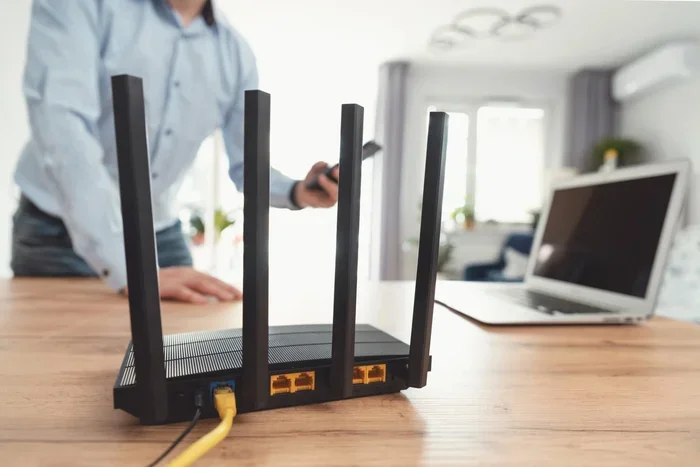
A cable modem flap occurs when your modem repeatedly loses its connection to your internet service provider and then reconnects. The term comes from the way the modem’s status light blinks on and off, almost like a flap of a bird’s wing. Each blink represents a drop and a reconnect attempt.
Your modem talks to your ISP through a broadband signal that travels over a coaxial cable or a fiber line. When that signal gets disrupted, even for a few seconds, the modem loses its link to the network. It then tries to re-establish the connection. This back-and-forth is what we call a flap.
The DOCSIS protocol, which stands for Data Over Cable Service Interface Specification, is the standard most cable modems use. When a flap happens, the modem has to go through the full handshake process again with the ISP’s network. That process takes time, and during it, you have no internet access.
A single flap might last only a few seconds. But when flaps happen repeatedly, they add up. You might notice slow loading times, dropped calls, or buffers that never seem to finish. Over time, a flapping modem can wear out your equipment and degrade your overall network stability.
Common Causes of a Cable Modem Flap
Several factors can trigger a cable modem flap. Understanding the root cause is the first step toward fixing it. Let us look at the most common reasons your modem might be flapping.
Signal Interference
Signal interference is one of the top causes of modem flapping. Electrical devices near your modem can send out signals that disrupt your broadband connection. Microwaves, baby monitors, cordless phones, and even fluorescent lights can create line noise that weakens your signal.
Another form of interference comes from your neighbors. If you live in a dense apartment building or a neighborhood with many homes on the same cable node, shared bandwidth can cause signal degradation. This is especially common during peak usage hours in the evening.
Weather can also play a role. Heavy rain, lightning, and strong winds can introduce signal loss in outdoor cables and connections. If your coaxial cable runs outside your home, a storm might be enough to trigger a flap.
Faulty Cables and Connections
Loose or damaged cables are a frequent culprit behind modem flaps. Over time, the coaxial cable that connects your modem to the wall outlet can wear out. The center conductor might fray, or the shielding might break, letting in interference.
Connector cables that are not firmly seated can also cause intermittent drops. Even a tiny gap in the connection can disrupt the signal enough to trigger a flap. This is why it is always worth checking your cables first when troubleshooting connectivity issues.
Splitters that distribute your signal to multiple devices can weaken the signal strength. A cheap or old splitter might introduce too much signal loss, causing your modem to drop offline frequently. Replacing a worn splitter with a high-quality one can sometimes solve the problem entirely.
ISP Network Issues
Sometimes the problem is not in your home at all. Your ISP’s network might be experiencing issues that cause widespread internet outages or intermittent flapping. Maintenance work, equipment upgrades, or overloaded nodes can all lead to connection instability for customers.
Your ISP might also be experiencing downstream signal or upstream signal problems on their end. When the signal they send to your modem is too weak or too noisy, your modem struggles to hold a stable connection. In these cases, you will need to contact your ISP to report the issue and wait for them to resolve it.
How to Identify a Cable Modem Flap
Spotting a modem flap early can save you a lot of frustration. Here are the most common signs that your modem is flapping.
- Blinking online light: The online or internet light on your modem blinks instead of staying solid. This is the most obvious sign of a flap.
- Frequent disconnections: Your devices lose Wi-Fi connection multiple times a day, even though other devices in the home seem fine.
- Slow internet speeds: Your connection feels sluggish, especially after a brief outage that you might not even notice.
- High latency: Online games lag, and video calls freeze or drop audio. This happens because each flap introduces latency and potential packet loss.
- Modem logs: Many modems let you check the connection log. Look for repeated entries showing “treating” or “lost sync,” which indicate flapping events.
If you notice these signs, check your modem lights first. A solid online light means your connection is stable. A blinking or off light means your modem is struggling to maintain a link. You can also check your modem’s status page through a web browser to see how often the connection drops.
How to Fix a Cable Modem Flap
Dealing with a flapping modem can feel overwhelming, but most fixes are simple and take just a few minutes. Let us walk through the steps you can take to stop the flapping.
Quick Fixes You Can Try
Restart your modem. This is the simplest and most effective first step. Unplug the power cable from your modem, wait 30 seconds, and plug it back in. A modem reboot clears the temporary memory and forces the modem to re-negotiate a fresh connection with your ISP.
Check all cables. Go to the back of your modem and make sure every cable is firmly connected. Look for frayed wires, bent connectors, or loose coaxial fittings. Replace any cable that looks damaged. A new ethernet cable between your modem and router can also help if the issue is within your home network.
Remove signal splitters. If you use a splitter to share your modem signal with a TV or another device, try connecting the modem directly to the wall outlet. This removes any extra signal loss from the splitter and can stabilize your connection.
Move your modem. If your modem is near a microwave, cordless phone, or other electronic device, move it to a different location. Reducing electromagnetic interference can dramatically improve signal quality and reduce flapping.
Update your modem firmware. Check your modem manufacturer’s website or admin panel for a firmware update. Outdated firmware can cause compatibility issues with your ISP’s network and lead to connection drops.
When to Contact Your ISP
If the quick fixes above do not stop the flapping, it is time to reach out to your ISP. Call their technical support line and explain that your modem is flapping. They can check your signal levels remotely and look for issues on their end.
Your ISP might send a technician to check the line going into your home. They can also replace your modem if it is old or malfunctioning. In some cases, they might need to adjust the signal levels on their end to give you a stronger, more stable connection.
Keep track of when the flapping happens and how often. This information helps your ISP diagnose the issue faster. Note the time of day, which devices are affected, and how long each outage lasts.
How a Cable Modem Flap Affects Your Internet
A flapping modem does more than just interrupt your browsing. It can cause a ripple effect across all your connected devices and online activities.
For gamers, a modem flap can be devastating. Frequent connection drops cause lag, disconnections from matches, and lost progress. If you have noticed gaming issues, it is worth checking whether your modem is flapping. To understand how hardware and connectivity interact during gaming, you can read about Is Fortnite A Cpu Or Gpu Game to see how system performance ties into a smooth gaming experience.
For remote workers, a flapping connection can cause dropped video calls, lost files, and missed deadlines. Even a few seconds of downtime can disrupt a presentation or a client meeting.
For households with multiple users, a flapping modem affects everyone. Streaming services buffer, downloads restart, and smart home devices lose their connection. The more devices you have, the more noticeable the impact becomes.
Over time, frequent flapping can also degrade your modem’s hardware. Each reconnect cycle puts stress on the modem’s internal components. This can shorten the lifespan of your equipment and lead to more frequent failures.
Preventing Future Modem Flaps
Prevention is always better than cure. Here are some steps you can take to reduce the chances of a cable modem flap happening again.
- Use high-quality cables: Invest in well-shielded coaxial cables and connectors. Cheap cables are more prone to signal loss and interference.
- Keep your modem cool: Just like monitoring what is a good idle GPU temperature helps protect your graphics card, keeping your modem in a well-ventilated area prevents overheating. Overheating can cause instability and connection drops.
- Check your system regularly: Make sure your devices have enough memory and processing power to handle your internet usage. If your laptop struggles with basic tasks, learn about Is 8 Gb Ram Good For A Laptop to see if an upgrade could improve your overall system performance and help you spot connectivity issues more easily.
- Schedule modem restarts: A weekly restart can clear out temporary glitches and keep your modem running smoothly.
- Replace old equipment: Modems have a lifespan of about 3 to 5 years. If your modem is older, consider upgrading to a newer model that supports the latest DOCSIS standards.
- Ask your ISP about line checks: Regular line inspections can catch problems before they cause flapping.
Taking these simple steps can make a big difference in your internet reliability. A little prevention goes a long way toward keeping your connection stable and your frustration levels low.
Conclusion
A cable modem flap is a frustrating but very fixable problem. It happens when your modem repeatedly loses and regains its internet connection, causing drops in your broadband signal and instability across all your devices. The most common causes are signal interference, faulty cables, loose connections, and ISP network issues.
You can fix most flapping problems with simple steps like restarting your modem, checking your cables, and removing signal splitters. If those steps do not work, contacting your ISP is the next best move. And taking preventive measures like using quality cables, keeping your modem cool, and upgrading old equipment can stop flaps from coming back.
Remember, a stable internet connection starts with understanding your equipment. Now that you know what a cable modem flap is and how to handle it, you are better equipped to keep your internet running smoothly. Take action today, and enjoy a more reliable connection tomorrow.
Frequently Asked Questions
What does a cable modem flap look like?
A cable modem flap usually shows up as a blinking online light on your modem. You might also notice your internet dropping for a few seconds and then coming back. Some modems display error codes or log repeated disconnections in their status page.
How is a cable modem flap different from a slow internet connection?
A slow connection still works, but a flapping modem completely drops the connection and reconnects repeatedly. Slow speeds are a constant problem, while a flap causes brief, repeated outages that come and go throughout the day.
Can a bad coaxial cable cause a modem flap?
Yes, a damaged or low-quality coaxial cable is one of the most common causes of modem flapping. A cable with a broken shield or a loose connector can introduce signal loss and interference that triggers repeated disconnections.
How often is it normal for a modem to flap?
A modem should rarely flap. A few disconnections per month might be normal due to network maintenance or weather. But if your modem is flapping multiple times a day, it is a sign that something needs to be fixed.
Will restarting my modem fix a flap permanently?
A restart can fix a temporary flap, but it will not solve a permanent problem. If the underlying cause, such as a faulty cable or ISP signal issue, is not addressed, the flap will likely return.
Should I replace my modem if it keeps flapping?
If your modem is more than 4 or 5 years old and flapping continues despite all troubleshooting, it is a good idea to replace it. Older modems may not support current signal standards, and their internal components can degrade over time. Contact your ISP for a replacement if needed.