What Phones Work Great with Magicjack
Finding the right phone for your MagicJack device is easier than you think. MagicJack works with a wide range of phones, including cordless models, desk phones, and even your existing landline when paired with an adapter. In this guide, we break down the best MagicJack compatible phones so you can enjoy clear internet calling without the hassle.
MagicJack has been a game-changer for people who want affordable phone service without the hefty monthly bills. But one question keeps coming up: what phones work great with MagicJack? Whether you are looking for a simple home setup or a reliable office solution, picking the right phone makes all the difference.
The good news is that MagicJack is compatible with a wide variety of phones. From basic corded models to advanced cordless devices, you have plenty of options. In this guide, we will walk you through the best phones to use with your MagicJack device, share setup tips, and help you avoid common mistakes.
Key Takeaways
- MagicJack works with most standard phones: You can use your existing landline phone with the right adapter.
- Cordless phones are a popular choice: DECT 6.0 cordless phones offer freedom and clear sound quality.
- Desk phones deliver reliability: Business-grade desk phones pair well with MagicJack for home offices.
- Smartphones work too: The MagicJack app lets you use your phone as a VoIP device on the go.
- Check your hardware compatibility: Make sure your computer or router supports the MagicJack device properly.
- Setup is simple: Most phone pairings take just a few minutes with no technical skills needed.
📑 Table of Contents
What Is MagicJack and How Does It Work?
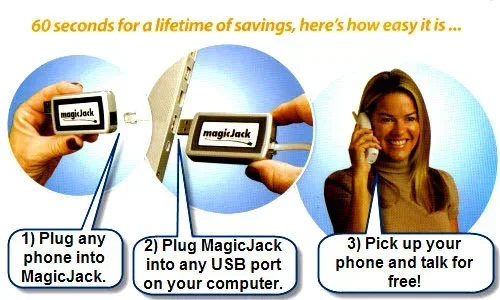
MagicJack is a VoIP phone adapter that lets you make calls over the internet instead of using a traditional phone line. You plug it into your computer or router, and it turns your internet connection into a phone line. This means you can ditch your landline and save money every month.
The device comes in different versions, including the MagicJack GO and the MagicJack Plus. Each version connects differently, but the core idea stays the same. You get a broadband telephone experience without the bulky phone bill. Most users pair MagicJack with a standard phone or a cordless handset for the best experience.
Why People Choose MagicJack
- Low cost: MagicJack offers one of the cheapest phone service options available.
- No contract: You are not locked into a long-term agreement.
- Portability: You can take your number and service with you anywhere with internet.
- Features included: Call waiting, voicemail, caller ID, and three-way calling come standard.
Best Cordless Phones for MagicJack
If you want freedom to move around your home while talking, a cordless phone is the way to go. Most cordless phone models work well with MagicJack as long as they connect through a standard phone jack. The MagicJack device acts as a bridge between your internet service and your wireless handset.
What to Look For in a Cordless Phone
Not all cordless phones are created equal. Here are the key features you should check before buying:
- DECT 6.0 technology: This ensures clear sound and less interference from other devices.
- Multiple handsets: Great for households where more than one person needs a phone.
- Long battery life: Look for handsets that last at least 10 hours on a single charge.
- Caller ID and display: These features help you screen calls easily.
- Compatibility with analog adapters: Make sure the phone works with a standard phone jack output.
Some popular brands like Panasonic, AT&T, and VTech offer models that pair perfectly with MagicJack. You do not need a fancy or expensive phone to get great results. A basic wireless phone with DECT 6.0 will do the job just fine.
Best Corded Desk Phones for MagicJack
If you prefer a more traditional setup, a corded desk phone works wonderfully with MagicJack. These phones are reliable, never need charging, and offer solid call quality. They are especially popular for home offices and small businesses.
Top Picks for Corded Desk Phones
- Panasonic KX-TGE230: A budget-friendly option with clear sound and easy setup.
- AT&T CL2940: Simple, reliable, and perfect for basic calling needs.
- VTech DS6151: Offers extra features like speakerphone and call waiting.
- Cisco SPA504G: A more advanced option ideal for business users who need multiple lines.
When using a corded desk phone, you simply connect the phone cable from the MagicJack adapter into the phone base. That is it. No complicated setup required. What phones work great with MagicJack in this category? Almost any standard corded phone with an RJ11 phone jack will work without issues.
Using MagicJack with Your Existing Landline Phone
One of the best things about MagicJack is that you can keep using your current phone. If you already have a landline phone at home, you do not need to throw it away. MagicJack comes with an adapter that lets you plug your existing phone right in.
Here is how it works. You connect the MagicJack device to your computer or router. Then, you plug your landline phone into the MagicJack adapter using a standard phone cord. Your phone now routes calls through the internet. It is that simple.
Just make sure your phone is in good working condition. Old phones with worn-out wiring may cause static or connection issues. If your phone is more than 10 years old, you might want to test it first before fully committing to MagicJack as your home phone replacement.
Smartphones and the MagicJack App
Did you know you can also use your smartphone with MagicJack? The MagicJack app turns your mobile phone into a VoIP device. You can make and receive calls using your MagicJack number right from your phone screen.
This is perfect for people who travel often or want to use their MagicJack service on the go. The app works on both Android and iOS devices. You just need a stable internet connection, and you are good to go.
Using your phone this way also means you do not need a separate phone adapter when you are away from home. Your smartphone becomes the internet calling device itself. This flexibility is one of the biggest advantages of the MagicJack ecosystem.
Recommended Computer and Router Setup
To get the most out of your MagicJack device, you need a solid computer or router setup. MagicJack runs in the background while you use your computer, so your system needs enough power to handle calls without lag.
If you are using a laptop, make sure it has enough RAM to run the MagicJack software smoothly. A system with at least 4GB of RAM is recommended. If you are upgrading or building a new setup, you should check whether laptop RAM will work in a desktop if you plan to switch between devices.
For storage, consider using an external SSD to back up your call logs and settings. An external SSD enclosure with fast transfer speeds like Thunderbolt 5 can make this process quick and reliable. This is especially helpful if you use MagicJack for business and need to keep records organized.
Quick Setup Tips
- Always use a wired internet connection for the best call quality.
- Close unnecessary programs while on a call to free up system resources.
- Update your MagicJack software regularly for the latest features.
- Place your MagicJack device away from other USB devices to avoid interference.
Common Mistakes to Avoid
Even though MagicJack is easy to use, some mistakes can cause frustration. Here are the most common ones and how to avoid them:
- Using a weak Wi-Fi connection: MagicJack needs a stable internet connection. A weak signal leads to dropped calls and poor audio quality.
- Skipping the adapter: Do not try to connect a phone directly without the proper adapter. This can damage your device.
- Ignoring software updates: Outdated MagicJack software can cause compatibility issues with newer phones.
- Overloading your USB port: Plugging too many devices into one USB hub can cause power issues and call disruptions.
- Not testing before committing: Always test your phone and MagicJack setup with a short call before relying on it full-time.
Avoiding these simple mistakes will keep your VoIP phone service running smoothly and help you get the most out of your MagicJack investment.
Final Thoughts
So, what is the bottom line? What phones work great with MagicJack? The answer is almost any phone. Cordless phones, corded desk phones, landline handsets, and even smartphones all work with MagicJack when set up correctly. The key is to match your phone to your needs and make sure your setup is solid.
MagicJack gives you the freedom to choose. You are not stuck with one specific brand or model. Whether you want a basic corded phone for the kitchen or a full-featured cordless set for the whole house, MagicJack has you covered. Take your time, pick the right phone, and enjoy affordable, reliable phone service through your internet connection.
Start with the basics, test your setup, and upgrade as needed. With the right phone and a little patience, your MagicJack experience will be smooth and hassle-free for years to come.
Frequently Asked Questions
Can I use any phone with MagicJack?
Yes, most phones work with MagicJack as long as they have a standard phone jack or can connect through an adapter. Cordless phones, corded desk phones, and landline handsets all work well. Just make sure your phone is in good working condition and compatible with the MagicJack adapter.
Do I need a special phone to use MagicJack?
No, you do not need a special phone. MagicJack works with regular phones you already own. The MagicJack device acts as a bridge between your phone and the internet. You just need the adapter that comes with your MagicJack unit.
Can I use MagicJack with a Bluetooth phone?
Bluetooth phones are not directly supported by MagicJack. You need a phone with a standard phone jack or one that connects through an adapter. However, you can use the MagicJack app on a Bluetooth headset with your smartphone for wireless calling on the go.
Is MagicJack compatible with VoIP desk phones?
Yes, many VoIP desk phones work with MagicJack, especially models that support standard analog adapter connections. Cisco and Polycom are popular brands that pair well with MagicJack. Always check the phone’s compatibility before purchasing to avoid any issues.
How many phones can I connect to one MagicJack device?
Typically, one MagicJack device supports one phone connection at a time. If you need multiple phones, you can use a cordless phone system with a base station connected to MagicJack. This lets you have several handsets throughout your home while using a single MagicJack line.
Does MagicJack work with smartphones?
Yes, MagicJack offers an app for both Android and iOS smartphones. The app lets you use your MagicJack number to make and receive calls through your phone’s internet connection. This is a great option for people who want to use MagicJack on the go without carrying extra hardware.
=== CONCLUSION ===
What phones work great with MagicJack is a question with a very simple answer: almost any phone does. Whether you choose a cordless model for flexibility, a corded desk phone for reliability, or the MagicJack app on your smartphone for portability, you have options. The best phone for you depends on your lifestyle, budget, and calling needs.
Take the time to pick the right setup, follow the tips in this guide, and you will enjoy clear, affordable phone service through your internet connection. MagicJack makes it easy to stay connected without breaking the bank. Start exploring your options today and find the perfect phone for your MagicJack setup.