What Is an Lcd Inverter
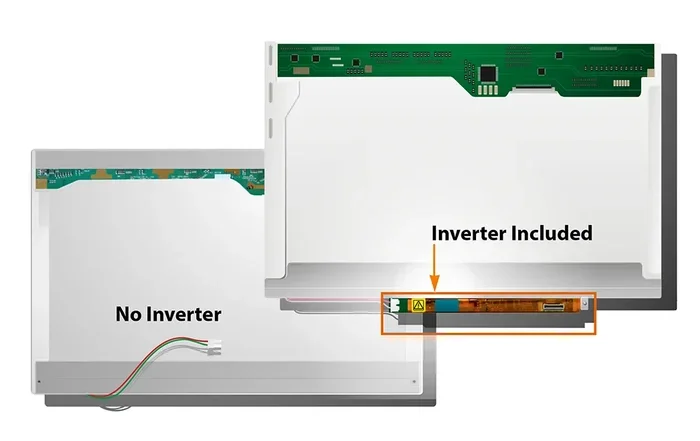
An LCD inverter is a small circuit board that converts low-voltage power into the high voltage needed to light up your LCD screen’s backlight. Without it, your laptop or monitor display stays dark even when the device is turned on. Understanding how this component works helps you troubleshoot dim or flickering screens and decide whether a repair or replacement makes sense.
Have you ever turned on your laptop and noticed the screen was completely black, even though you could hear the computer running? Or maybe your display flickers intermittently and dims randomly. These frustrating issues often trace back to one small but critical component — the LCD inverter.
The LCD inverter is the unsung hero behind every LCD screen. It works quietly behind the scenes, converting low-voltage power into the high voltage your backlight needs to illuminate. If you have ever wondered why your screen goes dark or glows faintly, the answer usually lives inside this tiny circuit board.
In this guide, we break down exactly what an LCD inverter does, how it works, and what to do when it fails. Whether you are a curious tech user or someone facing a dim screen right now, this article covers everything you need to know.
Key Takeaways
- Core Function: The LCD inverter takes low voltage from your device and boosts it to power the backlight lamp.
- Common Failure Signs: A dim or flickering screen, color shifts, and intermittent blackouts often point to a failing inverter.
- Replaceable Component: Most LCD inverters are affordable and relatively easy to swap out on laptops and monitors.
- LED vs. CCFL: Older screens use CCFL backlights with separate inverters, while modern LED screens often integrate the inverter function directly.
- Diagnosis First: Always rule out other causes like a damaged display cable or dying laptop RAM before replacing the inverter.
- Preventive Care: Proper ventilation and stable power help extend the life of your LCD inverter and overall display hardware.
📑 Table of Contents
- What Is an LCD Inverter?
- How Does an LCD Inverter Work?
- Signs Your LCD Inverter Is Failing
- Can You Replace an LCD Inverter?
- LCD Inverter vs. LED Backlight: Key Differences
- Tips for Maintaining Your LCD Inverter
- Common Mistakes When Diagnosing LCD Inverter Issues
- When to Seek Professional Help
- Conclusion
What Is an LCD Inverter?
An LCD inverter is a small electronic board found inside laptops, desktop monitors, and other LCD display devices. Its main job is to take the low-voltage DC power from your device’s motherboard and convert it into the higher-voltage AC power that the backlight lamp requires.
Think of it like a translator. Your laptop’s motherboard speaks low-voltage DC, but the backlight lamp needs high-voltage AC to glow. The inverter bridges that gap. Without it, the backlight stays off, and your screen appears completely black — even though the device is powered on and running.
Most LCD inverters are located on the bottom half of the laptop motherboard or attached directly to the display panel’s rear cover. They are small, usually about the size of a stick of gum, and connected to the backlight lamp through a thin wire or cable.
Why the Inverter Matters
The backlight lamp is what makes your screen visible. LCD panels themselves do not produce light. They rely on a light source behind the glass to illuminate the pixels. That light source is the backlight, and the LCD inverter is what powers it.
When the inverter works correctly, you see a bright, clear display. When it fails, the screen goes dark or becomes extremely dim. This makes the inverter one of the most important components for everyday screen visibility.
How Does an LCD Inverter Work?
Understanding how the LCD inverter works is simpler than it sounds. The process follows a clear path from your device’s battery to the backlight.
First, your laptop battery or power adapter supplies DC power at a low voltage — usually around 5 to 19 volts. This power travels to the motherboard and then to the inverter board. The inverter then boosts this low voltage to a much higher level, typically between 400 and 1,500 volts, depending on the backlight type.
This high-voltage AC current flows to the backlight lamp, which is usually a CCFL (cold cathode fluorescent lamp) or an LED strip. The lamp lights up and illuminates the LCD panel from behind, making your screen visible.
The Role of the Inverter Circuit
The inverter circuit inside the board uses a transformer to step up the voltage. It also includes capacitors and transistors that regulate the flow of current. These components work together to maintain a steady voltage supply to the backlight, ensuring consistent display brightness.
In older laptops, the inverter operated independently from the main board. In newer models, especially those with LED backlight technology, the inverter function is often built directly into the motherboard. This integration makes modern displays thinner and more energy-efficient.
CCFL vs. LED Backlight Inverters
There are two main types of backlight systems in LCD screens, and each uses a different inverter setup.
- CCFL Backlights: These older screens use a fluorescent tube that requires a separate inverter board to operate. The inverter provides the high voltage needed to light the tube. These were standard in laptops made before 2010.
- LED Backlights: Modern screens use LED strips that run on lower voltage DC power. Many LED screens do not need a separate inverter because the motherboard handles the voltage conversion. However, some LED displays still use a small inverter circuit for brightness control.
If you are troubleshooting a dim screen, knowing whether your device uses CCFL or LED backlighting helps narrow down the problem. You can usually find this information in your device’s service manual or by checking the model number online.
Signs Your LCD Inverter Is Failing
A failing LCD inverter produces several telltale symptoms. Catching these signs early helps you avoid unnecessary replacements and rule out other issues.
Screen Dimming or Flickering
The most common sign of a failing inverter is a screen that dims significantly or flickers. You might notice the display works fine when cold but gets dimmer after a few minutes of use. Or the screen flickers intermittently, especially when you tilt the laptop lid.
Complete Black Screen
If your laptop turns on — you can hear the fan spinning and the hard drive working — but the screen stays completely black, a dead inverter board could be the cause. Shine a flashlight on the screen at a sharp angle. If you can faintly see the desktop image, the backlight is not working, and the inverter is a likely suspect.
Inconsistent Brightness
Another symptom is a screen that changes brightness on its own or only works at certain angles. This happens when the inverter circuit cannot maintain a steady voltage supply to the backlight. The result is an unreliable display that keeps you guessing.
Color Shifts or Pink Tint
In some cases, a failing inverter causes a pink or reddish tint on the screen. This occurs when the backlight lamp receives unstable power. The color shift usually worsens over time as the inverter deteriorates further.
Can You Replace an LCD Inverter?
Yes, replacing a LCD inverter is one of the more straightforward laptop repairs you can do at home. The process is not complicated, but it does require patience and a basic set of tools.
What You Will Need
- A replacement inverter board matched to your specific laptop model
- A small Phillips-head screwdriver
- A plastic spudger or opening tool
- A well-lit workspace
- Anti-static wrist strap (optional but recommended)
Step-by-Step Replacement
- Power off your laptop and unplug it from the charger. Remove the battery if possible.
- Remove the bezel around the screen. Use the plastic spudger to gently pry off the plastic frame. Be careful not to break any clips.
- Locate the inverter board. It is usually mounted near the bottom of the display panel with one or two small screws.
- Disconnect the cables. Unplug the display cable and the inverter wire that connects to the backlight lamp. Take note of where each cable was seated.
- Remove the old inverter by unscrewing it and carefully lifting it out.
- Install the new inverter in the same position. Secure it with the screws and reconnect both cables firmly.
- Reassemble the bezel and test the screen by powering on the laptop.
Cost Considerations
A replacement LCD inverter typically costs between $10 and $30, depending on your laptop model. This makes it a very affordable repair compared to replacing the entire display panel. Before you buy, verify the exact model number of your current inverter to ensure compatibility.
Also, keep in mind that some modern laptops with LED backlights do not have a separate inverter board. In these cases, a dim screen might point to a different issue, such as a failing power management component or a damaged display cable. Checking your device specifications first saves time and money.
LCD Inverter vs. LED Backlight: Key Differences
Understanding the difference between older LCD inverter setups and modern LED backlight systems helps you diagnose screen issues more accurately.
| Feature | CCFL with Inverter | LED Backlight |
|---|---|---|
| Backlight Type | Fluorescent tube | LED strips |
| Voltage Required | High voltage AC (400-1500V) | Low voltage DC (3-30V) |
| Separate Inverter Board | Yes | Rarely |
| Power Consumption | Higher | Lower |
| Common Era | Before 2010 | 2010 and newer |
| Repair Complexity | Moderate | Simple or N/A |
The shift from CCFL to LED backlights changed how laptop screens are powered. LED technology eliminated the need for a separate inverter in most cases, which simplified the hardware and improved energy efficiency. If you own a newer device, the term “LCD inverter” might not even apply to your setup.
Tips for Maintaining Your LCD Inverter
While LCD inverters are durable components, a few simple habits can extend their lifespan and keep your display working reliably.
- Keep vents clear. Overheating stresses electronic components, including the inverter board. Ensure your laptop’s fans and vents are not blocked by dust or fabric.
- Use a surge protector. Power surges can damage the inverter circuit and other sensitive hardware. A good surge protector adds an extra layer of protection.
- Avoid extreme temperatures. Excessive heat or cold can weaken the solder joints on the inverter board over time.
- Handle the display gently. Rough handling can damage the display cable or loosen the inverter connections, leading to intermittent screen problems.
- Update your display drivers. Sometimes what looks like an inverter problem is actually a software issue. Updating graphics drivers can resolve false positives.
Taking care of your laptop hardware overall also protects the inverter. For example, keeping your device clean and ensuring proper airflow relates to the same principles that extend the life of components like your CPU cooler and camera sensor — all benefit from stable temperatures and clean environments.
Common Mistakes When Diagnosing LCD Inverter Issues
Jumping to conclusions about a dead inverter can lead to wasted time and money. Avoid these common mistakes.
- Assuming it is always the inverter. A black screen can also be caused by a faulty display cable, a damaged screen panel, or even a software crash. Always check the simplest possibilities first.
- Ignoring the backlight cable. Sometimes the wire connecting the inverter to the backlight lamp is loose or damaged, not the inverter itself. Reseating this cable can solve the problem without any part replacement.
- Buying the wrong replacement. Not all inverters are universal. You must match the replacement board to your exact laptop model and backlight type.
- Skipping the flashlight test. Before replacing any part, perform the flashlight test. Shine a light on the screen at a dark angle. If you can see the desktop image faintly, the backlight is the issue — but the cause could still be a damaged lamp, not just the inverter.
Being methodical in your diagnosis saves you from unnecessary purchases. If you are unsure, consult a professional technician or your device’s service manual before ordering parts.
When to Seek Professional Help
Most LCD inverter replacements are manageable for users comfortable opening their laptops. However, some situations call for professional assistance. If your device is still under warranty, opening the case may void the coverage. Also, if you are not confident working with small electronic components, a repair shop can handle the job safely.
Additionally, if your screen issues persist after replacing the inverter, the problem might lie elsewhere — possibly in the display panel itself or the graphics processing unit on the motherboard. A professional can run deeper diagnostics to pinpoint the root cause.
For users wondering whether investing in a repair is worthwhile, consider this: a new LCD inverter costs very little compared to a full display replacement. In most cases, fixing the inverter is the smartest and most cost-effective path forward.
Conclusion
The LCD inverter plays a vital role in making your screen visible. It converts low-voltage power into the high-voltage current your backlight needs to illuminate the display. When it works, you never notice it. When it fails, it can make your device nearly unusable.
Now that you understand what an LCD inverter does, how it works, and how to spot a failing one, you are better equipped to handle common screen issues. Whether you choose to replace the part yourself or seek professional help, the knowledge gives you confidence and saves money.
Keep your device well-ventilated, use surge protection, and stay curious about how your hardware works. A little maintenance goes a long way in keeping your LCD display bright and reliable for years to come.
Frequently Asked Questions
What causes an LCD inverter to fail?
Heat buildup, age, power surges, and worn-out solder joints are the most common causes of LCD inverter failure. Over time, the components on the inverter board degrade, especially in devices that run hot or are used in demanding environments.
Can a laptop work without an LCD inverter?
No, a laptop with a CCFL backlight cannot produce a visible image without a working LCD inverter. The backlight lamp receives no power, so the screen stays completely dark. However, modern LED-backlit laptops may not use a separate inverter at all.
How do I know if I need a new inverter or a new screen?
Perform the flashlight test. Shine a bright light on the screen in a dark room. If you can see the desktop image faintly, the backlight is not working, which points to the inverter. If the image is completely invisible, the display panel itself may be damaged.
Is it expensive to replace an LCD inverter?
Not at all. Replacement LCD inverters typically cost between $10 and $30. The repair is also straightforward enough that many users handle it themselves, saving on labor costs entirely.
Can a loose display cable mimic inverter failure?
Yes, a loose or damaged display cable can cause the same symptoms as a dead inverter — dim screen, flickering, or a black display. Always check the cable connection before replacing the inverter to avoid unnecessary part purchases.
Are all LCD inverters universal?
No, LCD inverters are model-specific. You must match the inverter to your exact laptop or monitor model. Check your device’s service manual or the part number on the old inverter before ordering a replacement.