What Will Block a Bluetooth Signal
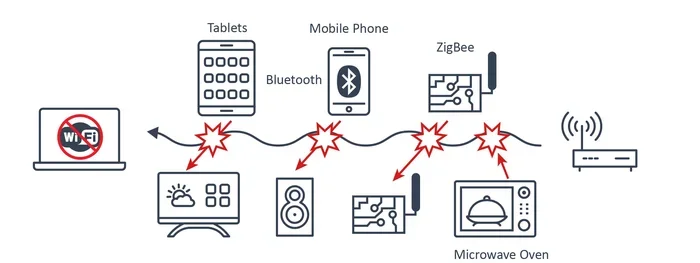
A Bluetooth signal can be blocked by physical barriers, electronic interference, and even other wireless devices operating on the same frequency. Understanding the common culprits helps you troubleshoot connectivity problems fast. This guide covers everything from walls and microwaves to Wi-Fi routers and metal surfaces that weaken or kill your Bluetooth connection. You will learn simple fixes to boost signal strength and keep your devices paired reliably.
Bluetooth technology makes our lives easier. We connect wireless headphones, keyboards, mice, and speakers without dealing with cords. But sometimes, Bluetooth just stops working. Your device disconnects, audio cuts out, or pairing fails completely. The culprit is often something blocking the Bluetooth signal. Understanding what causes this interference saves you frustration and time.
Many people assume Bluetooth problems mean their device is broken. In most cases, that is not true. Something in the environment is blocking or weakening the wireless connection. This guide explains exactly what will block a Bluetooth signal and what you can do about it. You will learn about physical barriers, electronic interference, and practical fixes that work.
Whether you are dealing with a Bluetooth mouse that keeps disconnecting or wireless headphones that drop audio mid-song, the causes are similar. Let us dive into the science of Bluetooth signals and the everyday things that disrupt them.
Key Takeaways
- Physical barriers like walls, metal, and water absorb Bluetooth signals and reduce range significantly.
- Other wireless devices on the 2.4 GHz frequency, such as Wi-Fi routers and microwaves, cause major interference.
- Bluetooth version differences between devices can affect signal strength and connectivity range.
- Simple fixes like repositioning devices or reducing distance often solve Bluetooth blocking problems.
- Understanding what blocks Bluetooth helps you set up a stronger, more reliable wireless environment at home or work.
- USB Bluetooth dongles and antenna upgrades can improve weak signal situations.
📑 Table of Contents
- What Is a Bluetooth Signal and How Does It Work?
- Common Things That Block a Bluetooth Signal
- Physical Objects That Weaken Bluetooth Signals
- How to Fix Bluetooth Signal Blocking Issues
- How to Prevent Bluetooth Signal Problems in the Future
- When Bluetooth Problems Mean Something More Serious
- Conclusion
What Is a Bluetooth Signal and How Does It Work?
A Bluetooth signal is a short-range wireless communication method. It uses radio waves to send data between devices. These radio waves travel on a specific frequency band, mostly 2.4 GHz. This is the same frequency band used by many household devices, which creates potential for interference.
Bluetooth works by sending small packets of data between a transmitter and a receiver. The range typically spans about 30 feet for most devices. Some newer versions of Bluetooth can reach farther. But walls, furniture, and electronics can all shrink that range dramatically.
The strength of your Bluetooth signal depends on several factors. Device power output matters. Antenna design matters. And the environment matters just as much. When something interrupts the path between two Bluetooth devices, the signal weakens or dies entirely.
Why Bluetooth Signals Are Vulnerable
Bluetooth signals are relatively weak compared to other wireless technologies. They operate at low power to conserve battery life in devices like your wireless mouse or earbuds. This low power means they are easy to block. A thick wall or a nearby microwave can overpower the signal easily.
Bluetooth also uses frequency hopping. This means it switches between channels rapidly to avoid interference. But if too many devices crowd the same space, hopping does not help much. The signal still struggles to get through.
Common Things That Block a Bluetooth Signal
Many everyday objects and devices can block or weaken Bluetooth signals. Knowing what these are helps you identify the problem quickly. Here are the most common blockers you will encounter.
Walls and Building Materials
Walls are the number one enemy of Bluetooth signals. Thick concrete walls block signals almost completely. Drywall is less of a problem but still weakens the connection. Brick, stone, and metal studs inside walls create serious barriers. If your Bluetooth device is in one room and your phone is in another, the wall between them matters a lot.
Water is another major signal blocker. Large fish tanks, water pipes, and even human bodies absorb Bluetooth radio waves. If you are using wireless earbuds and step into a shower, the water blocks the signal. This is why Bluetooth performance often drops in bathrooms or kitchens with lots of plumbing.
Electronic Devices on the Same Frequency
Many household electronics operate on the 2.4 GHz frequency, just like Bluetooth. This creates a crowded wireless environment. Devices that commonly interfere include:
- Wi-Fi routers — These broadcast on 2.4 GHz and 5 GHz bands. The 2.4 GHz band overlaps directly with Bluetooth.
- Microwaves — Old or damaged microwaves leak radiation on the 2.4 GHz band, which disrupts Bluetooth.
- Cordless phones — Older models use the 2.4 GHz frequency and can cause pairing problems.
- Baby monitors — These wireless devices often share the same frequency band.
- Wireless speakers — Multiple Bluetooth speakers in one room compete for signal space.
- USB 3.0 devices — These generate electromagnetic noise that can interfere with Bluetooth.
If you have ever wondered why your Bluetooth mouse stops working when you start microwaving dinner, this is why. The microwave emits strong radio noise on the same frequency, drowning out the Bluetooth signal.
Physical Objects That Weaken Bluetooth Signals
It is not just walls and electronics. Many physical objects in your home or office can weaken Bluetooth signals in surprising ways. Understanding these helps you position your devices better.
Metal and Reflective Surfaces
Metal is the worst material for Bluetooth signals. Metal surfaces reflect radio waves instead of letting them pass through. Large metal desks, filing cabinets, refrigerators, and even mirrors can redirect or absorb Bluetooth signals. If your Bluetooth keyboard stops working when you move it to one side of your desk, a metal drawer or leg underneath might be the cause.
Mirrors and glass with metallic coatings also block signals. Some modern office buildings use metal-coated glass windows. These windows look normal but they act like signal shields. If your Bluetooth device works outside but not inside, the building materials could be the issue.
Furniture and Large Objects
Big pieces of furniture block Bluetooth signals more than you might think. Solid wood desks, bookshelves filled with books, and large appliances all absorb radio waves. A Bluetooth speaker placed behind a tall bookshelf may lose connection with your phone. The books and wood act as a barrier between the two devices.
Even human bodies block Bluetooth to some degree. If you are wearing wireless earbuds and place your phone in your back pocket, your body gets in the way. This is why Bluetooth range drops when your body is between the transmitter and receiver.
Distance and Range Limitations
Bluetooth has a limited range for a reason. Most Class 2 Bluetooth devices work up to about 30 feet. Class 1 devices can reach up to 300 feet under ideal conditions. But real-world conditions rarely match ideal ones. Walls, furniture, and interference all shorten the effective range.
If your Bluetooth device is at the edge of its range, even small obstacles can push it over the limit. Moving closer to the source device often solves the problem instantly. This is the simplest fix and it works more often than people expect.
How to Fix Bluetooth Signal Blocking Issues
Once you know what blocks Bluetooth signals, fixing the problem becomes much easier. Here are practical steps you can take right now to improve your Bluetooth connection.
Reposition Your Devices
The fastest fix is to move your devices closer together. If your Bluetooth headphones keep disconnecting, bring your phone closer. Remove obstacles between the two devices. Even moving your device a few feet can make a big difference.
Try to keep Bluetooth devices in the same room when possible. Avoid placing them behind large furniture or inside closed cabinets. Line of sight between devices gives the best signal strength.
Reduce Wireless Congestion
If too many wireless devices compete for the same space, reducing the count helps. Turn off Bluetooth on devices you are not using. This frees up bandwidth for the devices that matter. Also, consider switching your Wi-Fi router to the 5 GHz band. This reduces congestion on the 2.4 GHz frequency that Bluetooth shares.
For users who rely on a Bluetooth mouse for laptop work, interference from nearby devices can be especially annoying. If your Bluetooth mouse keeps disconnecting during work hours, check how many wireless devices are active in the room. Disconnecting unused ones often restores stable connectivity.
Update Your Bluetooth Drivers and Firmware
Old software can cause Bluetooth problems that look like signal blocking. Manufacturers release updates that improve Bluetooth performance and fix connectivity bugs. Keep your laptop and peripheral devices updated. On Windows, check Device Manager for Bluetooth adapter updates. On phones, install system updates regularly.
If you use a Bluetooth dongle or adapter, make sure its drivers are current. An outdated driver can make a perfectly good Bluetooth connection appear broken.
Use a Bluetooth Extender or Repeater
For larger spaces, a Bluetooth extender boosts the signal. These devices receive the Bluetooth signal and rebroadcast it at higher power. They are especially useful in offices or large homes where walls and distance weaken the connection.
Some Bluetooth adapters come with external antennas. These provide better range than built-in antennas. If you connect a Bluetooth mouse to your laptop and experience frequent dropouts, a USB Bluetooth adapter with an external antenna can solve the problem.
How to Prevent Bluetooth Signal Problems in the Future
Prevention is always better than fixing problems after they happen. A few simple habits keep your Bluetooth devices working reliably.
First, keep Bluetooth devices away from large metal objects. Do not store your wireless keyboard in a metal drawer. Do not place your Bluetooth speaker directly on a metal surface. These small changes reduce signal blocking significantly.
Second, group your Bluetooth devices smartly. If you have multiple Bluetooth speakers, headphones, and keyboards in one room, they all compete for the same frequency space. Staggering their use or investing in devices that support newer Bluetooth versions reduces conflicts.
Third, restart your devices regularly. A simple restart clears temporary Bluetooth glitches and refreshes connections. This is the tech equivalent of turning it off and on again, and it works more often than you think.
Fourth, keep firmware updated on all Bluetooth peripherals. Manufacturers fix known interference issues through software updates. Checking for updates once a month takes just a few minutes but prevents many problems.
Finally, if you connect a Bluetooth mouse to your laptop and notice signal drops, check for USB 3.0 devices nearby. USB 3.0 ports and cables emit electromagnetic interference that specifically affects 2.4 GHz devices like Bluetooth. Moving your Bluetooth receiver away from USB 3.0 ports often fixes the issue immediately.
When Bluetooth Problems Mean Something More Serious
Most Bluetooth signal issues come from environmental factors. But sometimes the problem is hardware-related. If you have tried every fix and Bluetooth still fails, your device might have a faulty antenna or Bluetooth chip.
Devices that have been dropped or exposed to moisture can develop internal damage. Water damage corrodes Bluetooth antenna connections. Physical impacts can break internal components. In these cases, professional repair or replacement becomes necessary.
If you use a Bluetooth device for work and it keeps failing, consider testing it on another device. This helps you determine whether the problem is with the device or your environment. If the device works on another laptop, the issue is likely your original laptop’s Bluetooth hardware or settings.
Also, very old devices may not support newer Bluetooth standards. A Bluetooth 4.0 device paired with a Bluetooth 5.3 device works, but it defaults to the older version’s capabilities. This means you get shorter range and weaker signal strength. Upgrading older devices can improve your overall Bluetooth experience.
For those troubleshooting why a Bluetooth peripheral like a mouse won’t stay connected, the issue could be as simple as a low battery. Weak batteries reduce transmission power, which makes the signal easier to block. Replacing batteries often restores full connectivity without any other changes.
Conclusion
Many things can block a Bluetooth signal, from thick walls and metal surfaces to microwaves and Wi-Fi routers. The good news is that most Bluetooth problems have simple solutions. Repositioning devices, reducing wireless congestion, and keeping software updated solves the majority of issues. Understanding what blocks your Bluetooth signal gives you the power to fix it quickly.
Take a few minutes to assess your wireless environment. Look for obstacles, competing devices, and outdated software. Small changes make a big difference in Bluetooth performance. With the right setup, your wireless devices stay connected and work reliably every day.
Frequently Asked Questions
Can a Wi-Fi router block a Bluetooth signal?
Yes, Wi-Fi routers can block or weaken Bluetooth signals. Both Bluetooth and many Wi-Fi networks operate on the 2.4 GHz frequency. When a Wi-Fi router is close to your Bluetooth device, the two signals compete. This can cause Bluetooth dropouts and pairing failures. Switching your router to the 5 GHz band helps reduce this interference.
Does water really block Bluetooth signals?
Yes, water absorbs Bluetooth radio waves very effectively. Large bodies of water like fish tanks or water pipes can block signals completely. Even human bodies weaken Bluetooth signals because our bodies are mostly water. This is why Bluetooth performance often drops when you are near a pool or standing between your device and the signal source.
Why does my Bluetooth mouse keep losing connection?
Bluetooth mice lose connection for several reasons. Interference from other wireless devices is the most common cause. Physical obstacles like desks and walls also weaken the signal. Low batteries reduce transmission power and make the mouse more vulnerable to signal loss. Try moving the mouse closer to your laptop and replacing the batteries to see if the problem improves.
Can metal furniture block Bluetooth signals?
Absolutely. Metal furniture reflects and absorbs Bluetooth radio waves. Desks with metal frames, filing cabinets, and metal bookshelves all block signals. If your Bluetooth device works on one side of a metal desk but not the other, the metal is the likely cause. Moving the device to a non-metallic surface often fixes the problem.
Does the Bluetooth version affect signal blocking?
Yes, newer Bluetooth versions handle interference better than older ones. Bluetooth 5.0 and later offer improved range and stronger signal resistance. Older versions like Bluetooth 4.0 and below are more vulnerable to blocking. If possible, use devices that support Bluetooth 5.0 or higher for better performance in crowded wireless environments.
How far can a Bluetooth signal travel before it gets blocked?
Most Bluetooth devices work reliably up to about 30 feet in open space. Walls, furniture, and electronic interference reduce this range significantly. In ideal conditions with no obstacles, Bluetooth 5.0 can reach up to 240 feet. But in a typical home or office with walls and electronics, expect the range to be much shorter.