What Does Ios Mean on Your Iphone
iOS is the operating system that runs on every iPhone. It controls everything from your home screen to your apps, calls, and security settings. Understanding what iOS means helps you get the most out of your device. This guide breaks down the full meaning of iOS, how it works, and why keeping it updated matters for your phone’s performance and safety.
Key Takeaways
- iOS stands for iPhone Operating System: It is the software that makes your iPhone work.
- iOS controls every part of your phone: From the lock screen to apps, calls, and settings.
- Regular updates keep your iPhone safe and fast: New iOS versions bring features and security fixes.
- iOS is different from Android: It is built only for Apple devices and offers a closed, secure ecosystem.
- Checking your iOS version is easy: You can find it in the Settings app under General and About.
- iOS enables features like Face ID, iMessage, and the App Store: These are exclusive to Apple’s operating system.
📑 Table of Contents
What Is iOS and What Does It Mean on Your iPhone?
If you have ever looked at the top of your iPhone screen and seen “iOS” somewhere, you might have wondered what it actually means. The short answer is simple. iOS stands for iPhone Operating System. It is the software that runs on every iPhone made by Apple. Without iOS, your phone would just be a piece of metal and glass. It is the brain behind everything you do on your device.
Think of iOS like the engine in a car. You do not see it when you are driving, but it is doing all the heavy lifting. It makes the screen respond to your touch. It runs your apps. It handles your calls and texts. It even keeps your personal data safe. When you hear someone talk about iOS, they are talking about the software that makes your iPhone a smartphone.
Apple designed iOS to work only on its own devices. This means iPhones, iPads, and iPod Touches all use versions of iOS. It is a closed system, which means Apple controls everything about it. This gives users a smooth and consistent experience across all Apple products. If you use an iPhone, you are using iOS every single day.
Why Does iOS Matter for iPhone Users?
iOS matters because it directly affects how your phone works. A newer version of iOS can make your phone faster. It can add new features you have never seen before. It can also fix bugs and patch security holes. When Apple releases an iOS update, it is giving your phone a fresh start. You get new tools, better performance, and improved protection.
Many people do not realize how much their iPhone user interface depends on iOS. The way you swipe, tap, and navigate your phone is all built into the operating system. Even the smallest icons and animations are designed by Apple to work perfectly with iOS. This is why iPhones feel so smooth and intuitive compared to other phones.
The History of iOS
iOS has been around since the first iPhone came out in 2007. Back then, Apple did not even call it iOS. They called it “iPhone OS.” It was a simple system with basic features like a phone, a web browser, and a music player. Over the years, Apple has completely transformed it into one of the most powerful mobile operating systems in the world.
Early Beginnings of iPhone Software
The first version of iPhone OS had no App Store. You could not download third-party apps. Everything came built into the phone. Apple added the App Store in 2008 with iPhone OS 2.0. This changed everything. Suddenly, developers could create apps for the iPhone, and users had access to thousands of tools and games.
In 2010, Apple officially renamed iPhone OS to iOS 4. The name change reflected the fact that the operating system now powered more than just the iPhone. It also ran on the iPad. The Apple ecosystem was growing, and iOS was at the center of it all.
Major iOS Milestones Over the Years
Each major version of iOS brought big changes. Here are some of the most important milestones:
- iOS 4 (2010): Introduced multitasking and folders for organizing apps.
- iOS 6 (2012): Replaced Google Maps with Apple Maps and added Siri.
- iOS 7 (2013): Gave the iPhone a completely new flat design look.
- iOS 10 (2016): Added rich notifications and improved the lock screen experience.
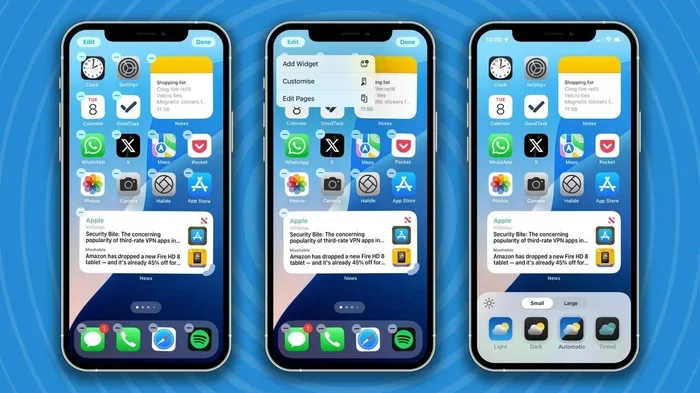
- iOS 14 (2020): Introduced widgets and the App Library for better home screen management.
- iOS 17 (2023): Brought StandBy mode, improved FaceTime, and new personalization features.
Every year, Apple pushes out a new version of iOS. These updates are free and easy to install. They keep your Apple device software running at its best.
What iOS Means for Your Daily iPhone Use
You might not think about iOS much during your day. But it is working behind the scenes on everything you do. From the moment you unlock your phone to the moment you charge it at night, iOS is in control.
Understanding the iPhone Interface
The iPhone interface you see on your screen is built on top of iOS. The home screen, the control center, the notification center, and the settings menu are all part of the operating system. Apple designs these elements to be simple and easy to use. That is why even young children and older adults can pick up an iPhone and figure it out quickly.
When you swipe down from the top right corner of your screen, you are accessing the Control Center. This is an iOS feature that lets you quickly turn on Wi-Fi, Bluetooth, and Airplane Mode. When you swipe down from the top left, you see your notifications. All of these interactions are powered by iOS.
iOS Features You Use Every Day
There are many features in iOS that you probably use without realizing they are part of the operating system. Here are some examples:
- Face ID and Touch ID: These security features are built into iOS to protect your phone.
- iMessage and FaceTime: These Apple communication tools only work because of iOS.
- The App Store: iOS manages how apps are downloaded, updated, and run on your phone.
- AirDrop: This quick sharing feature is an iOS system-level tool.
- Siri: Apple’s voice assistant runs directly on iOS.
- The Camera App: When you see the flower icon on your iPhone camera, that is part of the iOS camera interface. Learn more about what that flower means on your iPhone camera.
Even something as simple as adjusting your screen brightness or changing your ringtone is controlled by iOS. The operating system handles all the background work so you do not have to. This seamless experience is exactly what Apple is known for.
How to Check Your iOS Version
Checking which version of iOS your iPhone is running is very simple. Here is how you can do it:
- Open the Settings app on your iPhone.
- Tap on General.
- Tap on About.
- Look for Software Version. The number next to it is your current iOS version.
You will see something like “iOS 17.4” or “iOS 16.6.” The first number is the major version, and the second number is the minor update. Apple releases minor updates throughout the year to fix bugs and improve performance.
Why Keeping iOS Updated Matters
Updating your iOS is one of the most important things you can do for your phone. Here is why:
- Security: Apple patches vulnerabilities with every update. This keeps your personal data safe from hackers.
- Performance: Updates often include speed improvements and bug fixes that make your phone run smoother.
- New Features: Major iOS updates bring exciting new tools and capabilities to your device.
- App Compatibility: Many app developers require the latest iOS version to work properly.
To update your iOS, go to Settings, tap General, and then tap Software Update. If an update is available, tap Download and Install. Make sure your phone is plugged in and connected to Wi-Fi before you start.
iOS vs Other Mobile Operating Systems
iOS is not the only mobile operating system out there. Android is the biggest competitor. Both systems power the majority of smartphones in the world. But they are very different in how they work and what they offer.
How iOS Differs from Android
iOS is a closed system. Apple builds both the hardware and the software. This means every iPhone runs the same operating system, and Apple controls what users can and cannot do. Android, on the other hand, is open source. Many different companies use Android on their phones, from Samsung to Google to OnePlus.
Here is a quick comparison between the two:
- Customization: Android lets you change almost everything on your phone. iOS is more locked down, but Apple has been adding more customization options with each new version.
- Security: iOS is generally considered more secure because of its closed nature. Apple reviews every app before it goes on the App Store.
- Ecosystem: If you use an iPhone, iPad, and Mac, iOS ties them all together beautifully. Android works best with Google services.
- Updates: Apple pushes iOS updates to all supported devices at the same time. Android updates depend on your phone manufacturer and carrier.
Both systems are great. It really comes down to personal preference. But if you value simplicity, security, and a seamless experience across devices, iOS is hard to beat.
iOS and Your iPhone’s Camera
Your iPhone camera is one of the most powerful tools on your phone. And iOS plays a huge role in how it works. The operating system controls the camera interface, the photo processing, and the video settings. When you open the camera app, you are using an iOS-powered experience.
For example, if you have noticed a small flower icon in your iPhone camera, that is a part of the iOS camera system. It represents the macro mode, which lets you take close-up shots of small objects. Check out our guide on what the flower icon means in the iPhone camera to learn more about this feature.
iOS also handles things like portrait mode, night mode, and cinematic video recording. All of these features are powered by a combination of Apple’s hardware and iOS software working together. This is why iPhone photos look so good, even without extra editing.
iOS Security and Privacy
Apple takes privacy very seriously, and iOS is built with that in mind. Every iPhone comes with strong security features that are managed by the operating system. Here are some ways iOS protects you:
- App Tracking Transparency: iOS asks apps if they can track your activity across other apps and websites.
- On-Device Processing: Many features, like Face ID and Siri, process data right on your phone instead of sending it to the cloud.
- End-to-End Encryption: iMessages and FaceTime calls are encrypted by iOS so that only you and the person you are communicating with can read or hear them.
- Passkeys: iOS supports passkeys as a modern alternative to passwords. If you want to learn more about using passkeys on your devices, here is a guide on the best methods for using passkeys.
These security features are all built into iOS. They work automatically in the background, which means you do not need to be a tech expert to stay safe. Apple has made privacy a core part of the iPhone experience.
Conclusion
iOS is the heart and soul of every iPhone. It is the operating system that makes your phone work, keeps your data safe, and gives you access to thousands of apps and features. Whether you are checking your messages, taking photos, or updating your phone, iOS is there doing the work behind the scenes.
Understanding what iOS means and how it works helps you use your iPhone more effectively. It also helps you appreciate the effort Apple puts into creating a smooth, secure, and user-friendly experience. Keep your iOS updated, explore new features, and enjoy everything your iPhone has to offer.
Now that you know what iOS means on your iPhone, you can feel more confident navigating your device. Share this guide with a friend who might be curious about their iPhone’s software. The more you know about your phone, the better you can use it.
Frequently Asked Questions
Is iOS the same as iPhone?
No, iOS is the operating system that runs on the iPhone. The iPhone is the physical device. iOS is the software that makes the iPhone work. Think of it like this: the iPhone is the car, and iOS is the engine.
How often does Apple release new iOS updates?
Apple typically releases one major iOS update every year, usually in September. They also release smaller updates throughout the year to fix bugs and improve security. You can check for updates anytime in your Settings app.
Can I use iOS on a non-Apple device?
No, iOS is designed exclusively for Apple devices. It only runs on iPhones, iPads, and iPod Touches. Other phones use different operating systems like Android or Windows.
What does the M mean in M mode on my iPhone camera?
The M mode on your iPhone camera stands for Manual mode. It lets you control settings like shutter speed and ISO yourself. Learn more about what M means in camera settings to get the most out of manual mode.
Do iOS updates cost money?
No, all iOS updates are free. Apple provides major and minor updates at no cost to iPhone users. You just need a Wi-Fi connection and enough battery life to complete the download and installation.
What happens if I dont update my iOS?
If you skip updates, your phone will still work, but you may miss new features and security patches. Over time, outdated iOS versions can leave your phone vulnerable to security threats. It is always best to keep your iPhone updated to the latest version available.