What to Do If Your Cell Phone Goes Through the Washing Machine
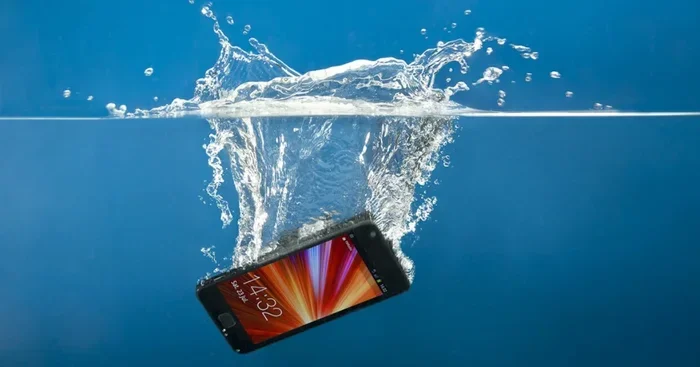
If your cell phone accidentally goes through the washing machine, don’t panic. Acting fast with the right steps can dramatically increase your chances of saving it. This guide walks you through every critical action, from immediate removal to long-term drying and testing.
You pull a load of laundry out of the washer and suddenly feel a sickening lurch in your stomach. Your cell phone went through the washing machine. Maybe it was in your pocket. Maybe it fell out of a jeans pocket and landed in the drum. Either way, you are staring at a wet, possibly ruined device.
Here is the good news. Many phones survive a wash cycle if you act quickly and follow the right steps. Thousands of people have rescued their water damaged phones using simple techniques. This guide gives you a clear, actionable plan to follow right now.
The key is speed. Every second your phone sits wet, the risk of corrosion and short circuits increases. Let us walk through exactly what to do, what to avoid, and how to give your phone the best shot at survival.
Key Takeaways
- Power off immediately: The single most important step is turning your phone off the moment you pull it out of the washer.
- Remove all accessories: Take out the SIM card, case, and anything attached to reduce moisture trapped inside.
- Skip the rice myth: Modern experts recommend silica gel packets or air drying over the old rice method, which can introduce dust and starch.
- Don’t charge a wet phone: Plugging in a water damaged phone can cause a short circuit and permanent board damage.
- Seek professional help: If your phone still won’t work after 48 hours of drying, take it to a certified phone repair specialist.
- Prevention is possible: Waterproof cases and keeping phones away from laundry loads can prevent this nightmare entirely.
📑 Table of Contents
Step 1: Remove the Phone Immediately
The moment you realize your phone went through the wash, grab it. Do not wait. Do not finish the laundry cycle first. Water begins causing damage the second it enters the device. The faster you remove it, the better your chances.
Here is what to do right away:
- Power off the phone immediately if it is still on
- Do not press any buttons or try to use it
- Shake off excess water gently
- Place it on a clean, dry towel
Resist the urge to turn the phone back on to check if it works. This is one of the most common mistakes people make. A wet phone turned on can experience electrical shorts that fry the internal circuitry beyond repair.
Why Speed Matters So Much
Water conducts electricity. When it reaches the circuit board inside your phone, it creates pathways where electricity should not flow. These unintended paths cause short circuits that burn out tiny components. The longer water sits on the board, the more damage occurs. In some cases, corrosion begins within minutes.
Think of it like this. If you spilled coffee on a desk, you would wipe it up right away. Your phone deserves the same urgency. The washing machine cycle actually helped spread water across every surface, which means moisture has likely reached every internal component.
Step 2: Remove All Accessories and Components
Now that the phone is out and powered off, it is time to open it up as much as possible. Removing accessories helps water escape and speeds up the drying process.
Do the following carefully:
- Remove the phone case completely
- Take out the SIM card tray
- Remove the SIM card and any memory cards
- Take out the earphones if they are plugged in
- Remove any screen protectors that might trap moisture underneath
Every piece you remove gives moisture another escape route. The SIM card tray is a common spot where water hides. The case traps moisture against the phone body. By removing everything, you are giving the drying process a head start.
Handling the SIM Card Carefully
Your SIM card holds important data. Gently pat it dry with a soft cloth. Do not blow on it with your mouth, as moisture from your breath can add to the problem. Place the SIM card on a dry surface and let it air dry separately from the phone.
If your phone has a removable battery, take it out too. However, most modern smartphones have sealed batteries. If that is the case with your device, do not attempt to open the phone yourself. Leave the sealed construction intact.
Step 3: Dry the Phone Properly
This is where most people go wrong. The old advice about putting your phone in a bowl of rice is everywhere, but it is not the best method anymore. Let us look at what actually works.
Why the Rice Method Falls Short
The rice method became popular because it is cheap and accessible. However, experts now agree it is not ideal. Rice dust can enter the phone’s ports and openings. Starch from the rice can leave a residue inside the device. And rice does not absorb moisture very quickly compared to other materials.
Here are better alternatives for drying your water damaged phone:
- Silica gel packets: These are the small packets found in shoe boxes and electronics packaging. They absorb moisture far more effectively than rice.
- Cat litter (crystal type): Unscented crystal cat litter works surprisingly well as a desiccant.
- Air drying: Place the phone on a dry towel in a warm, well-ventilated room. Avoid direct sunlight.
- Compressed air: Use short bursts of compressed air to push water out of charging ports and speaker grills.
The best approach combines methods. Use compressed air first to remove standing water. Then place the phone in a container with silica gel packets. Let it sit for at least 48 hours.
Quick Tips for Drying
- Use a soft, lint-free cloth to gently dab the exterior
- Do not use a hairdryer on high heat, as hot air can damage internal components
- Do not place the phone in a microwave or oven
- Keep the phone in a warm room, not in direct sunlight
- Angle the phone slightly to let gravity help water drain from openings
Patience is critical here. You might be tempted to check the phone after a few hours. Do not do it. Give it a full 48 hours minimum. Rushing this step is one of the leading causes of phone failure after water exposure.
Step 4: What Not to Do
There are several things that sound helpful but can actually make the damage worse. Knowing what to avoid is just as important as knowing what to do.
Common Mistakes That Make Things Worse
- Charging a wet phone: This can cause a short circuit. Wait until the phone is completely dry before connecting it to any power source.
- Using a hairdryer on high heat: Excessive heat can warp internal components and melt adhesives holding parts together.
- Shaking the phone vigorously: This can push water deeper into the device rather than helping it escape.
- Blowing into the ports with your mouth: Your breath contains moisture that adds to the problem.
- Taking the phone apart yourself: Unless you are a trained technician, opening the phone can cause more harm than good.
- Pressing buttons repeatedly: This can push water further into the device and activate circuits that should remain off.
One thing people often ask is whether they should try to clean the phone with alcohol. In some cases, a technician might use isopropyl alcohol to clean corrosion from circuit boards. But this should only be done by a professional. Do not attempt this at home unless you have experience with electronics repair.
Step 5: Test and Assess the Damage
After 48 hours of careful drying, it is time to check your phone. This is a nervous moment for everyone, so go slowly and carefully.
Follow these steps in order:
- Look for any visible moisture inside the screen or around the camera lens
- Check the charging port with a flashlight for any remaining droplets
- Insert the SIM card back into the tray
- Connect the phone to a charger without turning it on first
- Wait a few minutes to see if the charging indicator lights up
- If it charges, try pressing the power button to turn it on
Signs of Water Damage to Watch For
Even if your phone turns on, water damage may not be fully resolved. Watch for these warning signs in the days and weeks that follow:
- The touchscreen becomes unresponsive or erratic
- You notice audio issues such as muffled sound or no sound at all from the speakers
- The screen shows discoloration or dark spots
- The camera lens fogs up from inside
- The phone overheats unexpectedly
- You see rust or corrosion around the charging port
- The battery drains much faster than usual
If you notice any of these issues, your phone likely has residual moisture or corrosion inside. At this point, you should take it to a professional phone repair service. They have specialized tools to open the device safely and clean internal components.
When to Accept the Loss
Sometimes, despite your best efforts, the phone does not recover. If the phone will not turn on after 48 hours of drying, or if you see visible corrosion on the circuit board, the damage may be too severe. In these cases, it is time to explore your options for replacing the device or getting a quote for professional repair.
Do not keep trying to turn on a phone that clearly will not power up. Each attempt risks further electrical damage. Accept the situation and move forward with the next steps.
Preventing Future Disasters
Once you have been through the stress of a phone going through the wash, you will want to prevent it from happening again. Here are some practical steps you can take starting today.
Invest in a Waterproof Case
A good waterproof case adds a layer of protection against accidental water exposure. These cases are designed to keep water out even if your phone falls into a pool or gets soaked. They are not foolproof, but they significantly reduce the risk of water damage.
Create a Laundry Pocket Habit
Always check your pockets before putting clothes in the washer. Make this a routine. Some people even use a small laundry bag for items with electronics. It is a simple habit that saves hundreds of dollars in phone repairs.
Know Your Phone’s Water Resistance Rating
Many modern phones come with an IP rating that indicates water resistance. For example, an IP68 rating means the phone can typically survive submersion in water for a limited time. However, water resistance is not the same as waterproof. Detergents and soap in washing machines can break down water-resistant seals over time.
Keep a Backup Phone or Cloud Backup
The best protection against data loss is regular backups. If your phone does get damaged, you will not lose your photos, contacts, or important files. Set up automatic cloud backups so your data is always safe, even if your device is not.
When to Call a Professional
There is no shame in seeking professional help. Certified phone repair technicians have the tools and expertise to handle water damage that goes beyond what you can do at home.
Consider calling a professional if:
- The phone does not turn on after 48 hours of drying
- You see corrosion or residue inside the phone
- The phone turns on but has persistent issues with the screen, audio, or charging
- You are uncomfortable opening or handling the device yourself
Professional repair services can open the phone in a clean environment, clean the circuit board with specialized solutions, and replace damaged components. Many offer free diagnostics so you know the cost before committing to any repair.
Think of it this way. If you had a serious medical issue, you would not try to treat it yourself without training. The same logic applies to a water damaged phone with internal corrosion. Sometimes, the experts are the best choice.
Final Thoughts
A phone going through the washing machine is a stressful experience, but it does not have to be the end of your device. By following these steps quickly and carefully, you give your phone the best possible chance of survival. Act fast, dry thoroughly, and avoid the temptation to rush the process.
Remember that prevention is always better than cure. Take simple steps to protect your phone from future water exposure, and keep your data safe with regular backups. If all else fails, professional repair services can often bring even severely water damaged phones back to life.
Stay calm, follow this guide, and give your phone the best shot at a full recovery. You might just be surprised at how well it bounces back.
Frequently Asked Questions
Can a phone survive going through a washing machine?
Yes, many phones survive a wash cycle if you act quickly and follow the right drying steps. The key is to power off the phone immediately, remove all accessories, and let it dry for at least 48 hours. Speed and patience are your two biggest allies in this situation.
How long should I wait before trying to turn on my phone after it gets wet?
Wait at least 48 hours before attempting to power on a wet phone. Moisture trapped inside can cause short circuits when electricity flows through the device. Rushing this step is one of the most common reasons phones fail to recover after water exposure.
Is putting a wet phone in rice actually effective?
The rice method is outdated and not recommended by most experts today. Rice dust can enter ports and starch can leave residue inside the device. Silica gel packets, cat litter, or simple air drying in a warm room are much more effective and safer alternatives.
What should I do if my phone turns on but has audio issues?
Audio problems after water exposure often indicate residual moisture in the speaker components. Let the phone dry for additional time and avoid playing loud audio. If the issue persists after a few days, a professional phone repair service can clean the internal speaker components safely.
Can water damage show up weeks after the incident?
Yes, water damage can be delayed. Corrosion inside the phone can develop over days or even weeks after the initial exposure. Keep an eye on your phone for several weeks after the incident and watch for signs like discoloration, overheating, or unresponsive touchscreens.
How much does professional phone water damage repair cost?
Costs vary widely depending on the phone model and the extent of damage. Simple drying services may cost little, while full board replacements can be more expensive. Many repair shops offer free diagnostics, so you will know the exact cost before any work is done.