M2 2230 Vs 2280 Ssd Which Form Factor Is Right For You
The M.2 2230 and M.2 2280 SSDs are two popular form factors that serve different device needs. The 2230 is shorter and ideal for ultra-thin laptops and compact devices, while the 2280 is the standard size offering higher storage capacity. Choosing the right one depends on your device compatibility, performance needs, and budget.
If you are shopping for an M.2 SSD and have stumbled across both the 2230 and 2280 sizes, you are not alone. These two form factors look almost identical in name but serve very different purposes. The short answer is that the 2280 is the most common size for desktops and standard laptops, while the 2230 is built for ultra-compact devices like slim laptops and tablets.
In this guide, we break down everything you need to know about M2 2230 vs 2280 SSD. We will cover sizes, speeds, compatibility, and which one fits your setup best. By the end, you will know exactly which drive to pick.
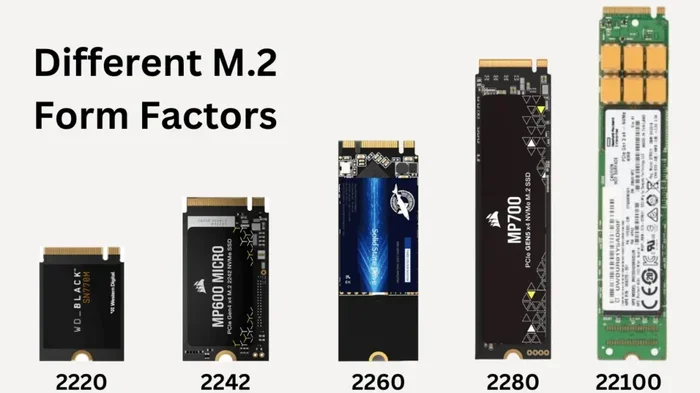
Let us start with the basics. The numbers 2230 and 2280 refer to the physical dimensions of the drive. The first two digits (22) represent the width in millimeters. The last two digits represent the length. So a 2230 is 22mm wide and 30mm long, while a 2280 is 22mm wide and 80mm long. That length difference has a big impact on what each drive can do.
Key Takeaways
- Size matters: The 2230 measures 22mm x 30mm, while the 2280 measures 22mm x 80mm, making the 2280 significantly longer.
- Capacity differences: The 2280 typically offers more storage options, from 500GB to 4TB, while the 2230 usually caps at 1TB or 2TB.
- Performance is similar: Both form factors use the same NVMe protocol and PCIe interfaces, so speed differences come from the drive itself, not the size.
- Device compatibility is key: Always check your laptop or motherboard manual before buying. Not all slots support both sizes.
- The 2280 is more common: Most desktops and standard laptops use the 2280, making it easier to find and replace.
- The 2230 fits compact devices: Ultrabooks, tablets, and mini PCs often rely on the smaller 2230 format.
📑 Table of Contents
What Is the M.2 SSD Form Factor?
The M.2 form factor is a small, flat storage drive that plugs directly into a motherboard. It replaces the older 2.5-inch SSDs and hard drives in many modern PCs. These drives are tiny, fast, and install without any cables. That is why they have become the go-to choice for NVMe solid state drives in today’s computers.
M.2 drives come in different lengths, and the most common ones are 2230, 2242, 2260, 2280, and 22110. The width stays the same at 22mm, but the length changes. Longer drives can hold more NAND flash chips, which means higher storage capacities. Shorter drives are designed for tight spaces where every millimeter counts.
Why Does Form Factor Matter?
Your device has a specific M.2 slot that supports only certain lengths. You cannot force a 2280 drive into a slot made for a 2230. Similarly, a 2230 drive will not fit properly in a 2280 slot if the slot does not have the right mounting holes. Always match the drive length to your device’s slot. This is the single most important thing to check before buying any M.2 NVMe SSD.
M.2 2230 SSD: Compact and Versatile
The M.2 2230 SSD is a relatively new addition to the storage market. It measures just 22mm wide and 30mm long. That makes it one of the shortest M.2 drives available. Despite its small size, it delivers the same NVMe speeds as larger drives, as long as it uses the same PCIe generation and NAND technology.
Where Is the 2230 Used?
The 2230 form factor is most commonly found in:
- Ultra-thin laptops like the Lenovo ThinkPad X1 Carbon and Dell XPS 13
- Tablets and 2-in-1 devices that need every bit of internal space
- Mini PCs and compact desktops
- Gaming handhelds like the Steam Deck and ASUS ROG Ally
Because these devices have limited internal room, manufacturers chose the 2230 to keep things slim. The good news is that a 2230 NVMe M.2 SSD can still offer blazing fast read and write speeds. For example, PCIe Gen4 2230 drives can hit sequential read speeds of 5,000 MB/s or more.
Capacity Options for 2230 Drives
Due to the shorter length, 2230 drives typically hold fewer NAND chips. You will commonly find them in 256GB, 512GB, 1TB, and 2TB capacities. The 2230 M.2 NVMe SSD market has grown fast, and brands like Crucial, Samsung, and Kingston now offer reliable options. If you need more than 2TB, the 2280 is your better bet.
M.2 2280 SSD: The Standard Size
The M.2 2280 SSD is the workhorse of the M.2 world. It measures 22mm wide and 80mm long. This is the size you will find in most desktop PCs, standard laptops, and upgrade kits. When people talk about an “M.2 SSD,” they are almost always referring to the 2280.
Why the 2280 Dominates
The 2280 form factor offers several advantages:
- More storage capacity: You can find 2280 drives up to 8TB, with common options at 500GB, 1TB, 2TB, and 4TB.
- More NAND chips: The extra length allows manufacturers to stack more flash memory, boosting capacity and sometimes performance.
- Wider availability: Almost every motherboard with an M.2 slot supports the 2280.
- Better pricing per GB: Because they are mass-produced, 2280 drives often cost less per terabyte.
If you are building a PC or upgrading a standard laptop, the M.2 2280 NVMe SSD is almost certainly the right choice. It is the default size for a reason. You can find excellent options in both PCIe Gen3 and Gen4 variants.
Speed and Performance of 2280 Drives
The 2280 form factor does not limit speed at all. A PCIe Gen4 M.2 2280 NVMe SSD can deliver the same speeds as a 2230 of the same generation. In fact, because it can house more NAND layers, some 2280 drives sustain higher write speeds under heavy workloads. This matters for tasks like video editing, large file transfers, and gaming.
For example, the PCIe Gen4 NVMe 2280 M.2 SSD category includes some of the fastest consumer drives on the market. These drives regularly push sequential reads past 7,000 MB/s and writes above 5,000 MB/s.
M2 2230 vs 2280 SSD: Head-to-Head Comparison
Now let us put the two side by side. Here is a quick comparison to help you visualize the differences.
| Feature | M.2 2230 | M.2 2280 |
|---|---|---|
| Width | 22mm | 22mm |
| Length | 30mm | 80mm |
| Common Capacities | 256GB to 2TB | 256GB to 8TB |
| Typical Devices | Ultrabooks, tablets, handhelds | Desktops, standard laptops |
| NAND Chip Count | Fewer chips | More chips |
| Max Sequential Read | Up to 7,000 MB/s (Gen4) | Up to 7,400 MB/s (Gen4) |
| Availability | Growing but limited | Very widely available |
| Pricing per GB | Slightly higher | Generally lower |
As you can see, the differences come down to physical size, capacity, and device compatibility. The actual NVMe performance depends more on the PCIe generation, the controller, and the NAND type than on the form factor itself.
Can You Use a 2230 in a 2280 Slot?
Some motherboards and laptops have M.2 slots that support multiple keying and lengths. In those cases, a 2230 drive can work in a 2280 slot if the slot has the correct mounting holes. However, this is not universal. Always check your device specifications. If you are unsure, look up your motherboard manual or contact the manufacturer. A mismatched drive will not work, and forcing it can damage the slot.
Can You Use a 2280 in a 2230 Slot?
No. A 2280 drive is simply too long to fit into a slot designed for a 2230. The connector and mounting holes will not align. This is a hard physical limitation. Never try to force a longer drive into a shorter slot.
Which Form Factor Is Right for You?
Choosing between the M2 2230 vs 2280 SSD comes down to three factors: your device, your storage needs, and your budget.
Pick the 2230 if: You own a slim laptop, a tablet, a mini PC, or a handheld gaming device. These devices are designed around the smaller form factor. Buying a 2230 ensures a perfect fit. If you need a portable external enclosure, you can also use a 2230 M.2 NVMe SSD enclosure to turn your drive into a mobile storage solution.
Pick the 2280 if: You are building or upgrading a desktop PC, a standard laptop, or a workstation. The 2280 gives you more capacity options and is easier to find at every price point. For most people, the 2280 is the safer and more practical choice. It is also the better option if you need large storage for gaming libraries or professional media work.
Consider both if: You own multiple devices and want to standardize on one brand or model line. Some manufacturers offer the same drive in both 2230 and 2280 lengths, which makes it easy to keep your storage ecosystem consistent.
Expert Tips and Common Mistakes
Quick Tips for Buying the Right M.2 SSD
- Check your device manual first. It will list the supported M.2 sizes and key types (B-key, M-key, or B+M-key).
- Match the PCIe generation. A PCIe Gen4 drive in a Gen3 slot will run at Gen3 speeds. This applies to both 2230 and 2280 drives.
- Consider thermal management. High-performance NVMe SSDs generate heat. The 2280 has more surface area for heat dissipation than the 2230, which can be important in compact devices.
- Buy from reputable brands. Brands like Samsung, Crucial, WD Black, and Kingston offer reliable warranties and consistent performance across both form factors.
Common Mistakes to Avoid
One of the biggest mistakes is buying a drive without checking slot compatibility. Another is assuming that a shorter drive is slower. As we discussed, the form factor does not limit speed. The NAND type, controller, and PCIe generation do.
Also, do not confuse M.2 SATA SSDs with NVMe M.2 SSDs. They look similar but use different protocols. An NVMe M.2 2280 SSD is much faster than a SATA M.2 of the same size. Always check whether your device supports NVMe or SATA before purchasing.
How to Install Your New M.2 SSD
Installing an M.2 SSD is straightforward. Here is a quick overview:
- Locate the M.2 slot on your motherboard or device.
- Remove the mounting screw.
- Insert the drive at a 30-degree angle into the slot.
- Press the drive down flat and secure it with the screw.
- Boot into your BIOS or operating system and initialize the drive.
If you are using a M2 NVMe SSD in USB enclosures, the process is even simpler. Just plug the drive into the enclosure, connect via USB, and you have portable high-speed storage. This works great with both 2230 and 2280 drives.
Final Thoughts
The M2 2230 vs 2280 SSD debate is not about which drive is better overall. It is about which drive is better for your specific device and needs. The 2230 shines in compact and portable devices where space is limited. The 2280 dominates in desktops and standard laptops, offering more capacity and better value.
Both form factors use the same NVMe technology and can deliver outstanding performance. Your choice should be driven by compatibility first, then capacity, and finally budget. Take the time to check your device specifications, and you will end up with the perfect M.2 NVMe SSD for your setup.
Whether you pick the compact 2230 or the standard 2280, you are making a great investment in faster boot times, quicker file transfers, and a more responsive computing experience. Happy upgrading.
Frequently Asked Questions
What is the main difference between M.2 2230 and 2280 SSDs?
The main difference is the length. The 2230 is 30mm long, while the 2280 is 80mm long. Both are 22mm wide. The longer 2280 drive can hold more NAND chips, which means higher storage capacities, while the 2230 is designed for compact devices with limited internal space.
Can I use a 2280 SSD in a slot designed for 2230?
No. A 2280 SSD is too long to fit into a 2230 slot. The connector and mounting holes will not align. Always match the drive length to your device’s supported M.2 size to avoid compatibility issues or physical damage.
Are M.2 2230 SSDs slower than 2280 SSDs?
No, the form factor does not affect speed. Both 2230 and 2280 drives can use the same NVMe protocol and PCIe generations. A PCIe Gen4 2230 drive can be just as fast as a Gen4 2280 drive. Speed depends on the controller, NAND type, and PCIe generation, not the size.
Which devices use M.2 2230 SSDs?
The 2230 form factor is common in ultra-thin laptops, tablets, 2-in-1 devices, mini PCs, and handheld gaming consoles like the Steam Deck and ASUS ROG Ally. These devices prioritize slim designs and need a compact storage solution.
Is the M.2 2280 SSD better for gaming?
The 2280 is generally better for gaming setups because it offers higher capacities (up to 4TB or more) and is widely supported by desktop motherboards. Large game libraries benefit from the extra storage space. However, the actual game load times depend on the drive’s PCIe generation and NAND speed, not the form factor.
How do I know which M.2 size my laptop supports?
Check your laptop’s user manual or visit the manufacturer’s website and look up your model’s specifications. The supported M.2 sizes, key types, and PCIe generations will be listed. You can also use a system information tool like CPU-Z to check your current SSD and slot details.