Pcie Gen 3 Vs Gen 4 Vs Gen 5 Ssd The Full Breakdown
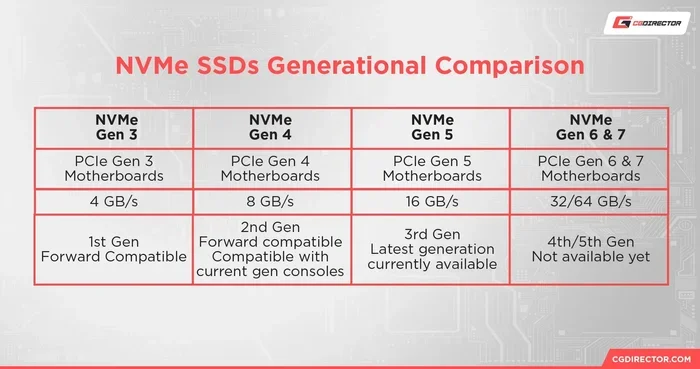
The Pcie Gen 3 Vs Gen 4 Vs Gen 5 Ssd showdown highlights major leaps in speed, bandwidth, and real-world performance that can transform how your system handles data. Each PCIe generation roughly doubles the previous one’s transfer rates, so Gen 5 delivers the fastest speeds while Gen 3 still offers excellent value for everyday tasks. Knowing what sets them apart ensures you choose the right SSD generation for your budget and workload without overpaying or settling for less.
Pcie Gen 3 Vs Gen 4 Vs Gen 5 Ssd The Full Breakdown
Choosing the right PCIe Gen 3 vs Gen 4 vs Gen 5 SSD can feel overwhelming. There are so many options on the market, and the numbers on the boxes don’t always tell the full story. Whether you are building a new PC or upgrading an existing one, understanding the differences between these three generations of NVMe SSD technology is essential. This guide breaks it all down in plain language so you can make a confident decision without getting lost in technical jargon.
Each PCIe generation brings faster speeds, better efficiency, and improved performance to the table. But faster does not always mean better for your specific needs. A Gen 5 SSD might be overkill for a casual user, while a Gen 3 drive could be perfectly fine for someone on a budget. By the end of this article, you will know exactly which generation fits your workload, your motherboard, and your wallet.
We will walk through the real-world speeds, compatibility considerations, and practical use cases for each generation. You will also find a side-by-side comparison table that makes the differences crystal clear. Let us dive in.
Key Takeaways
- PCIe Gen 3 offers up to 16 Gb/s bandwidth, ideal for budget builds.
- PCIe Gen 4 doubles Gen 3 speeds, delivering 32 Gb/s for faster gaming and workloads.
- PCIe Gen 5 provides 64 Gb/s, the latest peak performance for extreme tasks.
- Gen 4 SSDs are the sweet spot for most users, balancing cost and speed.
- Gen 5 drives require compatible motherboards and CPUs to reach full potential.
- Bandwidth isn’t everything; real-world gains depend on your specific use case and system.
📑 Table of Contents
What Makes Each PCIe Generation Different
The PCIe interface is the highway that connects your SSD to your motherboard. Think of it like a road. Gen 3 is a two-lane road, Gen 4 is a four-lane highway, and Gen 5 is an eight-lane superhighway. More lanes mean more data can travel at the same time, which directly impacts your SSD performance.
Here is what each generation brings to the table in terms of raw bandwidth per lane:
- PCIe Gen 3: 8 GT/s per lane, roughly 1 GB/s per lane in a x4 configuration
- PCIe Gen 4: 16 GT/s per lane, roughly 2 GB/s per lane in a x4 configuration
- PCIe Gen 5: 32 GT/s per lane, roughly 4 GB/s per lane in a x4 configuration
These numbers are theoretical maximums. Real-world sequential read and write speeds are usually a bit lower, but the trend is clear. Each new generation roughly doubles the bandwidth of the previous one. That is a massive leap that translates into tangible performance gains for demanding tasks.
How PCIe Lanes Affect Your M 2 Ssd
Most modern M 2 NVMe SSDs use four PCIe lanes (x4 configuration). This is the sweet spot for consumer drives because it balances speed with compatibility. Some older motherboards or certain slots might only support x2 or x1, which halves or quarters the available bandwidth. Always check your motherboard manual before buying a new M 2 SSD to make sure you are getting the full speed potential.
Another thing to keep in mind is that your CPU and chipset also play a role. Even if you buy a PCIe Gen 5 M 2 NVMe SSD, it will only run at the speed your motherboard and CPU support. This is called backward compatibility, and it is one of the most important things to understand before making a purchase.
Pcie Gen 3 Ssd The Reliable Workhorse
PCIe Gen 3 SSDs have been around for a long time, and for good reason. They are stable, widely compatible, and still plenty fast for most everyday tasks. If you are not doing heavy video editing or running the latest AAA games at maximum settings, a Gen 3 NVMe drive will serve you well.
Typical Speeds And Real World Performance
A typical PCIe Gen 3 NVMe SSD delivers sequential read speeds of around 3,500 MB/s and write speeds near 3,000 MB/s. Those numbers are impressive for general use. Boot times are fast, game load times are short, and file transfers feel snappy.
Here is where Gen 3 drives really shine: they are affordable. You can find excellent 1TB and 2TB Gen 3 M 2 SSDs at very competitive prices. For students, office workers, and casual gamers, the performance gap between Gen 3 and newer generations is barely noticeable in day to day use.
Who Should Stick With Pcie Gen 3
- Budget PC builders who want solid performance without breaking the bank
- Users with older motherboards that only support PCIe 3.0
- Casual gamers who play titles that are not bottlenecked by storage speed
- Office and productivity users who mainly work with documents and light multitasking
One important consideration is that many Gen 3 M 2 NVMe SSDs use older NAND flash technology and controller chips. While this does not make them bad drives, it does mean they may not receive firmware updates much longer. Always check the manufacturer’s support page before purchasing.
For more details on what a PCIe 3.0 NVMe SSD offers, check out our guide on PCIe 3.0 NVMe SSD options.
Pcie Gen 4 Ssd The Sweet Spot For Most Users
PCIe Gen 4 SSDs represent the current mainstream sweet spot in storage technology. They offer roughly double the bandwidth of Gen 3, which translates into noticeably faster load times and smoother performance in demanding scenarios. If you are building a new PC today, a Gen 4 NVMe M 2 SSD is the most logical choice for most people.
What Speeds Can You Expect
Most PCIe Gen 4 NVMe SSDs hit sequential read speeds between 6,000 and 7,500 MB/s, with write speeds in the 4,000 to 5,000 MB/s range. Some flagship models push even higher. These speeds make a real difference when you are loading large game worlds, editing 4K video, or transferring massive files.
The jump from Gen 3 to Gen 4 is not just about raw numbers. Gen 4 SSDs also tend to use newer NAND flash, better controller chips, and improved thermal solutions. This means they are not only faster but also more reliable under sustained workloads.
Who Benefits Most From Pcie Gen 4
- Gamers who want faster load times in modern titles
- Content creators working with large video and photo files
- Professionals who run data intensive applications
- Anyone building a new system with a compatible motherboard
Most modern motherboards released since 2022 support PCIe Gen 4 M 2 slots. This makes Gen 4 drives widely accessible without requiring expensive hardware upgrades. The price premium over Gen 3 has also shrunk significantly, making the value proposition very strong.
Want to explore specific Gen 4 M 2 NVMe SSD options? Our article on PCIe Gen 4 NVMe SSDs covers the best models available right now.
Pcie Gen 5 Ssd The Cutting Edge Of Storage
PCIe Gen 5 SSDs are the newest kids on the block, and they bring some truly mind boggling speeds to the table. If Gen 4 doubled Gen 3, Gen 5 doubles Gen 4. We are talking about sequential read speeds that can exceed 12,000 MB/s and write speeds pushing past 10,000 MB/s in some models.
Is The Speed Worth The Premium
Here is the honest truth: for most users, the speed difference between Gen 4 and Gen 5 is not something you will notice in everyday tasks. Game load times improve, yes, but not by a dramatic amount. The real benefits of Gen 5 storage show up in professional workflows like 8K video editing, massive database operations, and scientific computing.
The prices for PCIe Gen 5 NVMe M 2 SSDs are still quite high compared to Gen 4 options. A 1TB Gen 5 drive can cost two to three times as much as a comparable Gen 4 model. For now, Gen 5 is best suited for enthusiasts and professionals who need every last drop of performance.
Things To Consider Before Buying Gen 5
- Your motherboard must explicitly support PCIe 5.0 M 2 slots
- Thermal management becomes more important at these speeds
- The price to performance ratio is not yet ideal for most consumers
- Firmware and driver support is still maturing for Gen 5 drives
If you are curious about specific Gen 5 M 2 NVMe SSD models, take a look at our breakdown of PCIe 5.0 NVMe M 2 SSDs for recommendations and benchmarks.
Head To Head Comparison
Let us put all three generations side by side so you can see the differences at a glance. The table below covers key specifications and real-world performance metrics.
| Feature | PCIe Gen 3 | PCIe Gen 4 | PCIe Gen 5 |
|---|---|---|---|
| Bandwidth Per Lane | 8 GT/s | 16 GT/s | 32 GT/s |
| Max Sequential Read (x4) | ~3,500 MB/s | ~7,000 MB/s | ~12,000+ MB/s |
| Max Sequential Write (x4) | ~3,000 MB/s | ~5,000 MB/s | ~10,000+ MB/s |
| Typical 1TB Price Range | $50 – $80 | $70 – $110 | $150 – $250 |
| Best For | Budget builds, general use | Gaming, content creation | Professional workloads, enthusiasts |
| Motherboard Compatibility | Very wide | Most modern boards | Limited to newest boards |
| Thermal Requirements | Low | Moderate | High |
As you can see from the comparison, each generation has its place. The right choice depends entirely on your budget, your motherboard, and what you plan to do with your system.
Which Pcie Generation Should You Choose
Deciding between PCIe Gen 3 vs Gen 4 vs Gen 5 SSD comes down to a few simple factors. Let us walk through them so you can make the best choice for your situation.
Check Your Motherboard First
This is the most important step. Open your motherboard manual or check the manufacturer website to see which PCIe generations your M 2 slots support. If your board only has Gen 3 slots, there is no point in buying a Gen 4 or Gen 5 drive because it will run at Gen 3 speeds anyway.
Consider Your Workload
Think about what you actually do with your PC. If you browse the web, write documents, and play casual games, a Gen 3 or Gen 4 SSD will be more than enough. If you edit video, render 3D assets, or work with huge datasets, investing in a Gen 4 or Gen 5 drive can save you real time and frustration.
Set A Realistic Budget
Storage prices have come down a lot, but Gen 5 drives still carry a significant premium. Set a budget first, then find the best NVMe SSD within that range. There is no shame in choosing a Gen 3 or Gen 4 drive if it meets your needs and leaves room in your budget for other components.
Think About Future Proofing
If you are building a new PC today and plan to keep it for several years, a Gen 4 SSD is the safest bet. It offers excellent performance today and will remain relevant for years to come. Gen 5 is future proof, but the price gap is still wide enough that most people will get better value from Gen 4.
Final Thoughts On Pcie Gen 3 Vs Gen 4 Vs Gen 5 Ssd
The PCIe Gen 3 vs Gen 4 vs Gen 5 SSD debate does not have a single winner. Each generation serves a different purpose and fits different needs. Gen 3 SSDs remain a solid choice for budget builds and general use. Gen 4 SSDs deliver the best balance of speed, price, and compatibility for most users today. And Gen 5 SSDs are the future, offering blazing speeds for those who need every ounce of performance.
The most important thing is to match your SSD generation to your actual use case. Do not pay for Gen 5 speeds if Gen 4 would do the job just as well. And do not settle for Gen 3 if your workload demands faster storage. With the information in this guide, you are now equipped to make the right choice for your next storage upgrade.
Frequently Asked Questions
What is the main difference between PCIe Gen 3, Gen 4, and Gen 5 SSDs?
The main difference lies in speed and bandwidth. PCIe Gen 3 SSDs max out around 3,500 MB/s, Gen 4 doubles that to roughly 7,000 MB/s, and Gen 5 pushes further to about 10,000-14,000 MB/s. Each new generation doubles the bandwidth of the previous one, making them significantly faster for demanding tasks.
Which PCIe generation SSD is best for everyday use?
For most everyday users, a PCIe Gen 3 SSD offers more than enough speed for browsing, office work, and casual gaming. PCIe Gen 4 is a great middle ground if you want faster load times without paying a premium. Gen 5 makes sense only if you work with large files, video editing, or need the absolute fastest storage available.
Is a PCIe Gen 5 SSD worth the extra cost right now?
Currently, PCIe Gen 5 SSDs are expensive and offer limited real-world benefits for most users. The speeds are impressive on paper, but many CPUs and motherboards are still catching up to fully utilize that bandwidth. Unless you are a professional handling massive data workloads, Gen 4 SSDs provide the best value right now.
Can I install a PCIe Gen 4 SSD in a Gen 3 slot?
Yes, PCIe is backward compatible, so a Gen 4 SSD will work in a Gen 3 slot. However, it will run at Gen 3 speeds, which means you will not get the full performance boost. Always check your motherboard slots to match the SSD generation for the best results.
How much faster is PCIe Gen 4 compared to PCIe Gen 3 for SSDs?
PCIe Gen 4 SSDs are roughly twice as fast as Gen 3 in sequential read and write speeds. In real-world tasks like game loading or file transfers, you may notice a 30 to 50 percent improvement. The biggest gains show up in professional workflows like video rendering and large data transfers.
Do all motherboards support PCIe Gen 5 SSDs?
No, only newer motherboards with PCIe Gen 5 M.2 slots support Gen 5 SSDs. Most mid-range and older boards are limited to Gen 3 or Gen 4. Always check your motherboard specifications before buying a Gen 5 drive to avoid compatibility issues.