Are Hdmi and Displayport the Same
HDMI and DisplayPort are not the same, even though they both carry video and audio signals. Each connector type has unique features, bandwidth limits, and best-use cases. DisplayPort offers higher bandwidth and is ideal for gaming monitors and multi-display setups. HDMI is more common on TVs and consumer devices, making it the go-to for home entertainment. Understanding the differences helps you pick the right cable for your needs.
You plug in a cable, and your screen lights up. It feels simple. But behind that easy connection lies a world of technology that matters more than most people realize. HDMI and DisplayPort are two of the most common digital interfaces used today. They both send video and audio from a source to a display. But they are far from identical.
Whether you are building a gaming setup, connecting a laptop to a monitor, or setting up a home theater, knowing the difference between these two connectors can save you time, money, and frustration. This guide breaks everything down in plain language. You will learn what each connector does, where they differ, and which one is right for your specific needs.
The short answer is no, they are not the same. HDMI stands for High-Definition Multimedia Interface. DisplayPort is a display interface developed by VESA. Both are digital interfaces that carry high-definition signals. But their design, capabilities, and ideal use cases vary significantly. Let us dive into the details.
Key Takeaways
- Different connectors: HDMI and DisplayPort look different and serve slightly different purposes.
- Bandwidth matters: DisplayPort generally offers higher bandwidth than HDMI, supporting smoother high-resolution displays.
- Gaming advantage: DisplayPort is the preferred choice for gaming monitors due to its adaptive sync features.
- Home entertainment hub: HDMI is the standard for TVs, Blu-ray players, and streaming devices.
- Adapter flexibility: You can use adapters to convert between HDMI and DisplayPort when needed.
- Version differences: Both HDMI and DisplayPort have multiple versions with varying capabilities.
- Check your devices: Always verify port compatibility before buying a cable or adapter.
📑 Table of Contents
What Are HDMI and DisplayPort?
Before we compare them, it helps to understand what each connector is and where it came from. Both HDMI cables and DisplayPort cables transmit uncompressed digital signals. They carry both audio and video over a single cable. That is a big advantage over older analog connections like VGA or composite cables.
Understanding HDMI
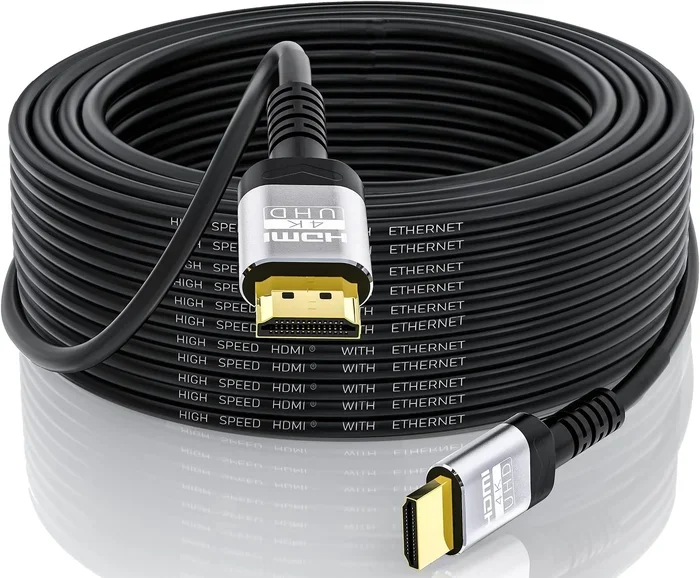
HDMI launched in 2003 and quickly became the standard for consumer electronics. You will find HDMI ports on TVs, Blu-ray players, game consoles, streaming sticks, and laptops. The connector comes in several sizes. The standard HDMI is the most common. Mini HDMI and Micro HDMI are smaller versions used on tablets and cameras.
HDMI supports high-definition video resolutions up to 4K and beyond, depending on the version. The latest HDMI 2.1 specification supports up to 10K resolution in theory. It also features enhanced audio return channel (eARC), which delivers high-quality audio to sound systems. For home entertainment, HDMI is hard to beat.
Understanding DisplayPort
DisplayPort arrived in 2006, designed primarily for computer displays. It was created by the Video Electronics Standards Association, or VESA. DisplayPort is most commonly found on desktop monitors, graphics cards, and high-end laptops. The connector has a distinctive rectangular shape with a slight notch on one side.
DisplayPort comes in two main sizes. The full-size DisplayPort and the smaller Mini DisplayPort. Apple popularized Mini DisplayPort in its MacBooks. DisplayPort also supports daisy-chaining, which lets you connect multiple monitors to a single port. This feature is a game-changer for productivity setups.
Key Differences Between HDMI and DisplayPort
Now that you know what each connector is, let us look at where they differ. These differences matter when you are choosing cables, buying monitors, or setting up a new workstation.
Bandwidth and Speed
Bandwidth is one of the biggest differences between the two connectors. It determines how much data can travel through the cable per second. Higher bandwidth means support for higher resolutions and refresh rates.
DisplayPort 2.0 offers a massive bandwidth of 77.37 Gbps. HDMI 2.1 maxes out at 48 Gbps. For most users, this gap does not matter every day. But for professionals working with 4K resolution at 144Hz or 8K displays, the extra bandwidth of DisplayPort makes a real difference.
Resolution and Refresh Rate Support
Both connectors support a wide range of resolutions and refresh rates. But DisplayPort tends to push the limits further at the high end. Here is a quick comparison of what each version supports:
- HDMI 2.0: 4K at 60Hz
- HDMI 2.1: 4K at 120Hz, 8K at 60Hz
- DisplayPort 1.4: 4K at 120Hz, 8K at 60Hz
- DisplayPort 2.0: Up to 16K at 60Hz
For a gaming monitor, DisplayPort often provides better performance at the highest settings. This is especially true for monitors with high refresh rates like 144Hz or 240Hz.
Audio and Video Transmission
Both HDMI and DisplayPort transmit audio and video together. But HDMI has a slight edge in consumer audio features. HDMI supports ARC and eARC, which let you send audio from your TV back to a soundbar or receiver. DisplayPort does not support these features.
For pure video quality, both connectors perform excellently. They both use digital signals, which means no quality loss from analog conversion. Signal quality remains strong with either cable type as long as you use a good-quality cable.
Connector Design and Compatibility
The physical shape of the connectors is different. HDMI has a flat, trapezoidal plug. DisplayPort has a rectangular plug with a clip that locks into place. The locking clip on DisplayPort helps prevent accidental disconnections, which is handy on a busy desk.
Port compatibility is another consideration. HDMI is everywhere. Your TV, game console, soundbar, and probably your streaming device all use HDMI. DisplayPort is more common on computer monitors and graphics cards. If you are connecting a PC to a TV, HDMI is usually the easier choice.
HDMI vs DisplayPort for Gaming
Gamers care about three things: resolution, refresh rate, and response time. DisplayPort has long been the favorite connector for PC gaming. Here is why.
First, DisplayPort supports adaptive sync technologies like FreeSync and G-Sync natively. These technologies reduce screen tearing and stuttering. HDMI also supports FreeSync and G-Sync now, but DisplayPort was the first to offer them.
Second, DisplayPort’s higher bandwidth headroom makes it better for ultrawide monitors. If you have a 3440×1440 ultrawide display running at high refresh rates, DisplayPort handles it more smoothly.
Third, DisplayPort allows daisy-chaining multiple monitors from one port. This means fewer cables cluttering your desk. For competitive gamers who run multiple screens for streaming and gameplay, this is a huge advantage.
That said, HDMI 2.1 has closed the gap significantly. Next-gen consoles like the PlayStation 5 and Xbox Series X use HDMI 2.1. If you are a console gamer, HDMI is the way to go. For PC gamers with high-end graphics cards, DisplayPort still holds a slight edge.
When setting up your gaming rig, consider the full ecosystem. If you are looking for the best audio to go with your display, check out the best gaming headsets available for your platform. A great headset complements your visual setup perfectly.
Which One Should You Choose?
The right choice depends on what devices you are connecting and what you plan to do with them. Here are some simple guidelines to follow.
Choose HDMI when:
- You are connecting a device to a TV or home theater system
- You want ARC or eARC audio features
- Your devices only have HDMI ports
- You are setting up a console gaming setup
- You want a cable that works across many different devices
Choose DisplayPort when:
- You are connecting a PC to a computer monitor
- You need high refresh rates for competitive gaming
- You want to daisy-chain multiple monitors
- You are using an ultrawide display
- You need the highest possible bandwidth for 4K or 8K
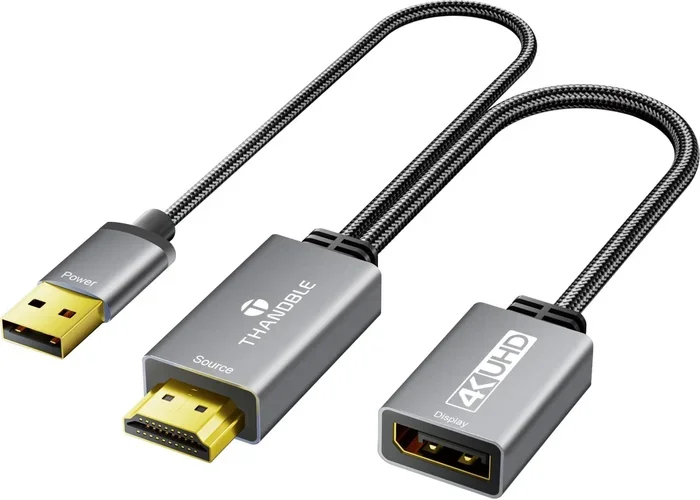
If you are unsure, check the ports on your devices first. Most modern laptops and desktops have both options. You can also use an adapter to convert between the two. Just remember that using an adapter may limit some features, like the highest refresh rates or adaptive sync support.
Common Mistakes People Make
Even tech-savvy people make mistakes when choosing between HDMI and DisplayPort. Here are the most common ones to avoid.
Assuming all HDMI cables are the same. HDMI comes in different versions. An older HDMI 1.4 cable cannot handle 4K at 120Hz, even if your devices support it. Always check the cable specification before buying.
Ignoring the version numbers. Both HDMI and DisplayPort have multiple versions. The version number tells you the maximum bandwidth and features supported. Using an older version cable with a newer device means you will not get the full performance.
Buying expensive cables you do not need. For most setups, a standard high-speed HDMI cable or a basic DisplayPort 1.4 cable works perfectly. Premium cables with fancy branding do not offer better performance for typical use.
Forgetting about adapter quality. If you need to convert between HDMI and DisplayPort, the quality of the adapter matters. Cheap adapters can cause signal loss, flickering, or reduced resolution. Invest in a reliable adapter from a trusted brand.
Overlooking cable length. Longer cables can degrade signal quality, especially at higher resolutions. Keep your cables as short as possible for the best performance. If you need a long run, consider an active cable or a signal booster.
Expert Insights on Display Connectivity
We asked display technology experts about the future of HDMI and DisplayPort. Here is what they shared.
HDMI is evolving too. HDMI 2.1 brought big improvements, including variable refresh rate and enhanced audio formats. The HDMI Forum continues to update the standard. For the average consumer, HDMI will remain the most versatile and widely supported option for years to come.
DisplayPort is pushing boundaries. DisplayPort 2.0 and 2.1 represent massive leaps in bandwidth. These versions enable resolutions and refresh rates that were impossible before. For professionals in video editing, 3D rendering, and high-end gaming, DisplayPort is the clear winner.
USB-C and Thunderbolt are changing the game. Many modern laptops now use USB-C or Thunderbolt ports that support DisplayPort Alt Mode. This means a single USB-C cable can carry video signals to a monitor. It is another reason to check your device’s port options before buying a cable.
When choosing a laptop for your setup, consider the available ports carefully. If you are in the market for a new machine, check out the best laptop brands that offer strong connectivity options including both HDMI and DisplayPort outputs.
Final Thoughts
HDMI and DisplayPort are not the same, and that is a good thing. Each connector has its strengths and ideal use cases. HDMI dominates the living room and consumer electronics world. DisplayPort rules the desktop and gaming monitor space. Understanding these differences empowers you to make smarter buying decisions.
Next time you need a new cable or set up a display, take a moment to check which port you have and what it can do. The right choice means better picture quality, smoother performance, and fewer headaches. Whether you are a casual viewer, a serious gamer, or a creative professional, there is a connector that fits your needs perfectly.
Start by identifying what you need most. Is it home theater simplicity? Gaming performance? Multi-monitor productivity? Once you know that, choosing between HDMI and DisplayPort becomes easy.
Frequently Asked Questions
Can I use an HDMI cable with a DisplayPort monitor?
Not directly. The connectors are physically different. However, you can use an active adapter or converter to bridge the two. Keep in mind that using an adapter may limit features like the highest refresh rates or adaptive sync support.
Is DisplayPort better than HDMI for 4K gaming?
Generally, yes. DisplayPort offers higher bandwidth, which supports smoother performance at 4K high refresh rates. For competitive gaming on a 4K monitor, DisplayPort is the preferred choice for most setups.
Can I run two monitors from one DisplayPort?
Yes. DisplayPort supports a feature called daisy-chaining, also known as Multi-Stream Transport. This lets you connect multiple monitors in a chain from a single port, reducing cable clutter on your desk.
Do all HDMI cables support 4K?
No. Only HDMI High Speed cables and newer versions support 4K. An older Standard HDMI cable will not carry a 4K signal. Always check the cable’s rated version before purchasing.
Does DisplayPort carry audio?
Yes. DisplayPort carries both audio and video signals over the same cable, just like HDMI. You can send sound to your monitor or an external audio system through a single DisplayPort connection.
Which version of HDMI should I buy?
For most users, HDMI 2.1 is the best choice. It supports 4K at 120Hz and 8K at 60Hz. If your devices only have HDMI 2.0 ports, an HDMI 2.1 cable will still work but will be limited to the older version’s capabilities.
=== CONCLUSION ===
HDMI and DisplayPort each serve important roles in the world of digital connectivity. They are not interchangeable, but they complement each other well. HDMI is the universal choice for home entertainment and consumer devices. DisplayPort is the power user’s pick for PC monitors and high-performance gaming. By understanding their differences, you can build a setup that delivers the best possible experience. Pick the right cable, enjoy your display, and never worry about signal quality again.