Is There Such a Thing as Usb Headphones

Yes, USB headphones are a real and popular category of audio accessories that connect directly to computers and laptops through a USB port. Unlike traditional headphones that rely on a 3.5mm jack, USB headphones have a built-in digital-to-analog converter, making them easy to use with no extra adapters needed.
You have probably seen a pair of headphones with a USB plug and wondered, “Is there such a thing as USB headphones?” The short answer is yes. USB headphones are a real and widely used category of audio gear. They connect directly to your computer, laptop, or gaming console through a USB port. No need for a separate adapter or a 3.5mm jack. If you have ever struggled with a broken headphone jack on your laptop, you already know how frustrating it can be. USB headphones solve that problem entirely.
In this guide, we will cover everything you need to know about USB headphones. We will explain how they work, the different types available, their benefits, and how to choose the right pair. Whether you are a gamer, a remote worker, or just someone who enjoys music, this article will help you understand why USB headphones have become so popular.
Key Takeaways
- USB headphones are a real product category: They connect directly to devices through USB ports and are widely available.
- USB headphones offer plug-and-play convenience: Most models work immediately without installing extra software or drivers.
- USB headphones often deliver better audio quality: The built-in digital-to-analog converter produces cleaner sound than a standard 3.5mm jack.
- USB headphones come in many styles: From gaming headsets to wireless options, there is a USB headphone for every use case.
- USB headphones work with multiple devices: Laptops, desktops, gaming consoles, and even some tablets support USB audio.
- USB headphones are easy to troubleshoot: Connection issues are usually simple to fix with basic steps.
📑 Table of Contents
What Are USB Headphones?
USB headphones are headphones that connect to your device using a USB cable or USB port. Instead of relying on an analog audio signal through a 3.5mm jack, they receive a digital signal directly. This means the headphones have a small built-in sound card inside them. That sound card converts the digital audio into analog sound that your ears can hear.
This is a big deal because it changes how audio travels from your device to your ears. Traditional headphones depend on your computer’s built-in sound card. If that sound card is low quality, your audio will sound flat or noisy. USB headphones bypass that limitation. They handle the audio conversion themselves, which often results in better audio quality right out of the box.
How Are They Different from Regular Headphones?
The main difference comes down to the connection. A regular pair of wired headphones uses a 3.5mm audio plug. You plug that into your phone, laptop, or tablet. The device’s internal sound card processes the audio signal. Then it sends that signal to the headphones as an analog wave.
USB headphones skip that middle step. The digital audio travels through the USB cable directly to the headphones. The headphones’ own built-in digital-to-analog converter (DAC) does the work. This gives you more control over the sound quality. It also means the audio is less likely to pick up interference from other electronic components inside your device.
How Do USB Headphones Work?
Understanding how USB headphones work is simpler than it sounds. When you plug a USB headphone into your computer, the device recognizes it as an audio output device. This is called a plug-and-play connection. Most modern operating systems, including Windows, macOS, and Linux, support USB audio devices natively. You do not need to download special software in most cases.
Here is what happens step by step when you play audio through USB headphones:
- Step 1: Your computer sends a digital audio signal through the USB cable.
- Step 2: The headphone’s built-in DAC receives the digital signal.
- Step 3: The DAC converts the digital signal into an analog audio wave.
- Step 4: The analog signal travels to the headphone drivers.
- Step 5: The drivers vibrate to produce sound waves that reach your ears.
That built-in DAC is the key component. It is essentially a tiny sound card inside the headphones. Some higher-end USB headphones have premium DACs that deliver studio-quality audio. This is one reason why audiophiles and professional musicians sometimes prefer USB audio gear.
The Role of the USB Audio Class
USB audio devices follow a standard called the USB Audio Class. This standard ensures that audio devices can communicate with computers without needing custom drivers. Almost all USB headphones use this standard, which is why they work so easily across different devices and operating systems. If you ever plug in a pair of USB headphones and they do not work right away, the issue is usually a simple settings fix, not a driver problem.
Types of USB Headphones Available
USB headphones come in many shapes and sizes. Different types serve different needs. Here are the most common categories you will find on the market today.
USB Gaming Headsets
Gaming headsets with USB connections are extremely popular. They often come with surround sound features, built-in microphones, and adjustable EQ settings. The USB connection ensures that the audio processing does not put extra strain on your computer. If you are a gamer, a USB gaming headset can give you a competitive edge with clear directional audio.
USB Headsets for Remote Work
With the rise of remote work, USB headsets for video calls have become essential. These headsets combine a microphone and headphones in one unit. The USB connection makes them easy to use with platforms like Zoom, Microsoft Teams, and Google Meet. You plug them in, and they are ready to go. No fiddling with audio settings for most setups.
USB Over-Ear Headphones
For music lovers who want high-quality audio, USB over-ear headphones are a great choice. These are full-size headphones that cover your ears completely. They often have larger drivers for richer bass and more detailed sound. Many music producers use USB headphones for mixing and listening because of their consistent audio output.
USB Earbuds
USB earbuds are a compact option for people who want portability. These are smaller than full headphones but still offer the benefits of USB audio. They are great for laptop users who need a lightweight audio solution. Some models even double as USB-C headphones, which work with newer laptops and phones that have dropped the 3.5mm jack.
Benefits of USB Headphones
USB headphones offer several advantages over traditional wired headphones. Here is why many people choose them.
- Plug and Play: Most USB headphones work the moment you plug them in. No need to install drivers or configure settings.
- Better Audio Quality: The built-in DAC delivers cleaner, more consistent sound than relying on your device’s internal sound card.
- No 3.5mm Jack Needed: Many modern laptops and tablets no longer include a headphone jack. USB headphones solve this problem.
- Reduced Interference: Digital audio signals are less prone to electromagnetic interference than analog signals through a 3.5mm cable.
- Built-In Microphone: Many USB headphones come with a microphone, making them ideal for calls and gaming.
- Easy Volume Control: USB headphones often have volume controls built into the cable or on the ear cup.
One of the biggest benefits is compatibility. USB headphones work with almost any device that has a USB port. This includes desktops, laptops, gaming consoles like the PlayStation and Xbox, and even some smart TVs. You do not need to carry extra adapters or cables. Just plug and play.
USB Headphones vs. Traditional 3.5mm Headphones
It is helpful to compare USB headphones with traditional 3.5mm headphones so you can make an informed choice. Here is a side-by-side look at the key differences.
| Feature | USB Headphones | 3.5mm Headphones |
|---|---|---|
| Connection Type | USB plug | 3.5mm audio jack |
| Audio Processing | Built-in DAC | Device sound card |
| Setup | Plug and play | Plug and play |
| Audio Quality | Consistent, less interference | Depends on device sound card |
| Compatibility | Any device with USB port | Any device with 3.5mm jack |
| Portability | Slightly less portable | Very portable |
| Price Range | Budget to premium | Budget to premium |
Neither option is objectively better. It depends on your needs. If you use a laptop without a headphone jack, USB headphones are the clear winner. If you prefer a simple setup and do not want to deal with USB cables, traditional headphones still work great.
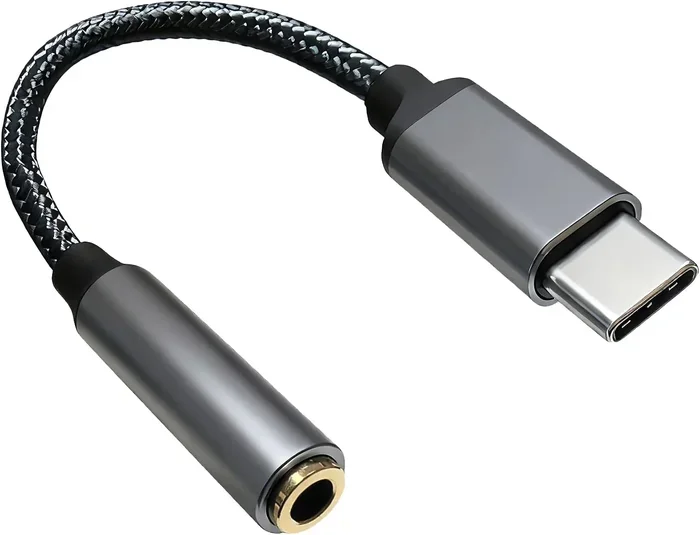
Some people also use a USB adapter to convert a 3.5mm headphone jack to USB. This gives you the benefits of USB audio without buying new headphones. However, a dedicated pair of USB headphones usually delivers better results than a cheap adapter.
How to Choose the Right USB Headphones
With so many options available, choosing the right pair of USB headphones can feel overwhelming. Here are some tips to help you make the best choice.
Consider Your Use Case
Think about what you will use the headphones for most often. If you are a gamer, look for a USB gaming headset with surround sound and a good microphone. If you work from home, prioritize comfort and call quality. If you just want to listen to music, focus on audio quality and driver size.
Check the Connection Type
USB headphones come with different connection types. USB-A is the standard rectangular plug that fits most desktop computers and older laptops. USB-C is the newer, smaller plug found on most modern laptops and smartphones. Make sure the USB headphones you buy match your device’s port type. If your device only has USB-C, look for a pair that supports USB-C or buy a USB-C to USB-A adapter.
Read Reviews and Test Audio Quality
Audio quality is subjective. What sounds great to one person might not impress another. Before buying, read reviews from other users. Look for feedback on bass response, clarity, and comfort. If possible, try the headphones in a store before purchasing. The best USB headphones are the ones that sound great to your ears and feel comfortable during long sessions.
Look for a Good Warranty
Like any tech accessory, headphones can break or wear out over time. Choose a brand that offers a solid warranty. Many quality USB headphones come with at least a one-year warranty. Some premium brands offer two or even three-year coverage. A good warranty gives you peace of mind and protects your investment.
Think About Wireless Options
While this article focuses on wired USB headphones, wireless USB headphones are also worth mentioning. Some wireless headsets use a USB dongle to connect to your device. This gives you the freedom of wireless audio without the hassle of Bluetooth pairing. If you want the best of both worlds, look for a wireless headset with a USB receiver.
Common Issues with USB Headphones and How to Fix Them
USB headphones are generally reliable, but you may run into occasional issues. Here are the most common problems and simple fixes.
- No Sound: Check that the headphones are selected as the default audio output device in your sound settings. Also try unplugging and replugging the USB cable.
- Low Volume: Adjust the volume both on your device and on the headphone volume control if it has one. Some USB headphones have a volume dial on the cable.
- Microphone Not Working: Make sure the microphone is enabled in your device’s privacy and audio settings. Some systems have separate settings for input and output devices.
- Audio Cutting Out: Try a different USB port. USB hubs can sometimes cause connection issues. Plugging directly into the computer’s port often fixes this.
- Driver Issues: Although rare, some USB headphones may need a driver update. Visit the manufacturer’s website to download the latest drivers if needed.
Most issues with USB headphones are easy to resolve. Start with the simplest fixes first, like checking connections and settings. If the problem persists, consult the manufacturer’s support page for detailed troubleshooting steps.
Frequently Asked Questions
Are USB headphones better than Bluetooth headphones?
It depends on what you value more. USB headphones offer a stable, wired connection with consistent audio quality. Bluetooth headphones give you wireless freedom. For gaming and professional work, USB headphones are often preferred because of their lower latency and reliable connection. For everyday listening on the go, Bluetooth headphones are more convenient.
Do USB headphones need drivers?
Most USB headphones do not need drivers. They use the USB Audio Class standard, which is supported by all major operating systems. You can plug them in and start using them right away. However, some gaming headsets with advanced features may include software that enhances the audio experience, but it is usually optional.
Can I use USB headphones with a smartphone?
Some smartphones support USB audio, especially Android devices. However, many phones do not have the software support for USB headphones. If your phone has a USB-C port, you can try a pair of USB-C headphones. Just keep in mind that compatibility varies by phone model. Always check the manufacturer’s specifications before buying.
Why do gamers prefer USB headphones?
Gamers prefer USB headphones because they provide consistent audio quality without relying on the computer’s internal sound card. The built-in DAC in USB headphones processes audio more reliably. Many gaming headsets also come with surround sound features and detachable microphones. These features give gamers a competitive advantage in multiplayer games.
Can I use USB headphones for music production?
Yes, many music producers use USB headphones for mixing and mastering. The built-in DAC provides a clean, accurate audio signal. However, professional studio work often requires dedicated audio interfaces for even higher quality. For casual music production and listening, USB headphones are more than sufficient.
How long do USB headphones last?
The lifespan of USB headphones depends on the build quality and how well you take care of them. A good pair can last anywhere from two to five years with regular use. Look for headphones with durable cables and replaceable parts. Proper storage, like coiling the cable loosely and keeping them in a case, can significantly extend their life.
Final Thoughts
USB headphones are absolutely a real thing, and they are one of the most convenient audio accessories you can own. They offer plug-and-play simplicity, reliable audio quality, and compatibility with almost any device that has a USB port. Whether you are gaming, working from home, or just enjoying your favorite music, a good pair of USB headphones can make a noticeable difference in your daily experience.
The best part is that you do not need to spend a fortune to get great sound. Budget-friendly options deliver solid performance, while premium models offer studio-quality audio for those who demand the best. With so many styles and price points available, there is a perfect pair of USB headphones for everyone. So the next time someone asks you, “Is there such a thing as USB headphones?” you can confidently say yes and share everything you have learned here.
If you are in the market for a new pair, consider checking out our guide on the best USB Type C headphones available right now. It is a great starting point for finding a pair that fits your needs and budget perfectly.