Are Usb Sticks Being Phased Out

Are USB sticks being phased out? The short answer is yes — slowly but surely. Cloud storage, wireless drives, and external SSDs are taking over. Still, USB flash drives aren’t dead yet. This guide breaks down why they’re declining, what’s replacing them, and whether you should still use one.
Let’s face it. The little USB flash drive sitting in your drawer has seen better days. For years, these tiny devices were the go-to way to move files between computers. But now, things are changing fast. So, are USB sticks being phased out? The answer is more interesting than you might think.
Technology moves quickly. What was cutting-edge five years ago feels outdated today. USB sticks once ruled portable storage. Now, cloud services, wireless drives, and external SSDs are stealing the spotlight. But that doesn’t mean the humble flash drive is gone forever. Let’s dig into why this shift is happening and what it means for you.
Key Takeaways
- USB sticks are declining: Cloud storage and wireless alternatives are reducing their relevance.
- External SSDs are the main replacement: Faster speeds and larger capacities make them a better choice.
- USB-C is changing the game: Newer ports are phasing out traditional USB-A connections.
- USB sticks still have niche uses: They remain handy for quick file transfers and bootable drives.
- Security concerns are growing: Lost or stolen USB sticks pose data risks that cloud storage avoids.
- Businesses are moving away: Companies prefer cloud solutions and network-based file sharing.
📑 Table of Contents
Why USB Sticks Are Losing Popularity
The rise of cloud storage hit USB sticks hard. Services like Google Drive, Dropbox, and OneDrive let you access files from any device with internet. No cables. No tiny drives to lose. Just open a browser and your files are there.
Cloud Storage Changed Everything
Before the cloud, you needed a physical device to carry files around. USB sticks filled that role perfectly. But cloud storage removed the need for physical media entirely. You can share a link instead of handing someone a drive. You can access your files from your phone, laptop, or tablet seamlessly.
Here are the main reasons cloud storage won over USB sticks:
- Accessibility: Files are available from anywhere with internet.
- No physical loss: You can’t misplace a cloud file the way you lose a USB stick.
- Easy sharing: Sending a link is faster than handing over a drive.
- Automatic backups: Cloud services sync your files automatically.
- Scalable storage: You can upgrade storage plans as needed.
The Capacity Problem
USB sticks also struggle with capacity. Most flash drives max out around 256GB or 512GB. That sounds like a lot until you need to transfer large video files or backup an entire hard drive. External SSDs now offer 1TB, 2TB, and even 4TB of storage in a compact form factor.
For example, the Sandisk Extreme Portable 2TB External USB C NVMe SSD delivers blazing fast speeds and massive storage in a pocket-sized device. It’s a direct upgrade from any traditional USB stick.
What’s Replacing USB Sticks
Several technologies are stepping in to fill the gap left by USB flash drives. Each has its strengths, and some are already becoming the new standard.
External SSDs
Solid state drives are the most direct replacement for USB sticks. They use the same flash memory technology but connect through faster interfaces. Most modern external SSDs use USB-C and the NVMe protocol, which delivers speeds that USB sticks simply can’t match.
If you need a portable drive that’s faster and more reliable than a USB stick, an M 2 NVMe SSD to USB 3.1 adapter lets you turn an internal NVMe drive into a high-speed external solution. These setups offer read speeds over 1,000 MB/s — way faster than any flash drive.
Wireless Portable Drives
Wireless hard drives let you stream and transfer files without cables. They create their own Wi-Fi hotspot, so multiple devices can connect at once. These are great for traveling or sharing files in a group setting.
However, wireless drives tend to be bulkier and more expensive than USB sticks. They also need battery charging. So they’re not a perfect replacement for every situation.
Network Attached Storage
For home and office use, NAS devices offer centralized file storage accessible by every device on your network. You don’t need to carry anything around. Just upload your files and access them from any connected device.
NAS systems are ideal for families or small teams who share files regularly. They’re more of a permanent solution compared to the portable nature of USB sticks.
The Rise of USB-C and New Connector Standards
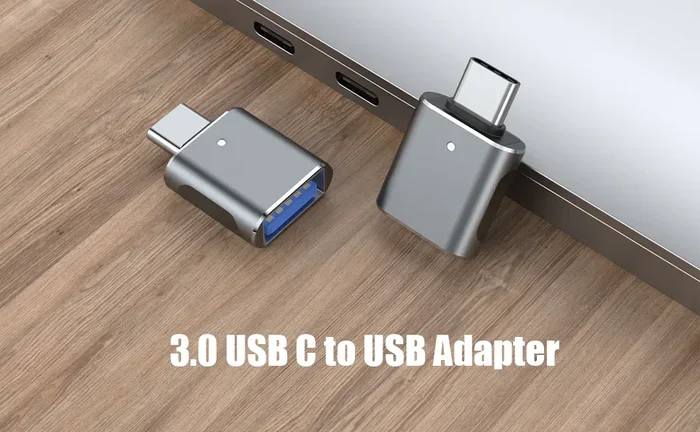
One major reason USB sticks are being phased out is the shift in connector types. Most newer laptops, tablets, and phones now use USB-C ports. Traditional USB-A ports — the rectangular ones most USB sticks use — are disappearing from new devices.
This creates a compatibility problem for USB stick users. You need dongles or adapters to plug a standard USB stick into a USB-C-only device. That’s inconvenient and adds bulk.
On the other hand, M 2 NVMe SSD enclosure adapter USB 3.1 enclosures solve this problem. They use USB-C connectors natively and offer much better performance. The transition to USB-C is pushing users toward better storage solutions overall.
USB4 and Thunderbolt 4
The latest USB4 and Thunderbolt 4 standards bring even faster data transfer speeds. These protocols support external NVMe drives that dramatically outperform USB flash drives. As more devices adopt these standards, the old USB stick becomes more obsolete.
Using an NVMe SSD to USB adapter with these new protocols gives you speeds that make USB sticks look slow by comparison. We’re talking about transfer rates that can move a 4K video file in seconds instead of minutes.
Are USB Sticks Completely Dead?
Not yet. USB sticks still serve specific purposes where other solutions fall short. Let’s look at the situations where they still make sense.
Bootable Drives and IT Tasks
IT professionals still rely on USB sticks for creating bootable drives. Installing operating systems, running diagnostics, and recovering systems often require a USB flash drive. This use case isn’t going away anytime soon.
Quick File Transfers
Sometimes you just need to move a few files between two computers quickly. No internet required. No setup needed. A USB stick works in seconds for this kind of simple task. It’s the most straightforward solution when you don’t want to deal with cloud accounts or cables.
Offline File Sharing
In environments without reliable internet, USB sticks remain essential. Schools, remote locations, and field work settings often lack consistent connectivity. A flash drive is the most practical way to share files in these situations.
Promotional and Branding Items
Companies still use custom USB sticks as promotional items at trade shows and events. They’re cheap to produce and useful for recipients. This market keeps USB sticks in production, even as their everyday use declines.
Security Concerns with USB Sticks
Security is another reason businesses are moving away from USB sticks. These small devices are easy to lose, and lost drives can expose sensitive data. A single lost USB stick could lead to a major data breach for an organization.
Many companies now block USB ports on employee computers entirely. This prevents unauthorized data transfers and protects against malware spread through infected drives. Cloud storage and secure network solutions offer better control and encryption.
Using an encrypted external SSD with a password provides better security than most USB sticks. Some models even include hardware encryption built into the drive controller. This level of protection is nearly impossible to find in affordable flash drives.
When Should You Still Use a USB Stick?
Despite all the alternatives, there are still times when a USB flash drive is the right choice. Here’s when to stick with one:
- Quick, small file transfers: Moving a few documents between devices.
- No internet access: Offline situations where cloud storage isn’t an option.
- Bootable system drives: OS installations and system recovery.
- Temporary file storage: When you need a drive for a short-term project.
- Budget constraints: USB sticks are still the cheapest option for small storage needs.
For anything beyond these use cases, an external SSD or cloud storage is a better investment. The performance and reliability improvements are worth the extra cost.
The Future of Portable Storage
So what does the future hold? Portable storage is heading toward faster, wireless, and more integrated solutions. Cloud storage will continue to grow. Wireless drives will get smaller and more affordable. And external SSDs will keep getting faster with each new generation of flash technology.
The traditional USB stick will likely follow the same path as other outdated tech. It won’t disappear overnight. But its role will shrink to niche applications. Within the next decade, most people may never need to buy a USB flash drive again.
For now, the market still supports USB sticks, but the writing is on the wall. If you’re shopping for portable storage today, consider an external NVMe SSD instead. You’ll get better performance, more capacity, and a longer useful lifespan.
Even adapters like an M 2 NVMe SSD to USB 3.1 adapter or a M 2 NVMe SSD enclosure adapter USB 3.1 make it easy to build a custom high-speed portable drive that blows any USB stick out of the water.
Final Thoughts
Are USB sticks being phased out? Yes, gradually but steadily. Cloud storage, wireless solutions, and fast external SSDs are replacing them in most use cases. USB sticks still work for quick transfers, bootable drives, and offline file sharing. But for everyday portable storage, better options exist.
The shift isn’t about USB sticks being bad. It’s about technology advancing. What served us well for years is now being outclassed by faster, more convenient alternatives. The best choice today depends on your needs. But if you’re buying a new portable drive, it’s worth looking beyond the traditional flash drive.
Embrace the change. Explore the modern alternatives. And keep that old USB stick in a drawer — just in case it still comes in handy for something.
Frequently Asked Questions
Do USB sticks still have a future?
USB sticks still have a niche future. They work well for bootable drives, quick file transfers, and offline sharing. But their role in everyday storage is shrinking fast as better alternatives emerge.
What is the best replacement for a USB stick?
An external SSD is the best replacement for most users. It offers faster speeds, more storage, and better reliability. The Sandisk Extreme Portable SSD is a popular choice that connects via USB-C for modern compatibility.
Can you still buy USB sticks easily?
Yes, USB sticks are still widely available and affordable. You can find them at most electronics stores and online retailers. However, the market is shrinking as demand shifts toward external SSDs and cloud storage.
Why are USB sticks slower than external SSDs?
USB sticks use older USB protocols and cheaper flash memory. External SSDs use NVMe technology and USB-C connections that deliver much faster data transfer speeds. This makes SSDs far more efficient for large file transfers.
Are USB sticks secure for sensitive data?
Most USB sticks lack encryption and password protection. This makes them risky for sensitive data. External SSDs with hardware encryption or cloud storage with end-to-end encryption are much safer options for protecting your files.
Will USB-A ports disappear from computers?
Many new laptops and tablets are dropping USB-A ports in favor of USB-C. While USB-A hasn’t disappeared completely yet, its presence is declining. This shift is one of the main reasons traditional USB sticks are becoming less practical.