Automotive Dealership Live Security Camera Surveillance

Automotive dealership live security camera surveillance gives you real‑time eyes on every corner of your business, from the showroom floor to the service bay. By choosing the right cameras, placement, and monitoring tools, you can deter theft, improve safety, and boost customer confidence—all while keeping costs under control.
Key Takeaways
- Live monitoring matters: Real‑time video lets you react instantly to incidents before they become losses.
- Strategic placement saves money: Cover high‑risk zones first—sales floor, inventory, and parking lot—to maximize ROI.
- Scalable systems grow with your dealership: Start with a few cameras and expand to a 16‑channel or larger network as needed.
- Integration is key: Pair cameras with alarm systems, access control, and cloud storage for a complete security solution.
- Compliance and privacy: Follow local regulations and post signage to keep customers and employees comfortable.
- Maintenance prevents blind spots: Regular cleaning, firmware updates, and lens checks keep your feed crystal clear.
- Choose the right partner: A professional installer familiar with commercial projects, like those featured in Commercial Security Camera Installation Latexo, ensures a smooth rollout.
📑 Table of Contents
- Why Live Surveillance Is a Game‑Changer for Dealerships
- Core Components of an Effective Live Surveillance System
- Planning Your Camera Layout
- Integrating Live Surveillance With Other Security Measures
- Cost‑Effective Strategies for Dealerships
- Legal and Privacy Considerations
- Choosing the Right Installation Partner
- Practical Tips for Ongoing Success
- Conclusion
Why Live Surveillance Is a Game‑Changer for Dealerships
Imagine walking into a busy showroom and seeing every aisle, every vehicle, and every customer on a single screen. That’s the power of automotive dealership live security camera surveillance. Unlike traditional “store‑after‑the‑fact” recordings, live video gives you the ability to see what’s happening right now and act in seconds.
Dealerships face a unique mix of risks: high‑value inventory, large public areas, service bays with expensive tools, and a rotating staff of salespeople and technicians. A single blind spot can become a costly theft or a safety incident. Live surveillance reduces those blind spots, deters potential thieves, and provides undeniable evidence if something does go wrong.
Core Components of an Effective Live Surveillance System
1. Cameras – Types and Features
Choosing the right camera starts with understanding the environment:
Visual guide about Automotive Dealership Live Security Camera Surveillance
Image source: static.vecteezy.com
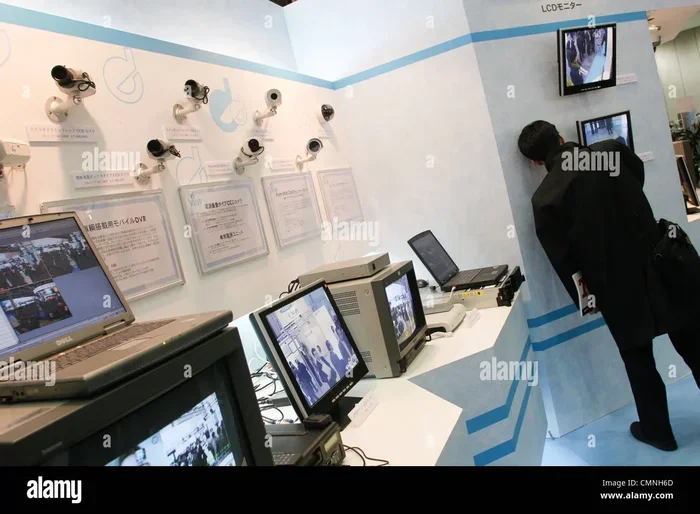
- IP dome cameras: Ideal for indoor showrooms and offices. They blend in with décor and offer high‑resolution 4K streams.
- Bullet cameras: Perfect for outdoor lots and service bays where weather resistance (IP66/67) is a must.
- PTZ (Pan‑Tilt‑Zoom) cameras: Provide flexible coverage of large parking areas; you can zoom in on a suspicious vehicle with a click.
- Thermal cameras: Detect heat signatures at night, useful for low‑light parking lots.
2. Recording & Storage
Live video needs a reliable back‑end. Most dealerships opt for Network Video Recorders (NVRs) that store footage on high‑capacity HDDs or SSDs. Cloud storage is also popular because it protects data from on‑site damage and allows remote access from any device.
3. Monitoring Software
Modern surveillance platforms let you view multiple feeds on a single dashboard, set motion alerts, and even use AI to flag unusual behavior (e.g., a person loitering near new inventory). Mobile apps let managers check the lot from a coffee break.
4. Network Infrastructure
A stable Ethernet or PoE (Power over Ethernet) network is the backbone. Ensure you have enough bandwidth for 4K streams—typically 5‑10 Mbps per camera. A dedicated VLAN for security cameras keeps traffic separate from guest Wi‑Fi.
Planning Your Camera Layout
Step 1: Conduct a Risk Assessment
Walk the property and list high‑value assets and vulnerable zones. Common spots include:
Visual guide about Automotive Dealership Live Security Camera Surveillance
Image source: thumbs.dreamstime.com
- Showroom entrances and exits
- Vehicle display rows
- Service bays and parts storage
- Cash registers and office areas
- Parking lot entrances, exits, and blind corners
Step 2: Map Camera Coverage
Use a simple floor‑plan sketch. Place cameras to avoid overlapping blind spots but ensure some overlap for redundancy. For example, a PTZ camera at the lot entrance can cover the entire drive‑through while a fixed bullet camera watches the far‑end of the lot.
Step 3: Choose the Right Lens
Wide‑angle lenses (2.8 mm‑4 mm) work well for open spaces. For detailed identification of license plates, a narrower 12 mm lens with infrared illumination is best.
Step 4: Plan Power and Cabling
PoE switches simplify installation—one cable supplies both power and data. If you have an older building, consider fiber‑optic runs to maintain speed over long distances.
Integrating Live Surveillance With Other Security Measures
Alarm Systems & Access Control
When a motion sensor triggers an alarm, your NVR can automatically switch the relevant camera to “alert mode,” highlighting the incident in real time. Pairing cameras with badge readers lets you see exactly who entered a restricted area.
Visual guide about Automotive Dealership Live Security Camera Surveillance
Image source: s1.milffox.com
Video Analytics & AI
Modern AI can count people, detect abandoned objects, and even recognize repeat offenders. Set up alerts for events like “vehicle parked for more than 30 minutes in a no‑parking zone.”
Cloud and Local Backup
Store the last 30 days locally for quick retrieval, and push critical clips to the cloud for long‑term archiving. This dual approach protects you from both hardware failure and ransomware.
Cost‑Effective Strategies for Dealerships
Start Small, Scale Up
Begin with a handful of critical cameras—perhaps two indoor dome cameras and one outdoor bullet camera. As budget allows, expand to a full 16 channel security camera system that can handle dozens of feeds.
Leverage Existing Infrastructure
If your dealership already has Wi‑Fi, add PoE injectors to use the same cabling for cameras. This reduces the need for new conduit work.
Consider Subscription Plans
Many providers bundle hardware, installation, and cloud storage into a monthly fee. This turns a large upfront cost into a predictable expense.
Legal and Privacy Considerations
Live surveillance must respect privacy laws. Post clear signage at entrances stating that video monitoring is in use. Avoid pointing cameras directly at restrooms or changing areas. In some states, you may need to inform employees about monitoring in workspaces.
Choosing the Right Installation Partner
Installations that involve multiple cameras, network switches, and integration with alarm systems are not DIY projects. Look for a company experienced with commercial projects—like those detailed in Commercial Security Camera Installation Latexo. A professional will handle permits, cable routing, and system testing, ensuring you get a reliable, warranty‑backed solution.
Practical Tips for Ongoing Success
Regular Maintenance Checks
Schedule quarterly inspections: clean lenses, verify power, and test motion alerts. Firmware updates often add security patches and new features.
Use Remote Viewing Wisely
Set up mobile alerts for motion in the lot after hours. This lets you call security or police before a theft escalates.
Train Staff
Teach sales and service employees how to report suspicious activity and how to access live feeds if needed. A well‑informed team is an extra layer of defense.
Review Footage Periodically
Even if no incident occurs, reviewing weekly footage can reveal patterns—like a customer repeatedly circling a particular vehicle—that may indicate a future risk.
Leverage Related Content
For ideas on securing outdoor areas, see our guide on Parking Lot Security Camera Footage. It offers tips on lighting, camera angles, and storage best practices that apply directly to dealership lots.
Conclusion
Automotive dealership live security camera surveillance isn’t just a fancy add‑on; it’s a vital tool that protects assets, enhances safety, and builds trust with customers. By selecting the right cameras, planning a thoughtful layout, integrating with alarm and analytics systems, and partnering with experienced installers, you create a robust security network that grows with your business. Start small, stay compliant, and keep the system maintained—your dealership will thank you with fewer losses and a smoother operation.
Frequently Asked Questions
How many cameras does a typical dealership need?
The number varies, but most midsize dealerships start with 8‑12 cameras covering the showroom, service bays, parts room, and parking lot. You can expand as the lot grows.
Can I watch the live feed on my phone?
Yes. Most modern NVRs offer mobile apps for iOS and Android, letting you view any camera in real time and receive push alerts.
What resolution is best for identifying license plates?
A 4K (3840 × 2160) camera with a narrow‑focus lens and infrared illumination provides the detail needed to read plates even at night.
Is cloud storage safe for my surveillance footage?
Cloud providers use encryption and redundant servers, making it very secure. It also protects footage from on‑site theft or damage.
Do I need to tell customers I’m recording?
Yes. Posting visible signs at entrances that state “Video surveillance in operation” satisfies most legal requirements and keeps customers informed.
How often should I replace camera hardware?
Quality IP cameras typically last 5‑7 years. Replace them when image quality degrades, firmware updates are no longer supported, or the warranty expires.