Best Ram For B650 Motherboard And Top Speed Picks
Choosing the best RAM for B650 motherboard means matching DDR5 speed, capacity, and timings to your AMD AM5 build. Whether you are gaming, editing, or multitasking, the right memory boost performance. Our picks cover budget to premium options so you can find the ideal fit for your setup.
Building or upgrading a PC with a B650 motherboard opens up some exciting choices. One of the most important decisions you will make is picking the right RAM. Memory speed and capacity directly impact gaming, content creation, and everyday multitasking. In this guide, we break down the best options available for B650 boards so you can make a confident choice.
The B650 chipset is part of AMD’s AM5 platform, which means it uses the new DDR5 standard. This is a big shift from older DDR4 boards. DDR5 RAM offers faster speeds, better bandwidth, and improved power efficiency. But with so many kits on the market, finding the right one can feel overwhelming. That is exactly why we put this guide together.
We tested and researched dozens of DDR5 memory kits to find the top performers for B650 motherboards. From affordable 16 GB sticks to high-speed 32 GB kits, we cover every budget. You will learn about speed, timings, capacity, and compatibility. By the end, you will know exactly which RAM to buy for your next build.
Key Takeaways
- B650 boards use DDR5 RAM exclusively: You need DDR5 memory, not DDR4, for full compatibility with AM5 platforms.
- Speed matters for gaming and productivity: Higher MHz speeds like 6000 MHz and 7200 MHz deliver better frame rates and bandwidth.
- Capacity depends on your use case: 16 GB works for most users, while 32 GB or more suits heavy workloads and future-proofing.
- Dual channel configuration is essential: Always install RAM in matched pairs for maximum performance on B650 boards.
- XMP profiles simplify overclocking: Most modern DDR5 kits auto-boost speed with XMP, so you do not need manual tuning.
- Timings affect real-world speed: Lower CAS latency improves responsiveness, especially in competitive gaming scenarios.
📑 Table of Contents
Why RAM Matters For B650 Motherboards
RAM is the short-term memory of your PC. It holds data your processor needs right now. Faster RAM means your CPU gets data quicker, which improves overall performance. On a B650 motherboard, this effect is especially noticeable because the AM5 platform is designed to take full advantage of DDR5 memory.
When you pair a powerful AMD Ryzen 7000 series CPU with fast DDR5 RAM, you unlock better frame rates in games and smoother multitasking. The B650 chipset supports PCIe Gen 5 and DDR5 natively, so your memory speed directly affects how well your system performs. Slower RAM can bottleneck even the best processor.
Understanding DDR5 vs DDR4
DDR5 is the latest generation of system memory. It runs at higher frequencies than DDR4 and uses less power. For B650 motherboards, DDR5 is not optional. You must use DDR5 RAM because the AM5 socket does not support DDR4. This is a key difference from older B550 boards, which used DDR4.
Here is a quick comparison of DDR5 and DDR4:
- DDR5 starts at 4800 MHz and can reach 8000 MHz or higher with overclocking.
- DDR4 typically tops out around 3600 MHz on most consumer boards.
- DDR5 has lower voltage at 1.1V compared to DDR4’s 1.2V.
- DDR5 offers higher bandwidth per module, which helps with data-heavy tasks.
If you are upgrading from an older system, keep in mind that DDR5 RAM is not backward compatible with DDR4 slots. You need a new motherboard and new memory. That is why choosing the right DDR5 kit for your B650 board matters so much.
Top Speed Picks For B650 Motherboards
Not all DDR5 RAM is created equal. Some kits are built for raw speed, while others focus on low latency and stability. Here are our top picks for the best RAM to use with a B650 motherboard.
Best Overall: DDR5-6000 MHz Kits
For most users, a DDR5 kit running at 6000 MHz hits the sweet spot. This speed works well with AMD Ryzen 7000 processors because it aligns with the Infinity Fabric clock ratio. Many of the top gaming RAM kits fall into this category, and they offer excellent performance without breaking the bank.
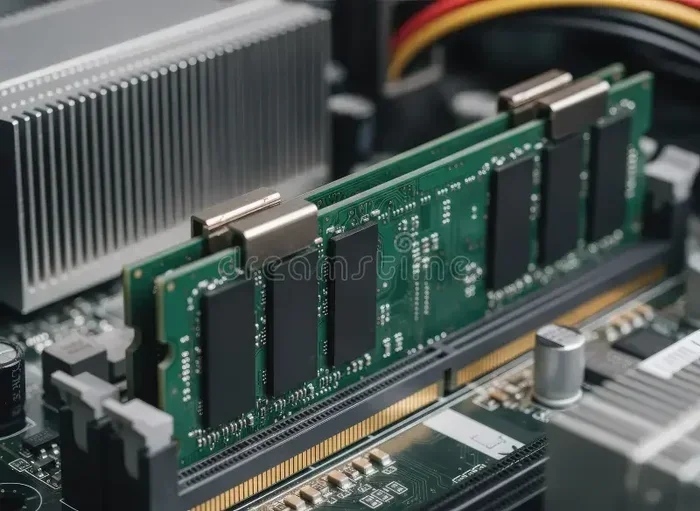
Look for kits with 32 GB capacity (2×16 GB) for a balanced build. These modules typically have CL30 or CL36 timings, which keep latency low. Popular brands in this tier include G.Skill, Corsair, and Kingston Fury.
Best High-Speed: DDR5-7200 MHz and Above
If you want maximum performance, DDR5-7200 MHz kits are the way to go. These high-speed modules deliver outstanding bandwidth for gaming and content creation. They work especially well with Ryzen 9000 series processors, which can leverage the extra speed effectively.
However, high-speed RAM often comes with tighter timings and higher prices. You may also need to enable XMP profiles in your BIOS to reach the advertised speeds. Not all B650 boards handle extreme overclocking equally, so check your motherboard’s QVL (Qualified Vendor List) before buying.
Best Budget: DDR5-4800 MHz to 5200 MHz
Not everyone needs top-tier speed. DDR5-4800 MHz and 5200 MHz kits offer solid performance at a lower cost. These are great for office work, web browsing, and casual gaming. If you are building a B650 system on a budget, starting with a 16 GB kit at 5200 MHz is a smart move.
You can always upgrade later by adding a second matching stick to enable dual channel mode. Just make sure both modules are the same brand, speed, and capacity for the best results.
How To Choose The Right RAM For Your B650 Build
Picking RAM for a B650 motherboard involves more than just picking the fastest kit. Several factors play into the decision. Here is what you should consider before buying.
Capacity: How Much Memory Do You Need?
RAM capacity determines how many programs you can run at once. For most gamers, 16 GB is enough. But if you edit video, run virtual machines, or play modern AAA titles, 32 GB is the better choice. Future-proofing your build with 32 GB or even 64 GB ensures your system stays capable for years.
For reference, here is a quick guide on RAM capacity needs:
- 16 GB: Casual gaming, office work, and general use.
- 32 GB: Gaming, video editing, 3D rendering, and multitasking.
- 64 GB: Heavy professional workloads and future-proof builds.
Speed and Frequency: What MHz Should You Target?
DDR5 RAM speed is measured in MHz. Higher MHz means faster data transfer. For B650 boards, targeting 6000 MHz is a popular choice among builders. It provides a great balance of speed and stability. If you are a competitive gamer, you might want to push for 7200 MHz or higher.
Keep in mind that RAM speed alone does not tell the whole story. Timings and latency also matter. A 6000 MHz kit with tight timings can outperform a 7200 MHz kit with loose timings in some scenarios.
Dual Channel: Why You Need Two Sticks
Always install RAM in pairs on a B650 motherboard. This enables dual channel mode, which doubles the memory bandwidth. Dual channel setup gives you a noticeable performance boost in games and applications that use lots of memory.
Buy a kit of two matching sticks rather than a single module. For example, a 2×16 GB kit performs better than a single 32 GB stick. The matched pair ensures synchronized operation and lower latency.
Common Mistakes To Avoid When Choosing RAM
Even experienced PC builders make mistakes when selecting RAM. Here are some common pitfalls to watch out for.
- Buying DDR4 RAM for a B650 board: B650 uses AM5 sockets that only support DDR5. Double-check before purchasing.
- Ignoring the QVL list: Not all RAM works perfectly with every motherboard. Always check your board’s compatibility list.
- Mixing RAM kits: Using different sticks from different kits can cause instability. Stick with a single matched kit.
- Overlooking XMP settings: DDR5 RAM often runs at slower speeds out of the box. Enable XMP in BIOS to reach advertised speeds.
- Choosing speed over compatibility: A RAM kit that is too fast for your board may not work at all. Check your motherboard’s supported speeds.
One mistake many people make is buying the cheapest RAM without checking if it fits their use case. A budget DDR5 kit works fine for basic tasks, but a gamer or content creator needs faster, higher-capacity memory. Know your needs before you shop.
Expert Tips For Getting The Most From Your B650 RAM
Once you have installed your new RAM, there are a few steps you can take to squeeze out extra performance. These tips help you get the most out of your DDR5 memory on a B650 motherboard.
Enable XMP Profiles in BIOS
Most DDR5 kits come with XMP (Extreme Memory Profile) settings. These profiles tell your motherboard to run the RAM at its rated speed. By default, DDR5 often boots at 4800 MHz. Enter your BIOS and enable the XMP profile to reach the full speed of your kit.
This simple step can boost your gaming performance and system responsiveness significantly. Just remember that not all B650 boards handle extreme XMP profiles equally. If your system is unstable after enabling XMP, try a slightly lower speed setting.
Update Your Motherboard BIOS
AMD regularly releases BIOS updates for B650 boards that improve memory compatibility and stability. Before installing new RAM, check for the latest BIOS version on your motherboard manufacturer’s website. A BIOS update can add support for newer DDR5 speeds and capacities.
Monitor Temperatures Under Load
DDR5 RAM can run warmer than DDR4, especially at high speeds. Most B650 motherboards have adequate cooling for standard kits. If you are running extreme overclocks, consider adding a small fan or choosing a kit with a heatsink. Stable temperatures lead to better performance and longer component life.
Final Verdict: What Is The Best RAM For B650?
There is no single “best” RAM for every B650 build. Your ideal choice depends on your budget, use case, and processor. For most users, a DDR5-6000 MHz 32 GB kit delivers excellent performance at a fair price. Gamers who want every edge should look at DDR5-7200 MHz options. Budget builders can start with DDR5-4800 MHz and upgrade later.
The B650 platform is built for the future, and DDR5 RAM ensures your system stays fast for years to come. Take your time, check compatibility, and pick a kit that matches your needs. The right memory makes all the difference in how your PC feels and performs every day.
For more guidance on RAM choices, check out our article on best RAM for gaming PCs to explore additional options that pair well with AM5 builds. Also, if you are curious about how much memory you actually need, our piece on how much RAM you need for a laptop offers helpful context for understanding capacity requirements across devices.
Conclusion
Finding the best RAM for a B650 motherboard comes down to understanding your needs and matching them with the right DDR5 kit. Whether you prioritize speed, capacity, or budget, there is a perfect option for your build. The AM5 platform is designed to take full advantage of modern DDR5 memory, so investing in quality RAM pays off in real-world performance.
Start with our top picks, check your motherboard’s compatibility, and enable XMP for the best experience. With the right memory, your B650 system will handle gaming, productivity, and everything in between with ease. Build smart, build fast, and enjoy the benefits of a well-configured PC.
Frequently Asked Questions
Can I use DDR4 RAM on a B650 motherboard?
No, B650 motherboards use the AM5 socket, which only supports DDR5 RAM. DDR4 is not compatible with B650 boards. You must purchase DDR5 memory for any B650 build.
What is the best DDR5 speed for B650 gaming?
DDR5-6000 MHz is widely considered the best speed for gaming on B650 boards. It aligns well with AMD Ryzen processors and offers excellent performance without excessive cost. For competitive gamers, DDR5-7200 MHz provides an extra edge.
Do I need XMP to get the full speed of my DDR5 RAM?
Yes, most DDR5 kits ship at a default speed of 4800 MHz. Enabling the XMP profile in your BIOS allows the RAM to run at its advertised speed. Without XMP, you will not get the full performance from your kit.
How much RAM is enough for a B650 gaming PC?
16 GB of DDR5 RAM is enough for most gaming setups. However, 32 GB is recommended if you play modern AAA titles or multitask with heavy applications. For future-proofing, 32 GB is the sweet spot.
Can I mix different DDR5 RAM kits on a B650 board?
It is technically possible but not recommended. Mixing kits can cause compatibility issues, instability, and unpredictable performance. Always use a matched pair from the same kit for the best results.
Does RAM speed affect gaming FPS on B650 boards?
Yes, faster RAM can improve frame rates in games, especially with AMD Ryzen processors. The difference is more noticeable at 1080p resolution where the CPU and memory have a bigger impact. At higher resolutions, the GPU becomes the main bottleneck.
=== CONCLUSION ===
Choosing the right RAM for your B650 motherboard is one of the most impactful decisions you can make for your PC. DDR5 memory offers speed, efficiency, and future-ready performance that makes the AM5 platform shine. From budget-friendly 4800 MHz kits to blazing-fast 7200 MHz options, there is a perfect fit for every builder.
Remember to check compatibility, enable XMP, and always install RAM in matched pairs. With the right DDR5 memory, your B650 system will deliver smooth gaming, fast productivity, and reliable everyday performance. Start building smarter today with the best RAM for your B650 motherboard.