How Much Ram Do You Need for a Laptop
How much RAM do you need for a laptop depends on what you do every day. Most users are fine with 8GB, but gamers and creative professionals should aim for 16GB or more. Choosing the right amount of memory keeps your laptop fast, responsive, and ready for anything.
Let us be honest. When your laptop starts freezing, lagging, or crashing, the first thing you think about is memory. how much ram do you need for a laptop is one of the most common questions people ask, and for good reason. RAM, or Random Access Memory, is the short-term memory your computer uses to handle everything you do right now. Whether you are browsing the web, editing a video, or playing a game, your laptop depends on RAM to keep things running smoothly.
The right amount of memory makes a huge difference. Too little, and your system struggles. Too much, and you waste money. This guide breaks it all down in simple terms so you can make the best choice for your needs. We will walk through what RAM actually does, how much you need for different tasks, and how to check what you already have.
By the end of this article, you will know exactly what kind of memory setup works best for you. No guesswork. No confusion. Just clear, practical advice you can use right away.
Key Takeaways
- 8GB of RAM: Enough for basic browsing, office work, and light multitasking on most laptops.
- 16GB of RAM: The sweet spot for gaming, photo editing, and smooth multitasking without slowdowns.
- 32GB or more: Best for video editing, 3D rendering, programming, and heavy professional workloads.
- Check your current RAM: You can easily check how much memory your laptop has using built-in tools in Windows or macOS.
- Upgrade when possible: Many laptops allow RAM upgrades, which is a cheap and easy way to boost performance.
- More RAM is not always better: If your tasks don’t need it, extra memory will not make your laptop faster.
📑 Table of Contents
Understanding What RAM Does in a Laptop
Think of RAM as your laptop’s short-term workspace. When you open an app, a browser tab, or a file, your computer loads it into RAM so it can access the data quickly. The more RAM you have, the more things your laptop can handle at the same time without slowing down.
Here is a simple way to think about it. Your laptop’s processor is the brain. RAM is the desk where the brain does its work. A bigger desk means you can spread out more papers and work on them at the same time. A tiny desk means you keep shuffling papers in and out, which slows everything down.
RAM is different from your laptop’s storage drive. Your storage holds files permanently, like your photos and documents. RAM only holds data temporarily while your laptop is running. When you turn off your computer, everything in RAM disappears.
Two main types of RAM are common in laptops today. DDR4 has been the standard for years and still works great for most users. DDR5 is newer, faster, and becoming more common in modern laptops. Both do the same job, but DDR5 handles data more quickly, which helps with demanding tasks.
How Much RAM Do You Actually Need for a Laptop
The answer to how much ram do you need for a laptop depends entirely on what you use your laptop for. There is no one-size-fits-all answer. Let us break it down by use case so you can find the right fit.
For Basic Everyday Use
If you mostly use your laptop for browsing the web, checking email, watching videos, and light document editing, 8GB of RAM is a solid choice. This is enough memory for most everyday tasks without breaking the bank. You can open a few browser tabs, run a word processor, and stream music or videos without any issues.
For basic use, you do not need to spend extra on 16GB or more. how much ram is good for a laptop in this category is clearly 8GB. It gives you enough room to work comfortably without wasting money on memory you will not use.
For Work and Productivity
If your job involves running multiple apps at once, 16GB of RAM is the sweet spot. Think about spreadsheets, video calls, multiple browser tabs, and design software all running at the same time. 16GB handles this workload with ease and keeps everything responsive.
Many professionals find that 16GB is the minimum comfortable amount for modern work. Even if you are not doing anything fancy, having extra memory means your laptop stays fast when you need it most. For how much ram do you need for a laptop in a work setting, 16GB is the safe bet.
For Gaming
Gaming is one of the most memory-hungry activities. Modern games demand a lot from your system, and having enough RAM prevents stuttering, long loading times, and crashes. For most games, 16GB is the recommended minimum. This gives you a smooth experience at medium to high settings.
If you want to play the latest AAA titles or stream your gameplay at the same time, 32GB is the better choice. Some games also benefit from faster RAM speeds, so keep an eye on MHz ratings when shopping. But for most gamers, 16GB hits the perfect balance between performance and cost.
For Creative and Professional Work
Video editing, 3D modeling, music production, and large-scale photo editing all need serious memory. If you work with large files or run professional software like Adobe Premiere Pro, Blender, or AutoCAD, you should aim for 32GB or more.
These applications load huge amounts of data into RAM while you work. Without enough memory, your laptop will slow to a crawl, and your creative flow will suffer. For what is ram good for in a laptop in creative fields, the answer is handling large files and complex projects without interruptions.
| Use Case | Recommended RAM | Budget Range |
|---|---|---|
| Basic browsing and email | 8GB | $300-$500 laptops |
| Office work and productivity | 16GB | $500-$900 laptops |
| Gaming | 16GB (32GB ideal) | $700-$1500 laptops |
| Video editing and 3D work | 32GB or more | $1000+ laptops |
| Programming and development | 16GB (32GB ideal) | $600-$1200 laptops |
How to Check Your Current RAM
Before you decide to upgrade, you need to know what you already have. Checking your current RAM is quick and easy. You do not need any special tools or technical skills.
On Windows, press Ctrl + Shift + Esc to open the Task Manager. Click on the Performance tab and select Memory. You will see your total RAM, how much is being used, and your memory speed. On macOS, click the Apple menu, choose About This Mac, and your RAM will be listed right there.
If you want to dig deeper, you can also check the ram of a laptop using command-line tools or third-party apps like CPU-Z. These give you detailed information about your memory type, speed, and how many slots are available for upgrades.
Knowing your current memory helps you decide whether an upgrade makes sense. If you already have 16GB and you only browse the web, you probably do not need more. But if you have 8GB and your laptop keeps slowing down, adding more memory could be a game changer.
Can You Upgrade Your Laptop RAM?
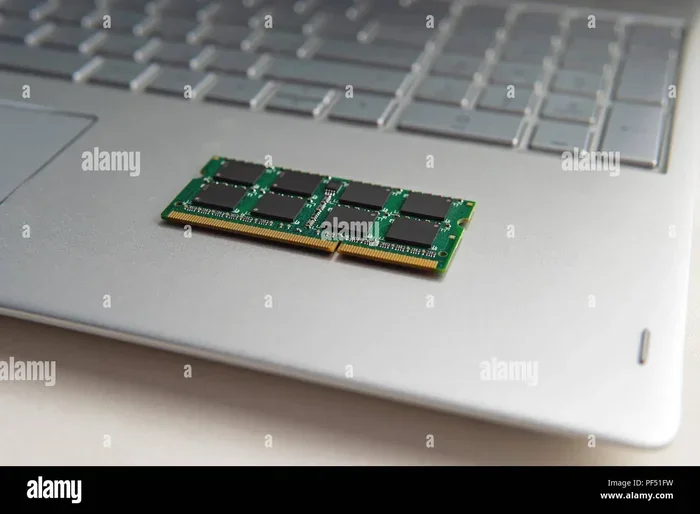
Not all laptops let you upgrade RAM. Some have memory soldered directly to the motherboard, which means it cannot be changed. Other laptops have one or two RAM slots that you can access by opening the back panel.
Before you buy new memory, check your laptop’s specs. Look up your model online or check the manufacturer’s website. You want to know how many slots you have, what type of RAM is supported, and the maximum amount your laptop can handle.
If your laptop does allow upgrades, installing RAM is simpler than most people think. You just need a small screwdriver, an anti-static wrist strap (optional but helpful), and a clean workspace. how do you install ram on a laptop is a straightforward process that takes about 10 to 15 minutes for most models.
When buying new RAM, make sure it matches your existing memory in terms of type and speed. Mixing different types can cause compatibility issues. If you are unsure, buy a matching pair of RAM sticks for the best results.
Common Mistakes People Make With Laptop RAM
There are a few common mistakes that people make when thinking about laptop memory. Avoiding these can save you time, money, and frustration.
Mistake 1: Buying more RAM than you need. If you only browse the web and check email, 32GB of RAM is overkill. You will not notice a difference over 8GB or 16GB, and you will waste your money.
Mistake 2: Ignoring RAM speed. More memory is not the only factor. RAM speed, measured in MHz, also affects performance. Faster memory helps with tasks that need quick data access, like gaming and video editing.
Mistake 3: Forgetting about your operating system. Your operating system uses a portion of your RAM just to run. Windows 11 uses about 3.5GB to 4GB at idle. macOS uses a similar amount. So if you have 8GB total, your actual usable memory is around 4GB to 4.5GB.
Mistake 4: Not closing unused apps. Even with plenty of RAM, keeping dozens of apps open will slow your laptop down. Get in the habit of closing programs you are not using. This frees up memory and keeps things running smoothly.
Mistake 5: Confusing RAM with storage. Many people think adding RAM will fix a slow laptop, but sometimes the real problem is a full or slow storage drive. If your laptop uses an old hard drive, upgrading to an SSD will make a bigger difference than adding more RAM in many cases.
Expert Insight
When it comes to how much ram do you need for a laptop, the best approach is to match your memory to your actual workload. Most people overestimate what they need, while others underestimate it. Take an honest look at what you do on your laptop every day, and choose accordingly. A memory upgrade is one of the easiest and most affordable ways to breathe new life into an older laptop.
Final Thoughts on Choosing the Right RAM
Choosing the right amount of memory for your laptop does not have to be complicated. The key is understanding what you use your laptop for and matching your RAM to those needs. For most everyday users, 8GB is plenty. For gamers and professionals, 16GB or 32GB makes a real difference.
Remember that RAM is just one piece of the puzzle. Your processor, storage drive, and graphics card all work together to determine overall performance. But memory is one of the easiest and most cost-effective upgrades you can make.
Take a moment today to check how much RAM your laptop currently has. If it is running low for your needs, consider an upgrade. A simple memory boost can transform a sluggish laptop into a fast, responsive machine. how much ram do you need for a laptop comes down to your personal use, and now you have all the information you need to make the right choice.
Do not let slow performance hold you back. Whether you are a student, a professional, a gamer, or a creative, the right amount of RAM keeps your laptop working at its best. Invest in the right memory, and your laptop will thank you every day.
Frequently Asked Questions
Is 8GB of RAM enough for a laptop in 2024?
Yes, 8GB is still enough for basic tasks like browsing, email, and document editing. However, if you run multiple apps at once or do anything more demanding, you will notice slowdowns. For most light users, 8GB remains a solid starting point.
Can too much RAM hurt your laptop?
No, too much RAM cannot physically harm your laptop. However, if you buy more memory than your laptop supports or more than your tasks need, you simply waste money. Your laptop will not run faster just because it has extra unused memory.
Does RAM speed matter as much as RAM size?
RAM size matters more for most users because it determines how many tasks your laptop can handle at once. Speed matters more for specific workloads like gaming and video editing. For everyday use, prioritize capacity over speed.
How do I know if my laptop RAM is upgradeable?
Check your laptop model online or in the user manual. Look for information about RAM slots and maximum supported memory. Some laptops have soldered RAM that cannot be upgraded, while others have accessible slots for easy upgrades.
What happens when your laptop runs out of RAM?
When your laptop runs out of RAM, it starts using your storage drive as virtual memory. This is much slower and causes your laptop to freeze, lag, or crash. You may also see error messages about low memory or apps closing unexpectedly.
Should I upgrade RAM or buy a new laptop?
If your laptop supports RAM upgrades and you only need a small boost, upgrading is a cheap and easy fix. But if your laptop is old and has other issues like a slow processor or outdated storage, a new laptop might be the better long-term investment.