Best Amazon Alternatives To Crucial Ram For Your PC
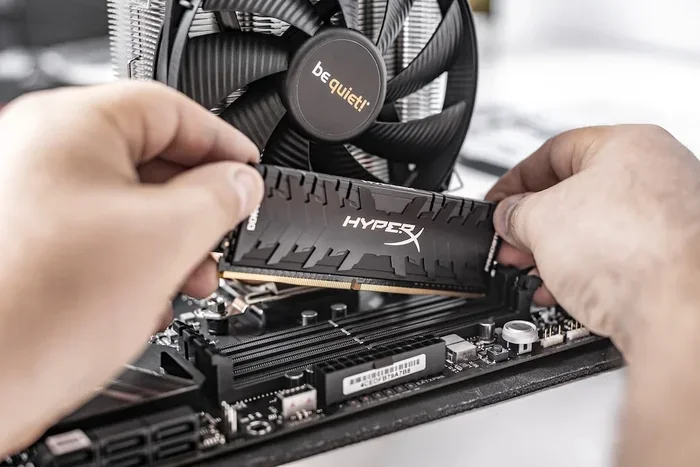
Finding the right RAM for your PC doesn’t have to mean buying from Crucial alone. There are several excellent Amazon alternatives to Crucial RAM that offer similar quality, better prices, and reliable performance. Whether you need DDR4 or DDR5 memory for a laptop or desktop build, these brands give you more choices without sacrificing speed or compatibility.
When it’s time to boost your PC’s memory, Crucial is often the first brand that comes to mind. But did you know there are powerful Amazon alternatives to Crucial RAM that might work even better for your setup? Whether you’re building a new desktop or upgrading a laptop, the memory market is full of brands that compete on speed, reliability, and price.
Shopping for RAM on Amazon can feel overwhelming. So many options, so many brands, and so many specs to compare. That’s exactly why I put this guide together. I’ll walk you through the best alternatives to Crucial RAM you can find on Amazon right now. You’ll learn what makes each brand stand out, how to pick the right DDR4 or DDR5 memory for your system, and how to avoid common mistakes that slow you down.
The good news is that you don’t need to stick with just one brand. Some of the best-performing memory modules on the market come from companies you might not have considered yet. Let’s dive in and explore your options.
Key Takeaways
- Kingston, Corsair, and G.Skill are top Amazon alternatives to Crucial RAM that deliver excellent performance and value.
- DDR4 and DDR5 RAM options are widely available on Amazon from multiple trusted brands besides Crucial.
- Checking RAM compatibility before purchasing ensures your PC or laptop supports the memory you choose.
- Price differences between brands can be significant, and shopping around on Amazon often saves money.
- Reading user reviews and ratings on Amazon helps you pick reliable RAM sticks that match your needs.
- Warranty and brand reputation matter just as much as raw speed when choosing RAM alternatives.
📑 Table of Contents
- Why Look Beyond Crucial For Your RAM?
- Top Amazon Alternatives To Crucial RAM Brands
- How To Choose The Right RAM For Your PC
- Price Comparison: Crucial vs. Top Alternatives
- How To Upgrade Your RAM The Right Way
- Quick Tips For Getting The Best Deal On Amazon
- Final Thoughts On Amazon Alternatives To Crucial Ram
Why Look Beyond Crucial For Your RAM?
Crucial makes solid RAM. No doubt about that. But they’re not the only game in town, and in many cases, other brands offer the same or better performance at lower prices. When you search for Amazon alternatives to Crucial RAM, you open yourself up to a wider range of choices.
Here are a few reasons to consider other brands:
- Better pricing: Competing brands often run sales and discounts that make their RAM more affordable than Crucial’s offerings.
- More variety: Different brands specialize in different types of memory, from low-latency kits for gaming to high-capacity sticks for workstations.
- Faster availability: Sometimes Crucial RAM sells out quickly on Amazon. Alternative brands may have the same product in stock right away.
- Better warranty terms: Some brands offer longer warranties or easier replacement processes than Crucial.
At the end of the day, your PC doesn’t care which brand made the RAM. It only cares about the DDR type, speed, capacity, and compatibility. So why not explore what else is out there?
Top Amazon Alternatives To Crucial RAM Brands
Let’s look at the brands that genuinely compete with Crucial in the memory market. Each of these has strong Amazon listings, solid customer reviews, and proven track records.
Kingston Technology
Kingston is one of the biggest names in memory, and for good reason. Their DDR4 and DDR5 RAM kits are widely available on Amazon and offer excellent value. Kingston makes everything from basic SODIMM modules for laptops to high-performance desktop kits with speeds up to 6000 MHz.
What I like about Kingston is their consistency. Their RAM sticks are reliable, widely compatible, and often come with a lifetime warranty. If you want a safe, well-known alternative to Crucial, Kingston is a great starting point.
Corsair
Corsair is a favorite among PC builders and gamers. Their Vengeance and Dominator lines are some of the most popular RAM kits on Amazon. Corsair sticks often come with sleek heat spreaders and RGB lighting, which is a nice bonus if you care about aesthetics.
Performance-wise, Corsair competes closely with Crucial in most benchmarks. Their DDR5 RAM options are especially strong right now, with many kits supporting high speeds and tight timings. If you want a brand that pushes performance limits, Corsair is worth a look.
G.Skill
G.Skill is the go-to brand for enthusiasts and overclockers. Their Trident Z series is legendary in the PC building community. G.Skill pushes the boundaries of RAM speed and latency, offering some of the fastest kits available on Amazon.
While G.Skill might cost a bit more than Crucial or Kingston, the performance gains are real. If you’re building a gaming PC or a workstation where every megahertz counts, G.Skill deserves your attention.
Samsung
Samsung is a bit different from the others. They don’t sell branded RAM kits the way Corsair or G.Skill do. Instead, Samsung manufactures the actual memory chips used inside many RAM sticks, including some Crucial modules. However, Samsung does offer their own DDR4 and DDR5 memory modules through certain retailers on Amazon.
Choosing Samsung directly can sometimes save you money because you’re buying the chip manufacturer’s own product. It’s a smart move if you want to cut out the middleman.
TeamGroup
TeamGroup is a lesser-known but surprisingly capable brand. Their T-Force series offers competitive DDR4 and DDR5 kits at prices that often beat Crucial and Corsair. TeamGroup has been growing fast in the memory market, and their Amazon listings show strong customer satisfaction.
If you’re on a budget but still want reliable PC RAM brands, TeamGroup is definitely worth checking out on Amazon.
How To Choose The Right RAM For Your PC
Picking RAM isn’t just about picking the cheapest or fastest option. There are a few things you need to check first to make sure everything works smoothly with your system.
Check Your DDR Type
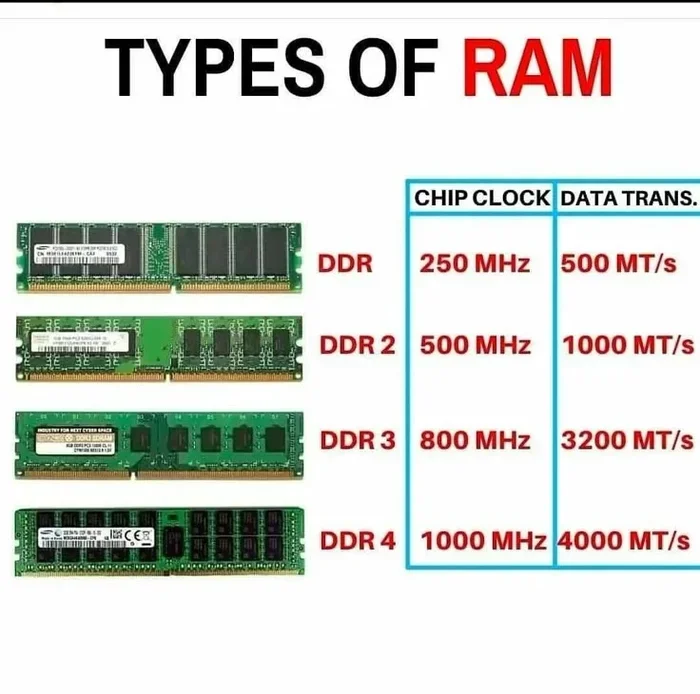
Not all RAM is the same. Your motherboard or laptop supports either DDR4 or DDR5 memory, and they are not interchangeable. Before you buy any Amazon alternatives to Crucial RAM, find out which DDR type your system uses. You can check your current RAM or look up your motherboard model online.
If you’re unsure about your system’s memory type, you can use tools or guides to find your RAM DDR type quickly and easily.
Match The Speed And Capacity
RAM speed is measured in MHz, and higher numbers generally mean faster performance. But your motherboard has limits. If you buy 3200 MHz RAM but your board only supports 2666 MHz, the RAM will run at the lower speed.
Capacity matters too. Most casual users do fine with 16 GB of RAM. Power users and gamers might want 32 GB or more. Think about what you actually need before you spend money.
Verify RAM Compatibility
This step is super important. Not every RAM stick works with every motherboard or laptop. Before you click “Buy Now,” double-check that the RAM you’re considering is compatible with your system.
If you want to be thorough, you can learn how to check RAM compatibility with your laptop to avoid buying the wrong product. This saves time, money, and frustration.
Consider Dual Channel Setup
Most modern systems perform better with dual channel RAM. This means using two matching sticks instead of one. For example, two 8 GB sticks in dual channel will outperform a single 16 GB stick in many scenarios. When shopping on Amazon, look for kits that come in pairs.
Price Comparison: Crucial vs. Top Alternatives
Price is where many of the Amazon alternatives to Crucial RAM really shine. Let’s take a quick look at how the top brands compare in terms of average pricing for common configurations.
| Brand | 16 GB DDR4 Kit | 32 GB DDR4 Kit | 16 GB DDR5 Kit |
|---|---|---|---|
| Crucial | $55-$65 | $90-$110 | $75-$90 |
| Kingston | $45-$60 | $80-$100 | $70-$85 |
| Corsair | $50-$65 | $85-$105 | $75-$95 |
| G.Skill | $55-$70 | $95-$115 | $80-$100 |
| TeamGroup | $40-$55 | $75-$90 | $65-$80 |
| Samsung | $45-$60 | $80-$95 | $70-$85 |
As you can see, the prices vary quite a bit across brands. TeamGroup and Kingston often offer the best deals, while G.Skill tends to cost more for its high-performance kits. But remember, a higher price doesn’t always mean better performance for your specific needs.
Also, prices on Amazon change frequently. Keep an eye out for lightning deals and coupon discounts. You might find a Kingston or Corsair kit that undercuts Crucial’s price by a noticeable margin during a sale event.
How To Upgrade Your RAM The Right Way
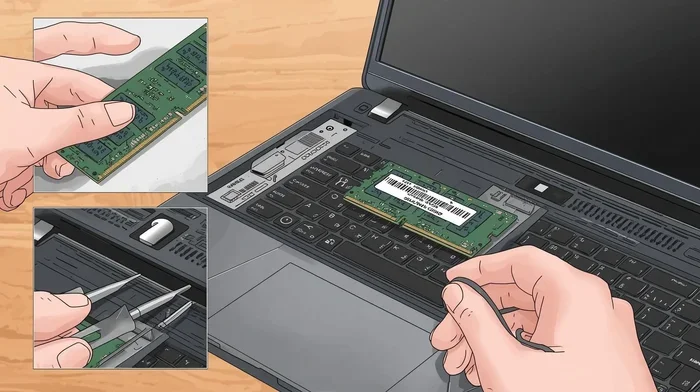
Once you’ve picked your new RAM from one of these Amazon alternatives, it’s time to install it. The process is simpler than most people think, but a few tips can make it go smoothly.
Step-by-Step RAM Installation
- Power off your PC and unplug it from the wall. Remove the side panel of your desktop case.
- Locate the RAM slots on your motherboard. They’re the long slots near the CPU.
- Press the clips on both sides of the existing RAM sticks to release them.
- Align the new RAM with the slot, matching the notch on the stick to the ridge in the slot.
- Press down firmly until the clips click into place on both sides.
- Close the case, plug everything back in, and power on your PC.
If you want a more detailed walkthrough, I’ve written a full guide on how to upgrade the RAM of a laptop that covers the process step by step for both desktops and laptops.
Common Mistakes To Avoid
- Mixing DDR4 and DDR5 RAM: They are physically different and won’t work in the same slots.
- Forcing a RAM stick: If it doesn’t slide in easily, check the alignment. Forcing it can damage the module.
- Ignoring XMP profiles: After installing new RAM, you may need to enable XMP or DOCP in your BIOS to get the rated speed.
- Buying the wrong form factor: Desktops use DIMM sticks, while laptops use SODIMM sticks. Make sure you get the right one.
Quick Tips For Getting The Best Deal On Amazon
Shopping smart on Amazon can save you real money on your RAM purchase. Here are some quick tips:
- Set price alerts: Use Amazon’s price tracking tools to get notified when your preferred RAM drops in price.
- Check used and renewed listings: Amazon Renewed and third-party sellers often offer the same RAM at lower prices with warranties.
- Buy RAM kits instead of individual sticks: Kits are usually cheaper per GB and guaranteed to be matched pairs.
- Read recent reviews: Look for reviews from the last few months to ensure the product is still current and reliable.
- Compare total cost including shipping: Some sellers offer free shipping while others don’t, which can affect the final price.
If you’re not sure whether your laptop even supports RAM upgrades, you can check with our guide on whether RAM can be added to a laptop. It helps you figure out if an upgrade is even possible before you spend any money.
Final Thoughts On Amazon Alternatives To Crucial Ram
The world of PC memory has never been more competitive, and that’s great news for buyers. The best Amazon alternatives to Crucial RAM give you more options, better prices, and in many cases, equal or superior performance. Whether you go with Kingston, Corsair, G.Skill, Samsung, or TeamGroup, you’re getting quality memory that will serve your PC well for years.
Don’t limit yourself to just one brand when shopping for RAM. Take the time to compare specs, read reviews, and check prices across different sellers on Amazon. A little research goes a long way toward finding the perfect memory upgrade for your system.
Start exploring your options today. Your PC will thank you for the extra speed and multitasking power that a solid RAM upgrade brings.
Frequently Asked Questions
Is Crucial RAM really the best option for PC upgrades?
Crucial RAM is reliable and well-known, but it’s not the only good option. Brands like Kingston, Corsair, and G.Skill offer comparable or even better performance in many cases. The best choice depends on your budget, system compatibility, and specific needs.
Can I use Amazon alternatives to Crucial RAM in any laptop?
Not necessarily. You need to check your laptop’s RAM type (DDR4 or DDR5), maximum capacity, and whether it supports SODIMM modules. Always verify compatibility before purchasing any RAM from Amazon.
Are cheaper RAM brands on Amazon worth buying?
Yes, many budget brands like TeamGroup offer solid performance and reliability. The key is to check reviews, warranty terms, and specs. A lower price doesn’t always mean lower quality, especially from reputable Amazon sellers.
How do I know if my PC needs a RAM upgrade?
If your PC runs slowly when multitasking, takes a long time to open apps, or uses most of its available memory during normal tasks, a RAM upgrade can help significantly. You can also check your current RAM usage in Task Manager on Windows.
What’s the difference between DDR4 and DDR5 RAM on Amazon?
DDR5 RAM is newer and generally faster than DDR4. It offers higher bandwidth, lower power consumption, and better performance for demanding tasks. However, DDR4 is still widely used and perfectly capable for most users. Make sure your motherboard supports the type you choose.
How many RAM sticks should I buy for my PC?
For most users, a dual-channel kit of two sticks (like 2×8 GB for 16 GB total) is the best choice. It provides better performance than a single stick and is more cost-effective. If you need more capacity, you can always add more sticks later if your motherboard has free slots.