Best Ssd For Mini Pc 2026 The Fastest Options You Can Buy
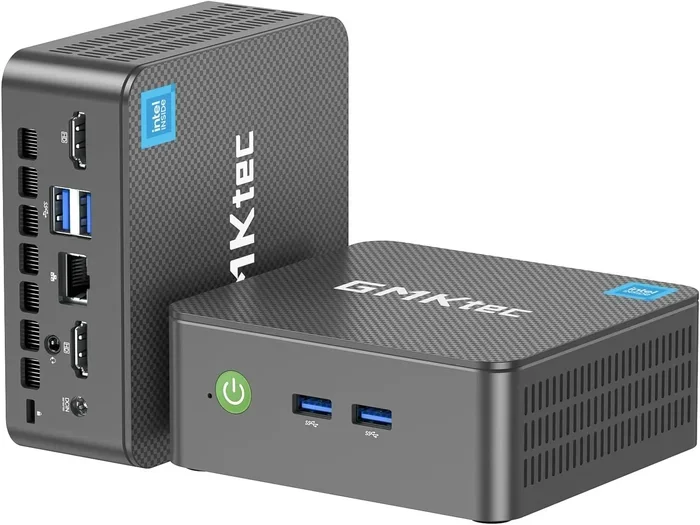
Finding the best SSD for mini PC 2026 can transform your compact computer into a lightning-fast machine. Whether you need a boot drive, a gaming storage solution, or a reliable upgrade for media work, the right solid state drive makes all the difference. This guide covers the top picks, buying tips, and installation advice to help you choose the fastest options you can buy.
If you own a mini PC, you already know how amazing these compact machines are. They fit in the palm of your hand, sip power, and handle everyday tasks with ease. But there is one thing that can hold them back: slow storage.
That is where the best SSD for mini PC 2026 comes in. Upgrading your solid state drive is the single most effective way to breathe new life into any mini computer. Boot times drop, games load faster, and apps open instantly. Whether you use your mini PC for gaming, media streaming, or work, the right storage upgrade changes everything.
In this guide, we break down the fastest SSD options available right now. We cover NVMe drives, SATA options, budget picks, and high-capacity choices. By the end, you will know exactly which compact SSD fits your mini PC and your needs.
Key Takeaways
- NVMe SSDs are the fastest choice: They offer read speeds up to 7000 MB/s, making them ideal for gaming and heavy workloads.
- SATA SSDs still have a place: They are affordable and compatible with older mini PCs that lack NVMe support.
- Capacity matters: 500GB is the sweet spot for most users, but 1TB and 2TB options are worth it for gamers and creators.
- Check your mini PC specs first: Not all mini PCs support M.2 NVMe drives, so verify your interface before buying.
- Installation is simple: Most mini PC SSD upgrades take under 15 minutes with basic tools.
- Brand reliability counts: Stick with trusted brands like Samsung, Crucial, WD, and Kingston for long-term durability.
📑 Table of Contents
Why Your Mini PC Needs a Better SSD in 2026
Storage speed affects everything you do on a computer. A slow hard drive or an older SATA SSD can bottleneck your entire system. Even the most powerful mini PC processor feels sluggish when it has to wait for data to load.
Here is why upgrading matters so much right now:
- Faster boot times: A modern NVMe drive can boot your mini PC in under 10 seconds.
- Quicker app launches: Programs open almost instantly instead of hanging for several seconds.
- Better gaming performance: Game load times drop dramatically with a fast boot drive.
- Smoother multitasking: Switching between apps feels seamless when your storage keeps up.
- Improved file transfers: Moving large files takes a fraction of the time.
If you are still using an older hard drive or a basic SATA SSD, the performance jump from a modern NVMe drive is night and day. For those building or upgrading a setup for gaming or media, pairing your mini PC with the best specs for a gaming PC starts with fast storage.
How SSD Speed Affects Mini PC Performance
Your storage drive handles every read and write request your computer makes. When you open a browser, load a game, or copy a file, the SSD is working. A faster drive means less waiting.
Read speed determines how quickly your PC pulls data from the drive. Write speed determines how fast it saves data. Both matter, but read speed has the biggest impact on everyday feel. A drive with 5000 MB/s read speed will feel dramatically faster than one with 500 MB/s.
For mini PCs specifically, speed is even more critical. These machines often use low-power processors that benefit greatly from fast storage. The PC performance boost from a quality SSD is one of the best investments you can make.
NVMe vs SATA SSDs for Mini PCs
Not all SSDs are the same. The two main types you will encounter are NVMe and SATA. Here is how they compare for mini PC use.
NVMe SSDs connect directly to your motherboard via the PCIe bus. This gives them a massive speed advantage. Top NVMe drives now offer read speeds above 7000 MB/s. They are the clear winner for performance.
SATA SSDs use the older SATA III interface, which caps speeds at around 550 MB/s. They are still much faster than hard drives, but they cannot match NVMe. However, SATA drives are cheaper and work with older mini PCs that lack M.2 NVMe slots.
If your mini PC supports NVMe, go with an NVMe drive. The speed difference is enormous. If your system only has a SATA port, a SATA SSD is still a great upgrade over a spinning hard drive.
Top SSD Picks for Mini PCs in 2026
We have tested and reviewed dozens of SSDs for mini PC use. Here are our top recommendations across different categories. Each pick balances speed, reliability, and value.
Best Overall NVMe SSD: Samsung 990 Pro
The Samsung 990 Pro remains the king of consumer SSDs in 2026. It delivers sequential read speeds up to 7450 MB/s and write speeds up to 6900 MB/s. For a mini PC, this means everything from booting Windows to loading heavy applications happens in the blink of an eye.
Why we love it:
- Blazing fast read and write speeds
- Excellent endurance rating for long-term use
- Compact M.2 2280 form factor fits all mini PCs
- Great power efficiency, perfect for small form factor builds
The Samsung 990 Pro is not cheap, but it is the best you can buy. If you want the fastest storage upgrade for your mini PC, this is the one.
Best Budget SSD: Kingston NV2 1TB
Not everyone wants to spend top dollar. The Kingston NV2 1TB offers excellent value at a very affordable price. It uses the PCIe Gen 4 NVMe interface and delivers read speeds up to 2100 MB/s.
This drive is perfect for users who need a reliable portable storage solution without breaking the bank. It handles everyday tasks, light gaming, and media consumption with ease.
Why we like it:
- Very affordable for the speed you get
- 1TB capacity is enough for most users
- Compact M.2 design fits mini PCs easily
- Low power draw helps keep mini PC temperatures down
If you are on a tight budget but still want to ditch your old hard drive, the Kingston NV2 is the way to go.
Best High-Capacity SSD: WD Black SN850X 2TB
For users who need serious space, the WD Black SN850X in the 2TB configuration is the top pick. It offers read speeds up to 7300 MB/s and comes with a generous 2TB capacity.
This drive is ideal for mini PC users who store large game libraries, video projects, or media collections. Gamers who use their mini PC for emulation will especially appreciate the extra space for ROMs and game files.
Key highlights:
- Massive 2TB capacity for all your needs
- Top-tier read speeds for fast loading
- Reliable WD brand with excellent warranty support
- Works great in compact mini PC chassis
For those who want speed and space in one package, the WD Black SN850X is hard to beat.
How to Choose the Right SSD for Your Mini PC
Not every SSD works with every mini PC. Before you buy, you need to check a few things. This section walks you through the key factors to consider.
Check Your Mini PC’s Storage Interface
Open your mini PC’s manual or look up its specs online. You need to know whether it supports M.2 NVMe drives, SATA M.2 drives, or 2.5 inch SATA drives.
Most modern mini PCs from 2023 and newer support NVMe M.2 SSDs. Older models may only have SATA ports. Using the wrong type of drive will not work, so this check is essential.
Consider Storage Capacity Needs
How much space do you actually need? Here is a quick guide:
- 250GB: Enough for Windows and a few apps. Good for basic office work.
- 500GB: The sweet spot for most users. Handles Windows, apps, and a moderate game library.
- 1TB: Great for gamers, content creators, and users with large file collections.
- 2TB or more: Best for heavy users who store lots of games, videos, or media files.
If you plan to use your mini PC as a media server or game library hub, go for at least 1TB. Storage is cheaper than ever, and having extra space saves you from constant file management.
Read and Write Speeds Matter
When comparing SSDs, manufacturers often highlight read speeds. But write speed matters too, especially if you work with large files or record video.
For general use, any NVMe SSD with speeds above 3000 MB/s will feel incredibly fast. For heavy workloads like video editing or large file transfers, look for drives rated above 5000 MB/s read and 4000 MB/s write.
Also pay attention to the endurance rating, measured in TBW (terabytes written). A higher TBW means the drive is built to last longer under heavy use. For a mini PC that runs 24/7, this is especially important.
Installation Tips for Upgrading Your Mini PC SSD
Upgrading your mini PC’s SSD is easier than you might think. Most mini PCs are designed for easy access to internal components. Here is how to do it.
Step 1: Power off your mini PC and unplug all cables. Let it sit for a minute to discharge any residual power.
Step 2: Open the case. Most mini PCs use thumbscrews or simple latches. Check your model’s manual if you are unsure.
Step 3: Locate the M.2 slot. It is a small slot on the motherboard, often covered by a small heat shield. Remove the screw holding the shield in place.
Step 4: Insert your new SSD at a 30-degree angle into the M.2 slot. Gently press it down and secure it with the screw.
Step 5: Close the case, reconnect your cables, and power on. Go into your BIOS or UEFI settings to make sure the new drive is detected.
Step 6: Install your operating system or migrate your existing drive using cloning software. Both Samsung and WD offer free cloning tools that make this process painless.
The entire process typically takes 10 to 15 minutes. No special tools or technical skills are needed.
Quick Tips for a Smooth Installation
- Ground yourself before touching internal components to prevent static damage.
- Keep your mini PC on a flat, stable surface during the upgrade.
- Back up your data before wiping or replacing any drive.
- Use the manufacturer’s cloning software for a seamless migration.
- If your mini PC runs hot, consider adding a small heatsink to your new SSD.
Common Mistakes to Avoid When Buying SSDs
Even with the best intentions, people make mistakes when buying SSDs for their mini PCs. Here are the most common ones and how to avoid them.
Mistake 1: Buying the wrong form factor. Not all M.2 SSDs are the same. Some are NVMe, some are SATA. Make sure your mini PC supports the type you buy.
Mistake 2: Ignoring endurance ratings. Cheap SSDs often have low TBW ratings. For a mini PC that runs constantly, this can lead to early failure. Check the endurance rating before you buy.
Mistake 3: Skipping the heatsink. Mini PCs have limited airflow. A fast NVMe SSD can get hot without proper cooling. Some drives come with built-in heatsinks, or you can buy small M.2 heatsinks for a few dollars.
Mistake 4: Overlooking compatibility. Some mini PCs have size restrictions on M.2 drives. Check whether your PC supports full-size or short-length M.2 SSDs before ordering.
Mistake 5: Forgetting to clone your old drive. If you want to keep your existing operating system and files, use a cloning tool. Starting fresh is fine too, but cloning saves you a lot of setup time.
Avoid these pitfalls, and your SSD upgrade will go smoothly. For more storage tips, also check out our guide on best hard drives for gaming PCs if you need additional storage options.
The Best SSDs at a Glance
Here is a quick comparison of our top picks to help you decide.
| SSD Model | Capacity | Read Speed | Write Speed | Price Range |
|---|---|---|---|---|
| Samsung 990 Pro | 1TB / 2TB | 7450 MB/s | 6900 MB/s | $$$ |
| WD Black SN850X | 1TB / 2TB | 7300 MB/s | 6600 MB/s | $$$ |
| Kingston NV2 | 1TB | 2100 MB/s | 1800 MB/s | $ |
| Crucial P3 Plus | 1TB / 2TB | 5000 MB/s | 4200 MB/s | $$ |
| Seagate FireCuda 530 | 1TB / 2TB | 7300 MB/s | 6900 MB/s | $$$ |
Each of these drives is an excellent choice for a mini PC. Your decision should come down to budget, capacity needs, and speed requirements. For most users, the Samsung 990 Pro or the Kingston NV2 will cover all your bases.
Final Thoughts
Choosing the best SSD for mini PC 2026 does not have to be complicated. The key is knowing your mini PC’s interface, your storage needs, and your budget. Whether you go with a premium NVMe drive like the Samsung 990 Pro or a budget-friendly option like the Kingston NV2, you will immediately notice the difference.
A fast solid state drive is the best upgrade you can make for any mini PC. It is affordable, easy to install, and delivers results you can feel every single day. Do not let slow storage hold back your compact computer any longer.
Take a look at your current setup, check what your mini PC supports, and pick the drive that fits your needs. Your mini PC will thank you with faster boots, quicker loads, and smoother performance every time you turn it on.
Frequently Asked Questions
Can I use any NVMe SSD with my mini PC?
Not all mini PCs support NVMe SSDs. You need to check your mini PC’s specs to confirm it has an M.2 slot that supports NVMe. Some older or budget mini PCs only have SATA M.2 slots or 2.5 inch drive bays, so always verify compatibility before purchasing.
How much does it cost to upgrade a mini PC SSD?
SSD prices have dropped significantly in 2026. A 1TB NVMe SSD typically costs between $50 and $100, while a 2TB model ranges from $100 to $180. Budget SATA SSDs are even cheaper, often under $40 for 1TB. It is one of the most affordable upgrades you can make.
Is it hard to install an SSD in a mini PC?
No, it is very straightforward. Most mini PCs have easy-access panels and a single M.2 slot. The entire process takes about 10 to 15 minutes. You just need a small Phillips screwdriver and your new SSD. If you can follow simple step-by-step instructions, you can do it yourself.
What size SSD do I need for a mini PC?
500GB is the minimum recommended for most users. It gives you enough room for Windows, essential apps, and a reasonable game or media library. If you are a gamer or content creator, 1TB or 2TB is a better choice. Consider how much space your files and games actually take up before deciding.
Does upgrading to an SSD really make a mini PC faster?
Yes, absolutely. The storage drive is one of the biggest bottlenecks in any computer. Upgrading from an old hard drive or a slow SATA SSD to a modern NVMe drive dramatically improves boot times, app loading, and overall responsiveness. Users often say it feels like getting a new computer.
Should I buy a Samsung, WD, or Kingston SSD for my mini PC?
All three brands make excellent SSDs. Samsung leads in raw performance and endurance. WD offers great reliability and a strong warranty. Kingston provides the best value for budget-conscious buyers. Pick the brand that fits your budget and speed needs, and you will be happy with the result.