Check Whether Laptop Original or Not
Knowing how to check whether a laptop is original or not saves you from buying counterfeit products and losing money. This guide walks you through simple, proven methods like verifying the serial number, checking the packaging, and confirming specs on the manufacturer’s website. Whether you are buying new or secondhand, these tips help you spot a fake laptop quickly and confidently.
You just got a new laptop and something feels off. The keyboard feels slightly different. The build quality is not what you expected. Maybe you bought it from a third-party seller and now you are wondering, check whether laptop original or not. This is a more common problem than most people think. Counterfeit laptops flood the market, especially online. And many buyers do not realize they have a fake until weeks or months later.
Checking whether your laptop is original or not does not require technical expertise. You do not need to be a tech genius. With a few simple checks, you can confirm authenticity in under 15 minutes. This guide gives you every tool and trick you need. From serial numbers to packaging details, we cover it all. Let us walk through it together.
Key Takeaways
- Check the serial number: Every original laptop has a unique serial number that you can verify on the manufacturer’s website.
- Inspect the packaging and accessories: Original laptops come with quality boxes, holographic stickers, and genuine accessories.
- Verify the product key and warranty: A valid product key and active warranty are strong signs of an authentic laptop.
- Compare specifications online: Cross-check your laptop specs with the official manufacturer details to spot discrepancies.
- Look for quality build and materials: Fake laptops often have poor build quality, loose joints, and cheap materials.
- Use the manufacturer’s support tools: Official support pages and diagnostic tools can confirm your laptop’s authenticity.
- Buy from authorized sellers: Purchasing from trusted retailers greatly reduces the risk of getting a counterfeit laptop.
- Why It Matters to Check Whether Your Laptop Is Original
- How to Check Whether Laptop Original or Not: Step-by-Step Methods
- Common Signs Your Laptop Might Be Fake
- Tips to Avoid Buying a Fake Laptop in the First Place
- What to Do If You Already Bought a Fake Laptop
- Expert Insights on Laptop Authenticity
- Conclusion
- Performance: Original laptops use tested and certified components. Fakes use cheap substitutes that underperform.
- Safety: Poorly made batteries in fake laptops can be a fire hazard. This is a real and serious risk.
- Warranty and support: Counterfeit laptops cannot be serviced under official warranty. You are left with no recourse.
- Resale value: An original laptop holds its value. A fake laptop is worth almost nothing when you try to sell it.
- Software updates: Original laptops receive regular updates. Fake laptops often run modified or outdated software.
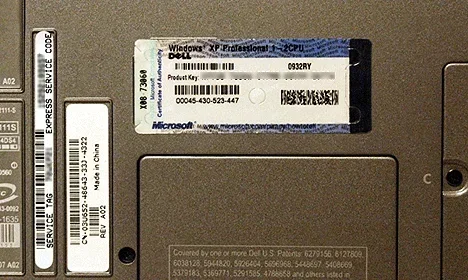
- Flip your laptop over and look for a sticker or engraved text. The serial number is usually printed there.
- Write down the serial number exactly as shown.
- Visit the official website of the laptop brand.
- Navigate to the support or warranty verification page.
- Enter the serial number and check the results.
- Holographic stickers: Most major brands use holographic seals on the box. These are hard to replicate and are a strong authenticity marker.
- Quality of printing: Original boxes have sharp, high-resolution printing. Fakes often have blurry text or faded colors.
- Included accessories: Check if the charger, cable, and manual match the brand’s standard accessories. Counterfeit laptops often include generic or wrong chargers.
- Barcode and labels: Original packaging has scannable barcodes. Try scanning them with your phone to see if they link to the correct product page.
- Sponges and inserts: Many brands use custom foam or plastic inserts to hold the laptop. These are carefully molded and hard to fake.
- Find the exact model number of your laptop. It is usually printed on a sticker on the bottom or inside the battery compartment.
- Go to the official manufacturer’s website.
- Search for that model number.
- Compare the listed specs with what your laptop shows.
- The product key should activate without errors.
- The pre-installed software should match the brand’s standard offerings.
- Bloatware on a genuine laptop is usually limited and branded. Fakes often have random or excessive pre-installed software.
- Check if the operating system shows as genuine in the settings. On Windows, go to Settings > Update & Security > Activation.
- Hinges: Original laptop hinges feel smooth and sturdy. Loose or wobbly hinges suggest a counterfeit.
- Keyboard feel: Original keyboards have consistent key travel and spacing. Fake keyboards often feel mushy or uneven.
- Trackpad: The trackpad on an original laptop clicks evenly and responds smoothly. Inconsistencies are a red flag.
- Seams and joints: Look at the gaps between the screen and the body. Original laptops have even, tight gaps. Fakes often have uneven or wide gaps.
- Weight: Compare the weight with the official specifications. Counterfeit laptops are sometimes lighter because they use cheaper materials.
- Dell: Use the Dell Support page to enter your service tag and check warranty and authenticity.
- HP: HP’s Support Check tool lets you verify your product and warranty status online.
- Lenovo: Lenovo’s support portal allows you to look up your device by serial number or model number.
- Apple: Apple’s Check Coverage page lets you enter the serial number to verify your MacBook is genuine and under warranty.
- ASUS: ASUS provides a warranty registration and product lookup tool on their official website.
- The price was significantly lower than retail price. If it seems too good to be true, it probably is.
- The seller could not provide a proper receipt or invoice.
- The serial number does not return any results on the manufacturer’s website.
- The laptop overheats frequently or has random shutdowns.
- The battery drains extremely fast, even when not in use.
- The laptop came with a generic charger instead of the brand-specific one.
- The operating system shows as counterfeit or unactivated.
- The warranty registration fails when you try to register the product.
- Buy from authorized retailers: Stick to official brand stores, authorized dealers, and reputable online platforms.
- Check the seller’s reputation: Read reviews and ratings before making a purchase. Look for verified buyer feedback.
- Compare prices: If the price is much lower than other sellers, be suspicious. Counterfeit goods are often priced attractively to lure buyers.
- Request proof of purchase: Always ask for a receipt, invoice, or order confirmation from the seller.
- Verify the warranty: A genuine laptop comes with a manufacturer’s warranty. Check the warranty terms before buying.
- Avoid too-good-to-be-true deals: Extremely discounted prices are the biggest red flag in online shopping.
- Inspect the product immediately: When you receive the laptop, check it thoroughly before accepting the delivery.
- Document everything: Take screenshots of the serial number, product key, and any discrepancies you found.
- Contact the seller: Reach out to the seller immediately and explain the situation. Request a refund or replacement.
- Contact the manufacturer: Report the counterfeit product to the official brand. They may be able to help verify and take action.
- File a complaint: If the seller does not respond, file a complaint on the platform where you made the purchase.
- Report to authorities: In serious cases, report the counterfeit product to consumer protection agencies in your country.
📑 Table of Contents
Why It Matters to Check Whether Your Laptop Is Original
Buying a fake laptop is more than just a disappointment. It can cost you money, data, and time. Counterfeit laptops often use low-quality components. They may overheat, crash, or fail within months. Some fake laptops even have outdated hardware that is repackaged as something new.
Here is why authenticity matters:
When you check whether laptop original or not before or after purchase, you protect yourself from all of these problems. It is always better to be safe than sorry.
How to Check Whether Laptop Original or Not: Step-by-Step Methods
There are several reliable ways to verify your laptop’s authenticity. Each method targets a different aspect of the product. Use a combination of these for the best results.
1. Verify the Serial Number
Every original laptop comes with a unique serial number. This number acts like a fingerprint for your device. It tells the manufacturer exactly which unit it is and when it was made.
Here is how to find and verify it:
If the serial number returns valid information, your laptop is likely original. If it shows no results or an error, be cautious. You can also check your serial number through the system settings. On Windows, go to Settings > System > About. On macOS, click the Apple menu > About This Mac.
For more details on checking your device information, you can also learn how to check RAM of your laptop as part of verifying overall system specs.
2. Inspect the Packaging and Accessories
The packaging of a laptop tells you a lot about its authenticity. Original manufacturers invest heavily in quality packaging. Fake laptops often have sloppy or low-quality boxes.
Look for these signs:
Take your time with this step. A quick look at the box can save you from a big headache later.
3. Cross-Check Specifications Online
Every laptop model has specific, documented specifications. These include the processor type, RAM, storage, display resolution, and battery capacity. If something does not match, that is a red flag.
Here is what to do:
You can also check your laptop’s specs directly. On Windows, open the Task Manager and go to the Performance tab. On macOS, use the System Information tool. If your RAM or processor does not match the official specs, something is wrong.
You can check RAM in your laptop easily to compare against the official specifications. Similarly, verifying RAM compatibility helps confirm whether your laptop’s memory matches the genuine model.
4. Check the Product Key and Software
Original laptops come with genuine software licenses. The product key is usually printed on a sticker on the laptop itself or included in the packaging. You can verify this key on the Microsoft or software manufacturer’s website.
Here are some things to look for:
If the product key is missing, scratched off, or does not work, that is a serious warning sign. A check whether laptop original or not process should always include software verification.
5. Examine the Build Quality and Materials
Original laptops are built with specific materials and tight tolerances. The fit and finish are consistent across all units. Fake laptops often cut corners on materials and construction.
Pay attention to these details:
These physical checks are simple but effective. Trust your instincts. If something feels cheap or wrong, it probably is.
6. Use the Manufacturer’s Official Support Tools
Most major laptop brands offer online tools to verify authenticity. These tools check your serial number, model number, and warranty status. They are the most authoritative source of information.
Here are some examples:
These tools are free and easy to use. They give you definitive answers about your laptop’s authenticity. Always use the official website and not a third-party site, as fake sites can trick you.
Common Signs Your Laptop Might Be Fake
Sometimes the warning signs are obvious. Other times they are subtle. Here are the most common indicators that your laptop might not be original:
If you notice even two or three of these signs, take action immediately. Contact the seller and try to get a refund. You can also reach out to the manufacturer for guidance.
Tips to Avoid Buying a Fake Laptop in the First Place
Prevention is always better than cure. Here are some tips to help you buy an original laptop every time:
Following these tips dramatically reduces your risk of ending up with a fake laptop. A little caution goes a long way.
What to Do If You Already Bought a Fake Laptop
If you discover that your laptop is not original, do not panic. Here is what you should do:
Acting quickly gives you the best chance of getting your money back and preventing others from falling for the same scam.
Expert Insights on Laptop Authenticity
Industry experts agree that counterfeit laptops have become more sophisticated over the years. Modern fakes can look nearly identical to the real thing at first glance. However, there are always subtle differences that give them away.
According to consumer protection agencies, the most common fake laptop brands are those with high market demand and premium pricing. Brands like Apple, Dell, HP, Lenovo, and ASUS are frequently targeted by counterfeiters.
Experts also recommend always checking the laptop authenticity through multiple methods. No single check is foolproof. But combining serial number verification, packaging inspection, spec comparison, and manufacturer tool checks gives you near-complete confidence in your laptop’s authenticity.
One important tip from experts: always keep your purchase receipt and warranty documents in a safe place. These documents are your proof of purchase and are essential if you ever need to make a claim or return a product.
When in doubt, do not hesitate to reach out to the manufacturer’s customer support. They are there to help, and they can confirm whether your device is genuine. The process is simple and usually free.
Remember, a check whether laptop original or not process is not just about avoiding fakes. It is about protecting your investment, your data, and your peace of mind. Taking a few extra minutes to verify authenticity can save you hundreds or even thousands of dollars in the long run.
Conclusion
Knowing how to check whether laptop original or not is an essential skill for every laptop buyer and user. The methods in this guide are simple, effective, and do not require any special tools or technical knowledge. From verifying the serial number to inspecting the build quality, each step adds another layer of protection against counterfeit products.
Always buy from trusted sellers, keep your receipts, and use the manufacturer’s official verification tools. If something feels wrong, trust your instincts and investigate further. Your laptop is a significant investment, and you deserve to know that it is genuine.
Take a few minutes today to run through these checks. It could save you from a costly mistake and give you complete confidence in your device. Stay informed, stay cautious, and always verify before you trust.
Frequently Asked Questions
How can I quickly check if my laptop is original?
The fastest way is to verify your serial number on the manufacturer’s official website. Enter the serial number and check if it returns valid product information. This single check can confirm authenticity in under two minutes.
Can a fake laptop pass a warranty check?
No. Counterfeit laptops cannot be registered under the manufacturer’s official warranty. When you try to verify the warranty using the serial number, the system will either show no results or indicate the product is not genuine.
What should I do if my serial number does not work on the manufacturer’s website?
If your serial number returns no results, do not panic. Double-check that you entered it correctly without any spaces or errors. If it still does not work, contact the manufacturer’s customer support directly for assistance. They can help determine if the product is authentic.
Are refurbished laptops the same as fake laptops?
No. Refurbished laptops are genuine products that have been previously used and restored. Fake laptops are counterfeit copies made to deceive buyers. Always verify the authenticity of any laptop, whether new or refurbished, before purchasing.
How can I tell if my laptop charger is original?
Original chargers have the brand logo, correct wattage, and quality build. They also match the specifications listed on the manufacturer’s website. Counterfeit chargers often have misspelled logos, incorrect voltage, and cheap materials. Check the charger label carefully and compare it with the official product page.
Is it safe to buy a laptop from a third-party seller online?
It can be safe if you take proper precautions. Always buy from sellers with strong ratings and verified reviews. Check the return policy, request a receipt, and verify the serial number as soon as you receive the laptop. Being cautious protects you from counterfeit products.