Crucial Ddr5 Ram Alternatives Worth Exploring Today
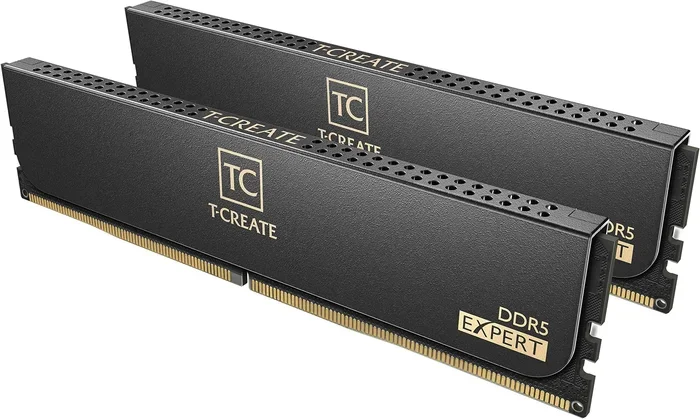
Looking beyond Crucial DDR5 RAM? You’re in the right place. This guide covers the top Crucial DDR5 Ram Alternatives from brands like Kingston Fury, G.Skill, and Corsair. You’ll learn how to compare speeds, capacities, and compatibility to find the best DDR5 upgrade for your system without overpaying.
If you’ve been eyeing a DDR5 RAM upgrade but keep seeing Crucial options, you might wonder what else is out there. The good news is there are plenty of Crucial DDR5 Ram Alternatives that deliver the same — or even better — performance. Whether you’re building a new laptop or upgrading an existing one, exploring other brands can save you money and unlock better features.
DDR5 RAM has completely changed the game for laptop and desktop memory. It offers faster speeds, better power efficiency, and higher capacities than its predecessor DDR4. But Crucial isn’t the only player in the market. Brands like Kingston Fury, G.Skill, Corsair, and others all manufacture DDR5 modules that compete head-to-head with Crucial’s offerings. In this guide, we’ll walk through the best alternatives, what to look for, and how to make the right choice for your setup.
Key Takeaways
- Kingston Fury DDR5 RAM offers excellent performance at competitive prices and is a top Crucial DDR5 Ram Alternative.
- G.Skill and Corsair both produce high-quality DDR5 modules with aggressive speed profiles and reliable timings.
- DDR5 5600MHz remains the sweet spot for most users, balancing speed and affordability.
- Capacity matters — 32GB DDR5 RAM is increasingly the go-to choice for gaming, content creation, and multitasking.
- Compatibility checks are essential before purchasing any DDR5 RAM alternative for your laptop or desktop.
- Cooling solutions for DDR5 RAM can help maintain stable performance under heavy workloads.
📑 Table of Contents
- Why Look Beyond Crucial for DDR5 RAM?
- Top Crucial DDR5 Ram Alternatives to Consider
- DDR5 RAM Speed and Capacity: What Should You Choose?
- Compatibility: Will Your Laptop or Motherboard Support DDR5?
- Does DDR5 RAM Need Cooling?
- How to Choose the Best DDR5 RAM Alternative for Your Needs
- Final Thoughts on Crucial DDR5 Ram Alternatives
Why Look Beyond Crucial for DDR5 RAM?
Crucial is a trusted brand, no doubt. But the memory market has gotten crowded with excellent options. Shopping around lets you compare DDR5 RAM speed, latency, heat spreaders, and pricing. Sometimes you’ll find the same chip on a different module at a lower price. Other times, a competing brand offers features Crucial doesn’t, like RGB lighting or tighter timing profiles.
Here are a few reasons to explore DDR5 laptop RAM alternatives:
- Price differences: The same DDR5 module can vary by $10 to $30 between brands. Those savings add up, especially when buying multiple sticks.
- Speed options: Some brands push higher speeds out of the box, giving you a performance edge in gaming and heavy workloads.
- Design and aesthetics: If your laptop or PC case has a transparent side panel, RGB or stylish heat spreaders matter.
- Availability: Popular brands may have better stock during RAM shortages, so you’re less likely to face long wait times.
Also, keep in mind that DDR5 5600MHz is the sweet spot for most users. It strikes the perfect balance between performance and cost. You don’t need to spend extra on DDR5-6000 or higher unless you’re a hardcore gamer or content creator.
Top Crucial DDR5 Ram Alternatives to Consider
Let’s dive into the brands and products that stand out as genuine alternatives to Crucial DDR5 RAM. Each of these manufacturers brings something unique to the table.
Kingston Fury DDR5 RAM
Kingston Fury is one of the strongest competitors in the DDR5 space. Their DDR5 modules are well-reviewed, widely available, and offer solid performance. The Kingston Fury Impact series is specifically designed for laptops, making it a great DDR5 laptop RAM option if you need a compact SO-DIMM module.
Here’s what makes Kingston Fury a compelling alternative:
- Available in speeds from DDR5-4800 to DDR5-5600 and beyond
- Compact SO-DIMM designs for laptop compatibility
- Competitive pricing compared to Crucial
- Reliable performance with tight timings
- Solid warranty and customer support
If you’re looking for a 32GB DDR5 5600 laptop RAM kit, Kingston Fury should be at the top of your list. Their modules are known for stability and consistent performance across different platforms. You can find them in configurations from 8GB to 64GB, giving you flexibility for any build.
G.Skill Trident Z5 DDR5
G.Skill is a name that enthusiasts trust. Their Trident Z5 DDR5 series pushes high speeds and offers some of the tightest latency numbers in the industry. While G.Skill is more commonly associated with desktop builds, they do offer laptop-compatible DDR5 SO-DIMMs as well.
Key highlights of G.Skill DDR5 RAM:
- Speeds ranging from DDR5-4800 up to DDR5-7200+ for enthusiasts
- Excellent XMP and EXPO profiles for easy overclocking
- Premium aluminum heat spreaders
- Strong presence in the gaming and workstation markets
- Multiple capacity options, including 16GB DDR5 5600MHz and 32GB kits
G.Skill’s DDR5 RAM is ideal if you want maximum performance and don’t mind paying a slight premium. Their DDR5 5600 laptop RAM 64GB kits are popular among power users who run demanding applications like video editing, 3D rendering, and machine learning workloads.
Corsair Vengeance DDR5
Corsair has been in the memory game for decades, and their Vengeance DDR5 line is a natural choice for anyone looking for a Crucial alternative. Corsair DDR5 modules are known for reliability, good heat dissipation, and clean BIOS compatibility.
Why consider Corsair Vengeance DDR5:
- Wide range of speeds from DDR5-4800 to DDR5-6000
- Built-in aluminum heat spreaders for thermal management
- Excellent motherboard compatibility
- Available in both desktop and laptop form factors
- Strong resale value if you ever upgrade again
Corsair is a safe, well-rounded choice. If you want a 16GB DDR5 5600MHz laptop RAM stick that just works without fuss, Corsair Vengeance is hard to beat. Their modules are thoroughly tested and come with solid warranty coverage.
DDR5 RAM Speed and Capacity: What Should You Choose?
Choosing the right speed and capacity is one of the most important decisions when picking a DDR5 RAM alternative. Here’s a simple breakdown to help you decide.
Speed Tiers for DDR5 RAM
DDR5 RAM comes in several speed tiers. The speed you choose depends on your use case and budget.
- DDR5-4800MHz: The entry-level DDR5 speed. Great for basic productivity and everyday tasks. Very affordable.
- DDR5-5200MHz: A solid middle ground. Good for gaming and general use. The 8GB DDR5 5200MHz laptop RAM option is popular for budget builds.
- DDR5-5600MHz: The sweet spot. Best balance of speed, latency, and price. Ideal for gaming and content creation.
- DDR5-6000MHz+: Enthusiast territory. Best for competitive gaming and heavy workloads. Pricier but offers a real performance boost.
Capacity Guide
How much memory you need depends on what you do with your computer:
| Use Case | Recommended Capacity | Recommended Speed |
|---|---|---|
| Basic browsing and office work | 8GB to 16GB | DDR5-4800 to DDR5-5200 |
| Gaming | 16GB to 32GB | DDR5-5200 to DDR5-5600 |
| Video editing | 32GB | DDR5-5600 |
| 3D rendering and CAD | 32GB to 64GB | DDR5-5600 or higher |
| Machine learning | 32GB+ | DDR5-5600 or higher |
For most users, 32GB DDR5 5600MHz laptop RAM is the best all-around choice. It handles gaming, multitasking, and creative workloads with ease. If you’re on a tighter budget, a 16GB DDR5 5600MHz laptop RAM stick still delivers excellent performance for everyday use.
Compatibility: Will Your Laptop or Motherboard Support DDR5?
Before you buy any DDR5 RAM alternative, you need to confirm compatibility. DDR5 RAM is not backward compatible with DDR4 slots. You need a motherboard or laptop that specifically supports DDR5 memory.
Here’s how to check:
- Check your motherboard manual: Look for the supported memory types. If it lists DDR5, you’re good to go.
- Use a system scanner tool: Crucial itself offers a free system scanner that tells you exactly what memory your system supports.
- Check your laptop model: Not all laptops support RAM upgrades. Some have soldered memory. Verify your laptop model allows user-upgradeable RAM before purchasing.
- Confirm the form factor: Desktops use DIMM sticks, while laptops use SO-DIMM sticks. Make sure you buy the right one.
If you’re unsure whether your current RAM is DDR4 or DDR5, check out our guide on how to find your RAM DDR type. It’s a quick and easy process that saves you from buying the wrong module.
Also worth noting: if you’re considering a storage upgrade alongside your RAM swap, a Crucial P310 2TB PCIe Gen4 NVMe 2230 M.2 SSD pairs beautifully with DDR5 RAM for a complete system refresh. The combination of fast memory and fast storage transforms any laptop’s responsiveness.
Does DDR5 RAM Need Cooling?
One question that comes up often with DDR5 RAM is whether you need a cooling solution. The short answer is: it depends.
DDR5 RAM runs hotter than DDR4, especially at higher speeds. For most casual users and office workers, the stock heat spreaders that come with DDR5 modules are enough. But if you’re pushing your RAM to DDR5-5600 or higher, or running intensive workloads for hours, a cooling solution can help.
Here are some quick tips for DDR5 RAM thermal management:
- Use a laptop cooling pad: If you’re on a laptop, a good cooling pad improves airflow and keeps memory temperatures in check.
- Ensure proper case ventilation: For desktops, make sure your case has adequate fan airflow around the RAM slots.
- Consider DDR5 RAM with built-in heat spreaders: Most quality DDR5 modules come with aluminum heat spreaders that passively dissipate heat.
- Monitor temperatures: Some motherboard software lets you monitor RAM temperatures. If they exceed 85°C under load, consider adding cooling.
For most users, DDR5 RAM cooling isn’t a major concern. But if you’re doing heavy rendering or running VMs, it’s worth paying attention to thermal performance.
How to Choose the Best DDR5 RAM Alternative for Your Needs
With so many options on the market, choosing the right DDR5 RAM alternative can feel overwhelming. Here’s a simple framework to help you decide.
Step 1: Define your budget. DDR5 RAM prices have dropped significantly over the past year. A 32GB DDR5-5600 kit now costs around $60 to $90 depending on the brand. Set a budget and narrow your options accordingly.
Step 2: Match your use case. A gamer needs different RAM than a student or a video editor. Use the capacity and speed guide above to match your needs.
Step 3: Check compatibility. Confirm that your system supports DDR5 and that the form factor (DIMM or SO-DIMM) matches your machine.
Step 4: Compare brands. Look at reviews, benchmarks, and user feedback for Kingston Fury, G.Skill, Corsair, and Crucial DDR5 RAM. You’ll often find that the performance differences between brands are minimal at the same speed and capacity.
Step 5: Consider future-proofing. If you plan to keep your system for several years, investing in 32GB or even 64GB of DDR5 RAM is a smart move. Software and applications are only getting more memory-hungry.
For those who want a complete storage and memory upgrade, pairing a Crucial P3 Plus NVMe SSD with a quality DDR5 RAM kit gives your system a massive performance boost across the board.
Final Thoughts on Crucial DDR5 Ram Alternatives
The market for DDR5 laptop RAM has never been more competitive. Crucial remains a solid choice, but brands like Kingston Fury, G.Skill, and Corsair offer compelling alternatives that match or exceed Crucial’s performance at competitive prices. Whether you need 16GB, 32GB, or 64GB of DDR5 memory, there’s an option out there that fits your budget and your needs.
Remember to always verify compatibility before purchasing. DDR5 is not backward compatible with DDR4, and not all laptops support user-upgradeable RAM. Take your time, compare options, and you’ll find the perfect DDR5 module for your system.
If you’re ready to upgrade, check out the Kingston Fury DDR5 RAM options for a reliable and affordable alternative, or explore the Crucial P310 2TB PCIe Gen4 NVMe 2230 M.2 SSD for a complete system refresh that pairs perfectly with your new DDR5 memory.
Frequently Asked Questions
What is the best alternative to Crucial DDR5 RAM?
Kingston Fury DDR5 RAM is widely considered the best alternative to Crucial. It offers comparable performance, competitive pricing, and excellent reliability. G.Skill and Corsair are also strong choices depending on your specific needs and budget.
Can I use Kingston Fury DDR5 RAM instead of Crucial?
Yes, Kingston Fury DDR5 RAM works just as well as Crucial DDR5 RAM. Both brands use quality memory chips and offer similar performance. Just make sure the speed, capacity, and form factor match your system requirements before purchasing.
Is DDR5 RAM worth the upgrade over DDR4?
Absolutely. DDR5 RAM offers higher speeds, better power efficiency, and higher capacities than DDR4. If you’re building a new system or upgrading an older one, DDR5 is the way to go. It provides a noticeable performance boost in gaming, multitasking, and content creation.
How much DDR5 RAM do I need for gaming?
16GB of DDR5 RAM is the minimum for modern gaming. However, 32GB is becoming the standard for a smoother experience, especially in memory-intensive games and when running background applications. A 32GB DDR5 5600MHz kit is the ideal setup for most gamers.
Do I need a special motherboard for DDR5 RAM?
Yes, DDR5 RAM requires a motherboard with DDR5 memory slots. DDR5 is not backward compatible with DDR4 motherboards. Always check your motherboard specifications before purchasing DDR5 RAM to ensure compatibility.
Can I mix different brands of DDR5 RAM?
Technically yes, but it’s not recommended. Mixing DDR5 RAM from different brands can cause compatibility issues, instability, and reduced performance. Stick with a single brand and model for the best results and easiest troubleshooting.
=== CONCLUSION ===
Exploring Crucial DDR5 Ram Alternatives opens up a world of options that can save you money and improve your system’s performance. Brands like Kingston Fury, G.Skill, and Corsair all produce excellent DDR5 modules that rival Crucial in speed, reliability, and value. The key is to match your choice to your specific needs — whether that’s gaming, content creation, or everyday productivity.
Start by checking your system’s compatibility, choosing the right speed and capacity, and comparing prices across brands. With DDR5 RAM prices continuing to drop, there’s never been a better time to upgrade. Make the switch today and experience the speed and efficiency that DDR5 memory brings to your workflow.