Laptop Ram Upgrade Void Warranty What You Need To Know
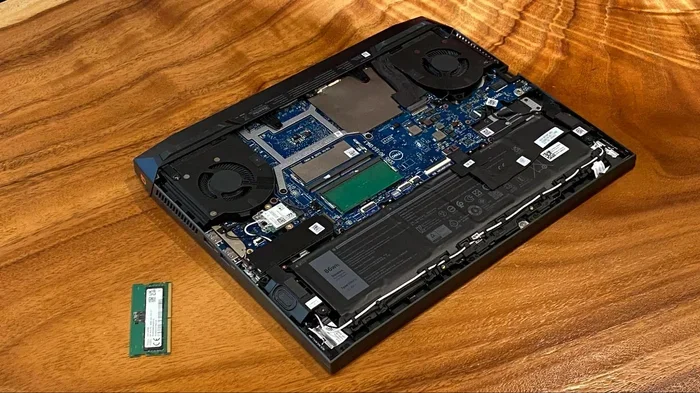
Many people fear that a laptop ram upgrade voids their warranty, but the truth is more nuanced than you might think. In most cases, upgrading your RAM won’t automatically cancel your coverage, especially if you follow the manufacturer’s guidelines. This guide breaks down the real rules, brand-by-brand policies, and practical tips to keep your warranty intact while boosting your laptop’s performance.
You love your laptop. It’s your workhorse, your entertainment hub, and maybe even your lifeline. But over time, you notice it’s slowing down. Apps take forever to load. Multitasking feels impossible. So you start thinking about upgrading your RAM.
But then doubt creeps in. Will a laptop ram upgrade void my warranty? It’s one of the most common questions people ask before opening up their machines. The fear is real. Nobody wants to spend money on an upgrade only to lose their warranty coverage on a completely different part.
The good news? The answer isn’t a simple yes or no. It depends on your laptop brand, your warranty type, and how you do the upgrade. Let’s break it all down so you can make a smart, informed decision.
If you’re not sure whether your laptop even supports a memory upgrade, check out this guide on can you upgrade ram in a laptop to find out before you do anything.
Key Takeaways
- Upgrading RAM doesn’t always void your warranty: The Magnuson-Moss Warranty Act protects consumers in the U.S., meaning manufacturers can’t blanket-void warranties just because you upgraded your memory.
- Brand policies vary: Some brands like Dell and HP have specific rules about self-repair, while others are more lenient.
- Proof of damage matters: A manufacturer must prove your RAM upgrade directly caused the problem to deny a claim.
- DIY upgrades carry some risk: Improper installation can damage components, which may lead to a legitimate warranty denial.
- Professional installation is safer: Having a certified technician handle the upgrade reduces the risk of accidental damage.
- Keep your original RAM: Storing your old RAM sticks helps you revert changes if a warranty issue arises.
- Check your warranty terms first: Always read the fine print before opening your laptop.
📑 Table of Contents
- What Does It Mean to Upgrade Laptop RAM?
- Does a Laptop Ram Upgrade Void Warranty?
- Brand-by-Brand Warranty Policies on RAM Upgrades
- Common Mistakes That Can Void Your Warranty During a RAM Upgrade
- How to Upgrade RAM Safely Without Losing Warranty
- When Should You Pay for Professional RAM Installation?
- The Bottom Line
What Does It Mean to Upgrade Laptop RAM?
Before diving into warranty details, let’s quickly cover what a RAM upgrade actually involves. RAM, or Random Access Memory, is the short-term memory your laptop uses to handle tasks. More RAM means smoother multitasking and faster performance.
Upgrading your RAM means adding new memory sticks or replacing old ones with higher-capacity modules. It’s one of the easiest and most affordable ways to breathe new life into an aging laptop. Most laptops have at least one RAM slot accessible on the bottom of the machine.
The process typically involves:
- Opening the laptop bottom panel
- Locating the RAM slots
- Removing existing sticks (if needed)
- Inserting new RAM modules
- Closing the panel and testing
It sounds simple, and for most people, it is. But the moment you open your laptop, questions about warranty coverage start popping up. That’s where things get tricky.
Does a Laptop Ram Upgrade Void Warranty?
This is the big question. And the honest answer is: it depends. Let’s look at the legal and practical side of things.
The Magnuson-Moss Warranty Act
In the United States, the Magnuson-Moss Warranty Act is a federal law that protects consumers. It states that a manufacturer cannot void your entire warranty just because you performed a self-repair or upgrade. They can only deny coverage for the specific part that was damaged by your actions.
So if you upgrade your RAM and your keyboard stops working six months later, the manufacturer still has to honor the keyboard warranty. They can’t use the RAM upgrade as an excuse to reject your claim.
However, if your RAM upgrade somehow causes damage to the motherboard, that’s a different story. The manufacturer could argue that the upgrade directly caused the problem. This is where things get gray.
When Can a Manufacturer Legally Deny a Claim?
Manufacturers can deny a warranty claim if they can prove that your RAM upgrade directly caused the issue. For example:
- You used incompatible RAM that fried the memory controller
- You installed RAM incorrectly and bent pins on the motherboard
- You damaged other components during the installation process
But here’s the thing: the burden of proof falls on the manufacturer. They need to show a direct link between your upgrade and the failure. In most cases, this is hard to prove.
If you want a detailed walkthrough of the actual upgrade process, this how to upgrade ram in laptop guide covers everything step by step.
Brand-by-Brand Warranty Policies on RAM Upgrades
Not all laptop brands treat RAM upgrades the same way. Let’s look at how some of the major manufacturers handle this issue.
HP and HP Pavilion Laptops
HP’s warranty policy is somewhat flexible. Upgrading RAM generally does not void your HP warranty. The company understands that RAM is a user-serviceable part. However, if HP can prove that your RAM caused damage, they may deny the claim related to that specific component.
For HP Pavilion laptops specifically, the RAM slots are designed for easy user access. This means HP expects users to upgrade memory if needed. If you want brand-specific details, check out the ram upgrade for hp laptop guide.
Dell Laptops
Dell is generally okay with RAM upgrades. Their business-oriented laptops like the Latitude and Precision lines are designed with upgradeability in mind. Dell’s warranty typically covers issues unrelated to your RAM upgrade.
That said, Dell’s consumer models (Inspiron, XPS) may have tighter restrictions. Always check your specific model’s warranty terms before opening the case.
Lenovo Laptops
Lenovo takes a similar approach to Dell. Many Lenovo laptops come with accessible RAM slots. Upgrading memory is generally considered a user action and won’t void the warranty. But again, damage caused by improper installation is not covered.
Lenovo’s gaming line, including the Legion series, is particularly friendly toward upgrades. These laptops are built with enthusiasts in mind.
ASUS Laptops
ASUS allows RAM upgrades without voiding the warranty in most cases. The company designs many of its laptops with user-upgradeable memory. ASUS support has been known to help customers with RAM upgrade questions.
For ASUS Vivobook owners specifically, there’s a dedicated guide available at asus vivobook laptop ram upgrade that walks you through the process safely.
Acer Laptops
Acer’s warranty policy follows industry norms. Upgrading RAM is allowed, but you’re responsible for any damage caused during the process. Acer designs most of its laptops with accessible RAM slots, which signals that upgrades are expected.
If you own an Acer Aspire or Nitro model, the upgrade process is straightforward and well-documented.
Common Mistakes That Can Void Your Warranty During a RAM Upgrade
Even though upgrading RAM is generally safe, certain mistakes can lead to warranty issues. Here are the most common pitfalls to avoid:
Using Incompatible RAM
Not all RAM sticks work with all laptops. Using the wrong type, speed, or voltage can cause system instability or even hardware damage. Always check your laptop’s specifications before purchasing new RAM.
Look for the right DDR type (DDR4, DDR5), speed (MHz), and form factor (SO-DIMM). When in doubt, consult your laptop’s manual or the manufacturer’s website.
Improper Installation
Forcing RAM sticks into slots, bending pins, or using excessive pressure can damage your laptop. Always handle RAM gently and align the notch properly before inserting.
Static electricity is another silent killer. Always ground yourself before touching internal components. Use an anti-static wrist strap if possible.
Skipping the Manual
Every laptop is different. Some have RAM soldered to the motherboard, while others have replaceable slots. Opening a laptop that has soldered RAM won’t do anything, but opening it carelessly could still cause damage.
Always read your laptop’s service manual before attempting any upgrade. Most manufacturers publish these PDFs on their support websites.
Not Keeping Records
This is a simple but often overlooked step. Keep your original RAM sticks in a safe place. Take photos before and after the upgrade. Store your purchase receipts for the new RAM.
If a warranty dispute ever arises, this documentation can be your best friend. It proves that you didn’t cause the problem and that the upgrade was done correctly.
How to Upgrade RAM Safely Without Losing Warranty
Want to boost your laptop’s performance without gambling on your warranty? Follow these proven tips.
Step 1: Read Your Warranty Terms
This is the most important step. Before you do anything, read your laptop’s warranty documentation. Look for any clauses about self-repair, upgrades, or user-serviceable parts. If the language is unclear, call the manufacturer’s support line and ask directly.
Most companies will tell you clearly whether RAM upgrades are allowed. Don’t rely on forum posts or outdated information.
Step 2: Backup Your Data
Before opening your laptop, back up all important files. While a RAM upgrade won’t affect your data, any accident during the process could. Better safe than sorry.
Step 3: Use the Right Tools
You’ll need a small Phillips-head screwdriver and an anti-static wrist strap. Work on a clean, flat surface. Good lighting helps too.
Step 4: Install Carefully
Handle RAM by the edges. Never touch the gold contacts. Align the notch, press firmly but gently, and listen for the click. Once both sticks are in, reseat the bottom panel securely.
Step 5: Test Before Closing
Power on your laptop with the panel open (if safe to do so). Check that the system recognizes the new RAM. Run a memory test tool like MemTest86 to verify everything works correctly.
If you want to understand the cost implications, this cost of ram upgrade on laptop article covers pricing and budget considerations.
Step 6: Keep Everything Organized
Store your old RAM in an anti-static bag. Keep your screws in a small container. Take photos during disassembly. These small habits save headaches later.
When Should You Pay for Professional RAM Installation?
DIY RAM upgrades are rewarding and cost-effective. But sometimes, paying a professional is the smarter choice.
Consider professional installation if:
- Your laptop is still under a premium warranty plan
- You’re uncomfortable opening electronic devices
- Your laptop has a complex or sealed design
- You’re worried about accidental damage
Many electronics stores and repair shops offer RAM installation services for a reasonable fee. The peace of mind is often worth the extra cost, especially if your laptop is expensive or still under warranty.
Some manufacturers even offer official upgrade services. Dell, for instance, has a professional upgrade program for many of its laptop lines. This way, your warranty stays fully intact.
The Bottom Line
So, does a laptop ram upgrade void warranty? In most cases, no. The law and most manufacturer policies protect you as a consumer. Upgrading your RAM is a legitimate way to improve performance, and it shouldn’t cost you your warranty.
The key is to be informed, be careful, and follow the rules. Read your warranty terms, use compatible parts, install carefully, and keep your documentation. If you do all of this, you can upgrade with confidence.
Remember, the goal is to make your laptop faster and more capable. Don’t let fear of warranty issues hold you back from getting the performance boost you deserve. Just be smart about it, and you’ll be just fine.
For more guidance on the upgrade process itself, visit this how to upgrade my laptop ram resource for a complete walkthrough.
Frequently Asked Questions
Will upgrading my RAM automatically void my laptop warranty?
No, upgrading your RAM does not automatically void your laptop warranty. Under the Magnuson-Moss Warranty Act in the U.S., manufacturers cannot void your entire warranty just because you performed a self-repair. They can only deny claims if they prove the RAM upgrade directly caused the specific issue.
Can a manufacturer deny my warranty claim after a RAM upgrade?
Yes, but only if the manufacturer can prove that your RAM upgrade directly caused the problem. Simply having upgraded your RAM is not enough reason for them to deny a claim for an unrelated issue like a broken screen or faulty keyboard.
Is it safer to have a professional install my RAM?
Yes, professional installation is safer if you’re concerned about warranty protection. A certified technician reduces the risk of accidental damage and provides documentation that can support your warranty claim if needed.
What should I do if my laptop has soldered RAM?
If your laptop has soldered RAM, you cannot upgrade it yourself. Attempting to open the laptop unnecessarily could risk damage. Check your laptop’s specifications first and consider professional help or accepting the current memory configuration.
Does removing the original RAM affect my warranty?
Removing your original RAM does not void your warranty by itself. However, if you lose or damage components during removal and cannot restore the original configuration, it may complicate warranty claims. Always keep your original parts safe.
How can I check if my laptop RAM is user-upgradeable?
Check your laptop’s service manual, which is usually available on the manufacturer’s support website. You can also use system information tools like CPU-Z or check your laptop model specifications online to confirm whether the RAM slots are accessible and replaceable.