Do Usb Wall Outlets Draw Power When Not in Use

USB wall outlets can draw a small amount of power even when nothing is connected, a phenomenon known as standby or vampire power. Most modern USB wall adapters use minimal energy in idle mode, typically under 0.5 watts, but older or damaged units may consume more. Understanding how much power your USB outlets use when not in use can help you lower your electricity bill and reduce energy waste in your home.
This is a comprehensive guide about Do Usb Wall Outlets Draw Power When Not In Use.
Key Takeaways
- USB wall outlets draw standby power: Even with no device connected, most USB outlets use a small amount of electricity, usually less than 0.5 watts.
- Vampire power adds up over time: Multiple idle USB chargers across your home can collectively waste noticeable energy over months.
- Older adapters waste more energy: Outdated or damaged USB wall outlets are less efficient and draw more idle power than modern ones.
- Unplugging saves money: Simply unplugging unused USB outlets can reduce your electricity bill by a small but meaningful amount.
- Smart power strips help: Using smart strips with USB ports can automatically cut power to idle devices and chargers.
- USB power delivery varies: The amount of standby power depends on the charger design, wattage, and build quality.
[FEATURED_IMAGE_PLACEHOLDER]
Do USB Wall Outlets Draw Power When Not in Use?
You plug in a USB wall outlet to charge your phone. Once the phone is full, you unplug it and walk away. But here is the question that surprises many people: does that USB wall outlet still use electricity even when nothing is plugged into it?
The short answer is yes. Most USB wall outlets draw a small amount of power even when no device is connected. This is commonly called standby power or vampire power. It is the same reason your TV uses a tiny bit of electricity even when it is turned off.
Now, before you panic, the amount of power is usually very small. A typical modern USB wall outlet uses less than 0.5 watts when idle. But when you add up every USB charger, wall outlet, and adapter in your home, that tiny draw can become a real source of wasted energy. Over a year, all those idle USB outlets can add a few dollars to your electricity bill. Not a fortune, but enough to notice if you are trying to be energy efficient.
In this article, we will break down exactly how much power USB wall outlets use when not in use, why they draw power at all, and what you can do to stop the waste. Whether you are trying to save money or just curious about how your electrical devices work, this guide covers everything you need to know.
Why Do USB Wall Outlets Draw Power When Idle?
It might seem strange that a USB wall outlet uses any power when nothing is plugged in. After all, there is no device to charge. So why does it still draw electricity?
The Power Supply Stays Active
Every USB wall outlet has a small internal power supply. This power supply converts the high-voltage AC power from your wall into the low-voltage DC power that USB devices need. Even when nothing is connected, this power supply stays active and ready. It is essentially waiting for a device to plug in so it can start delivering power immediately.
This is similar to how a laptop charger works. If you plug your laptop charger into the wall but do not connect the laptop, the charger still draws a small amount of power. The same principle applies to USB wall outlets.
Indicator Lights and Circuits
Many USB wall outlets have small LED indicator lights. These lights show that the outlet is receiving power. While the LED itself uses very little energy, it does contribute to the overall idle draw. Some outlets also have tiny circuits that monitor for a connected device, and these circuits need a small amount of power to function.
Transformer Losses
USB wall outlets contain small transformers that step down the voltage from your wall outlet to the 5 volts that USB devices use. Transformers are not 100% efficient. Even with no load connected, some energy is lost as heat in the transformer core and windings. This is called no-load loss, and it is a normal part of how transformers work.
How Much Power Do USB Wall Outlets Use When Not in Use?
Now that you know why USB wall outlets draw power, let us talk numbers. How much power are we actually talking about?
Typical Standby Power Draw
Most modern USB wall outlets use between 0.1 and 0.5 watts when nothing is plugged in. To put that in perspective, a single idle USB outlet uses about as much power as a small LED night light. Over 24 hours, it uses roughly 0.012 kilowatt-hours (kWh). Over a full year, that adds up to about 10.8 kWh per outlet.
At an average electricity rate of $0.13 per kWh, one idle USB outlet costs about $1.40 per year. Not bad on its own. But here is where it gets interesting.
The Cost Adds Up Fast
The average home has multiple USB wall outlets. You might have one in the bedroom, one in the living room, one in the kitchen, and maybe one in the office or garage. If you have five USB outlets that are all idle, you are looking at about 7 kWh per year and roughly $7 in electricity costs. Now multiply that by every house in your neighborhood, and the total waste becomes significant.
Compare this to devices like case fans or other USB-powered accessories that draw more power during use. A typical case fan uses about 2 to 3 watts when running, which is much more than the idle draw of a USB outlet. But the key point is that idle power is constant, meaning it never turns off unless you physically unplug the outlet.
Older vs. Newer USB Outlets
Not all USB wall outlets are created equal. Older models, especially those made before 2015, tend to be much less efficient. They may draw 1 to 2 watts even when idle. Newer models that meet modern energy efficiency standards are designed to minimize standby power. Some high-quality USB outlets use less than 0.1 watts when idle, which is almost negligible.
| Type of USB Outlet | Idle Power Draw | Annual Cost (Est.) |
|---|---|---|
| Modern USB outlet (2018+) | 0.1 to 0.3 watts | $0.50 to $1.50 |
| Standard USB outlet (2010-2017) | 0.3 to 0.5 watts | $1.50 to $2.50 |
| Older USB outlet (pre-2010) | 0.5 to 2.0 watts | $2.50 to $10.00 |
| Damaged or faulty USB outlet | 2.0+ watts | $10.00+ |
What Is Vampire Power and Why Does It Matter?
You have probably heard the term vampire power before. It refers to the electricity that devices consume even when they are turned off or not actively being used. USB wall outlets are one of the most common sources of vampire power in a home.
Vampire power matters for two main reasons. First, it costs you money. Even small amounts of wasted energy add up over time. Second, it wastes natural resources. Every watt of electricity you do not use means less demand on power plants and a smaller carbon footprint for your household.
The good news is that vampire power from USB outlets is relatively easy to address. A few simple changes can eliminate most of the wasted energy.
Common Sources of Vampire Power in Homes
- USB wall chargers left plugged in with nothing connected
- Power strips with indicator lights that stay on 24/7
- TVs and set-top boxes that use standby mode
- Game consoles in rest mode
- Coffee makers with digital clocks
- Laptop power adapters plugged into the wall
How to Reduce Standby Power from USB Wall Outlets
If you want to stop your USB wall outlets from drawing power when not in use, you have several practical options. None of them require a lot of effort, and most can save you a small amount of money over time.
Option 1: Unplug When Not in Use
The simplest solution is to unplug your USB wall outlet when you are not using it. If you only charge your phone at night, unplug the outlet during the day. This completely eliminates standby power draw. It takes just a few seconds and costs nothing.
Of course, this is not always convenient. You might forget to plug it back in when you need it. That is where other solutions come in handy.
Option 2: Use a Smart Power Strip
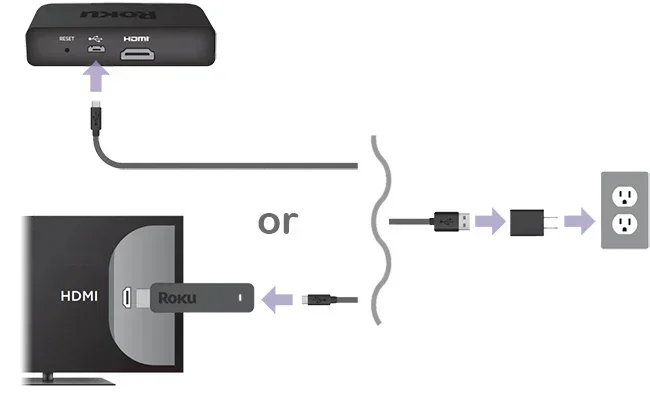
A smart power strip can detect when a device is not drawing power and automatically cut the electricity supply. Some smart strips have USB ports built in. When the USB device is fully charged or disconnected, the strip stops sending power to the USB port.
This is a great solution if you have multiple USB outlets on a single power strip. You get the convenience of leaving everything plugged in while still eliminating standby power waste.
Option 3: Upgrade to Energy-Efficient USB Outlets
When it is time to replace your USB wall outlets, look for models that are designed for low standby power. Many modern USB outlets use advanced power management circuits that reduce idle draw to almost zero. These outlets are not much more expensive than standard models, and they pay for themselves over time through energy savings.
Option 4: Use a USB Hub with a Power Switch
If you use a USB hub to connect multiple devices, consider getting one with an on/off switch. You can turn the hub off when you are not using any of the connected devices. This cuts power to all devices at once and eliminates standby draw from the hub itself.
Does USB Power Delivery Affect Standby Power?
The type of USB power delivery standard your wall outlet uses can also affect how much standby power it draws. Newer USB standards like USB Power Delivery (USB PD) are designed to be more efficient, both during active charging and in standby mode.
USB 2.0 vs. USB 3.0 vs. USB PD
USB 2.0 ports deliver up to 2.5 watts of power. USB 3.0 ports can deliver up to 4.5 watts. USB PD ports can deliver up to 100 watts. More powerful ports generally have more sophisticated power management circuits, which can actually reduce standby power draw compared to simpler, older designs.
Interestingly, some high-wattage USB PD chargers use even less standby power than basic 5-watt chargers. This is because they are designed with more advanced semiconductor technology that minimizes idle losses.
USB-C vs. USB-A Outlets
USB-C outlets tend to be more energy efficient than older USB-A outlets. The USB-C standard was designed with modern efficiency in mind, and many USB-C wall outlets include power management features that reduce standby consumption. If you are still using older USB-A wall outlets, upgrading to USB-C can help reduce your home’s overall energy waste.
Common Mistakes People Make with USB Wall Outlets
There are a few common mistakes that cause people to waste more energy than they need to with their USB wall outlets. Avoiding these simple errors can help you save both energy and money.
Leaving Chargers Plugged In 24/7
The most common mistake is leaving USB chargers plugged into the wall all day and every day. Even if nothing is connected, the charger still draws standby power. Over weeks and months, this adds up. Get into the habit of unplugging chargers when you are not using them.
Using Damaged or Faulty Outlets
A damaged USB wall outlet can draw significantly more power than a healthy one. If your outlet is warm to the touch, makes a buzzing sound, or has a damaged cable, replace it immediately. A faulty outlet is not just wasting energy; it can also be a fire hazard.
Buying the Cheapest Option
Very cheap USB wall outlets often use low-quality components that are less efficient. They may draw more standby power and could also pose safety risks. Spending a little more on a quality USB outlet from a reputable brand is worth it for both energy savings and safety.
Ignoring Multiple Idle Outlets
One idle USB outlet does not use much power. But most homes have several. People often ignore the cumulative effect of multiple idle outlets. Taking a few minutes to audit your home and unplug unused outlets can make a real difference.
Expert Insights on USB Outlet Power Draw
Energy experts agree that standby power from USB outlets is a small but real source of household energy waste. According to the U.S. Department of Energy, vampire power accounts for 5 to 10 percent of total residential electricity use. While USB outlets are only a small part of that, addressing them is an easy and free way to reduce your energy footprint.
Electrical engineers also point out that the design of the USB outlet matters a lot. Quality manufacturers invest in better power management circuits that minimize idle draw. When shopping for a USB wall outlet, look for ones that are Energy Star certified or meet modern efficiency standards. These products are tested to ensure they waste as little energy as possible when not in active use.
One expert tip is to use a kill-a-watt meter to measure the actual power draw of your USB outlets. These inexpensive devices plug into your wall and show you exactly how many watts each device uses. You might be surprised to see how much standby power your USB outlets are consuming. This simple test can help you identify which outlets are worth unplugging or replacing.
Conclusion
So, do USB wall outlets draw power when not in use? Yes, they do. But the good news is that the amount is very small for modern outlets. A single idle USB wall outlet uses less than half a watt, which costs roughly a dollar or less per year. The real issue comes when you have multiple idle outlets across your home, or when you are using older, inefficient models.
The best way to deal with standby power from USB outlets is simple: unplug them when you are not using them, upgrade to energy-efficient models, and consider using smart power strips. These small changes can help you save energy, reduce your electricity bill, and lower your environmental impact.
Take a look around your home right now. How many USB wall outlets are plugged in but not doing anything? Unplugging just a few of them can make a real difference. Start today and see the impact for yourself.
Frequently Asked Questions
Can I leave my USB wall outlet plugged in all the time?
Yes, you can leave a modern USB wall outlet plugged in all the time. The standby power draw is very low, usually less than 0.5 watts. However, if you want to save energy and reduce your electricity bill, it is best to unplug the outlet when you are not actively using it.
Is it dangerous to leave USB chargers plugged in when not in use?
Generally, it is not dangerous. Modern USB chargers are designed with safety features that prevent overheating and electrical faults. However, damaged or low-quality chargers can pose a fire risk. Always inspect your USB outlets for signs of wear and replace any that look damaged.
How can I measure the power draw of my USB wall outlet?
You can use a simple device called a kill-a-watt meter. Plug the meter into your wall outlet, then plug your USB charger into the meter. The meter will display the exact wattage being drawn, including standby power. This is a great way to see how much energy your USB outlets waste when idle.
Do all USB wall outlets have the same standby power draw?
No, they do not. Standby power draw varies depending on the design, quality, and age of the outlet. Newer, energy-efficient models use less than 0.1 watts, while older or damaged outlets can draw 2 watts or more. Always check the specifications before purchasing a USB wall outlet.
Will unplugging USB outlets really save me money?
Yes, it will. While one idle USB outlet only costs about $1 per year, multiple outlets add up. If you unplug five idle USB outlets, you could save around $5 per year. Over several years, that adds up. Plus, you are reducing your overall energy consumption, which helps the environment.
What is the difference between standby power and active power?
Standby power is the small amount of electricity a device uses when it is turned off or idle but still plugged in. Active power is the electricity the device uses when it is actively working, like charging a phone. USB wall outlets use very little standby power but more power when actively charging a connected device.