Does Ethernet to Usb Exist
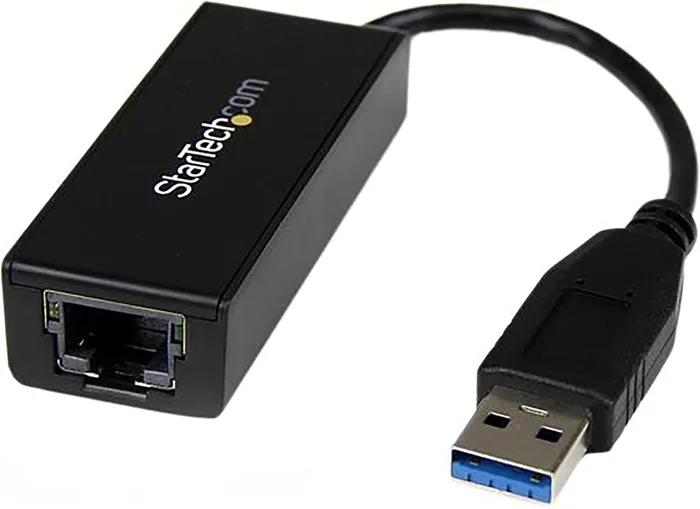
Yes, Ethernet to USB adapters absolutely exist and they are one of the simplest ways to add a wired internet connection to any device. A USB Ethernet adapter lets you plug an Ethernet cable into a USB port and get a stable, fast network connection. Whether you have a laptop, a tablet, or a desktop without a built-in Ethernet port, these tiny devices solve the problem in seconds.
This is a comprehensive guide about Does Ethernet To Usb Exist.
Key Takeaways
- Ethernet to USB adapters are real and widely available in many shapes and speeds.
- USB Ethernet adapters are plug and play and work on most laptops and desktops without extra setup.
- USB 3.0 and USB-C adapters offer gigabit speeds, making them great for gaming and streaming.
- A wired Ethernet connection is more stable than Wi-Fi, reducing lag and packet loss.
- Not all adapters are the same — check chipsets like Realtek and your device’s USB version for the best match.
- Using a USB Ethernet adapter is simple, but avoiding common mistakes ensures the best performance.
[FEATURED_IMAGE_PLACEHOLDER]
Have you ever sat down at a desk and realized your laptop has no Ethernet port? Or maybe you are at a friend’s house and the Wi-Fi keeps dropping. You plug in an Ethernet cable, but there is no port to use. This is where the question comes up — does Ethernet to USB exist? The short answer is yes, and it has been around for a long time. A USB Ethernet adapter is a small device that bridges the gap between your USB port and an Ethernet cable. It gives you a wired internet connection when your device does not have a built-in Ethernet jack.
Many people assume that wired internet is a thing of the past. They think Wi-Fi handles everything now. But wired connections still offer real advantages. They provide lower latency, more stable speeds, and fewer dropped packets. If you game online, work from home, or stream 4K content, a USB to Ethernet converter can make a huge difference. In this guide, we will walk through everything you need to know about Ethernet to USB adapters. We will cover how they work, the different types, which one to buy, and common mistakes to avoid.
What Is an Ethernet to USB Adapter?
A USB Ethernet adapter is a small dongle or device that connects to your computer through a USB port and provides an Ethernet jack on the other end. You plug the adapter into your USB port, then plug an Ethernet cable into the adapter. That is it. You now have a wired network connection. These adapters come in many forms, from tiny nano dongles to larger units with extra USB ports built in.
How Does It Work?
The adapter contains a small network chip, usually made by companies like Realtek or Intel. This chip handles the communication between your USB port and the Ethernet network. When you plug the adapter in, your operating system recognizes it as a network device. Most modern systems install the driver automatically. You just plug it in and it works. This is why people love plug and play Ethernet adapters. There is no need to install software or configure complicated settings.
The adapter takes the data from your USB connection and converts it into network signals that travel through the Ethernet cable. It also does the reverse, converting network signals back into USB data. This process happens fast, especially with USB 3.0 and USB-C adapters. The speed of your connection depends on the adapter’s capabilities and the USB port you use.
Why Do People Need Ethernet to USB Adapters?
There are many reasons someone might need a USB to Ethernet converter:
- Laptops without Ethernet ports: Most modern laptops are thin and light. They dropped the Ethernet port to save space. A USB adapter brings it back.
- Better Wi-Fi alternatives: Wi-Fi is convenient but not always reliable. A wired connection gives you a stable network for work or gaming.
- Travel and remote work: Hotel rooms and offices often have Ethernet ports but no Wi-Fi. A small adapter solves this instantly.
- Desktop upgrades: Some desktops come with only USB ports and no Ethernet jack. An adapter adds network capability easily.
- Network troubleshooting: IT professionals use USB Ethernet adapters to test and diagnose network issues on devices without built-in Ethernet.
Types of Ethernet to USB Adapters
Not all Ethernet to USB adapters are the same. They differ in speed, port type, and design. Understanding the types helps you choose the right one for your needs.
USB-A Ethernet Adapters
These are the most common type. They plug into the standard rectangular USB-A port found on almost all computers. USB-A Ethernet adapters come in different speed tiers:
- 10/100 Mbps adapters: These are the basic, budget-friendly options. They handle everyday browsing and email with no problem.
- Gigabit (10/100/1000 Mbps) adapters: These offer much faster speeds. They are ideal for streaming, gaming, and large file transfers.
When shopping for a USB Ethernet adapter, look for gigabit support if your internet plan is faster than 100 Mbps. A 10/100 adapter will bottleneck your speed.
USB-C Ethernet Adapters
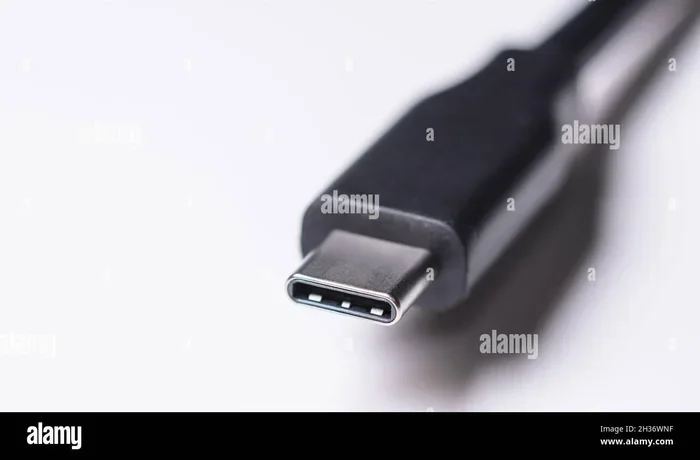
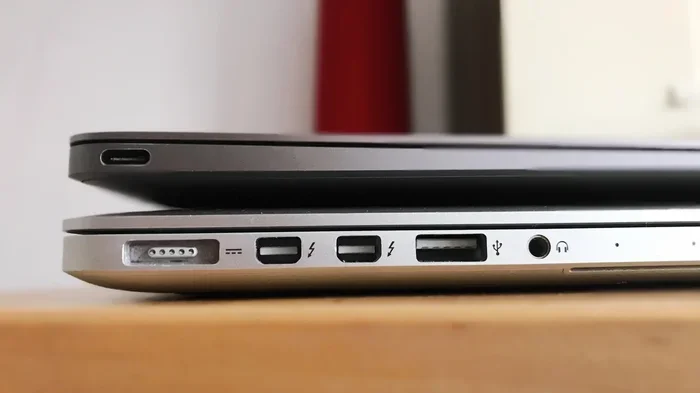
USB-C adapters connect to the newer oval-shaped USB-C port. They are popular with modern laptops like MacBooks and Chromebooks. USB-C Ethernet adapters often support USB 3.1 or USB 3.2 speeds, which means faster data transfer. Many also carry power, so you can charge your laptop while staying connected to the network.
Some USB-C adapters are part of a larger USB hub. These hubs offer multiple ports, including Ethernet, USB-A ports, HDMI, and SD card slots. They are great for people who need many connections in one device.
Nano and Portable Adapters
Nano adapters are tiny enough to stay plugged into your laptop at all times. They are perfect for people who travel often. You do not need to carry a separate adapter. Just leave it in your USB port and go. These adapters are small but still offer solid speeds, usually gigabit.
Does Ethernet to USB Work Well for Gaming?
Gamers often wonder if a USB Ethernet adapter can match the performance of a built-in Ethernet port. The answer is yes, in most cases. A quality gigabit USB Ethernet adapter provides a wired connection that is just as stable as any internal network card. The key is choosing an adapter with a good chipset and a USB 3.0 or USB-C connection.
Here is why wired connections matter for gaming:
- Lower ping: Wired connections have less latency than Wi-Fi. This means faster response times in competitive games.
- Stable connection: Wi-Fi can drop packets or fluctuate in speed. Ethernet gives you a consistent, steady connection.
- No interference: Wi-Fi signals can be disrupted by walls, other devices, and neighboring networks. Ethernet cables do not have this problem.
One thing to watch out for is USB port sharing. If you plug an Ethernet adapter into a USB hub that also connects to a USB hard drive, you might see slower speeds. For the best gaming performance, plug the adapter directly into your computer’s USB port.
If you are curious about other connectivity options, check out our guide on M.2 NVMe SSD to USB 3.1 adapters for more on how USB adapters expand your device capabilities.
How to Choose the Right Ethernet to USB Adapter
Buying the right adapter is easier when you know what to look for. Here are the key factors to consider:
Check Your USB Port Type
First, identify the USB ports on your device. Do you have USB-A or USB-C? Some adapters are universal and work with both, but most are designed for one type. If your laptop only has USB-C ports, you need a USB-C Ethernet adapter. Using a USB-A adapter with a USB-A to USB-C cable can work, but a direct USB-C adapter is more reliable.
Speed Matters
Match the adapter speed to your internet plan. If you have a 500 Mbps internet plan, a 10/100 adapter will limit you to 100 Mbps. Go for a gigabit adapter in this case. If your internet is slower, a basic 10/100 adapter might be enough. But gigabit adapters are usually only slightly more expensive, so they are a smart choice for future-proofing.
Chipset Quality
The chipset inside the adapter determines its performance and compatibility. Realtek chipsets are the most common and widely supported. Intel chipsets offer excellent performance but are found in fewer, often pricier adapters. Always check the chipset before buying. A good chipset means better driver support and fewer connection issues.
Build Quality and Portability
Think about how you will use the adapter. If you travel, a nano adapter that stays in your laptop is ideal. If you work at a desk, a larger adapter with an extra USB port can be useful. Build quality also matters. Cheap adapters with plastic casings can break easily. Look for metal-bodied adapters for durability.
For more on USB connectivity solutions, you might find our article on NVMe SSD to USB adapters helpful for understanding the broader USB adapter ecosystem.
Common Mistakes When Using Ethernet to USB Adapters
Even though these adapters are simple to use, people make mistakes that hurt performance. Here are some to avoid:
Using a USB 2.0 Port with a Gigabit Adapter
This is the most common mistake. A USB 2.0 port has a maximum speed of 480 Mbps. Even the best gigabit Ethernet adapter cannot reach its full potential through USB 2.0. Always plug your adapter into a USB 3.0 or USB-C port for the best speeds. If you are unsure, check your computer’s ports or look up your model online.
Ignoring Driver Updates
Most adapters work right out of the box, but driver updates can fix bugs and improve performance. Visit the manufacturer’s website and download the latest driver for your adapter model. This is especially important for Realtek-based adapters, which sometimes need manual driver installation on older operating systems.
Buying the Cheapest Adapter
A $5 adapter might seem like a great deal, but it often comes with a low-quality chipset and poor build quality. These adapters overheat, drop connections, and slow down your network. Spending a little more on a reputable brand pays off in reliability and speed. Look for adapters from well-known brands or ones with good user reviews.
Not Checking Operating System Compatibility
Most adapters work on Windows, macOS, and Linux. But some adapters only support specific versions. For example, an adapter might work on Windows 10 and 11 but not on Windows 7. Check the compatibility list before you buy, especially if you use an older operating system.
Expert Insights on Ethernet to USB Connectivity
Networking professionals agree that a wired connection is superior to Wi-Fi for most tasks. A USB Ethernet adapter brings that wired reliability to devices that lack a built-in Ethernet port. The technology is mature and dependable. You do not need to worry about compatibility or performance issues with a quality adapter.
One expert tip is to always keep a small Ethernet adapter in your laptop bag. You never know when you will need a wired connection at a hotel, office, or conference. A nano adapter takes up almost no space and can save you from frustrating Wi-Fi issues. If you are interested in how USB adapters fit into the broader connectivity landscape, our article on M.2 NVMe SSD and USB connectivity explores more ways USB adapters expand your device options.
Another tip from IT professionals is to use a short Ethernet cable with your adapter. Longer cables can cause slight signal loss, especially at higher speeds. A cable that is 1 to 3 feet long is perfect for a desk setup. If you need a longer run, look for a high-quality Cat6 or Cat6a cable.
If you want to explore more about USB-based accessories, our guide on how to get extra RAM on a laptop with USB covers other creative uses for USB connectivity.
Conclusion
So, does Ethernet to USB exist? Absolutely. A USB Ethernet adapter is a simple, affordable, and effective way to add a wired internet connection to any device with a USB port. Whether you need it for gaming, work, or just a more stable connection, there is an adapter that fits your needs. The key is choosing the right type, checking your USB port version, and avoiding common mistakes like using a USB 2.0 port with a gigabit adapter.
These adapters have come a long way. They are smaller, faster, and more reliable than ever. A quality Ethernet to USB converter can deliver gigabit speeds with no fuss. Next time you face a device without an Ethernet port, you know exactly what to do. Grab a USB Ethernet adapter and enjoy the benefits of a wired connection.
Wired internet is not dead. It is just a USB adapter away. Make the smart choice and upgrade your connectivity today.
Frequently Asked Questions
Can I use an Ethernet to USB adapter on any laptop?
Yes, most Ethernet to USB adapters work on any laptop with a USB port. Whether you have Windows, macOS, or ChromeOS, the adapter should be recognized automatically. Just make sure your laptop has a USB-A or USB-C port that matches your adapter type.
Will a USB Ethernet adapter slow down my internet speed?
A good USB Ethernet adapter will not slow down your speed. In fact, it can give you a faster and more stable connection than Wi-Fi. The key is to use a USB 3.0 or USB-C port and choose a gigabit adapter that matches your internet plan speed.
Do I need to install drivers for a USB Ethernet adapter?
Most modern adapters are plug and play and install drivers automatically. However, some adapters may require you to download the latest driver from the manufacturer’s website. This is especially true for older operating systems or certain Realtek-based adapters.
Can I use an Ethernet to USB adapter for streaming 4K video?
Yes, a gigabit USB Ethernet adapter handles 4K streaming easily. A wired connection provides a stable, uninterrupted stream without the buffering or drops that can happen with Wi-Fi. Just make sure your internet plan speed is at least 25 Mbps for smooth 4K playback.
Are USB-C Ethernet adapters faster than USB-A Ethernet adapters?
USB-C adapters can support faster speeds because they use newer USB standards like USB 3.1 and USB 3.2. USB-A adapters are also available in gigabit speeds, but USB-C is the better choice for modern laptops and future-proofing your setup.
How much does a good Ethernet to USB adapter cost?
A quality gigabit USB Ethernet adapter typically costs between $10 and $30. Budget adapters under $10 may work but often have lower build quality and slower chipsets. Spending a little more ensures better performance and long-term reliability.