Does Hdmi Over Ethernet Need Power
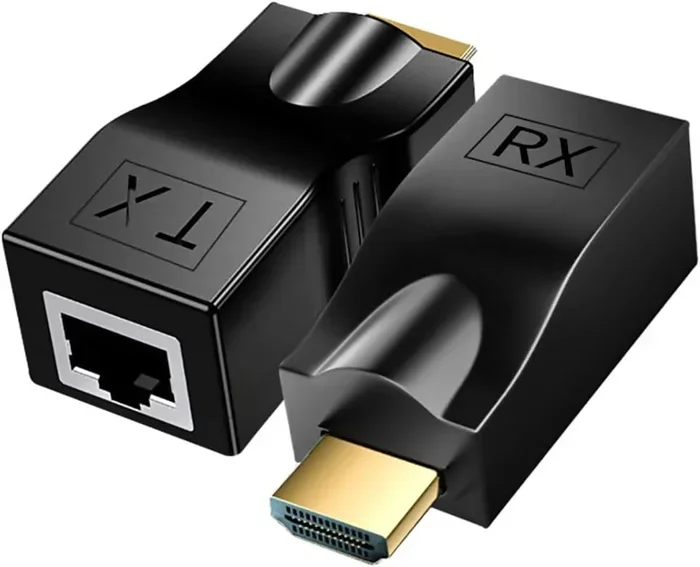
Yes, most HDMI over Ethernet extenders need power to work properly. These devices use a transmitter and receiver pair to send HDMI signals through Ethernet cables, and both units typically require a power source. However, some passive extenders and bus-powered options exist that draw power directly from the connected device.
If you have ever tried to run an HDMI cable across a large room or building, you know the frustration. Standard HDMI cables have a limited range, usually around 50 feet. Beyond that, the signal starts to degrade. This is where HDMI over Ethernet comes in. But a common question comes up: does HDMI over Ethernet need power?
The short answer is yes, in most cases. HDMI extenders that use Ethernet cables typically need a power source to boost and transmit the signal. But the full story is more interesting than that. There are different types of extenders, different power needs, and different setups that might change what you need. Let me walk you through everything you should know.
HDMI over Ethernet is a clever technology. It takes your HDMI signal and converts it into a format that can travel through an Ethernet cable. You use a transmitter unit at the source device and a receiver unit at the display. These two units work together to send high-quality audio and video over much longer distances than a standard HDMI cable can handle.
The setup is pretty simple. You plug the transmitter into your source device, like a laptop or a gaming console. Then you connect an Ethernet cable between the transmitter and receiver. Finally, you plug the receiver into your TV or monitor. It is a great solution for home theaters, office setups, and classroom presentations.
Key Takeaways
- Most HDMI over Ethernet extenders need external power: The transmitter and receiver units usually require a USB or wall adapter power source.
- Power draw is typically low: Most HDMI extenders use between 1 and 5 watts, making them very energy efficient.
- Passive extenders exist but have limits: Some bus-powered options work for short distances without a separate power adapter.
- Power matters for signal quality: Without adequate power, you may experience signal drops, low resolution, or no display at all.
- Check your setup before buying: Consider cable length, resolution needs, and available power sources when choosing an extender.
- HDMI over Ethernet is a great alternative: It lets you run HDMI signals much farther than standard cables allow.
- Always check the product specs: Not all extenders are the same, and power requirements vary by brand and model.
📑 Table of Contents
Do HDMI Over Ethernet Extenders Need Power?
The majority of HDMI over Ethernet extenders on the market do need power. Both the transmitter and the receiver unit usually require their own power source. This power is what allows the extender to convert the HDMI signal and push it through the Ethernet cable without losing quality.
Most extenders come with a USB cable for power. You can plug them into a USB port on your TV, laptop, or use a wall adapter. Some models include a power adapter in the box right out of the box. The power requirement is usually very small, so you do not need to worry about your electricity bill going up.
Why Do They Need Power?
HDMI signals carry a lot of data. When you send that data over a long Ethernet cable, the signal needs help to stay strong. The extender acts like a signal booster. It takes the HDMI input, converts it, sends it through the Ethernet cable, and then converts it back at the other end. All of that conversion takes energy.
Without power, the extender simply cannot process the signal. You would get no picture or a very poor-quality image. This is different from a simple HDMI cable, which carries the signal passively. An extender is an active device, and active devices need power to work.
How Much Power Do HDMI Over Ethernet Extenders Use?
Most HDMI extenders use between 1 and 5 watts of power. That is very little. To put it in perspective, your laptop charger might deliver 45 to 65 watts, and how much power does a laptop use when plugged in varies quite a bit depending on the model and workload. An HDMI extender uses only a tiny fraction of that.
Here is a quick breakdown of typical power usage:
- Basic extenders (1080p): Around 1 to 2 watts
- Mid-range extenders (4K at 30Hz): Around 2 to 4 watts
- Premium extenders (4K at 60Hz): Around 4 to 5 watts
- Active optical HDMI extenders: Around 3 to 6 watts
The power draw depends on the resolution you are running and the quality of the extender. Higher resolutions need more processing power, which means more electricity. But even at the higher end, the power cost is negligible.
Types of HDMI Over Ethernet Extenders
Not all HDMI extenders are the same. There are a few different types, and each one has different power needs. Understanding these types helps you choose the right one for your setup.
Active HDMI Extenders
Active extenders are the most common type. They need external power to work. These extenders offer the best signal quality and the longest range. You can typically get 100 to 300 feet of HDMI signal over a standard Ethernet cable with an active extender.
Active extenders are great for situations where you need to send a signal across a large room or between buildings. They support high resolutions, including 4K, and they maintain good image quality over long distances.
Passive HDMI Extenders
Passive extenders do not need a separate power source. Instead, they draw power directly from the HDMI port on your source device. This is called bus powering. However, passive extenders have significant limitations.
They usually only work for short distances, around 30 to 50 feet. The signal quality also drops faster with passive extenders compared to active ones. If you just need to stretch an HDMI cable a bit further and your device can provide enough power, a passive extender might work for you.
USB-Powered vs. Wall Adapter Extenders
Some HDMI over Ethernet extenders use a USB cable for power. This is very convenient because you can plug them into a USB port on your TV, laptop, or gaming console. Others come with a wall adapter that plugs into a standard outlet.
USB-powered extenders are great for keeping your setup clean and simple. You do not need an extra power brick sitting on the floor. But make sure your USB port can provide enough current. A standard USB 2.0 port provides 500 mA, while USB 3.0 provides 900 mA. Some extenders need more power than a USB port can deliver.
When HDMI Over Ethernet Extenders Might Not Need Power
There are a few situations where you might get away without powering your HDMI extender separately. Understanding these helps you plan your setup better.
Bus-Powered Setups
As I mentioned, some passive or bus-powered extenders draw power from the source device’s HDMI port. If you are connecting a device with a strong HDMI output, like a desktop computer or a dedicated media player, the HDMI port might provide enough power to run a simple extender.
However, this approach has limits. Not all devices can supply enough power through their HDMI ports. And if your source device is a streaming stick or a thin laptop, it may not have the power to spare. In those cases, you will need an active extender with its own power source.
Short Distance Setups
If you only need to extend your HDMI signal by 10 to 30 feet, you might not need an extender at all. A high-quality active HDMI cable can handle that distance without any power requirements. These cables have built-in signal amplification but do not need a separate power source.
For distances beyond that, an HDMI over Ethernet extender becomes the better choice. The Ethernet cable carries the signal much farther, and the extender ensures the quality stays high.
How to Choose the Right HDMI Over Ethernet Extender
Picking the right extender can be confusing with so many options on the market. Here are the key things to consider.
Resolution and Bandwidth
Think about what resolution you need. If you only watch 1080p content, a basic extender will do the job. If you want 4K quality, you need an extender that supports higher bandwidth. More bandwidth means more power consumption, so make sure your power source can handle it.
Cable Length
The length of your Ethernet cable matters a lot. Cat5e and Cat6 cables can carry HDMI signals up to about 300 feet, depending on the extender. But longer cables mean more signal loss, which means the extender has to work harder. This can increase power needs slightly.
Power Source Availability
Before you buy an extender, look at where you plan to install it. Is there a nearby USB port? A wall outlet? If you are mounting your TV on a wall, a USB-powered extender might be the easiest solution. If you are setting up in a room with limited outlets, look for a low-power model.
Build Quality and Brand Reputation
Cheap extenders often have poor power management. They might overheat or fail to deliver a stable signal. Spending a little more on a reputable brand saves you headaches later. Look for extenders with good reviews and solid build quality.
Common HDMI Over Ethernet Extender Problems
Even with the right extender, you might run into some issues. Here are the most common ones and how to fix them.
No Signal or Intermittent Signal
This is the most common problem. Usually, it happens because the extender is not getting enough power. Try plugging the extender into a different USB port or using the wall adapter instead. Also check that your Ethernet cable is not damaged.
Poor Image Quality
If your picture looks fuzzy or has artifacts, the signal might be weak. This can happen if your Ethernet cable is too long or of low quality. Try using a shorter Cat6 cable or moving the extender closer to the source device.
Extender Overheating
Some extenders run warm, especially during long sessions. This is normal to a degree. But if the extender feels too hot to touch, it might be drawing too much power or not getting enough ventilation. Make sure the extender has air flow around it and is not sitting in a closed cabinet.
Final Thoughts
So, does HDMI over Ethernet need power? In almost all cases, yes. The vast majority of HDMI extenders need a power source to boost and convert your signal properly. The good news is that the power draw is very small, usually between 1 and 5 watts.
Whether you choose an active extender with a wall adapter or a USB-powered model, make sure your power source can meet the requirements. Check the product specifications before you buy, and always consider your setup distance and resolution needs.
HDMI over Ethernet is a fantastic solution for extending your display signal. It is reliable, affordable, and easy to set up. With the right extender and a good power source, you can send high-quality HDMI signals across a building with confidence.
If you are setting up a home theater or a complex office display system, remember that your GPU fans always spin when your system is active, and your connected display devices also draw power. Planning for all your power needs ahead of time makes for a much smoother setup.
Frequently Asked Questions
Can I use HDMI over Ethernet without any power source?
In most cases, no. HDMI over Ethernet extenders are active devices that need power to convert and boost the signal. However, some passive extenders can draw power directly from the source device’s HDMI port for very short distances.
How far can I run HDMI over Ethernet with an extender?
Most HDMI over Ethernet extenders can send a signal up to 100 to 300 feet using a standard Cat5e or Cat6 Ethernet cable. The exact distance depends on the extender model and the quality of your Ethernet cable.
Do I need a special Ethernet cable for HDMI over Ethernet extenders?
No, you do not need anything special. Standard Cat5e or Cat6 Ethernet cables work well with most HDMI extenders. Cat6 cables offer slightly better performance and can handle longer distances more reliably.
Will an HDMI over Ethernet extender affect my image quality?
A good quality extender will maintain excellent image quality, including 4K resolution. Cheap or underpowered extenders might reduce quality or cause signal drops. Always check the extender’s specs and reviews before purchasing.
Can I power my HDMI extender from a USB port on my TV?
Yes, many HDMI extenders can be powered through a USB port on your TV or display. Just make sure your TV’s USB port provides enough current. If the extender flickers or loses signal, try using the included wall adapter instead.
Are HDMI over Ethernet extenders expensive?
Not at all. Most basic HDMI over Ethernet extenders cost between $20 and $50. Higher-end models that support 4K at 60Hz may cost $50 to $150. They are a very affordable way to extend your HDMI signal over long distances.
=== CONCLUSION ===
HDMI over Ethernet extenders are a simple and effective way to send high-quality video and audio over long distances. The answer to the main question is clear: yes, most HDMI over Ethernet extenders need power to function. Whether that power comes from a wall adapter, a USB port, or the source device itself, make sure your setup has a reliable power source.
By understanding your power needs and choosing the right extender for your situation, you can enjoy a seamless, high-quality display setup no matter how far apart your devices are. Take the time to plan your setup, check your power options, and invest in a quality extender. Your viewing experience will thank you.