Does It Matter Which Hdmi Cable I Use
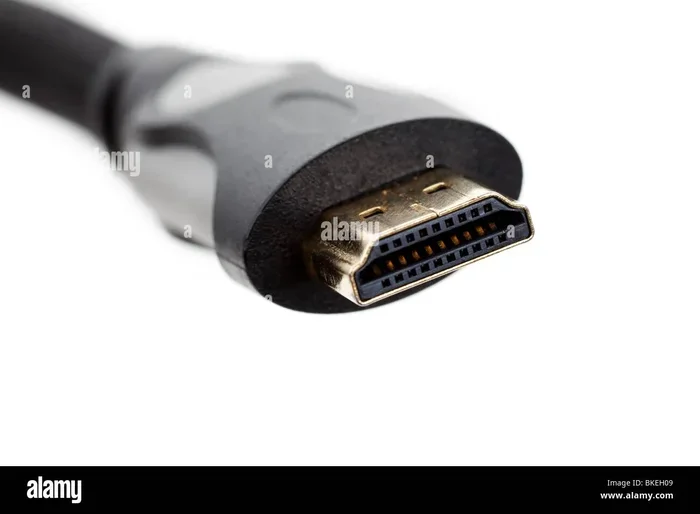
Not all HDMI cables are created equal. The cable you choose can impact your display resolution, refresh rate, and audio quality. Understanding the differences between HDMI 2.0 and HDMI 2.1 cables helps you avoid buyer’s remorse and get the best picture from your devices.
Key Takeaways
- HDMI cable versions matter: HDMI 2.0 and HDMI 2.1 support different bandwidths and features.
- Cable quality affects performance: Cheap cables may cause signal loss, especially at higher resolutions.
- Length and build quality count: Longer cables and poor shielding can degrade your signal.
- Not all cables are labeled correctly: Look for certified cables that match your device needs.
- Premium cables are not always better: You often pay for branding, not performance.
- Match your cable to your use case: Gaming, 4K streaming, and basic setups need different cables.
📑 Table of Contents
Does It Matter Which HDMI Cable I Use?
You plug in an HDMI cable. The screen turns on. Everything works. So does it really matter which cable you bought? The short answer is yes. The longer answer is that it depends on what you are trying to do. A cheap basic cable might work fine for watching standard videos. But if you are gaming in 4K or setting up a home theater, the wrong cable can cause serious problems.
HDMI cables carry both video and audio signals through a single wire. They connect your TV, monitor, laptop, gaming console, and streaming devices. But not all HDMI cables are built the same. Different versions support different resolutions, refresh rates, and features. Using the wrong one can mean blurry images, no sound, or a display that simply will not work.
In this guide, we will walk through everything you need to know. We will cover the different HDMI cable types, when cable quality actually matters, and how to pick the right one for your setup. By the end, you will know exactly what to look for and what to avoid.
Understanding HDMI Cable Types
HDMI cables come in different versions. Each version supports a specific set of features. The version determines the maximum bandwidth, resolution, and refresh rate the cable can handle. Here is a simple breakdown of the most common types you will encounter.
Standard HDMI Cable
The standard HDMI cable supports up to 1080p resolution. This is also known as HDMI 1.4. It is fine for basic tasks like browsing the web or watching regular TV. If you have an older monitor or a simple setup, this cable will get the job done. But it will not handle 4K content or high refresh rates.
High-Speed HDMI Cable
A high-speed HDMI cable supports 4K resolution at 30Hz or 60Hz. This is the most common cable you will find in stores today. It works well for most home entertainment setups. If you watch Netflix in 4K or play games on a console, this cable should be enough for most needs.
Premium High-Speed HDMI Cable
The premium high-speed cable is certified to handle 4K at 60Hz with HDR support. It also supports broader color ranges like BT.2020. These cables undergo testing to ensure they meet strict performance standards. If you have a 4K TV or monitor, this is the cable you want.
Ultra High-Speed HDMI Cable
This is the newest standard, known as HDMI 2.1. It supports up to 8K resolution at 60Hz or 4K at 120Hz and beyond. It also features Dynamic HDR and eARC for advanced audio. If you are a serious gamer or have a cutting-edge display, this is the cable to choose.
Does Cable Quality Affect Picture and Sound?
This is one of the most asked questions about HDMI cables. The honest answer is that cable quality does matter, but only up to a point. A well-built cable that meets the HDMI standard for your device will deliver a perfect signal. A poorly made cable might introduce signal loss or interference.
Signal degradation happens when the electrical signal weakens as it travels through the cable. This is more common with longer cables or cables with poor shielding. You might notice flickering, sparkles on the screen, or audio dropouts. In most cases, a certified cable of good quality will prevent these issues.
Here are a few factors that affect cable performance:
- Cable length: Longer cables are more prone to signal loss. Keep cables as short as possible for best results.
- Shielding: Better shielding blocks electromagnetic interference from other electronics.
- Connector quality: Gold-plated connectors resist corrosion and maintain a stable connection.
- Bandwidth capacity: The cable must support the bandwidth required by your device and display.
You do not need to spend a fortune on a cable. But spending a few extra dollars on a certified, well-built cable is a smart move. Avoid the cheapest no-name cables, especially for high-resolution setups.
When Does the HDMI Cable You Choose Actually Matter?
There are specific situations where your HDMI cable choice makes a real difference. In other situations, any cable will do. Let us break down when it matters and when it does not.
When It Matters
4K and 8K setups: If you own a 4K TV or monitor, you need a cable that supports that resolution. A standard cable simply cannot carry a 4K signal properly. You need at least a high-speed or premium high-speed cable.
High refresh rate gaming: Gamers who want 120Hz or 144Hz at 4K need an HDMI 2.1 cable. Older cables cannot handle that level of bandwidth. If you have a GPU that spikes to 100%, a bottleneck caused by a slow cable can make the problem worse.
Home theater systems: If you use eARC for advanced audio formats like Dolby Atmos, you need an HDMI 2.1 cable. Standard cables do not support these audio features.
Long cable runs: If your cable needs to stretch across a room, signal loss becomes a real concern. In these cases, consider a fiber optic HDMI cable or an active HDMI cable that boosts the signal.
When It Does Not Matter
Basic setups: If you are connecting a laptop to a 1080p monitor for office work, almost any HDMI cable will work fine.
Short distances: For short cable runs under six feet, signal degradation is rarely an issue with any decent cable.
Standard definition content: If you are watching regular TV or streaming at 720p, the cable type is not a bottleneck.
Common HDMI Cable Mistakes to Avoid
Many people make avoidable mistakes when buying HDMI cables. Here are the most common ones and how to steer clear of them.
Buying Based on Price Alone
Expensive does not always mean better. Some premium HDMI cables cost $50 or more but perform the same as a $10 certified cable. The price difference often goes toward branding and packaging. Look for certification labels instead of price tags.
Ignoring the HDMI Version
Not all cables are labeled with their version number. Some manufacturers use vague terms like “high speed” without specifying the version. Always check the packaging or product description for the HDMI version. If it says HDMI 2.1, it supports the latest features. If it does not specify, assume it is an older standard.
Using the Wrong Cable Length
A cable that is too long can weaken the signal. A cable that is too short might not reach your devices. Measure the distance between your devices before buying. If you need a longer run, look into active cables or signal boosters.
Overlooking Certification
HDMI-licensed cables carry a certification seal. This means they have been tested to meet specific performance standards. Non-certified cables may claim to support 4K or 8K but fail to deliver. Always look for the official HDMI certification mark.
Mixing and Matching Without Checking Compatibility
If you have multiple devices, make sure all your HDMI cables meet the requirements of the most demanding device in your setup. For example, if your gaming console supports 4K at 120Hz, your cable needs to support that. A lower-spec cable will limit your console’s performance.
For more tips on setting up your gaming gear, check out our guide on are gaming glasses worth it for other useful setup advice.
How to Choose the Right HDMI Cable for Your Setup
Picking the right HDMI cable does not have to be complicated. Follow these simple steps to find the perfect cable for your needs.
Step 1: Identify Your Display Resolution
What resolution does your TV or monitor support? If it is 1080p, a standard or high-speed cable will work. If it is 4K, you need a high-speed or premium high-speed cable. If it is 8K, you need an Ultra High-Speed HDMI 2.1 cable.
Step 2: Check Your Device Capabilities
Look at the specs of your source device. Does your gaming console support 4K at 120Hz? Does your Blu-ray player support HDR? Your cable needs to match the highest feature your devices can output.
Step 3: Consider the Cable Length
Measure the distance between your devices. For runs under 10 feet, most quality cables will work. For longer runs, consider active cables or fiber optic options that maintain signal strength.
Step 4: Look for Certification
Always buy certified cables. The HDMI Certification program ensures the cable meets the advertised specifications. This is your best guarantee of quality and performance.
Step 5: Think About Your Use Case
Are you setting up a gaming station, a home theater, or a simple office display? Your use case determines the cable features you need most. Gaming demands high bandwidth and refresh rates. Home theater demands audio support and HDR. Office work demands reliable connectivity at standard resolutions.
If you are curious about how your monitor setup affects overall performance, you might also enjoy our article on is overclocking your monitor worth it.
HDMI Cable Comparison Table
| Cable Type | HDMI Version | Max Resolution | Max Refresh Rate | Best For |
|---|---|---|---|---|
| Standard HDMI | HDMI 1.4 | 1080p | 30Hz | Basic setups, older devices |
| High-Speed HDMI | HDMI 2.0 | 4K | 60Hz | Most home entertainment |
| Premium High-Speed HDMI | HDMI 2.0 | 4K with HDR | 60Hz | 4K TVs, HDR content |
| Ultra High-Speed HDMI | HDMI 2.1 | 8K | 60Hz / 4K at 120Hz | Gaming, next-gen displays |
Final Thoughts
So, does it matter which HDMI cable you use? Yes, it does matter, but the degree of importance depends on your setup. For basic use, a standard cable works fine. For 4K gaming, home theater, or high refresh rate displays, you need the right cable version and quality.
The key takeaway is to match your cable to your devices. Check the resolution and features your display and source device support. Then buy a certified cable that meets or exceeds those requirements. You do not need the most expensive cable on the shelf. You just need the right one for your needs.
Take a few minutes to evaluate your current setup. If you are using an old or unknown cable, it might be worth upgrading. A good HDMI cable is a small investment that can make a big difference in your viewing and gaming experience.
Frequently Asked Questions
Can I use any HDMI cable for 4K TV?
Not all HDMI cables support 4K. You need at least a high-speed HDMI cable (HDMI 2.0) for 4K at 60Hz. For 4K at higher refresh rates or with HDR, you need a premium high-speed or Ultra High-Speed HDMI 2.1 cable. Check the cable specifications before buying.
Does a more expensive HDMI cable give better picture quality?
Not necessarily. A certified cable that meets the HDMI standard for your devices will deliver the same picture quality as an expensive one. The price difference often comes from branding, build quality, and extra features like thicker shielding. Focus on certification rather than price.
How long can an HDMI cable be before signal loss occurs?
For most standard HDMI cables, signal loss becomes a concern beyond 15 to 20 feet. Active HDMI cables and fiber optic HDMI cables can transmit signals over much longer distances without degradation. If you need a long cable run, invest in an active or fiber optic option.
What is the difference between HDMI 2.0 and HDMI 2.1?
HDMI 2.0 supports 4K at 60Hz and basic HDR. HDMI 2.1 supports much higher bandwidth, enabling 4K at 120Hz, 8K at 60Hz, Dynamic HDR, and eARC. HDMI 2.1 is designed for next-gen gaming consoles, high-end monitors, and advanced home theater systems.
Do gold-plated HDMI connectors make a difference?
Gold-plated connectors resist corrosion and provide a more reliable connection over time. They do not improve signal quality directly, but they help maintain a stable connection, especially in humid environments or with frequent plugging and unplugging.
Can a bad HDMI cable cause audio problems?
Yes. A faulty or low-quality HDMI cable can cause audio dropouts, static, or no sound at all. If you are experiencing audio issues, try replacing the cable first before troubleshooting other devices. A certified cable often solves unexpected audio problems.