Does High Speed Hdmi Cable with Ethernet Support 4k
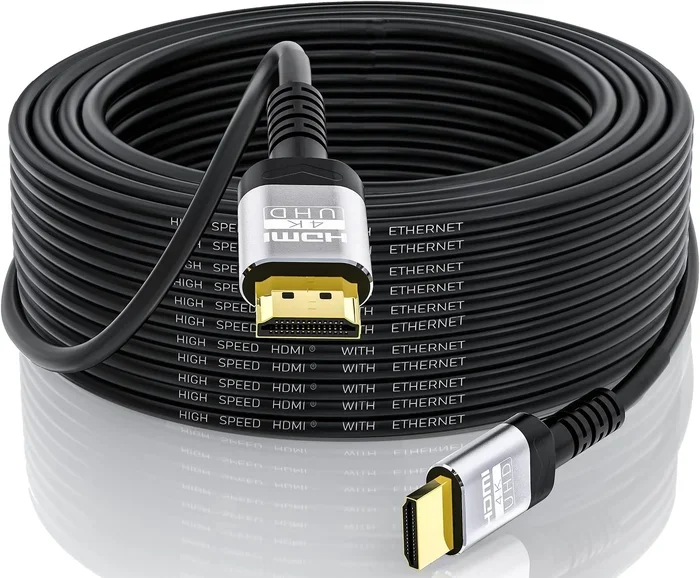
A high speed HDMI cable with Ethernet can support 4K resolution, but it depends on the HDMI version and bandwidth capacity. Not all high speed cables are created equal when it comes to delivering ultra high definition content. This guide breaks down everything you need to know about HDMI cable specs, Ethernet functionality, and 4K compatibility so you can make the right purchase decision.
You just bought a shiny new 4K TV or monitor. You want to connect your gaming console, Blu-ray player, or streaming box and get the best picture possible. So you grab a high speed HDMI cable with Ethernet from the drawer. But wait — does it actually support 4K? The answer is not as simple as yes or no. There are a few things you need to know before you plug in that cable and expect perfect ultra HD visuals.
In this article, we will walk through everything you need to know about high speed HDMI cables with Ethernet and their 4K capabilities. We will cover what these cables can do, what the different HDMI versions mean, and how to choose the right one for your setup. By the end, you will know exactly what to look for when shopping for your next cable.
Key Takeaways
- High speed HDMI cables with Ethernet can carry 4K signals, but only if they meet the right HDMI version standards.
- HDMI 2.0 and HDMI 2.1 cables are the key players for true 4K support at higher refresh rates.
- The Ethernet channel in HDMI cables allows networked devices to share an internet connection without a separate Ethernet cable.
- Cable length matters — longer cables can degrade signal quality for 4K content.
- Not all 4K devices need the same cable type, so always check your device specs before buying.
- Ethernet support in HDMI cables is a nice bonus feature but does not boost video resolution.
📑 Table of Contents
- What Is a High Speed HDMI Cable with Ethernet?
- Does a High Speed HDMI Cable with Ethernet Support 4K?
- How to Tell If Your HDMI Cable Supports 4K
- The Role of Ethernet in HDMI Cables
- Common Mistakes People Make With HDMI Cables
- Quick Tips for Choosing the Right HDMI Cable
- Expert Insight: What Professionals Recommend
- Final Thoughts
What Is a High Speed HDMI Cable with Ethernet?
A high speed HDMI cable is designed to handle more data than a standard HDMI cable. It supports higher resolutions and better color depth. The Ethernet channel built into the cable lets connected devices share an internet connection. This means you do not need a separate Ethernet cable running to your TV or projector.
Here is what the Ethernet feature actually does:
- Shares an internet connection between two HDMI devices on the same network.
- Eliminates the need for a second Ethernet cable in your entertainment setup.
- Works with any device that supports the HDMI Ethernet Channel.
But here is the important part. The Ethernet feature has nothing to do with video resolution. It is purely a networking tool. So even if your cable has Ethernet, it still needs to meet the right bandwidth requirements to carry a 4K signal.
Does a High Speed HDMI Cable with Ethernet Support 4K?
The short answer is yes, in most cases. But the full answer depends on a few key factors. Let us break them down so you understand exactly what is happening behind the scenes.
HDMI Version Matters Most
The HDMI version of your cable determines what resolutions it can handle. Here is a quick look at the main versions:
- HDMI 1.4: Supports 4K at 30Hz. This is fine for movies but not great for fast gaming.
- HDMI 2.0: Supports 4K at 60Hz. This is the sweet spot for most 4K content.
- HDMI 2.1: Supports 4K at 120Hz and even 8K. This is for serious gamers and prosumer setups.
A high speed HDMI cable with Ethernet that is built to HDMI 2.0 or 2.1 standards will absolutely handle 4K content. But if the cable only meets the HDMI 1.4 standard, you will be limited to 4K at 30 frames per second. That might work for streaming movies, but it will feel sluggish for gaming or sports.
Bandwidth Is the Real Story
Bandwidth is how much data your cable can move at one time. Think of it like a highway. The wider the highway, the more cars can pass through at once. A 4K video signal needs a lot of data to move smoothly. Here is how bandwidth breaks down:
- HDMI 1.4: 10.2 Gbps bandwidth.
- HDMI 2.0: 18 Gbps bandwidth.
- HDMI 2.1: 48 Gbps bandwidth.
For true 4K at 60Hz with HDR, you need at least 18 Gbps. That means your cable must be HDMI 2.0 or higher. A high speed HDMI cable with Ethernet that meets this standard will deliver a stunning 4K picture. Just make sure you are not confusing marketing terms with actual specs.
How to Tell If Your HDMI Cable Supports 4K
Not sure if your current cable can handle 4K? You are not alone. Many people buy cables without checking the fine print. Here is how you can find out for sure.
Check the Cable Label
Look at the packaging or the cable itself. You should see one of these labels:
- High Speed HDMI — This is the minimum for 4K at 30Hz.
- Premium High Speed HDMI — This guarantees 4K at 60Hz with HDR.
- Ultra High Speed HDMI — This supports 4K at 120Hz and 8K.
If your cable just says “High Speed” without the Premium or Ultra label, it might not support full 4K at 60Hz. The Ethernet feature does not change this. It is a separate capability from the resolution support.
Check Your Device Specs
Even if your cable supports 4K, your source device needs to as well. Check the specs of your Blu-ray player, gaming console, or streaming box. If your device outputs 4K but your cable cannot handle the bandwidth, you will get a lower resolution or no signal at all.
For example, if you use a 4K security camera with optical zoom and want to view the feed on a 4K monitor, you need a cable that matches both the camera’s output and the monitor’s input capabilities.
The Role of Ethernet in HDMI Cables
The Ethernet channel in HDMI cables is a useful feature, but it is often misunderstood. Let us clear up what it does and does not do.
The Ethernet channel allows two HDMI devices to communicate over a network connection through the cable itself. This is especially handy in setups where running a separate Ethernet cable is difficult or impractical. You can connect your smart TV to a network-enabled Blu-ray player or streaming device without extra wiring.
However, the Ethernet channel does not improve video quality. It does not increase bandwidth. And it does not make your 4K picture any sharper. It is purely a convenience feature for network sharing.
Also, both devices at each end of the cable need to support the HDMI Ethernet Channel for it to work. If one device does not support it, the Ethernet feature simply does not activate. This is worth keeping in mind when setting up a new home theater or office display system.
Common Mistakes People Make With HDMI Cables
There are a few mistakes that people make all the time when choosing and using HDMI cables. Avoiding these can save you a lot of frustration.
Buying Based on Length Alone
Some people think a longer cable is always better. But signal quality can degrade over longer distances, especially with 4K content. If you need a cable longer than 10 feet, look for one with built-in signal boosting or go for a fiber optic HDMI cable.
Ignoring the HDMI Version
Just because a cable says “high speed” does not mean it supports 4K at 60Hz. Always check the HDMI version number. If you want the best experience, go for HDMI 2.1 cables, especially if you are into gaming or plan to use a 4K drone camera with gimbal for capturing high resolution footage.
Assuming Ethernet Means Better Performance
This is a big one. The Ethernet feature does not make your HDMI cable better for video. It is a separate function. Do not pay extra just because a cable has Ethernet if your main goal is 4K video quality.
Using Old Cables for New Devices
If you have an older HDMI cable from years ago, it might not support modern 4K standards. Technology has come a long way. Upgrading to a newer cable can make a huge difference in picture quality and reliability.
Quick Tips for Choosing the Right HDMI Cable
Here are some fast tips to help you pick the perfect cable for your 4K setup:
- Look for Premium High Speed or Ultra High Speed certification. These labels guarantee 4K support.
- Check the HDMI version. HDMI 2.0 or higher is ideal for 4K at 60Hz.
- Consider cable length. Keep it as short as possible for the best signal quality.
- Do you need Ethernet? Only choose a cable with Ethernet if your setup actually requires it.
- Check both devices. Make sure your source and display both support the same HDMI standard.
Expert Insight: What Professionals Recommend
Audio and video professionals generally agree on one thing. The best HDMI cable is the one that meets the latest standard your devices support. You do not need to overspend on the most expensive cable, but you should avoid the cheapest options that do not meet current specs.
If you are setting up a gaming rig or a home theater, an Ultra High Speed HDMI cable is the safest choice. It future-proofs your setup for 4K at 120Hz, 8K, and even emerging display technologies. The Ethernet feature is a nice bonus but should not be the deciding factor in your purchase.
Also keep in mind that cable quality matters. A well-built cable with good shielding and gold-plated connectors will last longer and maintain signal integrity better than a cheap, flimsy option. Look for reputable brands and read reviews before you buy.
Final Thoughts
So, does a high speed HDMI cable with Ethernet support 4K? Yes, it can — as long as the cable meets the right HDMI version and bandwidth standards. The Ethernet feature is a convenient addition for network sharing, but it does not affect video resolution in any way.
Your best move is to check your devices, understand what HDMI version you need, and buy a cable that matches. Whether you are streaming movies, gaming, or setting up a professional display, the right cable makes all the difference. Do not let a cheap or outdated cable hold back your 4K experience.
Take a few minutes to review your setup today. Make sure your HDMI cable can keep up with your display. You will be glad you did when you see that crisp, vibrant 4K picture on your screen.
Frequently Asked Questions
Can I use any high speed HDMI cable for 4K?
Not all high speed HDMI cables support full 4K. You need a cable rated for HDMI 2.0 or higher to get 4K at 60Hz. Check the label for “Premium High Speed” or “Ultra High Speed” to be sure your cable can handle 4K content properly.
Does the Ethernet feature on an HDMI cable improve 4K video quality?
No, the Ethernet feature does not improve video quality at all. It is purely a networking tool that lets two HDMI devices share an internet connection. The Ethernet channel has nothing to do with resolution or bandwidth for video signals.
What is the difference between HDMI 2.0 and HDMI 2.1 for 4K?
HDMI 2.0 supports 4K at 60Hz, which is great for most streaming and gaming. HDMI 2.1 supports 4K at 120Hz and even 8K, making it ideal for high refresh rate gaming and professional content creation. The cable you choose should match your device’s HDMI version.
Can a long HDMI cable cause 4K signal loss?
Yes, longer cables can degrade signal quality, especially for 4K content. If you need a cable longer than 10 feet, consider a fiber optic HDMI cable or one with built-in signal boosting. This will help maintain a strong 4K signal over longer distances.
Do both devices need to support HDMI Ethernet for it to work?
Yes, both devices at each end of the cable must support the HDMI Ethernet Channel. If one device does not support it, the Ethernet feature will not activate. It is a two-way feature that requires compatible hardware on both sides.
Is a fiber optic HDMI cable better than a regular high speed HDMI cable for 4K?
Fiber optic HDMI cables offer better signal integrity over longer distances compared to standard copper cables. They are a great choice if you need to run a cable more than 15 feet while maintaining full 4K quality. They also tend to be more flexible and thinner than traditional HDMI cables.