Will a 100 Ft Hdmi Cable Work

A 100 ft HDMI cable can absolutely work, but your results depend heavily on the cable type, signal quality, and what devices you are connecting. Passive cables over 50 feet often suffer from signal degradation, while active HDMI cables with built-in boosters handle long runs much more reliably. Whether you are setting up a home theater or connecting a laptop to a distant display, choosing the right 100 ft HDMI cable makes all the difference.
So you need a 100 ft HDMI cable and you are wondering if it will actually work. The short answer is yes, but there is a lot more to the story than just plugging it in and hoping for the best. Long HDMI cable runs come with real challenges, and understanding them before you buy can save you from frustration, wasted money, and poor picture quality.
Whether you are setting up a home theater, connecting a laptop to a projector in a large room, or running a display across an office space, the length of your HDMI cable plays a huge role in performance. A 100 foot HDMI cable is not like a short 6-foot cord you plug behind your TV. Signal strength, cable build, and the type of HDMI technology all come into play at this distance.
In this guide, we will walk through everything you need to know about using a 100 ft HDMI cable. We will cover how these cables work, what affects their performance, and how to choose the right one for your setup. By the end, you will know exactly what to look for and what to avoid.
Key Takeaways
- Passive cables struggle past 50 feet: Signal degradation is real and can cause blank screens or sparkles at 100 feet.
- Active HDMI cables are the best choice: They boost the signal and deliver reliable 4K performance at 100 feet.
- HDMI version and bandwidth matter: HDMI 2.0 and newer handle long cable runs far better than older versions.
- HDMI repeaters extend your reach: A small repeater device can regenerate the signal and eliminate quality loss.
- Cable routing affects performance: Keeping your cable away from power sources reduces interference and improves signal quality.
- Test before you install permanently: Always run a quick test before running a 100 ft HDMI cable through walls or ceilings.
📑 Table of Contents
What Is a 100 Ft HDMI Cable?
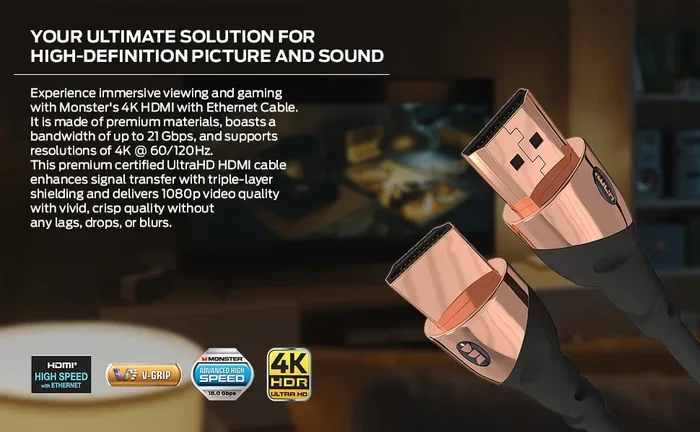
A 100 ft HDMI cable is simply an HDMI cable that measures 100 feet, or about 30 meters, from end to end. HDMI stands for High-Definition Multimedia Interface, and it carries both video and audio signals through a single cable. This makes it one of the most popular choices for connecting devices like laptops, Blu-ray players, gaming consoles, and streaming boxes to displays.
At 100 feet, you are dealing with a long cable run. Most standard HDMI cables are designed for short distances, typically under 25 feet. When you stretch that to 100 feet, the signal has to travel much farther through copper wiring. This is where things get tricky, and why not every 100 ft HDMI cable delivers the same results.
Why Cable Length Matters
HDMI signals are digital, which means they travel as ones and zeros. In theory, a digital signal should either arrive perfectly or not at all. In practice, long cables can cause signal degradation, which leads to sparkles, dropouts, or a completely blank screen. The longer the cable, the more resistance and interference the signal faces along the way.
At 100 feet, even a high-quality passive cable may struggle with higher resolutions like 4K or 8K. This is why many people turn to active HDMI cables or signal boosters for long runs. Understanding this basic fact helps you make a smarter buying decision and avoid the headache of a cable that does not deliver.
Will a 100 Ft HDMI Cable Work for Your Setup?
The honest answer depends on several factors. A 100 ft HDMI cable can absolutely work, but it needs to be the right type for your specific use case. Let us break down when it works well and when it falls short.
When a 100 Ft HDMI Cable Works Well
A long HDMI cable works great in these situations:
- You are using an active HDMI cable: Active cables have built-in signal amplifiers that boost the HDMI signal over long distances. A 100 ft active HDMI cable can handle 4K resolution at 60Hz without problems.
- You are running 1080p or lower resolutions: Standard definition and full HD signals are more forgiving over long cable runs. A passive 100 ft HDMI cable may work just fine for 1080p content.
- You use an HDMI repeater or extender: These devices sit between two shorter cable segments and regenerate the signal. This is a reliable way to push HDMI over 100 feet without any quality loss.
- Your setup uses HDMI 2.0 or newer: Newer HDMI versions handle bandwidth more efficiently, which helps with longer cable runs and higher resolutions.
When a 100 Ft HDMI Cable May Not Work
There are also situations where a 100 ft HDMI cable might give you trouble:
- You are using a cheap passive cable: Low-cost cables without signal boosting often fail at 100 feet, especially for 4K content. You get what you pay for with long cable runs.
- You need 8K or high-bandwidth 4K: These high-resolution signals need a lot of bandwidth, and long cables can choke the signal before it reaches your display.
- You run the cable near power sources: Electromagnetic interference from power cords can degrade the HDMI signal over long distances and cause flickering or dropouts.
- Your devices have older HDMI ports: Older HDMI 1.4 ports may not support the bandwidth needed for long cable runs at high resolutions.
Active vs Passive HDMI Cables
This is the most important distinction when shopping for a 100 ft HDMI cable. The two types work very differently, and choosing the wrong one can ruin your experience. Let us break down exactly how they compare.
| Feature | Passive HDMI Cable | Active HDMI Cable |
|---|---|---|
| Signal Boosting | No | Yes, built-in amplifier |
| Max Reliable Length | Up to 50 feet | Up to 100+ feet |
| 4K Support at 100 Ft | Unreliable | Reliable |
| Power Source Needed | No | Yes (usually USB or external) |
| Price Range | $10 – $30 | $30 – $100+ |
| Best For | Short runs under 50 ft | Long runs over 50 ft |
Why Active Cables Are Better for Long Runs
Active HDMI cables contain small electronic chips that boost the signal as it travels. Think of it like a relay race where each runner passes the baton at full strength. This is why a 100 ft active HDMI cable can deliver clean 4K video while a passive cable of the same length might show a snowy or blank screen.
One thing to keep in mind is that active cables need power. Most draw power from the HDMI port itself through a feature called HDCP, or High-bandwidth Digital Content Protection. Some older devices may not provide enough power, which can cause the cable to malfunction. In these cases, you may need a USB-powered HDMI extender instead of a standard active cable.
Factors That Affect HDMI Cable Performance Over Long Distances
Several factors determine whether your 100 ft HDMI cable will deliver a strong, clear signal. Let us look at the most important ones so you can set up your system with confidence.
Cable Build Quality
Not all long HDMI cables are created equal. Cheap cables with thin copper wiring and minimal shielding will struggle at 100 feet. Better cables use thicker conductors, double shielding, and quality connectors. When shopping for a 100 ft HDMI cable, look for brands that clearly state their specifications and use quality materials. A well-built cable from a reputable brand will outperform a cheap no-name cable every time.
HDMI Version and Bandwidth
Different HDMI versions support different bandwidths. HDMI 1.4 supports up to 10.2 Gbps, while HDMI 2.0 supports 18 Gbps, and HDMI 2.1 jumps to 48 Gbps. Higher bandwidth means the cable can carry more data, which is essential for high-resolution content. A 100 ft HDMI cable rated for HDMI 2.0 or higher will perform much better than one based on HDMI 1.4. Always check the HDMI version your devices support before buying a long cable.
Interference and Cable Routing
Long cables are more vulnerable to interference from other cables, power lines, and electronic devices. If you must run your 100 ft HDMI cable near power cords, try to keep them at least 6 inches apart. Using cables with heavy shielding also helps reduce interference and keeps your signal clean. Fiber optic HDMI cables are another option for long runs, as they are immune to electromagnetic interference.
Device Compatibility
Not every device handles long HDMI cables the same way. Some graphics cards and laptops have strong HDMI output signals that easily push through 100 feet of cable. Others may struggle even with a quality active cable. If you are connecting a laptop to a distant display via HDMI, the laptop’s hardware capabilities matter. Check your device specifications to make sure it supports the resolution and refresh rate you need over an extended cable run.
For example, if you are using a high-performance laptop to drive an external display via a long HDMI run, the laptop’s hardware capabilities matter. If you are looking to upgrade your setup, you might want to explore laptops with a lot of ram to ensure your system can handle high-resolution external displays smoothly. Stronger hardware generally means better output performance over long cable connections.
Also, if you plan to connect your laptop to an external display using a long HDMI run, you might want to check out how to buy a secondary monitor for tips on choosing the right display setup that complements your long cable installation.
Tips for Using a 100 Ft HDMI Cable Successfully
Getting the best performance from a 100 ft HDMI cable is not just about buying the right cable. How you set it up matters too. Here are some practical tips that make a real difference in your daily use.
1. Use an HDMI Repeater for Extra Insurance
An HDMI repeater is a small device that sits between two cable segments and regenerates the signal. If you are worried about signal loss at 100 feet, a repeater gives you peace of mind. It is an affordable solution that works with almost any 100 ft HDMI cable setup. You simply plug the repeater between two cables, and it boosts the signal back to full strength.
2. Avoid Sharp Bends and Kinks
Bending a long HDMI cable sharply can damage the internal wiring and weaken the signal. Always use gentle curves when routing your cable. Cable management clips and ties can help you keep the cable running smoothly without sharp turns. A good rule of thumb is to never bend the cable tighter than a quarter circle.
3. Test Before You Install Permanently
Before you run a 100 ft HDMI cable through walls or ceilings, test it in the exact setup you plan to use. Connect your source device and display, then check for any sparkles, flickering, or audio issues. Fixing a problem is much easier before the cable is permanently installed. Take 10 minutes to test everything thoroughly.
4. Consider an HDMI-over-Ethernet Extender
If a 100-foot HDMI cable does not work for your situation, an HDMI-over-Ethernet extender is a great alternative. These kits use CAT6 or CAT6a ethernet cable to carry the HDMI signal over much longer distances. They are especially useful for installations where running a single long HDMI cable is impractical. Many people use them in conference rooms and large home theaters.
5. Keep Your Cables Away from Power Sources
Electromagnetic interference from power cords can degrade your HDMI signal over long runs. When possible, route your 100 ft HDMI cable away from electrical wiring and power strips. If you must cross power cords, do so at right angles to minimize interference. Proper cable routing is one of the simplest ways to improve signal quality.
6. Check Your Power Requirements
When you connect external displays to your laptop using a long HDMI cable, your laptop may draw more power than usual. If you are running a setup with an external monitor connected via a 100 ft HDMI cable, keep in mind that your laptop’s power consumption can increase, especially if the display is high-resolution. You might want to check how much power does a laptop use when plugged in to understand the full impact of your setup and plan your power supply accordingly.
Final Verdict
So, will a 100 ft HDMI cable work? Yes, it can work very well, but only if you choose the right type of cable for your needs. For most users, an active HDMI cable rated for 100 feet is the safest and most reliable choice. It delivers strong signals, supports high resolutions like 4K, and gives you the flexibility to place your display anywhere in a room.
If you are on a tight budget and only need 1080p resolution, a quality passive cable might get the job done. But for 4K and beyond, invest in an active cable or use an HDMI repeater. The extra cost is worth the peace of mind and consistent performance you will get every time you turn on your display.
Take the time to match your cable to your setup. Check your device specs, consider your resolution needs, and test before you commit to a permanent installation. A little planning goes a long way with a 100 ft HDMI cable. Get the right cable, set it up properly, and you will enjoy a crisp, clear picture no matter how far your display sits from your source device.
Frequently Asked Questions
Can I use a passive 100 ft HDMI cable for 4K content?
It is not recommended. Passive cables over 50 feet often struggle with 4K resolution, and at 100 feet the signal degradation is very likely. You are much better off using an active HDMI cable or adding an HDMI repeater to your setup for reliable 4K performance at long distances.
Does HDMI cable length affect audio quality?
Yes, it can. A 100 ft HDMI cable that suffers from signal degradation may cause audio dropouts, crackling, or synchronization issues between audio and video. Using a quality active cable or an HDMI repeater helps maintain both video and audio quality over long cable runs.
Can I connect two 50 ft HDMI cables instead of one 100 ft cable?
Yes, you can. Using two shorter cables connected with an HDMI coupler or repeater can actually work better than a single long cable. The repeater regenerates the signal between the two segments, which helps maintain quality. This is a smart alternative if you cannot find a high-quality 100 ft cable.
Do I need a special HDMI cable for gaming at 100 feet?
Yes, for gaming at 100 feet you should use an active HDMI cable that supports the bandwidth you need. Gaming at 4K 120Hz, for example, requires HDMI 2.1 bandwidth, which is harder to push over long distances. An active cable rated for high bandwidth will give you the best gaming experience at this length.
How can I test if my 100 ft HDMI cable is working properly?
Connect your source device and display and watch for sparkles, flickering, or audio dropouts. Run a full-resolution test image or video and check for any artifacts. If you notice any issues, try repositioning the cable away from power sources or add an HDMI repeater to boost the signal.
What is the maximum length for an HDMI cable without a repeater?
For most passive HDMI cables, the reliable maximum length is around 50 feet. Beyond that, signal degradation becomes a real problem. Active cables can extend this to 100 feet or more, but for runs beyond 100 feet without any signal boosting, you should use an HDMI repeater or an HDMI-over-Ethernet extender.