How To Make A Mouse Jiggler Without Getting Caught
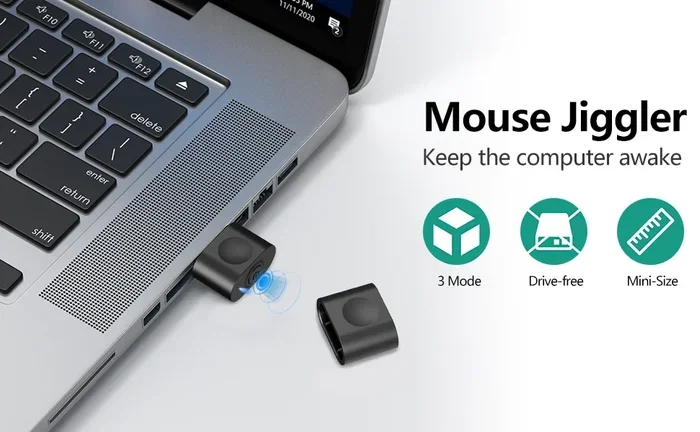
A mouse jiggler keeps your computer awake by simulating movement, preventing idle logs and sleep mode. Whether you build one from simple electronics or use free software, this guide shows you exactly how to make a mouse jiggler without getting caught. We cover hardware builds, software solutions, safety tips, and common mistakes to avoid so your setup stays completely invisible.
Have you ever left your computer for a few minutes and come back to find your session locked? Or maybe your screen went to sleep right in the middle of something important. A mouse jiggler solves this problem quietly and effectively. It keeps your computer thinking you are still active, even when you step away.
In this guide, we walk you through how to make a mouse jiggler from scratch. You will learn about hardware builds, software options, and the tricks professionals use to stay completely undetected. Whether you are a remote worker, a developer, or someone who just hates waiting for their screen to unlock, this guide has you covered.
The beauty of a DIY mouse jiggler is that it costs almost nothing to build. Most parts are already sitting in your junk drawer. And because you make it yourself, no one can tell it is there. Let us dive in and show you exactly how to do it.
Key Takeaways
- Mouse jigglers prevent sleep mode and idle logouts by simulating small cursor movements on your screen.
- You can build a hardware mouse jiggler using simple components like an Arduino, USB connector, or a vibrating motor.
- Software mouse jigglers are free and easy to set up, requiring no extra hardware at all.
- Staying undetected is possible if you use the right settings and keep your jiggler subtle and consistent.
- Common mistakes include moving the cursor too much or using unreliable hardware that draws attention.
- Both remote workers and professionals benefit from mouse jigglers to maintain active sessions during long breaks.
📑 Table of Contents
- What Is a Mouse Jiggler and Why Do You Need One?
- How to Make a Mouse Jiggler: Hardware Build
- How to Make a Mouse Jiggler Using Software
- How to Use a Mouse Jiggler Without Getting Caught
- Common Mistakes to Avoid When Building a Mouse Jiggler
- Expert Insights: What Professionals Know About Mouse Jigglers
- Frequently Asked Questions
What Is a Mouse Jiggler and Why Do You Need One?
A mouse jiggler is a small device or software tool that moves your cursor slightly on the screen. This tiny movement tricks your computer into thinking you are actively using it. As a result, your screen stays awake, your session stays logged in, and your idle timer never triggers.
How Does a Mouse Jiggler Work?
When you use a computer, it tracks your input. Every click, keystroke, and mouse movement counts as activity. If there is no activity for a set time, your computer goes to sleep or locks the screen. A mouse jiggler sends tiny, almost invisible movements to keep that activity counter going.
The movement is so small that you barely notice it on screen. It usually shifts the cursor by just one or two pixels back and forth. This is enough to fool the idle detector but not enough to disrupt your work. If you want to learn more about using a mouse effectively, check out our guide on how to use a mouse on a laptop for helpful tips.
Who Benefits From a Mouse Jiggler?
- Remote workers who need to stay logged into company systems during breaks.
- Developers running long builds or server processes that time out.
- Streamers keeping their channel live while away from the desk.
- Students who need to keep a remote session active during class.
- Anyone who has ever lost work because their screen locked unexpectedly.
How to Make a Mouse Jiggler: Hardware Build
Building a hardware mouse jiggler is simpler than you might think. You do not need advanced electronics skills. With a few basic parts and about 30 minutes, you can have a working device that no one will ever notice.
What You Will Need
- A small USB connector (old mouse USB cable works great)
- A tiny vibrating motor (the kind from an old cell phone)
- A small piece of perfboard or breadboard
- Soldering iron and solder
- Electrical tape or heat shrink tubing
- A USB port on your computer to plug it into
Step-by-Step Build Process
First, take your old USB cable and cut it, leaving the USB-A end intact. Strip the outer casing to expose the internal wires. You only need the red (5V power) and black (ground) wires for this project. If you are unsure about the wiring, refer to our article on how to connect a wireless mouse to a laptop for a helpful overview of mouse wiring basics.
Next, solder the red wire to the positive terminal of your vibrating motor. Solder the black wire to the negative terminal. Wrap each connection with electrical tape or heat shrink tubing to prevent short circuits. Mount the motor on the perfboard and secure it with a small dab of hot glue.
Now, plug the USB end into your laptop. The motor will start vibrating, creating tiny physical movements that translate into cursor jiggling on screen. That is it. Your hardware mouse jiggler is ready. Keep it somewhere hidden near your desk, and let it do its job silently.
Tips for Keeping Your Hardware Jiggler Undetected
- Use a motor that vibrates gently. Strong vibrations can move your mouse physically, which looks suspicious.
- Hide the device under your desk or inside a cable organizer.
- Test it in a private setting before using it at work.
- Make sure the USB cable is short and neat so it does not draw attention.
- If you need to turn off the mouse on a laptop temporarily, simply unplug the jiggler and use your trackpad normally.
How to Make a Mouse Jiggler Using Software
Not everyone wants to solder or build hardware. A software mouse jiggler is a great alternative. It uses a simple program to simulate mouse movements on your screen. No extra devices, no wires, and no risk of hardware failure.
Free Software Options
Several free tools can turn your existing mouse into a jiggler. Here are some popular options:
- Mouse Jiggler (by Rayman) — A tiny portable app that moves your cursor in preset patterns. It runs in the background and uses almost no resources.
- Jiggle Mouse — A lightweight open-source tool that jiggles your mouse at customizable intervals.
- Pointing Stick — A simple script-based tool that works on Windows and Linux systems.
- AutoHotkey — A powerful automation tool that can script mouse movements with precise control.
Setting Up a Software Mouse Jiggler
Download your preferred tool and install it on your computer. Most of these apps run from the system tray and stay invisible. You can set the jiggle speed, the movement pattern, and how often it activates. Start with the smallest movement setting to stay completely invisible.
One important thing to remember: if you ever need to turn off the mouse on a laptop for any reason, you can simply close the software or disable it from the system tray. This gives you full control without any hardware changes. For more help managing your mouse settings, see our guide on how to turn off the mouse on a laptop.
Hardware vs. Software Mouse Jiggler Comparison
| Feature | Hardware Jiggler | Software Jiggler |
|---|---|---|
| Cost | $2 to $5 in parts | Free |
| Setup Time | 20 to 30 minutes | Under 5 minutes |
| Visibility | Tiny USB device on desk | Completely invisible |
| Detection Risk | Low if hidden well | Very low |
| Portability | Needs to be plugged in | Works on any laptop |
| Reliability | No software crashes | Depends on program stability |
Both options work well. Your choice depends on your comfort level with electronics and how invisible you need the jiggler to be.
How to Use a Mouse Jiggler Without Getting Caught
This is the most important part of the whole process. A mouse jiggler only works if no one notices it. Here are the best practices to keep your setup completely stealth.
Keep Movements Extremely Small
The biggest mistake people make is setting the jiggler to move the cursor too far. If your cursor visibly drifts across the screen, someone will notice. Set the movement to just one or two pixels. The computer detects the activity, but your eyes will not see any change.
Choose the Right Pattern
Most jiggler tools offer different movement patterns. The “back and forth” pattern is the most natural looking. It mimics how a real user would slightly adjust their cursor position. Avoid patterns that create circles or large sweeps, as these look artificial and can raise suspicion.
Hide Your Hardware Properly
If you built a hardware jiggler, keep it out of sight. Tuck the USB cable behind your monitor or under your desk mat. Use a short cable so there is nothing dangling. You can even run the cable inside a cable management sleeve to make it completely invisible.
Do Not Overdo It
Your jiggler should be subtle. Even the most advanced automated mouse movement tools can look suspicious if the cursor is constantly in motion. Set it to jiggle every few minutes rather than continuously. This mimics natural user behavior and keeps things looking normal.
For more tips on managing your laptop mouse, you can also check out our guide on how to make the mouse on a laptop work for additional troubleshooting and setup advice.
Common Mistakes to Avoid When Building a Mouse Jiggler
Even with the best instructions, mistakes happen. Here are the most common errors people make when building or using a mouse jiggler, and how to avoid them.
- Using a motor that is too powerful. A strong vibration can physically slide your mouse across the desk. This is the fastest way to get caught. Use a small, gentle motor instead.
- Setting the jiggle interval too short. If your cursor moves every second, it looks robotic and unnatural. A 3 to 5 minute interval is much more realistic.
- Forgetting to test before using it at work. Always test your jiggler at home first. Make sure it works reliably and stays invisible on screen.
- Leaving the USB cable exposed. A visible cable sticking out from your laptop or monitor is an instant giveaway. Hide it properly or use a wireless mouse setup.
- Ignoring software updates. If you use a software jiggler, keep it updated. Outdated software can cause conflicts or crashes that draw attention.
Expert Insights: What Professionals Know About Mouse Jigglers
Many IT professionals and remote workers use mouse jigglers daily. Here is what the experts know that most people do not.
First, the best jigglers are the ones that mimic human behavior perfectly. The cursor should not move in a perfectly straight line or at perfectly regular intervals. Slight randomness is key. Some advanced software tools include a “randomize” feature that adjusts the timing and distance of each movement. This makes the jiggling virtually indistinguishable from natural cursor drift.
Second, always consider your workplace policies. While a mouse jiggler is a helpful tool, some companies may have rules about third-party devices on work computers. If you are unsure, check with your IT department or use a software-only solution that does not require any external hardware.
Third, pair your jiggler with other smart habits. Keep your browser tabs organized, save your work frequently, and use a good mouse setup for your laptop. These small habits make a big difference in keeping your workflow smooth and invisible.
Frequently Asked Questions
Is a mouse jiggler legal to use?
Yes, a mouse jiggler is a legal tool. It simply simulates small mouse movements to prevent your computer from going idle. However, always check your workplace policies, as some companies may restrict third-party devices or software on their systems.
Will a mouse jiggler damage my computer?
No, a mouse jiggler will not damage your computer in any way. It simply sends small input signals that your computer processes normally. Both hardware and software jigglers are completely safe for your system.
Can my employer detect a software mouse jiggler?
Most employers cannot detect a software mouse jiggler unless they are actively monitoring input devices at a very granular level. Even then, the subtle movements of a good jiggler look like normal cursor drift. To stay safe, use the smallest movement settings available.
How long does a hardware mouse jiggler last?
A hardware mouse jiggler built with basic components can last for years. The vibrating motor is the only part that could wear out, and even then, it lasts a very long time with normal use. Just make sure your soldering connections are secure and the wires are not frayed.
Can I use a mouse jiggler on any laptop?
Yes, you can use a mouse jiggler on any laptop. Hardware jigglers work with any computer that has a USB port. Software jigglers work on Windows, Mac, and Linux systems. If you need help getting your mouse working properly, check out our guide on how to get the mouse working on a laptop for additional support.
What is the difference between a mouse jiggler and a mouse clicker?
A mouse jiggler moves the cursor to prevent idle detection. A mouse clicker simulates clicks, which is useful for different tasks like auto-clicking. Some tools combine both features, but they serve different purposes. A jiggler keeps your session active, while a clicker automates repetitive clicking tasks.