How To Make A Mouse More Grippy With These Simple Tricks
Making your mouse more grippy is easier than you think. With a few simple household items and smart choices, you can transform a slippery mouse into a comfortable, precise tool. This guide covers everything from grip tape to mouse pad upgrades so you can take control of your mouse grip today.
Key Takeaways
- Grip tape is the fastest and cheapest fix for a slippery mouse and works on almost any surface.
- Rubber coating or spray adds lasting texture without changing the shape of your mouse.
- A quality mouse pad dramatically improves tracking and reduces wrist strain during long sessions.
- Mouse grip sleeves and covers are a great option if you want a removable, reusable solution.
- Replacing worn mouse feet can fix tracking issues and make the mouse glide more smoothly.
- Avoid common mistakes like using too much adhesive or choosing the wrong pad material.
- Consider your grip style (palm, claw, or fingertip) when choosing the best method for your needs.
📑 Table of Contents
- Why Your Mouse Grip Matters More Than You Think
- How To Make A Mouse More Grippy Using Grip Tape
- Modify The Mouse Surface For Better Traction
- Upgrade Your Mouse Pad For Better Control
- Mouse Accessories That Improve Grip
- Quick Tips And Common Mistakes To Avoid
- Expert Insights On Mouse Ergonomics
- Conclusion
Why Your Mouse Grip Matters More Than You Think
You might not think about your mouse grip until something goes wrong. But the way your hand interacts with your computer mouse affects everything from speed to comfort. A slippery mouse can cause frustration, slow you down, and even lead to wrist pain over time.
When your mouse feels smooth and slick, your hand constantly shifts on the surface. This means less precision and more effort. Whether you are gaming, designing, or just browsing, a secure grip makes a huge difference. It lets you focus on the task at hand instead of fighting your equipment.
The good news is that fixing a slippery mouse is simple. You do not need expensive gear or technical skills. A few household items and smart choices can transform your experience. Let us walk through the best methods to make your mouse more grippy and comfortable.
The Problem With Slippery Mice
Most modern mice have smooth plastic shells. This looks clean and sleek but feels terrible when your hands get sweaty. Office workers, gamers, and casual users all deal with this problem. The smooth surface lets your palm slide around, which reduces control and accuracy.
When your hand slips, you compensate by gripping harder. This creates tension in your fingers, palm, and wrist. Over hours of use, this tension turns into discomfort or even repetitive strain injuries. A mouse grip solution solves this at the root cause.
How Grip Affects Your Daily Workflow
Think about how often you use your mouse each day. If you work at a computer for eight hours, that is a lot of repetitive motion. A secure grip reduces the effort needed to move the cursor accurately. You make fewer corrections, your hand stays relaxed, and your work flows better.
For gamers, grip matters even more. A split-second slip can mean the difference between winning and losing. Players who use a palm grip, claw grip, or fingertip grip all benefit from better surface texture on their mouse. No matter your style, improving traction helps.
How To Make A Mouse More Grippy Using Grip Tape
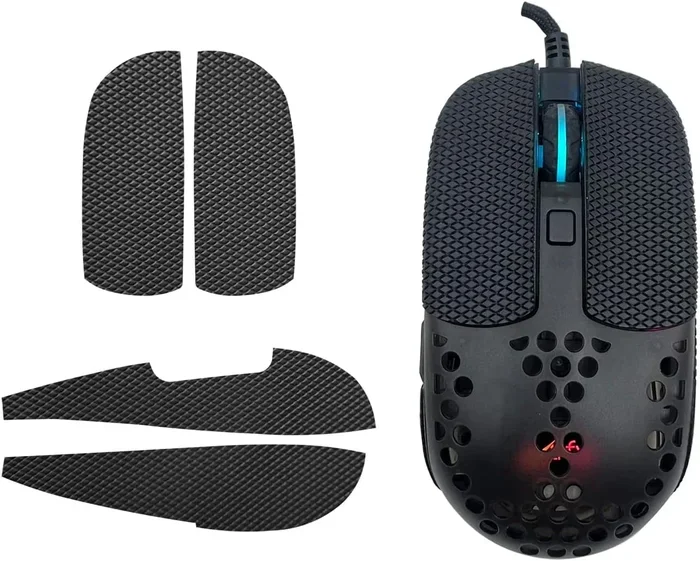
Grip tape is hands down the easiest and most affordable way to fix a slippery mouse. It is a thin, textured adhesive strip that you apply directly to the mouse surface. The result is a matte, rubbery texture that keeps your hand in place.
You can find grip tape at most hardware stores or online. It comes in rolls or pre-cut strips. Some options are clear, so they do not change the look of your mouse. Others come in black or gray for a more stealthy appearance.
Types Of Grip Tape To Consider
Not all grip tape is the same. Here are the most common types you will find:
- Rubber grip tape — The most popular option. It sticks well and feels soft under your fingers.
- Foam grip tape — Thicker and more cushioned. Great for people who press hard on their mouse.
- Clear adhesive tape — Less textured but still adds friction. Good for minimalists who want a subtle fix.
- Silicone grip strips — Reusable and washable. A great eco-friendly option.
Each type has its strengths. Rubber tape offers the best balance of comfort and grip. Foam tape works well for people with sweaty hands. Clear tape is ideal if you want to keep your mouse looking stock. Silicone strips are perfect if you want something you can remove and clean.
Step-By-Step Application Guide
Applying grip tape is simple. Follow these steps for the best results:
- Clean the mouse surface with rubbing alcohol. Let it dry completely.
- Measure and cut the tape to fit the top and sides of the mouse.
- Peel off the backing and press the tape onto the mouse firmly.
- Smooth out any bubbles with your finger or a credit card edge.
- Trim excess tape carefully with scissors for a clean look.
Take your time with this process. Rushing can lead to uneven edges or air bubbles. A clean application looks professional and lasts much longer. If you are using a wireless mouse, make sure the tape does not block any sensors or buttons.
One thing to keep in mind: grip tape can peel off over time with heavy use. This is normal. Just replace it when needed. It is a quick and cheap fix that makes a big difference in how your mouse feels during daily use.
Modify The Mouse Surface For Better Traction
If you do not want to add tape, you can modify the mouse surface itself. There are a few methods that change the texture of the plastic shell directly. These approaches give you a more permanent solution that feels like part of the mouse.
Using Rubber Coating Or Spray
Rubber coating spray is a popular choice for people who want a smooth but grippy finish. You spray a thin layer onto the mouse shell and let it dry. The result is a slightly rubbery texture that adds friction without changing the shape of the mouse.
Look for sprays specifically designed for electronics or grip enhancement. Brands like Plasti Dip are widely available and work well. Apply multiple thin coats instead of one thick layer. This prevents dripping and ensures an even finish.
Before you spray, make sure you mask off any areas you do not want to cover. Use painter’s tape to protect the sensor, buttons, and scroll wheel. Work in a well-ventilated area and let each coat dry fully before applying the next.
Adding Texture With Fine Sandpaper
Another method is to lightly sand the mouse surface with fine-grit sandpaper. This creates tiny scratches in the plastic that add texture. Use 400-grit or higher sandpaper to avoid damaging the shell.
Sand in small circular motions across the areas where your fingers and palm rest. Wipe away any dust with a damp cloth when you are done. The result is a matte, rough surface that grips your skin much better than smooth plastic.
This method works best on mice with hard plastic shells. Avoid sanding mice with soft or textured surfaces already. And always test a small hidden area first to make sure the finish looks the way you want.
Expert users sometimes combine sanding with a rubber coating for the best of both worlds. The sandpaper adds immediate texture while the coating seals and protects the surface. This creates a durable grip that lasts for months.
Upgrade Your Mouse Pad For Better Control
A mouse pad does more than protect your desk. It directly affects how your mouse tracks and how comfortable your hand feels. A good pad can make even a slippery mouse feel much more controlled. And the right pad can reduce wrist strain during long work sessions.
Choosing The Right Mouse Pad Material
Mouse pads come in many materials, and each one feels different under your mouse. Here is a quick comparison of the most common types:
| Material | Cost | Difficulty | Effectiveness |
|---|---|---|---|
| Cloth pad | Low | Easy | Medium |
| Hard plastic pad | Low | Easy | High |
| Rubber base pad | Medium | Easy | High |
| Extended desk mat | Medium | Easy | Medium |
| DIY textured pad | Low | Medium | High |
Cloth pads are the most common and affordable. They offer a good balance of speed and control. Hard plastic pads give you the fastest tracking but can feel slippery if your hand sweats. Rubber base pads combine stability with smooth tracking and are a great all-around choice.
An extended desk mat gives you more room to move your mouse freely. This is especially helpful if you use a large mouse pad or have a big desk setup. A bigger surface also means less friction, which reduces strain on your wrist.
DIY Mouse Pad Modifications
You can also modify your existing mouse pad to improve grip. Try placing a thin rubber mat underneath your cloth pad. This adds stability and prevents the pad from sliding around on your desk. Some people even add grip tape to the underside of their pad for extra security.
If your desk surface is very smooth, your mouse may glide too fast. A textured desk mat or even a piece of felt placed under your mouse pad can slow things down and give you more control. These small changes add up to a much better experience.
For those who use their laptop trackpad and an external mouse together, a dedicated mouse pad keeps everything organized. It also gives you a consistent surface that works well whether you are using a wired or wireless setup.
Mouse Accessories That Improve Grip
Beyond tape and pads, there are several accessories designed specifically to improve your mouse grip. These products are widely available and offer removable, reusable solutions. They are perfect if you share a mouse or want to switch between different setups.
Mouse Grip Sleeves And Covers
Mouse grip sleeves are fabric or silicone covers that slide over your mouse. They add a soft, textured layer that your hand grips naturally. These sleeves come in many colors and materials, so you can customize the look of your setup.
The best part about grip sleeves is that they are removable. You can take them off and wash them when they get dirty. This makes them a hygienic option for people who use their mouse at work and at home. They also protect the original mouse surface from wear and tear.
Look for sleeves that fit your specific mouse model. Universal sleeves work for most standard-sized mice but may not fit smaller or larger models well. Check the dimensions before you buy to ensure a snug fit.
Replacing Mouse Feet For Better Tracking
Your mouse has small feet (also called glides) on the bottom. These are the pads that let the mouse glide smoothly across your desk. Over time, they wear out and become rough or sticky. Replacing them is an easy way to improve both tracking and grip feel.
New mouse feet are cheap and widely available online. You can buy them in packs that fit most popular mouse models. To replace them, simply peel off the old feet and stick on the new ones. Make sure they are aligned properly for the best results.
Upgraded mouse feet made of PTFE (Teflon) material glide smoother and last longer than standard rubber feet. This small upgrade can make your mouse feel brand new again. It is one of the easiest and most affordable improvements you can make.
For users who connect their mouse via Bluetooth or USB dongle, make sure the feet are clean. Dust and debris can interfere with the sensor and cause tracking issues. A quick wipe with a cloth keeps everything working smoothly.
Quick Tips And Common Mistakes To Avoid
Quick Tips For Better Mouse Grip
Here are some fast tips that make a real difference in your daily use:
- Keep your hands clean and dry. Sweaty hands make any mouse slippery. Wash and dry your hands before long sessions.
- Use hand lotion sparingly. Moisturizers can leave a greasy residue on your mouse. Apply lotion and wait a few minutes before using your mouse.
- Choose a mouse that fits your hand size. A mouse that is too small or too large forces you to grip harder and tire faster.
- Adjust your DPI settings. A higher DPI means less physical movement needed. This reduces the strain on your grip.
- Take regular breaks. Give your hand and wrist a rest every 30 to 60 minutes during long work sessions.
- Clean your mouse regularly. Dirt and oils build up on the surface and reduce grip over time.
Common Mistakes To Avoid
Not all grip fixes work well for everyone. Here are mistakes to watch out for:
- Using too much adhesive tape. Thick layers can change the shape of the mouse and make it uncomfortable to hold.
- Choosing the wrong mouse pad surface. A pad that is too rough can slow your mouse down too much. A pad that is too smooth may not provide enough control.
- Ignoring your grip style. A palm grip needs a different surface than a fingertip grip. Choose your method based on how you naturally hold the mouse.
- Applying rubber coating unevenly. Thick spots can interfere with the sensor and cause tracking problems. Always apply thin, even coats.
- Forgetting to test the fix. Try your new grip setup for a few days before deciding it works. Your hand needs time to adjust to the new texture.
If you are still having trouble with your mouse after trying these methods, you might want to check if there is a deeper issue. Sometimes a mouse stops working properly because of a driver problem or a hardware fault. In those cases, it helps to know how to get the mouse back on a laptop and troubleshoot from the system level.
Expert Insights On Mouse Ergonomics
Ergonomics experts agree that grip is a critical part of a healthy workspace setup. Dr. Emily Stanton, a certified ergonomic specialist, explains that “the way a person holds their mouse directly impacts their risk of developing repetitive strain injuries.” She recommends choosing a grip solution that feels natural and does not force the hand into an awkward position.
According to ergonomic research, the ideal mouse grip allows your hand to rest in a neutral position. Your wrist should be straight, not bent upward or sideways. A secure grip reduces the need for tension in your fingers and forearm, which lowers the risk of conditions like carpal tunnel syndrome.
If you spend long hours at your computer, consider investing in an ergonomic mouse designed with grip in mind. These mice are shaped to fit the natural curve of your hand and reduce strain. They work well with all the grip-enhancing methods described above.
Remember that every person’s hand is different. What works for one person may not work for another. Experiment with different methods until you find the combination that feels right for you. The best grip solution is the one that lets you work comfortably and efficiently for hours at a time.
Finally, keep in mind that grip solutions are not just for desktop setups. If you use a wireless mouse with your laptop, the same principles apply. A secure grip helps you work confidently whether you are at your desk or traveling. For more tips on using your mouse effectively, check out how to use a mouse with a laptop for practical guidance.
Conclusion
Making your mouse more grippy is one of the simplest upgrades you can make to your workspace. Whether you choose grip tape, rubber coating, a new mouse pad, or accessories like grip sleeves, each method offers real benefits. The right solution depends on your personal preference, your grip style, and how much you use your mouse each day.
Start with the simplest fix and work your way up if needed. Grip tape is the fastest way to see results, while rubber coating or sleeve options offer longer-lasting improvements. Combine these with a quality mouse pad and proper hand care for the best experience.
Take a few minutes today to try one of these methods. Your hands will thank you tomorrow. A secure, comfortable mouse grip makes every click, scroll, and drag feel better. You will wonder how you ever worked without it.
Frequently Asked Questions
What Is The Best Material For Improving Mouse Grip?
Rubber grip tape is widely considered the best option for most users. It is affordable, easy to apply, and provides excellent traction. For a more premium feel, silicone grip sleeves are also a great choice because they are washable and reusable.
Can I Make My Laptop Mouse More Grippy?
Yes, you can apply grip tape or a silicone cover to your laptop trackpad or external mouse. The same methods work for both desktop and laptop setups. Just make sure any modifications do not interfere with the touchpad’s sensitivity.
How Do I Know Which Grip Style I Use?
Look at how your hand rests on the mouse when you are using it. If your entire palm rests on the mouse, you use a palm grip. If your palm is raised and only your fingertips and heel of your hand touch, you use a claw grip. If only your fingertips touch the mouse, you use a fingertip grip. Each style benefits from different grip solutions.
Will Grip Tape Affect My Mouse’s Tracking Accuracy?
No, grip tape should not affect tracking as long as you apply it carefully. Avoid covering the sensor area on the bottom of the mouse. Most grip tape is applied to the top and sides where your hand rests, so it has no impact on how the mouse tracks across your desk.
How Often Should I Replace Grip Tape Or Mouse Feet?
Grip tape typically lasts two to six months depending on usage. Replace it when you notice it peeling or losing its texture. Mouse feet should be replaced every three to four months for optimal tracking performance and smooth gliding.
Are There Any Health Benefits To Improving My Mouse Grip?
Yes, a better grip reduces the tension in your hand and wrist. This lowers the risk of repetitive strain injuries and wrist pain. When your hand does not have to grip as hard, your muscles stay more relaxed throughout the day, which improves comfort and long-term health.