Is Displayport 1 2 the Same as Hdmi
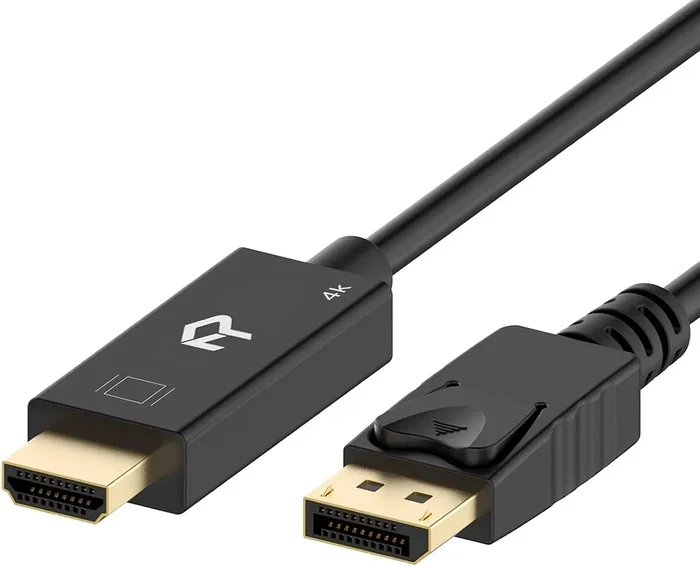
DisplayPort 1.2 and HDMI are not the same, even though both carry video and audio signals. DisplayPort 1.2 offers higher bandwidth, better support for high refresh rates, and features like adaptive sync that HDMI 1.4 lacks. HDMI remains more common on TVs and consumer devices, while DisplayPort 1.2 dominates in gaming monitors and professional setups. Understanding the differences helps you choose the right cable for your needs.
Many people ask whether DisplayPort 1.2 and HDMI are the same. They look similar on the outside, and both carry video and audio from a source to a display. But underneath, they are quite different. If you have ever plugged in a cable and wondered why your 4K display was not working the way you expected, the answer might be the cable standard you chose.
In this article, we will break down everything you need to know about DisplayPort 1.2 and HDMI. We will compare their bandwidth, resolution support, audio capabilities, and more. By the end, you will know exactly which cable to use and why. Let us dive in.
Key Takeaways
- DisplayPort 1.2 and HDMI are different standards: They have different bandwidth, connector designs, and feature sets.
- DisplayPort 1.2 supports higher bandwidth: At 17.28 Gbps, it handles 4K at 60Hz more easily than HDMI 1.4.
- HDMI is more widely compatible: Most TVs, Blu-ray players, and game consoles use HDMI ports.
- DisplayPort 1.2 includes adaptive sync: Features like FreeSync and G-Sync work better over DisplayPort 1.2.
- Choose based on your device: Match your cable to your monitor, laptop, or TV for the best experience.
- Adapters exist for both: You can convert between DisplayPort 1.2 and HDMI using active adapters when needed.
📑 Table of Contents
What Is DisplayPort 1.2?
DisplayPort 1.2 is a video display interface developed by VESA (Video Electronics Standards Association). It was released in 2009 and quickly became a favorite among PC users, gamers, and professionals. The connector comes in two main forms: the full-size DisplayPort and the mini DisplayPort, which you often find on older MacBooks and graphics cards.
The biggest selling point of DisplayPort 1.2 is its bandwidth. It supports a maximum data rate of 17.28 Gbps (gigabits per second). That is a lot of data, and it means you can push high resolutions and refresh rates with ease. For anyone building a gaming PC or a creative workstation, this matters a great deal.
What Is DisplayPort 1.2 Used For?
DisplayPort 1.2 is commonly found on monitors, graphics cards, and some laptops. It is the go-to connection for PC gaming because it handles high refresh rates and adaptive sync technologies well. If you have a gaming monitor that supports 144Hz or higher, there is a good chance it uses a DisplayPort connection.
Many professionals also prefer DisplayPort 1.2 for its multi-monitor support. You can daisy-chain several monitors from a single DisplayPort output, which reduces cable clutter on your desk. This feature is a game-changer for anyone who works with multiple screens throughout the day.
Another great use for DisplayPort 1.2 is connecting to 4K displays. With its bandwidth, it can drive a 4K monitor at 60Hz without any issues. This makes it ideal for video editing, graphic design, and other tasks that demand sharp, smooth visuals.
What Is HDMI?
HDMI stands for High-Definition Multimedia Interface. It was developed by a group of electronics manufacturers and has become the most widely used display connection in the world. You will find HDMI ports on TVs, Blu-ray players, game consoles, streaming devices, and laptops.
Unlike DisplayPort 1.2, which was designed primarily for PC displays, HDMI was built with consumer electronics in mind. It carries both video and audio over a single cable, and it supports features like CEC (Consumer Electronics Control), which lets you control multiple devices with one remote.
HDMI Versions Explained
There are several versions of HDMI, and they are not all the same. The most common versions you will encounter are:
- HDMI 1.4: Supports 4K at 30Hz and 3D content. This is the version most people associate with older devices.
- HDMI 2.0: Supports 4K at 60Hz and wider color gamuts. This is a big step up for high-resolution displays.
- HDMI 2.1: Supports 4K at 120Hz and even 8K at 60Hz. This is the latest standard and is found on modern gaming TVs and monitors.
When comparing DisplayPort 1.2 to HDMI, it is important to know which version of HDMI you are dealing with. HDMI 1.4 and DisplayPort 1.2 are not even close in terms of capability. But HDMI 2.0 and DisplayPort 1.2 are more competitive.
DisplayPort 1.2 vs HDMI: Head-to-Head Comparison
Let us put the two standards side by side. This table breaks down the key specifications so you can see the differences at a glance.
| Feature | DisplayPort 1.2 | HDMI 1.4 | HDMI 2.0 |
|---|---|---|---|
| Max Bandwidth | 17.28 Gbps | 10.2 Gbps | 18 Gbps |
| Max Resolution (at 60Hz) | 4K | 4K at 30Hz | 4K at 60Hz |
| Max Resolution (at 30Hz) | 5K | 4K | 4K |
| Adaptive Sync | Yes (FreeSync/G-Sync) | No | Yes (with HDMI VRR) |
| Audio Channels | Up to 8 channels | Up to 8 channels | Up to 8 channels |
| Connector Types | Full-size, Mini | Type A, C, D | Type A, C, D |
| Daisy-Chaining | Yes (Multi-Stream Transport) | No | No |
| Common On | PC monitors, GPUs, laptops | TVs, consoles, Blu-ray players | TVs, monitors, projectors |
As you can see from the table, DisplayPort 1.2 and HDMI each have their strengths. The choice depends on what devices you are connecting and what you plan to do with them.
Key Differences You Should Know
Now let us look at the specific areas where DisplayPort 1.2 and HDMI differ. These differences can have a big impact on your daily use.
Bandwidth and Speed
DisplayPort 1.2 offers 17.28 Gbps of bandwidth, while HDMI 1.4 maxes out at 10.2 Gbps. This is a huge gap. Higher bandwidth means more data can flow through the cable every second, which directly affects the resolutions and refresh rates you can achieve.
If you want to game at 1440p with a 144Hz refresh rate, DisplayPort 1.2 handles this effortlessly. HDMI 1.4 would struggle, and you might need to drop to 30Hz or lower the resolution. HDMI 2.0 closes this gap, but many older devices still use HDMI 1.4.
Resolution and Refresh Rate Support
Resolution and refresh rate go hand in hand when it comes to display quality. DisplayPort 1.2 can push 4K at 60Hz, which is smooth and detailed for both work and play. It can even handle 5K at 30Hz, though that is less common.
HDMI 1.4, on the other hand, can technically output 4K, but only at 30Hz. That is not smooth enough for gaming or video editing. HDMI 2.0 brings 4K at 60Hz, making it more competitive with DisplayPort 1.2 in this area.
For users who connect their setup to a 2-in-1 laptop with 16GB RAM for creative work, the choice of cable can affect how smoothly your external display performs. You can learn more about pairing your laptop with the right display in our 2-in-1 laptop with 16GB RAM guide.
Audio Capabilities
Both DisplayPort 1.2 and HDMI support multi-channel audio. They can both carry up to 8 channels of uncompressed audio. However, there is one key difference: HDMI supports ARC (Audio Return Channel) and eARC (Enhanced Audio Return Channel).
ARC lets your TV send audio back to your soundbar or receiver through the same HDMI cable. This is incredibly useful for home theater setups. DisplayPort 1.2 does not support ARC, so if you are building a home entertainment system, HDMI is the better choice.
On the other hand, if you are setting up a PC audio rig with external speakers, you might want to check out our best 2.1 PC speakers guide to pair with your display setup.
Connector Design
The physical connectors for DisplayPort 1.2 and HDMI are different. DisplayPort has a rectangular connector with a small latch on one side. HDMI has a smaller, trapezoidal connector that also locks in place.
One thing to note is that DisplayPort 1.2 comes in two sizes: full-size and mini DisplayPort. Apple popularized the mini DisplayPort, and you can still find it on some older devices. HDMI also comes in smaller variants, including the Type C (mini HDMI) and Type D (micro HDMI), but Type A (full-size) is by far the most common.
If you are using a laptop and need to connect to an external monitor, make sure you know which port your device has. Many modern laptops use HDMI or USB-C with DisplayPort Alt Mode, so check your device specifications before buying a cable.
Adaptive Sync and Gaming Features
This is where DisplayPort 1.2 really shines. It natively supports adaptive sync technologies like AMD FreeSync and NVIDIA G-Sync. These technologies reduce screen tearing and stuttering during fast-paced games, giving you a smoother gaming experience.
HDMI did not support adaptive sync until HDMI 2.1, and even then, the feature is not as widely adopted in the PC monitor space. If you are a gamer with a DisplayPort 1.2 monitor, you can take full advantage of these features right out of the box.
For more information on how your system setup affects display performance, check out our article on what is the RAM on a laptop to understand how memory impacts your overall experience.
Which One Should You Choose?
The right choice between DisplayPort 1.2 and HDMI depends on your specific situation. Here are some simple guidelines to help you decide.
Choose DisplayPort 1.2 if:
- You are connecting a PC to a gaming monitor.
- You want to use adaptive sync features like FreeSync or G-Sync.
- You need to daisy-chain multiple monitors.
- You are working with 4K displays at 60Hz or higher refresh rates.
- You are building a professional creative workstation.
Choose HDMI if:
- You are connecting a device to a TV or home theater system.
- You need ARC or eARC for audio return.
- Your device only has HDMI ports (consoles, Blu-ray players, streaming sticks).
- You are setting up a simple, plug-and-play display for casual use.
For many users, the answer is simple. If you are hooking up a PC to a monitor, go with DisplayPort 1.2. If you are connecting a laptop to a TV, use HDMI. The beauty of modern technology is that you can always use adapters to bridge the gap when needed.
If you are also thinking about upgrading your overall setup, knowing the right time to invest in new gear helps. Check out our guide on when is the best time to buy a laptop computer for tips on timing your purchases.
Common Myths About DisplayPort and HDMI
There are several myths floating around about these two standards. Let us clear up a few of the most common ones.
Myth 1: HDMI is always better for gaming. This is not true. For PC gaming, DisplayPort 1.2 often outperforms HDMI 1.4 and even some HDMI 2.0 connections. It offers higher bandwidth and better adaptive sync support.
Myth 2: DisplayPort cables are expensive. While premium DisplayPort 1.2 cables can cost more, basic ones are very affordable. You do not need to spend a fortune to get a reliable connection.
Myth 3: You cannot use both on the same device. Many modern graphics cards and laptops have both DisplayPort 1.2 and HDMI outputs. You can connect multiple displays using different standards at the same time.
Myth 4: Newer is always better. HDMI 2.1 is newer and faster than DisplayPort 1.2, but that does not mean it is better for every situation. If your monitor only supports DisplayPort 1.2, using an HDMI 2.1 cable will not unlock extra features.
Understanding these myths helps you make informed decisions. Do not let marketing hype or outdated advice steer you wrong. Always check the specifications of your devices and choose the cable that matches your needs.
The Bottom Line
DisplayPort 1.2 and HDMI are not the same, and they are not meant to be. Each standard has its own strengths and ideal use cases. DisplayPort 1.2 excels in PC gaming, professional work, and multi-monitor setups thanks to its higher bandwidth and adaptive sync support. HDMI remains the king of consumer electronics, offering broad compatibility with TVs, consoles, and home theater systems.
When choosing between the two, think about what devices you are connecting and what you plan to do. For most PC users, DisplayPort 1.2 is the better choice. For living room setups and casual viewing, HDMI wins. And when in doubt, an adapter can always save the day.
Make sure your cables match your devices, and you will enjoy a smooth, high-quality display experience every time. The right connection makes all the difference, whether you are gaming, working, or just watching your favorite show.
Frequently Asked Questions
Can I use a DisplayPort 1.2 to HDMI adapter?
Yes, you can use an active adapter to convert DisplayPort 1.2 to HDMI. These adapters are widely available and affordable. Make sure you get an active adapter, as passive adapters may not work for all resolutions and refresh rates.
Does HDMI 2.0 replace DisplayPort 1.2?
Not exactly. HDMI 2.0 and DisplayPort 1.2 are different standards with different strengths. HDMI 2.0 offers 4K at 60Hz and is great for TVs, while DisplayPort 1.2 excels in PC gaming and multi-monitor setups. They serve different purposes.
Can I run 4K at 120Hz with DisplayPort 1.2?
No, DisplayPort 1.2 does not support 4K at 120Hz. It can handle 4K at 60Hz or 5K at 30Hz. For 4K at 120Hz, you would need DisplayPort 1.4 or a newer version of the standard.
Is DisplayPort 1.2 good for gaming?
Absolutely. DisplayPort 1.2 is excellent for gaming. It supports high refresh rates, adaptive sync technologies like FreeSync and G-Sync, and can drive 1440p monitors at 144Hz with ease. Many gaming monitors use DisplayPort as their primary connection.
Why does my HDMI cable not support 4K at 60Hz?
If your HDMI cable only supports 4K at 30Hz, you are likely using an HDMI 1.4 cable. To get 4K at 60Hz, you need an HDMI 2.0 cable or a newer HDMI 2.1 cable. Check your cable specifications and your device ports to confirm the version.
Can I connect two monitors using DisplayPort 1.2?
Yes, DisplayPort 1.2 supports Multi-Stream Transport (MST), which allows you to daisy-chain multiple monitors from a single port. This is a great feature for keeping your workspace clean and organized. Make sure your monitors also support MST for this to work.