Is Micro Usb the Same as Usb C
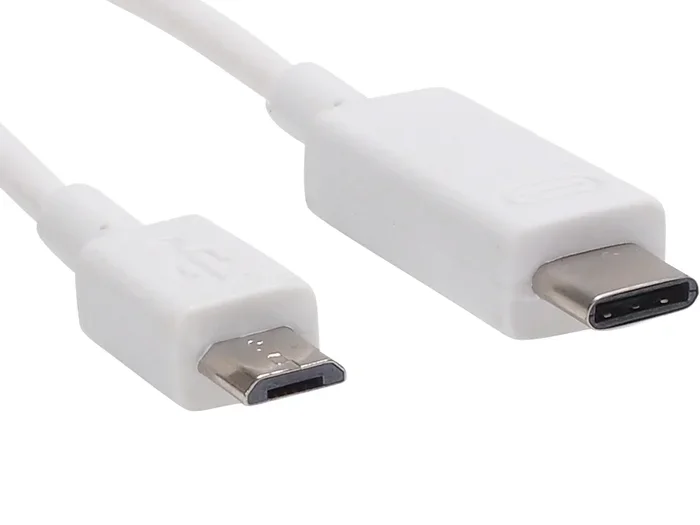
No, Micro USB and USB C are not the same. They differ in shape, speed, power delivery, and reversibility. USB C is the newer, faster, and more versatile connector that is replacing Micro USB in most modern devices. Understanding these differences helps you choose the right cable and avoid frustration.
You have probably held both a Micro USB cable and a USB C cable in your hand. They look similar at a glance, but they are very different. If you have ever grabbed the wrong cable or wondered why your device charges slowly, this article is for you.
The short answer is no. Micro USB and USB C are not the same. They are two different connector types with different shapes, speeds, and capabilities. In this guide, we will break down every difference in simple terms. You will learn which cable your devices need, why the change happened, and how to tell them apart in seconds.
We will also cover whether you can use them interchangeably, what adapters are available, and which one you should choose for your setup. By the end, you will never mix them up again.
Key Takeaways
- Different Shapes: Micro USB has a rectangular plug with a flat top, while USB C is small, oval, and reversible.
- Speed Matters: USB C supports much faster data transfer speeds than Micro USB.
- Power Delivery: USB C can deliver significantly more power, enabling faster charging.
- Reversibility: USB C plugs in either way, but Micro USB only works one direction.
- Device Compatibility: Older devices use Micro USB, while newer gadgets use USB C.
- Adapters Exist: You can use adapters to connect USB C devices to Micro USB cables and vice versa.
- Future-Proofing: USB C is becoming the universal standard for most electronics.
📑 Table of Contents
- What Is Micro USB?
- What Is USB C?
- Key Differences Between Micro USB and USB C
- Can You Use Micro USB and USB C Interchangeably?
- Which Devices Use Which Connector?
- Why Did the Industry Switch from Micro USB to USB C?
- Should You Still Buy Micro USB Cables?
- Common Mistakes People Make with USB C and Micro USB
- Quick Tips for Choosing the Right Cable
- The Bottom Line
What Is Micro USB?
Micro USB is a older connector standard that was widely used from the mid-2000s through the early 2020s. You probably have several devices at home that still use it. Think of older phones, portable speakers, fitness trackers, and cheap power banks.
The Micro USB plug is small and flat. It has a trapezoid shape with a flat top edge. There is only one way to insert it into a port. This means you might have to flip it a few times before it fits. That small frustration is something most of us have experienced.
Types of Micro USB
There are actually two versions of Micro USB you should know about:
- Micro USB 2.0: This is the most common version. It supports data transfer speeds up to 480 Mbps. It is what you will find on most older gadgets.
- Micro USB 3.0: This version is faster, with speeds up to 5 Gbps. It has a slightly different shape with an extra pin row. It is less common but still exists on some external hard drives.
Both versions share the same basic plug shape. The main difference is inside the connector. If you see a blue-colored port, it is usually Micro USB 3.0.
What Is USB C?
USB C is the newer connector standard that has taken over the electronics world. It is small, oval-shaped, and completely reversible. You can plug it in either direction, and it will work every time. This alone makes it a huge upgrade over Micro USB.
USB C is not just a connector shape. It is also a standard that supports the latest USB protocols. This means it can handle faster data transfer, more power delivery, and even video output. Many modern laptops, phones, tablets, and accessories now use USB C as their main port.
USB C Features at a Glance
- Reversible design: Plug it in either way with no guessing.
- Fast data transfer: USB 3.2 Gen 2 can reach speeds up to 10 Gbps. USB4 can go even faster at 40 Gbps.
- High power delivery: USB C can deliver up to 100 watts of power through USB PD (Power Delivery).
- Video output: With Alt Mode, USB C can connect directly to monitors and displays.
- Universal use: It works with phones, laptops, tablets, cameras, and more.
Many people love USB C because one cable can replace several. You can charge your phone, transfer files to a laptop, and connect to a display all with the same cable. This is a big reason why the industry moved away from older standards like Micro USB.
Key Differences Between Micro USB and USB C
Now let us get into the real comparison. Here are the main differences that set these two connectors apart.
Shape and Design
The most obvious difference is the shape. Micro USB has a flat, rectangular plug that only fits one way. USB C is small, oval, and symmetrical. You can flip a USB C plug around and it will still work.
This might seem like a small thing, but it makes a big difference in daily use. With Micro USB, you often find yourself in the dark fumbling with the cable. USB C eliminates that problem completely.
Data Transfer Speed
Speed is where USB C really shines. Here is a quick comparison:
- Micro USB 2.0: Up to 480 Mbps
- Micro USB 3.0: Up to 5 Gbps
- USB C (USB 3.2 Gen 1): Up to 5 Gbps
- USB C (USB 3.2 Gen 2): Up to 10 Gbps
- USB C (USB4): Up to 40 Gbps
Even the fastest Micro USB version cannot match the standard USB C speeds. If you need to transfer large files like videos or backups, USB C is clearly the better choice. This is especially true if you use devices like external SSDs or the M 2 Nvme To Usb C Ssd Enclosure for fast storage on the go.
Power Delivery and Charging
Charging speed depends on both the cable and the port. Micro USB typically supports up to 10 watts of charging power. USB C with USB Power Delivery can handle up to 100 watts or more.
This means USB C charges devices much faster. A phone that takes two hours to charge with Micro USB might charge fully in under an hour with USB C. Laptops and tablets benefit even more from this power advantage.
Reversibility
We mentioned this already, but it deserves its own spotlight. USB C plugs in either way. Micro USB does not. This is one of the most appreciated features of USB C. You will never again have to turn the cable around three times to find the right orientation.
Durability
USB C connectors are designed to last longer. They have a stronger build and a smoother insertion mechanism. Micro USB connectors tend to wear out faster, especially with frequent plugging and unplugging. The loose fit on many Micro USB ports is a common complaint.
Can You Use Micro USB and USB C Interchangeably?
The short answer is no, not directly. The connectors have different shapes and pin layouts. You cannot plug a Micro USB cable into a USB C port or vice versa without an adapter.
However, adapters do exist and they work well. You can buy a Micro USB to USB C adapter for a few dollars. This lets you use older cables with new devices, or new cables with older devices. It is not as fast or convenient as matching the right port, but it works in a pinch.
Keep in mind that using an adapter may limit speeds or power delivery. You will not get the full benefits of USB C through an adapter. But for basic charging or file transfers, it gets the job done.
If you want the best performance, always match the cable to the port. Use a USB C cable with USB C devices, and Micro USB cables only with devices that have Micro USB ports.
Which Devices Use Which Connector?
Knowing which connector your devices use helps you buy the right cables and accessories. Here is a simple breakdown.
Devices That Use Micro USB
- Older Android phones (pre-2017 models)
- Budget phones and entry-level devices
- Portable Bluetooth speakers
- Fitness trackers and smartwatches
- Older tablets and e-readers
- Many cheap power banks and flashlights
- Some car dash cams and GPS devices
Devices That Use USB C
- Most modern smartphones (Samsung Galaxy S series, Google Pixel, etc.)
- Apple iPhones (starting from iPhone 15)
- Modern laptops (MacBook, Dell XPS, Lenovo ThinkPad, etc.)
- Tablets (iPad Pro, Samsung Galaxy Tab, etc.)
- Wireless earbuds and headphones (like the Best USB Type C Headphones)
- External hard drives and SSDs
- Gaming controllers and accessories
- Cameras and drones
The trend is clear. USB C is taking over. Even devices that once relied on Micro USB are switching to USB C. If you buy a new gadget today, there is a very good chance it will use USB C.
Why Did the Industry Switch from Micro USB to USB C?
The shift from Micro USB to USB C was not sudden. It happened because USB C solves many problems that Micro USB had. Here are the main reasons the industry made the change.
1. Reversibility. The ability to plug in either direction was a game-changer. It sounds simple, but it eliminates daily frustration.
2. Faster Speeds. As devices needed more speed for large file transfers and fast charging, Micro USB could not keep up. USB C supports the latest USB standards and can handle much higher speeds.
3. More Power. Modern devices need more power. Laptops, for example, require more wattage than Micro USB can provide. USB C with Power Delivery handles this easily.
4. One Cable for Everything. USB C is becoming the universal port. You can charge, transfer data, and connect to displays with a single cable. This reduces cable clutter and simplifies your setup.
5. Future-Proofing. USB C is designed to support future technologies. The USB4 standard runs through USB C and offers even faster speeds. Investing in USB C now means your cables will stay relevant longer.
The European Union also played a role by pushing for a universal charging standard. This regulation helped accelerate the adoption of USB C across all devices, regardless of brand.
Should You Still Buy Micro USB Cables?
In most cases, you should buy USB C cables. They are faster, more versatile, and represent the current and future standard. However, there are a few situations where Micro USB cables still make sense.
If you have older devices that only support Micro USB, you will need those cables. Budget accessories like cheap power banks or basic LED lights often still use Micro USB. And if you are buying replacement cables for older gear, Micro USB is still widely available and affordable.
For everything else, go with USB C. It is the smarter long-term investment. You will use fewer cables, charge faster, and transfer files more quickly. If you use an external drive for backups, consider a Nvme Ssd to Usb Adapter to get the fastest speeds possible with USB C.
Common Mistakes People Make with USB C and Micro USB
Here are some mistakes to avoid:
- Assuming all USB C cables are the same: Not all USB C cables support the same speeds or power levels. Always check the specs before buying.
- Using cheap cables: Poor-quality cables can damage your devices or charge slowly. Stick with reputable brands.
- Forgetting about adapters: If you have a mix of old and new devices, keep a few adapters handy.
- Ignoring cable length: Longer cables can reduce charging speed. Use shorter cables for fast charging and longer ones for convenience.
- Force-fitting a cable: If a cable does not fit, do not force it. Check the port type and use the right cable or adapter.
Quick Tips for Choosing the Right Cable
Here are some practical tips to keep in mind:
- Check your device manual or look at the port shape to identify the connector type.
- Buy USB C cables that support USB 3.0 or higher for the best speeds.
- Look for USB PD (Power Delivery) on the cable label if fast charging matters to you.
- Keep a spare Micro USB cable for older devices you still use.
- Consider a multi-port charger with USB C and USB A outputs to charge multiple devices at once.
These small habits will save you time, money, and frustration in the long run.
The Bottom Line
So, is Micro USB the same as USB C? Absolutely not. They are two different connectors with different shapes, speeds, and capabilities. Micro USB served us well for many years, but USB C is the clear winner for modern devices.
USB C is faster, more powerful, reversible, and becoming the universal standard. If you are buying new cables or accessories, USB C should be your go-to choice. Keep a few Micro USB cables only for older devices that still need them.
The world of connectors is always evolving, but USB C is here to stay. Understanding the differences helps you make smarter choices and get the most out of your devices every day.
Frequently Asked Questions
Can I plug a Micro USB cable into a USB C port?
No, you cannot plug a Micro USB cable directly into a USB C port. The shapes and pin layouts are completely different. You will need a Micro USB to USB C adapter to bridge the two. Using an adapter works for basic charging and data transfer, but you will not get the full speed or power benefits of USB C.
Is USB C faster than Micro USB?
Yes, USB C is significantly faster. Even the fastest Micro USB 3.0 version maxes out at 5 Gbps. Standard USB C cables with USB 3.2 Gen 2 support speeds up to 10 Gbps, and USB4 cables can reach 40 Gbps. For everyday use, this means much faster file transfers and quicker charging times.
Why does USB C plug in either way but Micro USB does not?
USB C has a symmetrical oval shape with pins on both sides of the connector. This design allows it to work regardless of which way you insert it. Micro USB has an asymmetric shape with pins only on one side, so it only fits one way. The reversible design of USB C was a deliberate improvement over older connectors.
Can I charge my phone faster with USB C than with Micro USB?
Yes, in most cases you can. USB C supports USB Power Delivery, which can deliver much more power than Micro USB. This means faster charging for phones, tablets, and laptops. However, the actual speed also depends on your charger, the cable quality, and your device’s battery capabilities.
Are USB C cables more expensive than Micro USB cables?
Not necessarily. Basic USB C cables are widely available at similar prices to Micro USB cables. High-speed or high-power USB C cables may cost a bit more, but the price difference is small. As USB C becomes the standard, prices continue to drop and availability increases.
Will all future devices use USB C?
Most likely, yes. USB C is rapidly becoming the universal connector for phones, laptops, tablets, and accessories. Many countries have even passed regulations requiring USB C as the standard charging port. While it is impossible to predict the future with certainty, USB C is expected to remain the dominant connector for many years to come.