Is Usb Power 5v or 12v
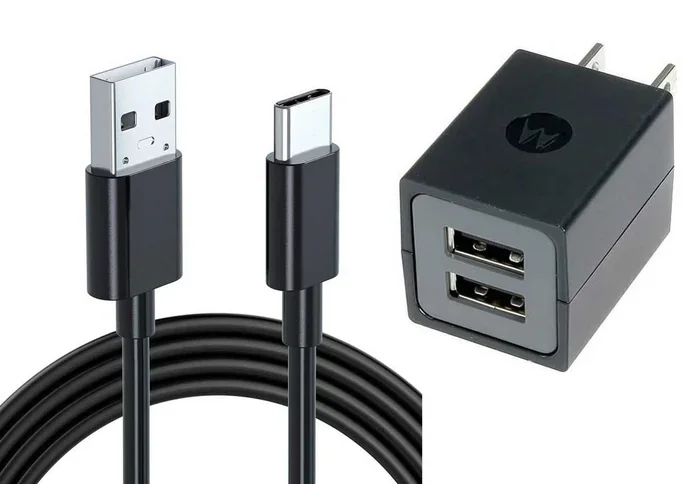
USB power is officially 5V for standard USB connections, but USB Power Delivery (PD) can push higher voltages up to 20V or more. The 12V figure you see on some devices is not a standard USB voltage — it usually comes from specialized adapters or non-USB power sources. Understanding the difference helps you charge devices safely and avoid damage.
Key Takeaways
- Standard USB power is 5V: All traditional USB ports deliver 5 volts, which is the universal baseline for USB charging.
- 12V is not a native USB voltage: If a device needs 12V, it typically uses a special adapter or a non-USB power supply.
- USB Power Delivery changes the game: USB PD can negotiate voltages up to 20V, making it versatile for laptops and monitors.
- Check your device specs: Always verify the voltage and wattage requirements before plugging in any USB cable or charger.
- Using the wrong voltage can damage devices: Feeding 12V into a 5V-only USB port is a real risk that can fry your equipment.
- USB-C with PD support offers the most flexibility: Modern USB-C cables can handle multiple voltage profiles for different devices.
- Power adapters matter: The wall adapter or hub you use determines the actual voltage delivered through a USB connection.
📑 Table of Contents
What Is USB Power Voltage?
When you plug something into a USB port, you expect it to charge or power up. But have you ever wondered what voltage is actually flowing through that cable? The short answer is that standard USB power is 5 volts. This has been the rule since USB was first introduced in the mid-1990s.
USB was designed to be simple and universal. A single voltage standard meant that any USB cable could work with any USB device. This was a huge deal back when every new gadget needed a unique charger. The 5V standard made life easier for everyone — consumers and manufacturers alike.
But technology does not stay still. As devices became more powerful, the need for more wattage grew. That is where USB Power Delivery comes in. We will get into that shortly. First, let us look at the basics of USB voltage in more detail.
The Standard 5V USB Voltage
Every USB 1.0, 2.0, and 3.0 port delivers 5 volts by default. This is written into the USB specification. Whether you are plugging in a keyboard, a flash drive, or a phone charger, the baseline voltage is 5V.
Here is what that means in practice:
- USB 1.0 and 2.0 can supply up to 0.5 watts at 5V (about 100 milliamps).
- USB 3.0 bumps that up to 4.5 watts at 5V (about 900 milliamps).
- USB Battery Charging spec allows up to 1.5 amps at 5V (7.5 watts) for dedicated charging ports.
For small devices like mice, controllers, and flash drives, 5V is plenty. But larger devices like tablets, laptops, and cameras need more power. That is exactly why the industry created USB Power Delivery.
USB 3.0 and Newer Standards
USB 3.0 brought a noticeable upgrade in power delivery. Instead of 500 milliamps, USB 3.0 ports can deliver 900 milliamps. This is still at 5 volts, but the increased current means more usable power.
Later versions like USB Type-C opened the door to much higher voltages. USB-C is not just a new shape — it supports the USB Power Delivery protocol. This protocol lets the device and the charger negotiate the best voltage and current for the job. More on that below.
Can USB Deliver 12V?
This is where things get interesting. The short answer is no — standard USB does not deliver 12V. But the full answer is a bit more nuanced. Let us break it down.
When you see a device that runs on 12V, it usually does not plug directly into a regular USB port. Instead, it uses a specialized power adapter or a converter. Some devices come with a USB cable but rely on an external power brick that steps up or adjusts the voltage to 12V before it reaches the device.
USB Power Delivery and Higher Voltages
USB Power Delivery (PD) is a game-changer. It allows USB cables to carry voltages well beyond 5V. Here are the voltage profiles supported by USB PD:
- 5V — the standard baseline
- 9V — common for fast-charging phones
- 15V — used by some tablets and monitors
- 20V — standard for most USB-C laptops
Notice that 12V is not on that list. USB PD jumps from 9V to 15V. So if a device needs exactly 12V, it cannot get that directly from a USB PD source. It would need a voltage regulator or a dedicated power supply.
For example, many security camera power supply 12V units use a barrel jack or a proprietary connector — not a standard USB plug. The same goes for most cctv camera power supply 12V systems. These are purpose-built power sources, not USB-powered devices.
When Do You Need 12V via USB?
You rarely need 12V directly from a USB port. But some situations come up:
- Industrial equipment that runs on 12V but uses a USB connection for data.
- LED lighting strips that are powered through USB but need a step-up converter.
- Certain monitors and displays that accept USB-C power but require an external 12V adapter for full brightness.
In all these cases, the 12V comes from a converter or adapter — not from the USB port itself. The USB connection handles data or provides a 5V baseline, and additional circuitry steps the voltage up or down as needed.
Common USB Devices and Their Voltage Needs
Not all USB devices are created equal. Some sip power, while others need a serious boost. Here is a quick look at what different devices typically need.
| Device Type | Typical Voltage | Typical Power Draw |
|---|---|---|
| Flash Drive | 5V | 0.5W – 1W |
| Wireless Mouse | 5V | 0.5W – 1W |
| Smartphone | 5V – 9V (USB PD) | 5W – 18W |
| Tablet | 5V – 9V (USB PD) | 10W – 20W |
| Laptop | 5V – 20V (USB PD) | 30W – 100W+ |
| Security Camera | 12V (non-USB) | 2W – 5W |
| External SSD | 5V (via USB) | 2W – 5W |
Notice how most consumer devices stay at 5V or use USB PD to negotiate higher voltages. The 12V devices are almost always cameras, industrial sensors, or specialized equipment that uses non-USB connectors.
If you are shopping for accessories, always check the voltage requirements. Using a 5V USB port to power a 12V device will not work. And plugging a 12V source into a 5V USB device can cause real damage. This is why understanding your power supply matters so much.
How to Check USB Port Voltage
Wondering what voltage your USB port is actually delivering? There are a few easy ways to find out.
- Check the device manual. Most manufacturers list the voltage and wattage requirements in the specs section.
- Use a USB voltage tester. These small gadgets plug into the USB port and display the voltage on a tiny screen. They cost around $5 to $15 and are very handy.
- Look at the charger or adapter label. The wall adapter or USB hub usually has the output voltage printed on it. Look for “Output: 5V” or “Output: 9V/20V” for PD chargers.
- Check your operating system. On Windows, you can use tools like HWiNFO or USBTreeView to see detailed USB port information.
Quick Tip: Never assume a USB port gives you 5V. Some ports — especially on laptops — may deliver different voltages depending on the port type and the device plugged in. Always verify before connecting something sensitive.
If you are dealing with a setup that needs stable power, like a security camera power supply 12V system or a cctv camera power supply 12V rig, you want to make sure your power source is reliable. Fluctuating voltage can cause cameras to flicker, disconnect, or fail entirely.
USB 5V vs 12V: Key Differences
Let us put the two side by side so the differences are crystal clear.
| Feature | USB 5V | 12V (Non-USB) |
|---|---|---|
| Standard Voltage | Yes — USB spec | No — not a USB standard |
| Common Devices | Phones, drives, peripherals | Security cameras, LED lights |
| Connector Types | USB-A, USB-C, micro-USB | Barrel jack, terminal blocks |
| Power Delivery Protocol | USB PD (negotiated) | Fixed output |
| Max Current (typical) | Up to 3A (USB PD) | Varies by supply |
| Risk of Damage | Low (within spec) | High if connected to 5V device |
The table makes one thing obvious: 5V and 12V are not interchangeable. They serve completely different purposes and use different connectors. Mixing them up can lead to devices not working, or worse, getting fried.
For most everyday users, 5V USB power is all you need. Your phone, your tablet, your wireless keyboard — they all run on 5V through USB. You only need to think about 12V when you are working with specialized equipment like cameras or industrial gear.
Expert Insights: The Role of Voltage Regulators
Here is something that often gets overlooked. Many devices that appear to run on 12V actually have a voltage regulator built in. This regulator takes the incoming power — whether it is 5V USB or 12V barrel jack — and converts it to the exact voltage the internal components need.
This means some devices are more flexible than they appear. For instance, certain external drives that come with a USB cable and a power adapter use the adapter to provide 12V, while the USB connection handles data or provides supplementary power. The internal circuitry manages the rest.
Similarly, when you use an nvme ssd to usb adapter or a m 2 nvme ssd to usb c ssd enclosure, the enclosure has its own voltage regulation. The USB port provides 5V, and the enclosure’s circuitry converts that to whatever the SSD needs. This is why you never need to worry about 12V when using these kinds of accessories.
Common Mistakes and Myths
Let us clear up a few things that cause confusion.
- Myth: All USB ports deliver the same power. Reality: A USB 2.0 port gives much less power than a USB-C port with PD support. Always check the port type and the charger specs.
- Myth: 12V USB cables exist. Reality: There is no such thing as a standard 12V USB cable. If you see one, it has a converter built in or it is not a true USB standard cable.
- Myth: Higher voltage charges faster. Reality: Charging speed depends on both voltage and current (amps). USB PD handles this negotiation automatically, but you still need a compatible charger and device.
- Mistake: Using a 12V adapter with a 5V USB device. This is a fast way to fry your gadget. Always match the voltage to the device requirements.
- Mistake: Ignoring wattage. Voltage alone does not tell the whole story. A 5V port at 3 amps delivers 15 watts. A 5V port at 0.5 amps delivers only 2.5 watts. Check both numbers.
One mistake people make with their setups is assuming that any power supply will work as long as the connector fits. This is dangerous. The how much power does a laptop use when plugged in depends heavily on using the correct voltage and wattage. The same principle applies to every USB-powered device.
Another common issue is using low-quality cables. A cheap USB cable can cause voltage drops, slow charging, or even data loss. Invest in good cables from reputable brands. Your devices — and your data — will thank you.
Final Thoughts
So, to answer the question directly: USB power is 5V. That is the standard, and it has been for decades. The 12V figure belongs to a different world of power supplies — one that uses barrel jacks, terminal blocks, and proprietary connectors, not standard USB plugs.
That said, USB Power Delivery has expanded what USB can do. With PD, you can get 9V, 15V, and 20V through a USB-C cable. But even with PD, 12V is not a standard profile. If your device needs 12V, you will need a dedicated power supply or a converter.
The bottom line is simple: know your device’s voltage requirements, use the right power source, and never force a connection that does not match. A few minutes of checking can save you from a costly mistake and keep your gear running smoothly for years to come.
Whether you are powering a simple flash drive, charging your phone, or setting up a camera system, understanding USB voltage helps you make smart choices. Stay informed, stay safe, and let your USB connections work the way they were designed to.
Frequently Asked Questions
Is USB power always 5 volts?
Standard USB ports deliver 5V, which is the baseline set by the USB specification. However, USB Power Delivery can negotiate higher voltages like 9V, 15V, or 20V through USB-C cables. The 5V default remains true for all traditional USB-A and USB-B ports.
Can I run a 12V device directly from a USB port?
No, you should not. Standard USB ports output 5V, and connecting a 12V device can damage both the device and the port. You would need a step-up converter or a dedicated 12V power supply to run a 12V device safely.
What is USB Power Delivery (PD)?
USB Power Delivery is a protocol that allows USB-C cables to negotiate higher voltages and currents between the charger and the device. It supports voltage profiles of 5V, 9V, 15V, and 20V, making it versatile for phones, tablets, and laptops.
Why do some devices need 12V instead of 5V?
Devices like security cameras, LED strips, and certain industrial sensors require more power than 5V USB can provide. These devices use dedicated power supplies that output 12V through barrel jacks or other non-USB connectors.
How can I tell if my USB port supports higher voltages?
Check if your port is USB-C and supports USB Power Delivery. You can also look at your charger or adapter for the output voltage label. Using a USB voltage tester is another reliable way to measure what your port is actually delivering.
Is it safe to use a USB hub for power-hungry devices?
It depends. A powered USB hub with its own AC adapter can deliver more current than a computer’s built-in USB port. However, it still outputs 5V by default. For devices that need more than 5V, you will need a hub with USB PD support or a separate power supply.