Is Usb Tethering the Same as Hotspot
USB tethering and mobile hotspots both share your phone’s internet with other devices, but they work in very different ways. USB tethering uses a cable for a fast, stable, and secure connection, while a hotspot relies on Wi-Fi for wireless convenience. Understanding the difference helps you choose the right method for your needs.
Have you ever been stuck somewhere without Wi-Fi and wished your phone could share its internet with your laptop? You are not alone. USB tethering and mobile hotspots are two of the most popular ways to get online when you are away from a home network. But here is the big question: are they the same thing?
The short answer is no. They both share your phone’s mobile data with other devices, but the way they do it is completely different. One uses a physical cable, and the other uses wireless signals. Each method has its own strengths and weaknesses. In this guide, we will break down everything you need to know so you can pick the right option for your situation.
Whether you are a traveler, a remote worker, or someone who just wants a backup internet source, understanding the difference between these two methods matters. Let us dive in and explore USB tethering vs hotspot in detail.
Key Takeaways
- USB tethering and hotspots are not the same: One uses a cable, the other uses Wi-Fi.
- USB tethering offers faster speeds: A wired connection typically delivers better performance than wireless.
- Hotspots are more convenient: No cables needed, so multiple devices can connect easily.
- Battery drain differs: Hotspots drain your phone battery faster than USB tethering.
- Security varies: USB tethering is more secure since it requires a physical connection.
- Both methods use your mobile data plan: Keep an eye on your data usage either way.
📑 Table of Contents
- What Is USB Tethering?
- What Is a Mobile Hotspot?
- USB Tethering vs Hotspot: Head-to-Head Comparison
- When Should You Use USB Tethering?
- When Should You Use a Mobile Hotspot?
- Does USB Tethering Affect Your Phone’s Performance?
- Can You Use Both Methods at the Same Time?
- Which Method Uses Less Data?
- Final Thoughts
What Is USB Tethering?
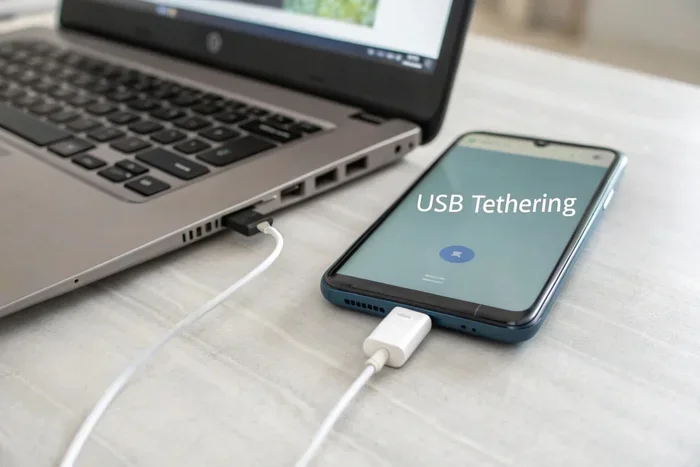
USB tethering is a method of sharing your phone’s mobile data connection with another device through a USB cable. When you connect your phone to a laptop or tablet using a cable, your phone acts like a modem. The other device gets internet access through that wired connection.
The process is simple. You plug your phone into your computer using a USB cable. Then you go to your phone’s settings and enable USB tethering. Within seconds, your laptop is online using your phone’s data connection. It works with both Android and iPhone devices, though the setup steps may vary slightly.
How USB Tethering Works
When you enable USB tethering, your phone creates a small local network between itself and the connected device. The data flows through the USB cable, not through the air. This means your connection is not affected by Wi-Fi interference or distance limits. The signal stays strong as long as the cable is plugged in.
Most modern smartphones support this feature. You do not need any extra apps or software. Your phone and computer handle everything automatically once tethering is turned on. The connection shows up on your laptop as a new network adapter, just like a regular Wi-Fi or Ethernet connection.
Pros of USB Tethering
- Faster speeds: A wired connection is almost always faster than Wi-Fi. You get more stable data transfer rates.
- Lower latency: Online gaming and video calls perform better on a tethered connection.
- More secure: Since the connection is physical, it is much harder for others to intercept your data.
- No battery drain from Wi-Fi: Your phone does not need to power a wireless radio, which saves energy.
- Stable connection: You do not have to worry about signal drops or interference from other devices.
Cons of USB Tethering
- Requires a cable: You need to carry a compatible USB cable everywhere you go.
- Limited range: Your laptop must stay within cable length of your phone.
- One device at a time: Only the device plugged in via cable gets internet access.
- Phone charging: Some phones charge while tethered, but others may drain battery faster depending on usage.
What Is a Mobile Hotspot?
A mobile hotspot turns your phone into a wireless router. It broadcasts a Wi-Fi signal that other devices can connect to. Once enabled, any device within range can access the internet using your phone’s mobile data.
Setting up a hotspot is straightforward. You go to your phone’s settings, find the hotspot or tethering option, and turn it on. You set a name and password for your network. Then other devices search for the Wi-Fi network and connect just like they would at home or in a coffee shop.
How a Mobile Hotspot Works
When you enable a hotspot, your phone uses its built-in Wi-Fi antenna to create a local wireless network. It shares your cellular data connection with any device that connects to it. The phone essentially becomes a bridge between the cellular network and your other devices.
Hotspots work over short to medium distances, typically within 30 to 50 feet depending on your phone and environment. Walls, furniture, and other obstacles can reduce the range. Multiple devices can connect at the same time, usually between five and ten, depending on your phone model.
Pros of a Mobile Hotspot
- Wireless convenience: No cables needed. Any Wi-Fi-enabled device can connect.
- Multiple devices: You can share your connection with several devices at once.
- Portability: As long as you have signal, you can create a hotspot anywhere.
- No physical tethering: You are free to move around while staying connected.
- Easy setup: Most phones have a built-in hotspot feature ready to go.
Cons of a Mobile Hotspot
- Slower speeds: Wi-Fi is generally slower than a direct USB connection.
- Battery drain: Running a hotspot uses a lot of phone battery power quickly.
- Security risks: Wireless signals can be intercepted if you do not use a strong password.
- Signal interference: Other Wi-Fi networks and obstacles can weaken your connection.
- Data limits: Sharing data wirelessly to multiple devices can eat through your data plan fast.
USB Tethering vs Hotspot: Head-to-Head Comparison
Now that you understand both methods, let us compare them side by side. This table breaks down the key differences between USB tethering and a mobile hotspot.
| Feature | USB Tethering | Mobile Hotspot |
|---|---|---|
| Connection Type | Wired (USB cable) | Wireless (Wi-Fi) |
| Speed | Faster and more stable | Good, but can vary |
| Range | Limited to cable length | Up to 50 feet |
| Devices Supported | One at a time | Multiple simultaneously |
| Security | Very high (physical connection) | Moderate (depends on password) |
| Battery Impact | Low to moderate | High |
| Convenience | Less convenient (needs cable) | Very convenient |
| Setup Difficulty | Very easy | Very easy |
As you can see, neither method is perfect for every situation. Your choice depends on what matters most to you. If speed and security are your top priorities, USB tethering wins. If convenience and sharing with multiple devices matter more, a hotspot is the way to go.
When Should You Use USB Tethering?
USB tethering shines in specific situations. Here are the best times to use this method:
- You need a fast, stable connection: If you are working on something that requires a reliable internet link, a cable connection is hard to beat. Video editors, programmers, and remote workers benefit from the lower latency and consistent speeds.
- You are in a crowded area: In places with lots of Wi-Fi interference, a wired connection avoids the noise and congestion that can slow down wireless signals.
- Security is a concern: If you are accessing sensitive information like bank accounts or work files, a physical connection is much harder to hack than a Wi-Fi signal.
- You only need one device online: If it is just you and your laptop, tethering is simple and efficient.
For example, imagine you are at a busy airport or coffee shop. The Wi-Fi is slow and crowded. You plug in your phone with a USB cable, enable tethering, and suddenly you have a fast, private connection. No one else can access it, and your speeds stay consistent.
Also, if you are someone who travels frequently for work, you might want to check out when is the best time to purchase a laptop for travel-friendly setups that pair well with tethering. A lightweight laptop with good connectivity options makes tethering even more practical on the go.
When Should You Use a Mobile Hotspot?
A mobile hotspot is ideal in a different set of situations. Here is when it makes the most sense:
- Multiple devices need internet: If you are traveling with family or coworkers, a hotspot lets everyone connect at the same time. You do not need multiple cables or adapters.
- You need freedom of movement: A hotspot lets you walk around while staying connected. You are not tied to one spot by a cable.
- You do not have a cable handy: Sometimes you forget your USB cable or it is damaged. A hotspot saves the day in these moments.
- You want quick setup: Hotspots are ready in seconds. No cables, no settings adjustments. Just turn it on and connect.
Think about a road trip scenario. You and your family are in the car, and everyone wants to use their phones or tablets. You turn on your phone hotspot, share the password, and everyone is online. That kind of convenience is something USB tethering simply cannot match.
Tips for Using a Hotspot Effectively
- Use a strong password: Always set a complex password to prevent unauthorized users from accessing your data.
- Turn it off when not in use: This saves battery and protects your data.
- Monitor your data usage: Hotspots can burn through your data plan quickly, especially with video streaming.
- Keep your phone plugged in: Running a hotspot drains battery fast, so charge your phone while using it.
Does USB Tethering Affect Your Phone’s Performance?
Many people worry that tethering might slow down their phone or drain the battery. The truth is, it depends on how you use it. USB tethering generally has less impact on battery life than a hotspot because your phone does not need to power a Wi-Fi radio continuously.
However, tethering does use your phone’s processor and data connection. If you are running heavy tasks while tethered, your phone may get warm or slow down slightly. For most everyday tasks like browsing, email, and video calls, the impact is minimal.
If you are concerned about performance, you can always check your phone’s RAM and overall specs. Having enough memory helps your phone handle tethering without slowdowns. For instance, understanding the RAM on a laptop you plan to tether can also help you ensure smooth performance on the receiving end.
How to Minimize Battery Drain While Tethering
- Keep your phone plugged into a power source while tethering.
- Disable unnecessary apps and background processes on your phone.
- Use a shorter, high-quality USB cable for a more efficient connection.
- Turn off hotspot or Bluetooth tethering if you are already using USB tethering.
Can You Use Both Methods at the Same Time?
Technically, yes. Your phone can run a hotspot and USB tethering simultaneously. However, this is not always practical. Both methods draw from the same mobile data pool, so your data usage adds up quickly.
Using both at once can also put extra strain on your phone’s processor and battery. In most cases, it is better to pick one method and stick with it. If you need multiple devices connected, use a hotspot. If you need the fastest and most secure connection for one device, use USB tethering.
Some users also wonder about other connectivity methods like Bluetooth tethering. Bluetooth tethering is slower than both USB tethering and hotspots, but it uses less battery. It is a good backup option when you do not have a cable and do not want to drain your phone’s Wi-Fi radio.
For those who work remotely and rely on stable connections for tasks like coding or design, you might wonder is a graphics card necessary for programming. The answer is usually no, but a stable internet connection through tethering or hotspot is essential for cloud-based tools and collaboration.
Which Method Uses Less Data?
Both methods use the same amount of data for the same tasks. If you stream a video over USB tethering, it uses the same data as streaming that same video over a hotspot. The connection method does not change how much data each activity consumes.
However, hotspots can lead to higher data usage in practice. This is because multiple devices connected to a hotspot may run background apps, updates, and automatic downloads. With USB tethering, only one device is connected, so you have more control over data usage.
To stay on top of your data, monitor your usage regularly. Most phones have built-in data tracking tools. You can also set data warnings and limits in your phone settings to avoid unexpected overage charges.
Final Thoughts
USB tethering and mobile hotspots serve the same basic purpose: sharing your phone’s internet with other devices. But they do it in very different ways. USB tethering gives you a fast, secure, wired connection that is perfect for single-device use. A hotspot offers wireless convenience and multi-device support, making it ideal for group situations.
The best choice depends on your needs at any given moment. Carry a USB cable for fast, secure tethering when you need reliability. Use a hotspot when you need to connect multiple devices or move around freely. Understanding the strengths of each method ensures you always have the right connection for the job.
Next time you find yourself without Wi-Fi, you will know exactly which method to use. Whether you are working from a park, traveling abroad, or just need a backup connection, you are now equipped to make the smart choice between USB tethering and a mobile hotspot.
Frequently Asked Questions
Is USB tethering faster than a mobile hotspot?
Yes, in most cases USB tethering is faster than a mobile hotspot. A wired connection through a USB cable provides more stable speeds and lower latency compared to a wireless Wi-Fi hotspot. This makes tethering better for tasks that need a reliable connection, like video calls or online gaming.
Does USB tethering use more battery than a hotspot?
No, USB tethering typically uses less battery than a hotspot. When you use a hotspot, your phone has to power a Wi-Fi radio continuously, which drains the battery quickly. With tethering, the phone uses less power since the cable handles the data transfer.
Can I connect more than one device using USB tethering?
No, USB tethering only supports one device at a time because it relies on a single physical cable connection. If you need to connect multiple devices, a mobile hotspot is the better option since it can support several devices simultaneously over Wi-Fi.
Is USB tethering secure?
Yes, USB tethering is very secure. Because the connection is physical and requires a cable, it is extremely difficult for anyone to intercept your data. This makes it a much safer option than a Wi-Fi hotspot, which can potentially be accessed by others nearby.
Do I need any special apps for USB tethering?
No, you do not need any special apps. Both Android and iPhone devices have built-in USB tethering options. You just plug in your phone with a USB cable, go to your settings, and enable the feature. Your laptop will recognize the connection automatically.
Can I use USB tethering with an iPhone?
Yes, iPhones support USB tethering. You need to connect your iPhone to your laptop using a Lightning or USB-C cable, then enable Personal Hotspot in your iPhone settings. Make sure you have the latest version of iTunes or Apple Devices installed on your computer for the best compatibility.