List Of The Effects Of Computer Viruses And How They Harm
The list of the effects of computer viruses includes system slowdowns, data loss, identity theft, and hardware damage. Understanding these threats helps you take action before serious harm occurs. This guide covers every major way a virus can hurt your computer and gives you practical steps to stay safe.
Key Takeaways
- Data Loss and Corruption: Viruses can delete or damage your files beyond recovery.
- System Performance Drops: Infected computers often run slowly, freeze, or crash unexpectedly.
- Privacy Threats: Malware steals passwords, banking details, and personal information.
- Hardware Damage: Some viruses overheat your system and cause long-term hardware failure.
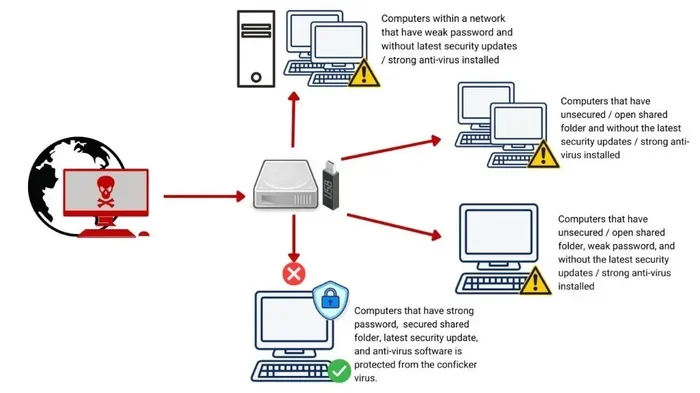
- Network Spread: Viruses can infect other devices on your network without you knowing.
- Financial Loss: Ransomware locks your files and demands payment to restore access.
📑 Table of Contents
- List Of The Effects Of Computer Viruses And How They Harm
- How Computer Viruses Slow Down Your System
- Data Loss and File Corruption
- Privacy Invasion and Identity Theft
- Hardware Damage and Overheating
- Network and Spread Damage
- Financial Loss and Ransomware Attacks
- How To Protect Your Computer From Virus Damage
- Conclusion
List Of The Effects Of Computer Viruses And How They Harm
Computer viruses are more than just annoying pop-ups. They can destroy your files, steal your personal data, and even break your hardware. The list of the effects of computer viruses is long, and each threat works differently. Some viruses hide quietly in the background. Others attack immediately and cause chaos. Either way, the damage can be costly and stressful.
Whether you use your laptop for work, school, or gaming, understanding these threats matters. A single virus can wipe out months of work in seconds. It can also expose your banking details to criminals halfway across the world. That is why knowing the effects of computer viruses is the first step toward protecting yourself.
In this article, we break down every major way a virus harms your system. We also share simple tips to keep your device safe. You do not need to be a tech expert to follow along. Just keep reading, and you will know exactly what to watch out for.
How Computer Viruses Slow Down Your System
One of the most common effects of a computer virus is a sudden drop in performance. Your computer starts lagging, programs take forever to open, and simple tasks feel impossible. This happens because many viruses consume your system resources in the background.
Why Does Your PC Get So Slow?
When a virus infects your machine, it often runs hidden processes. These processes eat up your CPU, RAM, and storage space. As a result, your operating system has less power for your actual work. You might notice your fan spinning loudly too. If your computer fan keeps running even when you are not doing anything heavy, a virus could be the cause.
Some viruses are designed to mine cryptocurrency using your hardware. Others simply duplicate themselves until your storage fills up. Either way, the result is the same: a frustrated user with a machine that barely works.
Common Signs Of A Slowing Computer
- Programs take longer than usual to launch.
- Your browser redirects to strange websites.
- Your screen freezes or locks up frequently.
- Error messages appear out of nowhere.
- Your hard drive light stays on constantly.
If you are dealing with these issues, you should fix a computer running slow and freezing right away. The longer you wait, the deeper the virus can dig into your system. Sometimes a simple antivirus scan solves the problem. Other times, you may need professional help.
Data Loss and File Corruption
Data loss is one of the scariest items on the list of the effects of computer viruses. Some viruses delete files outright. Others corrupt them so badly that nothing can recover them. This includes documents, photos, videos, and important work projects.
How Do Viruses Destroy Your Files?
Different viruses attack files in different ways. File-infector viruses attach themselves to your documents and alter the code. Boot sector viruses target the part of your hard drive that starts your computer. Once that area is damaged, your entire system may fail to boot.
Ransomware is especially dangerous. It locks your files and demands money to give them back. Even if you pay, there is no guarantee you will get your data returned. This type of attack has ruined businesses and ruined personal memories alike.
Ways To Protect Your Data
- Back up your files to an external drive every week.
- Use cloud storage for important documents.
- Install a trusted antivirus program and keep it updated.
- Never open email attachments from unknown senders.
- Enable file versioning if your cloud service supports it.
Remember, no security measure is 100% perfect. But having a backup means you can recover quickly. The goal is to make sure a virus does not take away what matters most to you.
Privacy Invasion and Identity Theft
Many people do not realize that viruses can spy on them. Spyware and keyloggers are types of malware designed to watch everything you do. They record your keystrokes, track your browsing, and capture your login credentials.
What Information Can a Virus Steal?
The answer is almost everything. A virus can grab your passwords, credit card numbers, and social security details. It can also access your email, social media accounts, and cloud storage. Once a criminal has this data, they can impersonate you, make purchases, or even open accounts in your name.
This is why cybersecurity threats like viruses are so dangerous. The harm is not always visible right away. By the time you notice something wrong, the damage may already be done. That is why regular system checks are so important.
Signs Your Privacy Has Been Compromised
- Unusual transactions appear on your bank statements.
- You receive password reset emails you did not request.
- Your social media posts or messages you did not write appear.
- New accounts show up under your name.
- Your browser has toolbars or extensions you never installed.
If any of these sound familiar, act fast. Change your passwords, run a full antivirus scan, and monitor your accounts closely. You can also check your RAM health to make sure nothing is hogging resources silently. Learning how to check the RAM of your laptop takes just a few minutes and can reveal hidden problems.
Hardware Damage and Overheating
Not many people know this, but some viruses can actually harm your physical hardware. These malicious programs push your components to work harder than they should. Over time, this causes wear and tear on your machine.
How Can Software Damage Hardware?
Certain viruses force your CPU and GPU to run at full speed around the clock. This generates excessive heat. If your cooling system cannot handle it, your components overheat. In serious cases, this leads to permanent damage to your processor, motherboard, or hard drive.
If you have ever wondered why your computer fan keeps running nonstop, a virus could be forcing it. The malware is essentially making your hardware work overtime without your knowledge or consent.
Warning Signs Of Hardware Stress
- Your laptop feels hot to the touch even during light use.
- The fan runs loudly and constantly.
- Your system shuts down randomly to prevent damage.
- You notice a burning smell coming from your device.
- Your screen flickers or shows strange artifacts.
Do not ignore these signs. They mean something is wrong. A virus might be the hidden cause. The sooner you address it, the better your chances of saving your hardware.
Network and Spread Damage
Computer viruses do not just hurt your device. They can spread to other devices on your network. This means your family members, coworkers, or clients could also become victims.
How Viruses Spread Across Networks
Many modern viruses are designed to replicate and move from device to device. They exploit weak network security, shared drives, and even Bluetooth connections. Once one device is infected, the virus can jump to others within minutes.
This is especially dangerous in office environments. A single infected laptop can bring down an entire company network. Shared files and printers become transmission points. That is why businesses invest heavily in network security and employee training.
Steps To Stop Virus Spread
- Disconnect infected devices from the network immediately.
- Run antivirus scans on every connected device.
- Keep your firewall turned on and properly configured.
- Update all software and operating systems regularly.
- Avoid sharing USB drives or external storage between devices.
Taking these simple steps can save you a lot of trouble. A virus that spreads across your network multiplies the damage exponentially. Stopping it early is the best defense.
Financial Loss and Ransomware Attacks
Financial damage from computer viruses is real and growing every year. Ransomware alone has cost individuals and businesses billions of dollars. These attacks lock your files and demand payment to unlock them.
How Ransomware Works
Ransomware typically enters your system through a phishing email or a malicious download. Once inside, it encrypts your files using a complex algorithm. You then receive a message demanding payment, usually in cryptocurrency, to get the decryption key.
The cruel truth is that paying the ransom does not guarantee you will get your files back. Many victims pay and still lose everything. That is why prevention is far better than cure.
Financial Effects Of A Virus Attack
- Cost of recovering or replacing damaged data.
- Lost income if your business operations stop.
- Payment demanded by ransomware attackers.
- Expenses for professional virus removal services.
- Long-term damage to your reputation or credit score.
The financial impact can be devastating. Small businesses are especially vulnerable because they often lack strong security measures. Even individuals can suffer serious losses if personal or financial files are encrypted or stolen.
How To Protect Your Computer From Virus Damage
Now that you know the list of the effects of computer viruses, it is time to take action. Protection does not have to be complicated or expensive. A few smart habits can make a huge difference.
Essential Protection Steps
- Install reliable antivirus software. Choose a trusted program and keep it updated. It will scan your system regularly and catch threats early.
- Keep your operating system updated. Updates patch security holes that viruses love to exploit.
- Be careful with email attachments. Never open files from senders you do not recognize.
- Use strong, unique passwords. This makes it harder for attackers to access your accounts.
- Back up your data regularly. A good backup saves you from total loss during an attack.
- Avoid suspicious websites and downloads. If something looks too good to be true, it probably is.
Quick Maintenance Habits
Make it a habit to check your system health regularly. Run antivirus scans at least once a week. Monitor your system performance for any unusual changes. If things start acting weird, do not ignore them. Early detection is your best weapon against viruses.
You should also learn the basics of your own device. For example, understanding what the RAM does in a laptop helps you spot performance issues faster. When your memory is being consumed by a hidden virus, you will notice the signs sooner.
Conclusion
The list of the effects of computer viruses is long and serious. From slowing down your system to stealing your identity, viruses cause real harm. They corrupt your files, damage your hardware, and drain your finances. No one is completely safe, but you can take control.
The best defense is awareness and action. Use strong antivirus software, keep your system updated, and back up your data often. Do not ignore warning signs like unexpected slowdowns or strange error messages. If your computer starts acting up, investigate immediately. The faster you respond, the less damage a virus can do.
Stay informed, stay protected, and do not let a virus take over your digital life. Your computer works hard for you. It deserves the best defense you can give it.
Frequently Asked Questions
What are the most common effects of a computer virus?
The most common effects include system slowdowns, frequent crashes, file corruption, and unexpected pop-ups. Some viruses also steal personal data or spread to other devices on your network.
Can a computer virus physically damage hardware?
Yes, some viruses can cause physical damage by forcing your components to overwork. This leads to overheating, which can shorten the lifespan of your CPU, GPU, or hard drive over time.
How do I know if my computer has a virus?
Signs include slow performance, strange error messages, unfamiliar programs running, and unexpected pop-ups. You can also run a full antivirus scan to detect and identify any threats on your system.
What should I do if my computer gets infected?
Disconnect from the internet immediately to stop the virus from spreading. Run a full antivirus scan, delete any detected threats, and change your passwords. If the problem persists, seek professional help.
Are free antivirus programs effective against viruses?
Some free programs offer decent basic protection, but they often lack advanced features. Paid antivirus suites usually provide better real-time protection, regular updates, and more comprehensive threat detection.
How can I prevent ransomware attacks?
Back up your files regularly, avoid clicking suspicious links or downloading unknown attachments, and keep your software updated. A good antivirus program with anti-ransomware features adds an extra layer of protection.