M.2 Ssd 512gb Nvme
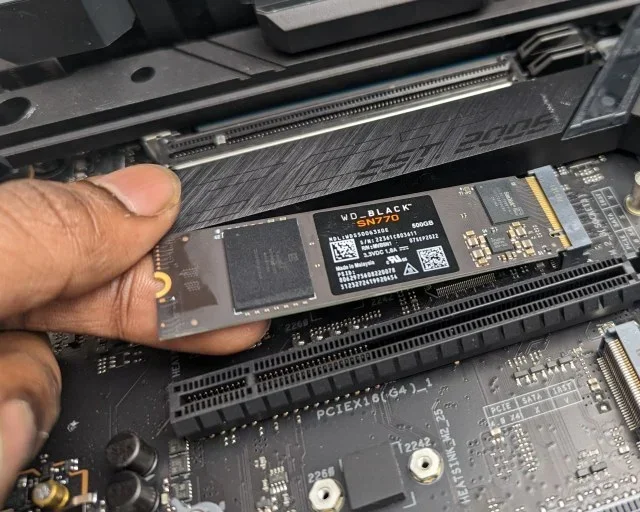
The M.2 SSD 512GB NVMe is one of the best storage upgrades you can make for your PC or laptop. It delivers blazing fast speeds, compact form factor, and plenty of space for games, apps, and files. In this guide, we break down everything you need to know before buying.
Key Takeaways
- Blazing Speeds: NVMe M.2 SSDs offer read speeds up to 7,000 MB/s, far faster than SATA drives.
- Compact Design: The M.2 2280 form factor fits most modern desktops and laptops with ease.
- Great Value: A 512GB capacity hits the sweet spot between price and storage for most users.
- Easy Installation: Installing an NVMe M.2 SSD is simple and requires no cables.
- Gaming & Productivity Boost: A 512GB NVMe drive dramatically reduces load times and improves workflow.
- Check Compatibility First: Always confirm your motherboard supports NVMe M.2 slots before purchasing.
📑 Table of Contents
What Is an M.2 SSD 512GB NVMe?
An M.2 SSD 512GB NVMe is a small, high-performance storage drive built for modern computers. It uses the NVMe protocol over a PCIe connection to deliver speeds that traditional hard drives and even SATA SSDs simply cannot match.
The M.2 form factor looks like a small stick of gum. It plugs directly into your motherboard. No cables. No extra power connectors. Just slot it in and you are good to go.
A 512GB capacity gives you enough room for your operating system, several games, productivity software, and plenty of media files. This makes it a popular choice for gamers, creators, and everyday users alike.
When people talk about NVMe M.2 SSDs, they are referring to drives that use the Non-Volatile Memory Express protocol. This protocol was designed specifically for flash storage. It removes the bottlenecks that slow down older SATA-based drives.
In simple terms, an NVMe M.2 drive is the fastest type of SSD you can buy for a consumer PC today. And the 512GB size offers a great balance of speed, capacity, and price.
Why Choose a 512GB NVMe M.2 SSD?
There are many reasons to pick a 512GB NVMe M.2 SSD for your next storage upgrade. Let us look at the biggest advantages.
Insane Speed
NVMe drives use the PCIe interface, which is much faster than SATA. A typical 512GB NVMe M.2 SSD can deliver sequential read speeds of 3,500 to 7,000 MB/s. Some premium models even hit higher numbers.
Compare that to a SATA SSD, which tops out around 550 MB/s. The difference is massive. Your system boots in seconds. Games load almost instantly. Large files transfer in a flash.
Compact and Space-Saving
The M.2 2280 form factor is tiny. It measures about 22mm wide and 80mm long. This small size frees up space inside your case. It also makes it perfect for laptops where every millimeter counts.
Because there are no cables, cable management becomes much simpler. Your build looks cleaner and airflow improves.
Perfect Capacity for Most Users
512GB is often called the sweet spot for SSD storage. It is large enough to hold:
- Your Windows or macOS operating system
- 5 to 10 modern games
- Productivity apps like Photoshop or Premiere Pro
- A solid collection of documents and media
If you need more space later, you can always add a second drive or upgrade to a 1TB M.2 NVMe SSD down the road.
How Does NVMe Compare to SATA SSDs?
Understanding the difference between NVMe and SATA helps you make the right choice. Here is a quick comparison of the two technologies.
| Feature | NVMe M.2 SSD | SATA SSD |
|---|---|---|
| Interface | PCIe (NVMe protocol) | SATA III |
| Max Read Speed | Up to 7,000 MB/s | Up to 550 MB/s |
| Max Write Speed | Up to 5,000 MB/s | Up to 520 MB/s |
| Form Factor | M.2 2280 (small) | 2.5-inch (larger) |
| Cables Needed | None | SATA data + power |
| Latency | Very low | Higher |
| Price per GB | Slightly higher | Lower |
As you can see, NVMe wins in nearly every performance category. The only real advantage SATA has is lower cost per gigabyte. But for most users, the speed boost from an M.2 SSD 512GB NVMe is worth every penny.
Top M.2 SSD 512GB NVMe Picks
Not all NVMe SSDs are created equal. Here are some popular and reliable options in the 512GB capacity.
Corsair MP600 Core XT
The Corsair MP600 Core XT M.2 NVMe SSD is a fantastic choice for most users. It delivers excellent sequential speeds and comes with a generous heatsink. This makes it a great option for both gaming and content creation workloads.
The 512GB model offers a good balance of performance and affordability. It is compatible with PCIe Gen 4 systems and works well in most modern builds.
Samsung 970 EVO Plus
The Samsung 970 EVO Plus NVMe M.2 SSD has been a long-time favorite. It uses V-NAND TLC technology and includes a DRAM cache. This combination delivers consistent performance even during heavy workloads.
The 512GB version handles gaming, video editing, and everyday tasks with ease. Samsung also provides a strong warranty, which adds peace of mind.
Kingston NV2
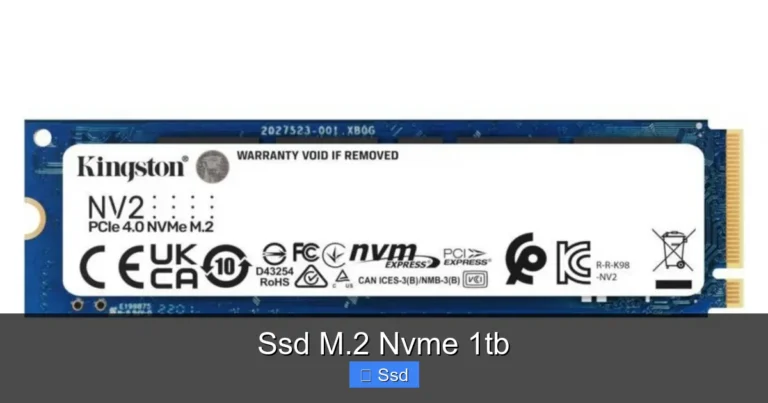
If you are on a tighter budget, the Kingston NV2 1TB M.2 2280 NVMe is worth looking at. While Kingston offers larger capacities, the 512GB variants provide solid performance at an attractive price point. It is a great entry-level NVMe option for first-time upgraders.
How to Install an M.2 SSD 512GB NVMe
Installing an NVMe M.2 SSD is one of the easiest PC upgrades you can do. Here is a step-by-step guide.
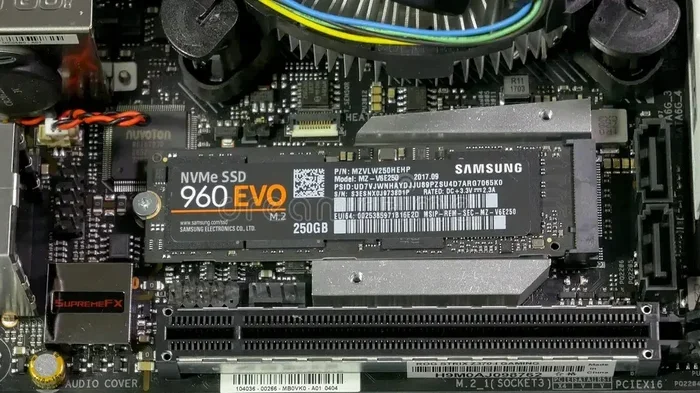
- Find the M.2 slot. Look for a slot labeled M.2 on your motherboard. It is usually located near the CPU or PCIe slots.
- Prepare the screw. Most motherboards come with a small M.2 screw. Find it in your motherboard box or use one from the standoff kit.
- Insert the drive. Hold the SSD at a 30-degree angle and slide it into the slot. The notch on the drive should align with the key on the slot.
- Press it down. Gently press the drive flat and secure it with the screw. Do not overtighten.
- Boot and format. Enter your BIOS to confirm the drive is detected. Then format it through Windows Disk Management or your operating system’s tool.
That is it. No cables, no fuss. Your new 512GB NVMe M.2 SSD is ready to go.
Quick Tips for Installation
- Always check your motherboard manual for compatible M.2 slots.
- Some M.2 slots share bandwidth with SATA ports. Using one may disable a SATA port.
- Make sure your BIOS is updated to the latest version for best NVMe compatibility.
- If your drive gets warm, consider adding an M.2 heatsink.
Who Should Buy a 512GB NVMe M.2 SSD?
This type of drive is ideal for a wide range of users. Here is a quick look at who benefits most.
Gamers
Modern games are huge. Installing them on an NVMe drive means faster load times and smoother gameplay. A 512GB capacity can hold several AAA titles comfortably.
Content Creators
Video editors and photographers benefit from the fast read and write speeds. Large project files open quickly. Exports happen faster. The M.2 SSD 512GB NVMe keeps your workflow moving.
Laptop Users
Many modern laptops come with NVMe M.2 slots. Upgrading from an older HDD or SATA SSD to a 512GB NVMe drive can transform your laptop’s performance. It feels like a brand new computer.
Budget Builders
If you are building a PC on a budget, a 512GB NVMe drive is a smart starting point. You get top-tier speed without breaking the bank. You can always add more storage later.
Common Mistakes to Avoid
Before you buy a 512GB NVMe M.2 SSD, keep these common mistakes in mind.
- Skipping compatibility checks. Not all motherboards support NVMe. Check your manual or specs before ordering.
- Ignoring heatsinks. NVMe drives can run hot, especially under heavy loads. A heatsink prevents thermal throttling.
- Buying the wrong key. M.2 slots come in different keys (B-key, M-key). Make sure your drive matches the slot.
- Overlooking DRAM cache. Drives with DRAM cache tend to offer more consistent performance. Look for this feature if you do intensive workloads.
- Forgetting about backup. An SSD upgrade is a great time to set up a backup routine for your data.
Expert Insights and Final Thoughts
Upgrading to an M.2 SSD 512GB NVMe is one of the most impactful changes you can make to any computer. The speed difference is immediate and noticeable. Whether you are booting your system, launching games, or moving large files, the performance gains are hard to ignore.
The 512GB capacity hits a perfect balance. It is not too small to feel cramped, and not so large that it stretches your budget. For most users, this is the ideal starting point for NVMe storage.
If you are currently using an older HDD or a slower SATA SSD, the upgrade experience is truly transformative. Your system will feel faster, more responsive, and more enjoyable to use every single day.
When choosing your drive, consider reputable brands like Corsair, Samsung, Kingston, and WD. Look for models with good warranty coverage and consistent performance reviews. And always make sure your system supports NVMe before you buy.
Storage technology moves fast. What is cutting edge today becomes mainstream tomorrow. The 512GB NVMe M.2 SSD is already a proven, reliable choice that delivers real-world value for years to come.
Do not wait until your old drive fails. Upgrade now and experience the difference that modern NVMe storage brings to your computing life.
Frequently Asked Questions
Is a 512GB NVMe M.2 SSD enough for gaming?
Yes, a 512GB NVMe drive can hold several modern games at once. Most AAA titles range from 50GB to 100GB, so you can comfortably fit 5 to 10 games. If you have a large library, consider pairing it with a secondary drive for extra storage.
Do I need a special motherboard for an M.2 NVMe SSD?
Your motherboard needs an M.2 slot that supports NVMe over PCIe. Most modern motherboards from the last few years include at least one compatible slot. Always check your motherboard manual to confirm NVMe support before purchasing.
Can I use an M.2 NVMe SSD as my main boot drive?
Absolutely. In fact, using an NVMe M.2 SSD as your boot drive is the best way to get the fastest system performance. Your operating system, applications, and games will load significantly faster compared to a traditional hard drive or SATA SSD.
Does an NVMe SSD need a heatsink?
Many NVMe SSDs come with a built-in heatsink. If your drive does not have one and you plan to do heavy workloads like video rendering or extended gaming sessions, adding an M.2 heatsink can help maintain performance by preventing thermal throttling.
What is the difference between M.2 SATA and M.2 NVMe?
An M.2 SATA SSD uses the SATA interface and is limited to around 550 MB/s. An M.2 NVMe SSD uses the PCIe interface and NVMe protocol, delivering speeds up to 7,000 MB/s or more. NVMe is significantly faster and is the recommended choice for new builds and upgrades.
How long does a 512GB NVMe M.2 SSD last?
Most quality NVMe SSDs are rated for hundreds of terabytes written (TBW). A 512GB drive from a reputable brand like Samsung or Corsair can last many years under normal use. The endurance is more than sufficient for everyday computing, gaming, and light to moderate content creation.
=== CONCLUSION ===
The M.2 SSD 512GB NVMe remains one of the best storage upgrades available today. It combines blazing speed, a compact design, and a practical 512GB capacity that suits most users perfectly. Whether you are a gamer, a creator, or simply looking to breathe new life into an older PC, this drive delivers outstanding value.
With easy installation, dramatic performance gains over older storage, and affordable pricing, there has never been a better time to upgrade. Pick a trusted brand, confirm your compatibility, and enjoy the speed of modern NVMe storage.