M 2 2242 Nvme Ssd
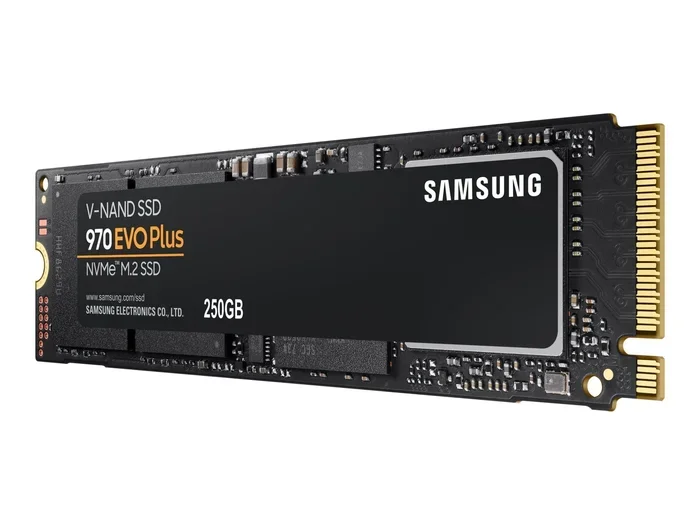
The M 2 2242 NVMe SSD is a tiny but powerful solid state drive that fits in ultra-thin laptops, tablets, and mini PCs. These drives use the NVMe protocol over PCIe to deliver blazing fast speeds in a super small form factor. Whether you are upgrading a portable device or building a compact system, understanding the M 2 2242 NVMe SSD is essential.
The M 2 2242 NVMe SSD has become one of the most exciting storage options for people who need speed in a tiny package. These drives are small enough to fit inside the slimmest laptops and tablets, yet they deliver performance that blows traditional hard drives out of the water. If you have ever wondered what makes these little drives so special, you are in the right place.
In this guide, we will cover everything you need to know about the M 2 2242 NVMe SSD. We will look at what they are, how they compare to other form factors, what speeds you can expect, and how to pick the right one for your needs. By the end, you will feel confident choosing and installing one of these drives.
Key Takeaways
- Compact Size: The M 2 2242 form factor measures just 22mm x 42mm, making it ideal for thin and lightweight devices.
- Blazing Speeds: NVMe protocol over PCIe delivers much faster read and write speeds compared to traditional SATA drives.
- Wide Compatibility: These drives work in many ultrabooks, mini PCs, tablets, and some gaming laptops.
- Multiple Capacities: Available from 128GB up to 2TB, giving you flexibility for different storage needs.
- Easy Installation: Most M 2 2242 slots are plug and play, making upgrades simple even for beginners.
- External Use Possible: You can use an M.2 NVMe SSD enclosure to turn these drives into portable external storage.
📑 Table of Contents
What Is an M 2 2242 NVMe SSD?
Let us break this down. The term “M 2” refers to the M.2 form factor, which is a standard for internal expansion cards. The “2242” tells you the physical size: 22 millimeters wide and 42 millimeters long. And “NVMe” stands for Non-Volatile Memory Express, which is a fast protocol that lets the drive communicate with your computer through the PCIe bus.
So when you put it all together, an M 2 2242 NVMe SSD is a small solid state drive that uses the NVMe protocol to deliver very high speeds. These drives are much smaller than the more common M 2 2280 drives, which measure 22mm by 80mm. The shorter length of the 2242 makes it perfect for devices where space is extremely limited.
The M 2 2242 NVMe SSD uses NAND flash memory to store data. There are different types of NAND, including TLC, QLC, and MLC. TLC (Triple-Level Cell) is the most common in consumer drives and offers a good balance of speed, endurance, and price. QLC (Quad-Level Cell) stores more data per cell but tends to be a bit slower and less durable over time.
Why NVMe Matters
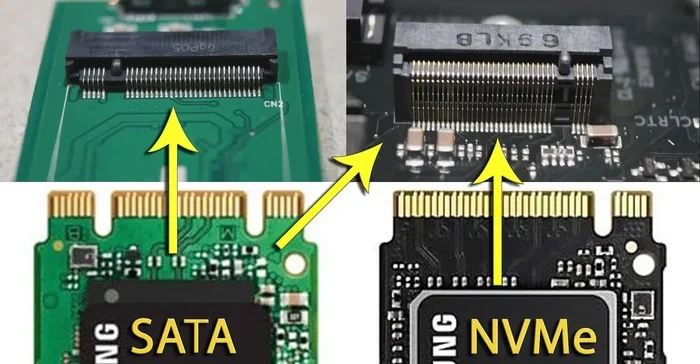
You might be wondering why NVMe is such a big deal. Traditional SATA SSDs have been around for a long time and they work fine. But the SATA interface was designed for spinning hard drives and has a speed limit of about 550 MB per second. NVMe bypasses that limitation entirely.
An M 2 2242 NVMe SSD can reach sequential read speeds of 2,000 to 3,500 MB per second or even higher, depending on the generation of PCIe it uses. That is roughly four to six times faster than a typical SATA SSD. For everyday tasks like booting Windows, opening apps, and transferring files, the difference is night and day.
M 2 2242 vs M 2 2280: Key Differences
One of the most common questions people ask is how the 2242 compares to the 2280. Both are M.2 drives, but the length is different. The 2280 is 80mm long and is the most widely used size in desktop PCs and standard laptops. The 2242 is only 42mm long, which makes it much shorter.
Here is a simple comparison to help you understand the differences:
- Width: Both are 22mm wide.
- Length: The 2242 is 42mm long, while the 2280 is 80mm long.
- Capacity: The 2280 can hold more storage because it has more space for NAND chips. The 2242 typically maxes out at 1TB or 2TB.
- Performance: Both use NVMe and can be equally fast. The speed depends on the controller and NAND type, not the length.
- Compatibility: A 2242 drive will not fit in a 2280 slot and vice versa. Always check your device specs before buying.
The M 2 2242 NVMe SSD is specifically designed for devices that have a 2242 slot. Many modern ultrabooks and mini PCs come with these slots built in. If your device has a 2242 slot, you cannot use a longer 2280 drive, and the reverse is also true.
Speed and Performance of M 2 2242 NVMe SSDs
When it comes to speed, the M 2 2242 NVMe SSD punches well above its weight. Even though these drives are small, they use the same NVMe technology as their larger counterparts. The actual speeds you get depend on the PCIe generation and the specific controller inside the drive.
PCIe Generations Explained
There are three main PCIe generations you will encounter with these drives:
- PCIe Gen 3: This is the most common generation for M 2 2242 NVMe SSDs. Sequential reads typically reach 1,800 to 3,500 MB per second. Writes range from 1,000 to 3,000 MB per second.
- PCIe Gen 4: Newer drives use Gen 4, which roughly doubles the bandwidth of Gen 3. You can see reads of 4,000 to 7,000 MB per second in top-tier models.
- PCIe Gen 5: The latest generation offers even higher speeds but is still rare in the 2242 form factor. These are mostly found in high-end devices.
For most users, a PCIe Gen 3 M 2 2242 NVMe SSD is more than enough. It will make your system feel incredibly responsive. If you do heavy video editing or work with large datasets, a Gen 4 drive is worth the extra cost.
Real World Performance
In everyday use, you will notice the M 2 2242 NVMe SSD boots Windows in seconds. Apps launch almost instantly. File transfers, especially large ones, happen much faster than with a traditional hard drive or even a SATA SSD.
Random read and write speeds matter just as much as sequential speeds. These are the speeds your system uses when opening multiple apps at once or switching between tasks. NVMe drives excel here too, with random IOPS often reaching hundreds of thousands.
Best Uses for M 2 2242 NVMe SSDs
The compact size of the M 2 2242 NVMe SSD makes it perfect for a variety of devices and use cases. Let us look at where these drives shine the most.
Ultrabooks and Thin Laptops
Ultrabooks like the Dell XPS 13, Lenovo ThinkPad X1 Carbon, and Apple MacBook Air often use the 2242 form factor. These laptops prioritize thinness and light weight, and the short M 2 2242 NVMe SSD helps them achieve that design. If your ultrabook has a 2242 slot, upgrading to a larger capacity M 2 2242 NVMe SSD can give you more space for your files and applications.
Mini PCs and NUCs
Mini PCs like Intel NUC and similar small form factor systems often have limited internal space. The 2242 form factor fits perfectly in these compact cases. You can use a 512GB NVMe M.2 SSD or a 1TB variant to store your operating system, games, and media in a tiny footprint.
Portable External Storage
Did you know you can use an M 2 2242 NVMe SSD as an external drive? All you need is an M.2 NVMe SSD enclosure or an M 2 NVMe SATA SSD enclosure that supports the 2242 size. Simply slide the drive into the enclosure, connect it via USB, and you have a super fast portable storage solution.
This is a great option for creatives who need to transport large video files or photographers who want fast backup on the go. The speeds of an NVMe drive in a quality enclosure can reach 1,000 MB per second or more over USB 3.2 Gen 2.
Tablets and 2-in-1 Devices
Some high-end tablets and 2-in-1 devices also use the 2242 form factor. These drives provide fast storage without taking up valuable internal space. If you use a tablet for work or creative tasks, an M 2 2242 NVMe SSD upgrade can make a huge difference in performance.
How to Choose the Right M 2 2242 NVMe SSD
Choosing the right drive can feel overwhelming with so many options available. Here are the key factors to consider when shopping for an M 2 2242 NVMe SSD.
Capacity
The most common capacities for the 2242 form factor are 128GB, 256GB, 512GB, and 1TB. For most users, 512GB is the sweet spot. It gives you enough room for your operating system, applications, and a good amount of personal files. If you need more space, a 1TB NVMe M.2 SSD is a great option.
- 128GB: Best for lightweight tasks and as a boot drive only.
- 256GB: Good for basic use with a few apps and documents.
- 512GB: Ideal for most users who need a balance of speed and space.
- 1TB: Perfect for power users, gamers, and content creators.
Brand and Reliability
Stick with well-known brands when choosing your M 2 2242 NVMe SSD. Brands like Samsung, WD, Crucial, Kingston, and Intel have established track records for quality and reliability. Check reviews and look for drives that come with a warranty of at least three to five years.
Price vs Performance
You do not always need the fastest drive for your needs. If you are just using the drive for everyday tasks like web browsing, document editing, and media consumption, a mid-range M 2 2242 NVMe SSD will serve you well. Save the premium Gen 4 or Gen 5 drives for situations where you truly need that extra speed.
Cooling and Thermals
Even though these drives are small, they can get warm during heavy use. Some M 2 2242 NVMe SSDs come with built-in heat spreadsers. If your device has good airflow, this may not be an issue. But if you are using an M 2 NVMe SSD enclosure without a fan, look for a drive that handles thermals well.
Installing Your M 2 2242 NVMe SSD
Installing an M 2 2242 NVMe SSD is straightforward in most cases. Here is a quick overview of the process.
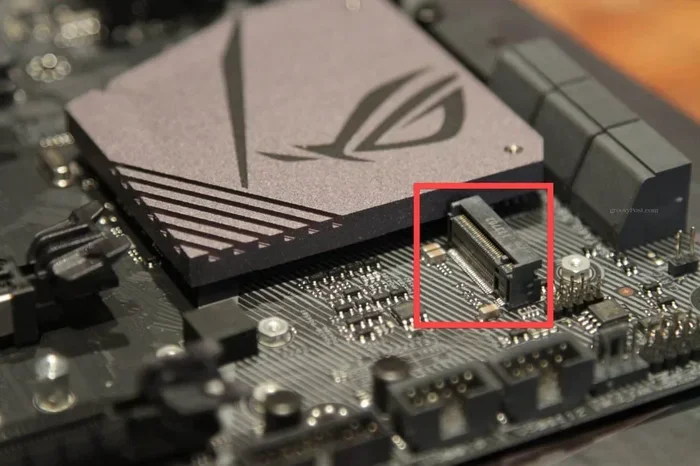
- Find the M 2 2242 slot on your device. It will be labeled on the motherboard or in the device manual.
- Insert the drive at a 30-degree angle into the slot.
- Press the drive down gently and secure it with the small screw that holds the M 2 slot in place.
- Boot up your computer and enter the BIOS to make sure the drive is detected.
- If needed, format the drive and install your operating system or use it as additional storage.
For external use, simply place the drive in a compatible M 2 NVMe SSD enclosure and connect it to your computer. The process is even simpler and requires no technical expertise.
One important tip: always make sure your device supports the 2242 form factor before purchasing. Using the wrong size will not work, and you could end up wasting money. Check your device specifications or consult the manufacturer if you are unsure.
Common Mistakes to Avoid
- Buying the wrong size: Always double-check that your device uses a 2242 slot, not a 2280 slot.
- Ignoring PCIe compatibility: Some older devices only support PCIe Gen 3. A Gen 4 drive will still work but will run at Gen 3 speeds.
- Skipping the screw: Always secure the drive with the M 2 screw. A loose drive can cause connection issues and data loss.
- Overlooking enclosure compatibility: Not all enclosures support the 2242 size. Check the enclosure specs before buying.
- Expecting SATA speeds: NVMe drives are much faster than SATA. Do not compare them using the same benchmarks.
Final Thoughts
The M 2 2242 NVMe SSD is a fantastic storage solution for anyone who needs speed in a compact form factor. Whether you are upgrading an ultrabook, building a mini PC, or creating a portable external drive, these small SSDs deliver outstanding performance. With speeds that rival much larger drives and capacities that range from 128GB to 2TB, there is an M 2 2242 NVMe SSD for nearly every use case.
Take the time to choose the right capacity, brand, and PCIe generation for your needs. And if you are looking for an easy way to use one externally, a quality M.2 NVMe SSD enclosure is all you need. With the right drive in place, your device will feel faster and more responsive than ever before.
Frequently Asked Questions
What devices use the M 2 2242 NVMe SSD form factor?
The M 2 2242 NVMe SSD is commonly found in ultrabooks, thin laptops, mini PCs, tablets, and some 2-in-1 devices. Brands like Dell, Lenovo, and HP often use this form factor in their portable product lines. Always check your device manual to confirm the slot size before purchasing.
Can I use an M 2 2280 drive in a 2242 slot?
No, the M 2 2280 drive is 80mm long and will not fit in a 2242 slot, which is only 42mm long. The physical dimensions are different and the drives are not interchangeable. Always match the form factor to your device slot.
How fast is an M 2 2242 NVMe SSD compared to a SATA SSD?
An M 2 2242 NVMe SSD is typically four to six times faster than a SATA SSD. While a SATA SSD tops out around 550 MB per second, NVMe drives can reach 3,500 MB per second or more on PCIe Gen 3, and even higher on Gen 4 and Gen 5.
What is the maximum capacity available for M 2 2242 NVMe SSDs?
Most manufacturers offer M 2 2242 NVMe SSDs in capacities up to 1TB or 2TB. The 1TB options are the most popular for users who need a balance of speed and storage space. Higher capacities tend to be more expensive in the 2242 form factor due to the smaller physical space for NAND chips.
Do I need a special enclosure to use an M 2 2242 NVMe SSD externally?
Yes, you need an enclosure that specifically supports the 2242 size. Not all M 2 NVMe SSD enclosures fit the shorter 2242 drives. Look for enclosures that list 2242 compatibility in their specifications. A good enclosure also provides protection and a USB connection for easy portability.
Is an M 2 2242 NVMe SSD worth the price over a traditional hard drive?
Absolutely. The speed difference between an M 2 2242 NVMe SSD and a traditional hard drive is enormous. Boot times drop from minutes to seconds, apps open instantly, and file transfers are dramatically faster. If your device supports NVMe, there is no reason to stick with an older hard drive.
=== CONCLUSION ===
The M 2 2242 NVMe SSD is a compact powerhouse that brings NVMe speed to the smallest devices. From ultrabooks to mini PCs and portable enclosures, these drives offer incredible performance in a tiny footprint. By understanding the form factor, choosing the right capacity, and ensuring compatibility, you can get the most out of your M 2 2242 NVMe SSD investment.
Whether you are upgrading an existing device or building a new compact system, these drives deliver the speed and reliability you need. Take action today and explore the options available for your setup. Your device will thank you with faster boot times, quicker app launches, and a much smoother overall experience.