Parts of a Camera Canon
Understanding the parts of a camera canon helps you shoot better photos every time. From the lens to the shutter, each piece plays a key role in capturing light and detail. This guide breaks down every major component in simple terms so you can use your Canon camera with full confidence.
Photography feels magical when you know how your gear works. Parts of a camera canon might sound technical at first, but the basics are actually quite simple. Every component has a clear job. When you understand those jobs, you stop guessing and start shooting with purpose.
Canon builds cameras for beginners and pros alike. Their designs share common parts across most models. Whether you hold an entry-level Rebel or a high-end EOS R, the core pieces work in similar ways. Learning these parts helps you read menus faster, fix small issues, and pick the right gear for your style.
This guide walks through each major component in plain language. You will see how light travels through the lens, how the sensor captures the scene, and how buttons and screens put you in control. By the end, you will know exactly what each part does and why it matters for your photos.
Key Takeaways
- Lens System: The lens gathers light and focuses it onto the sensor, making it the most critical part of your Canon camera.
- Shutter Mechanism: The shutter controls how long light hits the sensor, directly affecting exposure and motion blur.
- Image Sensor: Canon sensors convert light into digital data, with APS-C and full-frame options offering different quality levels.
- Viewfinder & LCD: These display tools help you compose shots and review images quickly in any lighting condition.
- Controls & Buttons: Dials, buttons, and menus let you adjust settings like ISO, aperture, and shutter speed on the fly.
- Memory & Power: SD cards store your photos while batteries keep everything running during long shooting sessions.
- Build & Ergonomics: A sturdy body and comfortable grip make handheld shooting easier and more reliable outdoors.
📑 Table of Contents
Understanding the Parts of a Camera Canon
Canon cameras follow a clear design logic. Light enters through the front, passes through glass elements, and lands on a digital sensor. The camera then processes that light into a file you can edit or share. Every part supports this flow. When one piece changes, the whole image can change too.
Think of your camera as a team. The lens is the eyes. The sensor is the brain. The shutter and aperture are the gates that control light. The body holds everything together and gives you a place to rest your hands. The screen and viewfinder act as your window into the scene. Each part matters, and each part works with the others.
You do not need to memorize every screw or circuit. You just need to know the main pieces and how they affect your results. That knowledge makes settings feel less random. It also helps you spot the right upgrade when you want better sharpness, faster autofocus, or cleaner low-light shots.
The Lens and Optical Elements
The lens is where the image really begins. Canon lenses use multiple glass elements arranged to bend and focus light. Some lenses are built for wide scenes, while others pull distant subjects closer. The front element is the first point of contact for light, so keeping it clean matters a lot.
Inside the lens, groups of elements move to focus your subject. A smooth focus ring helps you nail sharp details. Many Canon lenses also include image stabilization, which reduces blur from shaky hands. This feature is especially useful when you shoot indoors or in lower light.
The aperture sits inside the lens too. It is a set of blades that open and close to control light flow. A wider opening lets in more light and creates a softer background. A narrower opening keeps more of the scene in focus. If you ever wonder why two lenses give different looks, the aperture and optical design are usually the reason.
Quick Tip: Clean the front element with a soft microfiber cloth before important shoots. A small smudge can soften contrast and reduce sharpness.
Shutter, Sensor, and Image Processing
After light passes through the lens, it reaches the shutter. The shutter acts like a door that opens for a set time. A fast opening freezes motion. A slower opening can blur moving subjects or create smooth water in landscapes. Shutter speed is one of the three main exposure controls, so it deserves your attention.
Next comes the image sensor. Canon uses two main sensor sizes across its cameras. APS-C sensors are smaller and common in many entry and mid-level bodies. Full-frame sensors are larger and often found in advanced models. A larger sensor usually handles low light better and gives more control over background blur.
The sensor turns light into electronic signals. Then the camera processor takes over. Canon processors manage color, noise reduction, and file formats. This is where raw data becomes a finished image. If you shoot in raw, you keep more information for editing later. If you shoot in JPEG, the camera does more of the processing for you.
Common Mistake: Many new users leave the shutter open too long when handholding the camera. If your photos look blurry, try a faster shutter speed first before changing other settings.
Viewfinder, LCD Screen, and Composition Tools
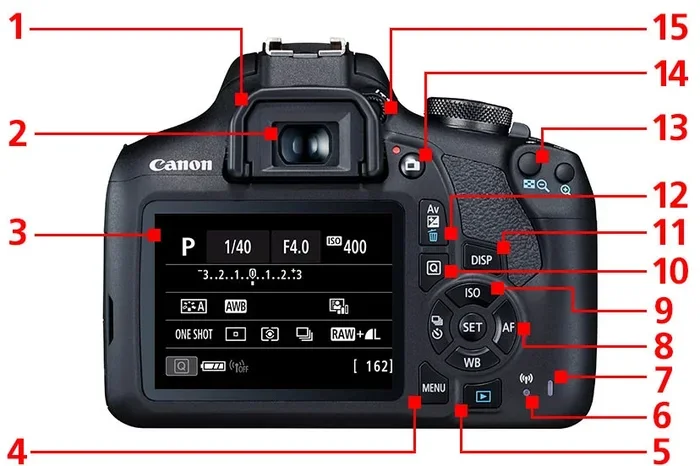
You need a clear way to see your scene. Canon cameras offer an optical viewfinder on many DSLR models and a tilting or vari-angle LCD on most modern bodies. The viewfinder gives a direct optical path through the lens on DSLRs, which helps you compose in bright sun. The LCD screen shows a live digital preview and works well for video, selfies, and low-angle shots.
Live view mode uses the rear screen instead of the viewfinder. This mode is great for precise focus and shallow depth of field. It also makes manual focus easier because you can zoom in on the screen to check edges. If your camera has a touchscreen, you can tap to set focus points quickly.
Some Canon models include a second screen on top for quick settings. That small display helps you check ISO, shutter speed, and battery level without turning around. These little tools save time when you shoot fast or work in changing light.
Expert Insight: Use the LCD for careful composition and the viewfinder for speed. Matching the right viewing tool to the moment makes your workflow smoother.
Controls, Dials, and Custom Buttons
Buttons and dials are your direct link to the camera. Canon designs them so you can change the most important settings without digging through menus. A main command dial usually adjusts shutter speed or aperture. Separate dials may handle ISO or exposure compensation. The more familiar these controls feel, the faster you can react.
The mode dial is another key part. It switches the camera between auto, semi-auto, and manual modes. Auto is useful when you are learning. Semi-auto modes let you control one setting while the camera helps with the rest. Manual mode gives you full control over the exposure triangle.
Many Canon cameras also let you customize buttons. You can assign focus functions, white balance, or metering choices to keys you reach easily. This feature is a big time saver during events, travel, or wildlife shooting. A well-set-up camera feels much easier to use.
Quick Tip: Practice changing one setting at a time until it becomes automatic. Muscle memory matters more than you think when the light changes fast.
Memory Cards, Batteries, and Power Management
Your photos need a place to live. Canon cameras usually store images on SD cards, and some professional models also support CompactFlash or CFexpress. A fast card helps when you shoot bursts of photos or record video. A slow card can cause delays and interrupt your flow.
Battery life matters too. Canon batteries vary by model, but most give you enough power for a full day of normal use. Cold weather, heavy video use, and constant review of images can drain power faster. Carrying a spare battery is one of the simplest ways to avoid missing a shot.
Power management also includes how you store and charge your gear. A small charger in your bag keeps things ready. If your camera supports USB charging, you can top up from a power bank during long outings. That flexibility is handy for trips and remote shoots.
Common Mistake: Do not wait until your battery is dead to recharge it. Partial charges are fine for modern lithium batteries, and a full spare saves stress on shoot days.
Body Design, Build Quality, and Ergonomics
The body holds everything together. Canon builds cameras with different levels of ruggedness, from lightweight entry models to weather-resistant professional bodies. A solid build helps when you shoot in rain, dust, or rough conditions. Even if you mostly shoot indoors, a comfortable body still makes a big difference.
Grip shape affects how steady your hold feels. A deeper grip can reduce strain during long sessions. Button placement matters too. If you can reach key controls without shifting your grip, you stay focused on the scene instead of fumbling for settings. Weight is another factor. Lighter cameras are easier to carry, while heavier bodies may feel more stable in hand.
Many Canon cameras include a hot shoe on top. This flat mount lets you attach external flashes, microphones, or other accessories. It is a simple but powerful feature because it expands what your camera can do. A camera body is not just a shell. It is the platform that supports your creative tools.
Expert Insight: If you plan to shoot for long periods, test the grip and button reach before buying. Comfort is not a luxury. It is part of consistent performance.
How the Parts of a Camera Canon Work Together
A camera is only as good as the way its parts cooperate. Light moves through the lens, the aperture sets the amount, the shutter sets the time, and the sensor records the result. The processor then shapes that result into a file. The screen and viewfinder help you check the outcome. Every step connects to the next.
This chain is why small changes matter. A slightly wider aperture can soften the background more. A faster shutter can freeze a jumping subject. A higher ISO can save a dark scene, though it may add noise. When you understand the chain, you can make choices on purpose instead of by luck.
Canon designs make this chain easy to manage. Clear labels, logical menus, and familiar control layouts help you move through settings without confusion. That is a big reason so many photographers trust Canon for daily use and important events. The parts are strong, and they are built to work as one system.
Choosing the Right Canon Camera Parts for Your Needs
Not every part matters equally for every shooter. If you take family photos, a comfortable body and a versatile lens may matter most. If you shoot sports, fast autofocus and a responsive shutter may matter more. If you love landscapes, a high-quality sensor and sharp wide lens may be your top priority. Match the parts to your goals.
Lens choice often changes the image more than the body does. A great lens on a modest camera can still produce beautiful results. A weak lens on a premium body may hold the whole system back. Start with the lens that fits your usual subjects, then choose a body that supports your shooting style.
You should also think about accessories as part of the system. Extra batteries, fast memory cards, a sturdy strap, and a protective case all support better shooting. These are not flashy parts, but they keep you ready. A camera that runs out of power or storage at the wrong moment is no help at all.
Quick Tip: Build your kit around one strong lens first. Then add a second lens only when you know what kind of photos you still cannot make.
Common Questions About Canon Camera Components
Many photographers ask the same core questions when they study camera parts. The good news is that the answers are usually simple. You do not need to master every spec to get great results. You just need to know what each part does and how it affects your images.
Another common question is whether a higher-priced body always gives better photos. Not always. A better sensor and faster processor can help, but lens quality, lighting, and technique still matter a lot. The best camera is the one that fits your hands, your subjects, and your budget.
People also ask how much maintenance camera parts need. The short answer is: not much, if you handle them well. Keep lenses capped when not in use, clean contacts gently, and store gear in a dry place. Small habits protect the whole system over time.
Final Thoughts on the Parts of a Camera Canon
Learning the parts of a camera canon gives you real control over your photography. The lens, shutter, sensor, viewfinder, buttons, memory card, battery, and body all play a role in the final image. Once you know their jobs, your settings feel less mysterious and your shots feel more intentional.
Start simple. Focus on the parts that affect your current photos the most. Clean your lens, check your battery, and practice one new control at a time. As those basics become natural, you will notice faster progress and better results. That is the real benefit of understanding your camera from the inside out.