Portable Windows A Simple Guide to Finding the Right Fit
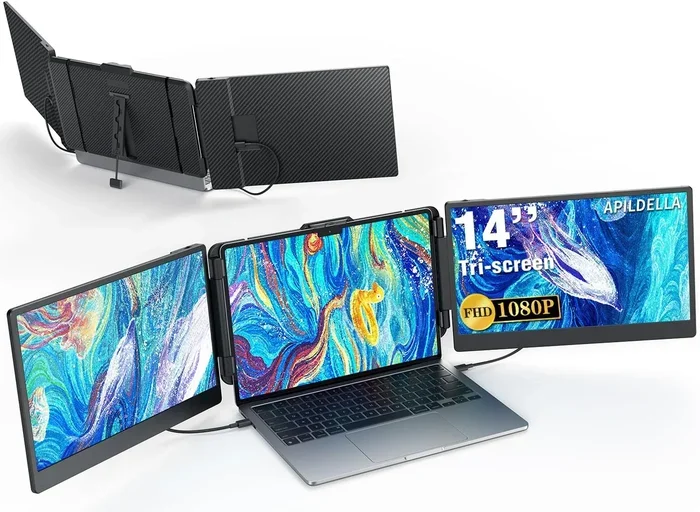
Portable Windows devices give you the power of a full desktop in a lightweight package. Whether you need a Windows laptop for school, work, or travel, picking the right one can feel overwhelming. This guide breaks down everything you need to know — from RAM and storage to battery life and form factors — so you can make a confident choice without the guesswork.
You want a portable Windows device that keeps up with your busy life. Maybe you need it for classes. Maybe you need it for work on the road. Or maybe you just want something light that still runs full Windows software.
Whatever your reason, picking the right portable Windows laptop doesn’t have to be confusing. This guide walks you through everything step by step. We’ll cover the types of devices available, what specs really matter, and how to avoid common buying mistakes. By the end, you’ll know exactly what to look for.
Key Takeaways
- Know Your Needs First: Match your device to your daily tasks — browsing, office work, or creative projects require different specs.
- Prioritize RAM and Storage: At least 8GB of RAM and a solid-state drive keep your Windows laptop running smoothly.
- Consider a 2-in-1: A Windows 2-in-1 laptop offers flexibility for both work and entertainment on the go.
- Don’t Ignore Battery Life: A long-lasting battery makes a huge difference for students and travelers.
- Check the Display Size: A 13- to 15-inch screen strikes the best balance between portability and usability.
- Read Reviews Before Buying: Real-world performance often differs from what the spec sheet promises.
📑 Table of Contents
- What Is a Portable Windows Device?
- Key Specs That Matter for Portable Windows
- Best Use Cases for Portable Windows Laptops
- How to Choose the Right Portable Windows Device
- Common Mistakes People Make When Buying Portable Windows Devices
- Quick Tips for Getting the Most Out of Your Portable Windows Device
- Final Thoughts
What Is a Portable Windows Device?
A portable Windows device is any computer running the Windows operating system that’s designed to be carried around easily. These include traditional laptops, detachable hybrids, and even small desktops meant for travel. They all share one goal — giving you a full Windows experience without the bulk.
Unlike tablets or Chromebooks, a Windows portable PC can run the full suite of desktop apps. That means Microsoft Office, Adobe tools, and specialized software all work just like they do on a desktop. For many users, this is the biggest advantage.
Most portable Windows devices weigh between 2 and 4 pounds. Ultrabooks and lightweight laptops push the lower end of that range. Larger gaming or workstation models sit higher. Your ideal weight depends on how often you’ll carry it.
Types of Portable Windows Devices
Not all portable Windows machines are the same. Here are the main categories you’ll encounter:
- Traditional Laptops: The classic clamshell design. Great for typing and everyday tasks. These are the most common Windows 11 laptops on the market.
- 2-in-1 Convertibles: These let you fold the screen back into a tablet. They’re perfect if you switch between work and media consumption.
- Ultrabooks: Thin, light, and optimized for portability. They often sacrifice some ports for a slimmer profile.
- Mini PCs: Tiny desktops you can carry in a backpack. They need a separate monitor and keyboard but offer strong performance.
Key Specs That Matter for Portable Windows
When shopping for a portable Windows laptop, the spec sheet can feel like a foreign language. Let’s break down the most important numbers so you know what to focus on.
Processor (CPU)
The processor is the brain of your device. For everyday tasks like browsing and office work, an Intel Core i5 or AMD Ryzen 5 is more than enough. If you do video editing or run heavy software, look for an i7 or Ryzen 7.
Newer generation chips also improve battery life significantly. So when comparing two devices with the same RAM, the one with the newer processor will usually perform better and last longer on a single charge.
RAM
Random Access Memory determines how many apps you can run at once. For Windows 11, 8GB is the minimum comfortable amount. But if you multitask a lot — say, having a browser with 20 tabs open while running a video call — 16GB of RAM makes a noticeable difference.
Some devices let you upgrade RAM later, but many modern laptops have it soldered to the motherboard. So try to get enough upfront. A 16GB RAM Windows 11 laptop is a sweet spot for most users.
Storage
Solid-state drives (SSDs) are the standard now. They’re faster and more durable than old hard drives. A 256GB SSD works fine for basic use. But if you store lots of photos, videos, or games, aim for 512GB or 1TB.
Some portable Windows devices also offer cloud storage options. This can supplement a smaller SSD if you don’t need everything saved locally.
Display
Screen size and quality affect both portability and comfort. A 13-inch display keeps the laptop light and compact. A 15-inch screen gives you more workspace but adds weight. For most people, 14 inches hits the perfect balance.
Look for at least a Full HD (1080p) resolution. Higher resolution screens like 2K or 4K look sharper but drain the battery faster. If your work involves color — like photo editing — prioritize color accuracy too.
Best Use Cases for Portable Windows Laptops
Different users need different things from their portable Windows device. Here are some common scenarios and what to look for in each.
For Students
Students need a reliable machine that’s light enough to carry all day. Battery life is critical — you don’t want your laptop dying halfway through a lecture. A device with at least 8GB of RAM and a solid SSD will handle note-taking, research, and presentations without any issues.
If you’re a student, check out our guide on the best Windows laptop for students for specific recommendations. Look for models that offer good keyboard quality too — you’ll be typing a lot.
For Remote Workers
Remote work demands consistency and reliability. You need a Windows laptop that handles video calls, multiple browser tabs, and productivity apps without lagging. A 16GB RAM configuration and a modern Intel or AMD processor will serve you well here.
Consider adding a portable monitor to your setup. It turns any coffee shop into a proper workspace and dramatically boosts productivity.
For Creatives
If you do design, music production, or video work, your portable Windows PC needs serious power. Look for dedicated graphics, fast storage, and a high-resolution display. A Windows 2-in-1 laptop with a stylus can be a game-changer for digital artists.
Check out our best Windows laptop for music production guide if audio work is your primary focus.
How to Choose the Right Portable Windows Device
With so many options out there, narrowing down your choice can feel tough. Here’s a simple framework to follow.
Step 1: Set a Budget
Portable Windows laptops range from under $300 to over $2,000. Decide what you can comfortably spend before you start shopping. Remember that mid-range devices often offer the best value — you get strong performance without paying for premium branding.
Step 2: List Your Must-Have Features
Write down what you absolutely need. Is it a touchscreen? A specific amount of storage? A certain number of USB ports? Having a clear list helps you filter out options quickly and avoid impulse buys.
Step 3: Read Real-World Reviews
Spec sheets don’t tell the whole story. A laptop might look great on paper but run hot or have a poor keyboard in practice. Watch video reviews and read user feedback to get the full picture.
Step 4: Consider Future Needs
Buy with a six-month to one-year horizon in mind. Will your needs change? If you’re a student moving into professional work, a device with upgradeable RAM or extra storage gives you room to grow.
Common Mistakes People Make When Buying Portable Windows Devices
Avoid these pitfalls to save money and frustration.
- Skimping on RAM: 4GB is no longer enough for modern Windows. You’ll struggle with multitasking and slow performance.
- Ignoring Battery Life: A thin laptop looks great but might only last four hours. Check real-world battery tests, not manufacturer claims.
- Overlooking Ports: Some ultraportable laptops sacrifice USB-A and HDMI. Make sure you have the connections you need or budget for dongles.
- Buying Based on Brand Alone: A well-known brand doesn’t always mean the best specs for your money. Compare models directly.
- Forgetting About the Keyboard and Trackpad: You’ll use these every single day. A beautiful screen means nothing if typing feels awful.
Quick Tips for Getting the Most Out of Your Portable Windows Device
Once you’ve picked your device, a few simple habits will keep it running strong for years.
- Keep Windows Updated: Updates include security patches and performance improvements. Don’t ignore them.
- Use an External SSD for Backups: A portable SSD like a SanDisk Extreme Portable gives you fast, reliable backup storage on the go.
- Manage Startup Programs: Too many apps launching at boot slows everything down. Disable what you don’t need.
- Invest in a Good Sleeve: A protective case adds minimal weight but saves you from costly damage.
- Calibrate Your Battery: Let your battery drain to about 20% and then charge to 100% once a month to maintain health.
Final Thoughts
Finding the right portable Windows device comes down to understanding what you need and matching it to the right specs. There’s no single perfect laptop — only the perfect laptop for you. Focus on the features that matter most for your daily routine, and you’ll end up with a device that feels great to use every day.
Take your time. Compare a few models. Read reviews. And don’t let sales pressure push you into a device that doesn’t fit. The right portable Windows laptop is out there — you just need to know what to look for.
Whether you’re a student grabbing notes in a lecture hall, a remote worker hopping between cafes, or a creative building something amazing, a well-chosen Windows portable PC makes all the difference. Use the tips in this guide, and you’ll walk into any store or website with confidence.
Frequently Asked Questions
What is the best portable Windows laptop for everyday use?
For most people, a 14-inch Windows 11 laptop with 8GB of RAM and a 256GB SSD strikes the right balance. It’s light enough to carry all day but powerful enough for browsing, office apps, and streaming. Check our guide on the best Windows laptop for students for top picks that work great for everyday tasks too.
How much RAM do I need in a portable Windows device?
8GB is the minimum for smooth performance with modern Windows. If you multitask heavily or run creative software, 16GB is a much better investment. A 16GB RAM Windows 11 laptop will stay fast for years and handle future software updates with ease.
Can I use a portable Windows device for gaming?
Yes, but it depends on the specs. Lightweight laptops with integrated graphics handle casual and indie games well. For demanding games, look for a model with a dedicated GPU and at least 16GB of RAM. Just keep in mind that gaming laptops tend to be heavier and have shorter battery life.
What’s the difference between a Windows 2-in-1 and a regular laptop?
A Windows 2-in-1 laptop has a flexible hinge or detachable keyboard that lets you use it as both a laptop and a tablet. Regular laptops have a fixed design. 2-in-1s offer more versatility but sometimes trade off battery life or raw performance for the added flexibility.
How long should a portable Windows laptop last on one charge?
Most modern Windows laptops last between 6 and 12 hours on a single charge, depending on usage. Ultrabooks and energy-efficient chips tend to hit the higher end. If you need all-day battery life, look for models tested to last at least 10 hours in real-world conditions.
Should I buy a portable Windows device with an SSD or HDD?
Always choose an SSD. Solid-state drives are significantly faster, more durable, and use less power than traditional hard drives. Even a basic SSD with 256GB will make your Windows portable PC feel snappy compared to an HDD of the same size.
=== CONCLUSION ===
Choosing the right portable Windows device doesn’t have to be a headache. Focus on the specs that match your daily routine, avoid the common buying traps, and don’t rush the decision. With the right Windows laptop in your bag, you’ll have a full-powered computer wherever life takes you.