Should I Use a Usb Data Blocker
A USB data blocker is a small but powerful tool that protects your devices from data theft and malware when charging at public stations. It stops unauthorized data transfer while letting power flow through safely. Whether you travel often or just need peace of mind, a USB data blocker is one of the smartest accessories you can own.
You have probably seen those charging stations at airports, malls, and hotels. They are convenient, but they come with a hidden risk. When you plug your phone into a public USB port, you are not just getting power. You might also be giving a stranger access to your personal data. This is exactly why more people are asking should I use a USB data blocker.
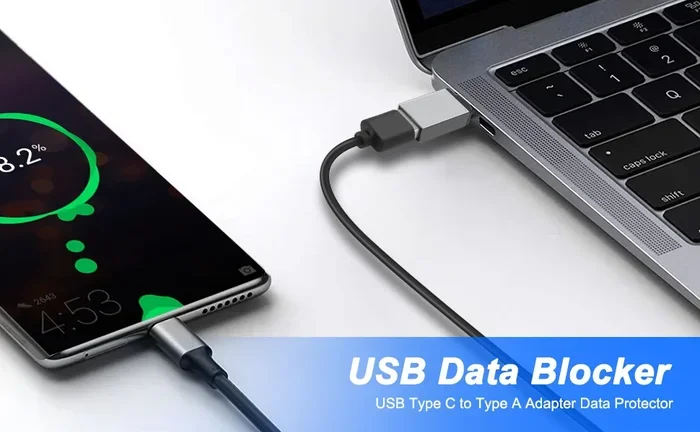
A USB data blocker is a small adapter that sits between your charging cable and the USB port. It allows electricity to pass through but blocks any data connection. Think of it as a bouncer for your charging port. It only lets power in and keeps data thieves out. In this article, we will walk through everything you need to know about these handy little devices.
Key Takeaways
- Prevents data theft: A USB data blocker stops hackers from accessing your personal data when you charge at public stations.
- Blocks juice jacking attacks: These malicious attacks can steal your information or install malware through compromised USB ports.
- Simple to use: You just plug the blocker between your cable and the charging port, no setup needed.
- Works with USB-C and USB-A: Most data blockers support multiple connector types for different devices.
- Affordable protection: USB data blockers cost very little compared to the potential cost of a data breach.
- Great for travelers: They are essential for anyone who relies on public charging spots at airports, hotels, or cafes.
📑 Table of Contents
What Is a USB Data Blocker?
A USB data blocker is a small plug-in device that sits between your charging cable and a USB power source. Its job is simple but important. It allows electrical current to flow through to your device while blocking any data pins inside the USB connection. This means your phone or laptop gets charged, but no data can be transferred in or out.
You may also hear people call these devices “USB condoms.” That name sounds funny, but it describes exactly what they do. They put a protective layer between your device and an unknown USB port. This keeps your personal files, passwords, and sensitive information safe from prying eyes.
How Does It Work?
Inside every USB cable, there are several pins. Some pins carry power, and others carry data. When you plug your device into a USB port, both power and data connections happen at the same time. A USB data blocker physically blocks the data pins. It only connects the power pins.
This is a very clever and simple design. There is no software to install. There is no app to download. You simply plug the blocker into the USB port, then plug your cable into the blocker. Your device charges normally, but the data connection is completely cut off.
Why You Need a USB Data Blocker
You might be thinking, “I never charge my phone at public stations.” But the truth is, many of us do it more often than we realize. Airport layovers, long shopping trips, and hotel rooms with limited outlets all make public charging tempting. Here is why using a USB data blocker should be part of your routine.
The Threat of Juice Jacking
Juice jacking is a real cybersecurity threat. It happens when a compromised USB charging port installs malware or steals data from your device. Hackers can modify public USB ports to access your files, copy your passwords, or even lock your device with ransomware.
The scary part is that you may not notice anything happening. Your phone charges just fine, but in the background, your data is being copied. A USB data blocker completely prevents this type of attack because it removes the data connection entirely.
Protecting Sensitive Information
Your phone holds a lot of personal information. Contacts, photos, messages, banking apps, and email accounts are all stored on your device. When you connect to an unknown USB port, you are essentially opening a door to all of that information.
Even if you trust the charging station, you do not know who set it up or what software might be running on it. A USB data blocker gives you control over your data connection. You get the power you need without taking any risks.
Peace of Mind While Traveling
Travelers are especially vulnerable to USB-based attacks. You are in unfamiliar places, your battery is low, and you need your phone for directions, tickets, and communication. The last thing you want to worry about is someone stealing your data through a charging port.
Carrying a USB data blocker is one of the easiest travel security habits you can build. It weighs almost nothing and fits in any bag. It gives you the confidence to charge anywhere without fear.
Common Uses for USB Data Blockers
USB data blockers are not just for public charging stations. They have several practical uses in everyday life. Here are some of the most common scenarios where a data blocker comes in handy.
- Airport and train station charging: These are high-traffic areas where USB ports are prime targets for hackers.
- Hotel room USB ports: Many hotel desks have built-in USB chargers that you do not know the history of.
- Cafes and restaurants: Free charging while you work or eat sounds great, but the risk is real.
- Car USB ports: If you borrow a car or use a rental, the USB port may have been connected to a compromised source.
- Shared devices: If you need to charge a device at a coworking space or library, a data blocker adds a layer of safety.
Even at home, a USB data blocker can be useful if you frequently connect your device to unfamiliar computers or charging hubs. It is a small investment that pays off in security.
How to Choose the Right USB Data Blocker
Not all USB data blockers are the same. Choosing the right one depends on your devices, your charging needs, and the types of ports you use. Here is what to look for.
Check the Connector Type
The first thing to check is the connector type. Most USB data blockers come in USB-A or USB-C versions. USB-A is the older, rectangular plug found on many wall chargers and computers. USB-C is the smaller, oval-shaped plug used on newer phones, tablets, and laptops.
Some blockers are universal and support both types. Others are designed for a specific connector. Make sure you get the right one for your device. If you use a Sandisk Extreme Portable 2TB External USB C NVMe SSD or any USB-C device, you will want a USB-C data blocker.
Look for Fast Charging Support
Not all data blockers support fast charging protocols. Some may slow down your charging speed because they interfere with power delivery. Look for blockers that support Quick Charge, Power Delivery, or other fast charging standards.
A good data blocker should charge your device at normal or fast speeds without any noticeable delay. If you notice your device charging slower than usual, the blocker may not be compatible with your power source.
Build Quality and Portability
USB data blockers are small, so build quality matters. You want one that feels sturdy and fits snugly into the USB port. A loose connection can cause charging interruptions or data errors.
Portability is also important. The best data blockers are compact enough to fit on a keychain or in a small pouch. You should be able to carry one everywhere without noticing it is there.
Brand Reputation and Reviews
When it comes to security accessories, brand reputation matters. Look for well-known brands with positive customer reviews. Avoid cheap, unbranded knockoffs that may not actually block data pins properly.
Reading reviews helps you understand real-world performance. You want a blocker that is reliable, durable, and truly effective at preventing data transfer.
Common Mistakes People Make with USB Charging
Even if you know about the risks, there are some common mistakes that people make when charging their devices in public.
- Using a USB data blocker that is damaged: A cracked or worn-out blocker may not block data pins properly. Always inspect your blocker before use.
- Assuming all public USB ports are safe: There is no way to tell if a public USB port has been tampered with. Always use a blocker.
- Ignoring software updates: A USB data blocker protects your hardware connection, but keeping your device software updated adds another layer of protection.
- Using cheap, unverified blockers: Some cheap data blockers look real but do not actually block data connections. Buy from trusted sellers.
- Forgetting to carry one: The best time to use a data blocker is before you need it. Make it a habit to always have one in your bag.
Expert Tips for Staying Safe with USB Charging
Security experts recommend several habits to keep your devices safe when charging on the go. Here are some practical tips.
- Always carry a USB data blocker: Keep one in your everyday bag, your travel bag, and your car.
- Use a power bank instead: A portable power bank eliminates the need for public USB ports altogether. This is the safest option.
- Use your own wall adapter: If a wall outlet is available, plug in your own charger instead of using a public USB port.
- Keep your device updated: Software updates often include security patches that protect against malware and data theft.
- Turn off your device while charging: This reduces the risk of any unauthorized data transfer, even if the connection is somehow compromised.
- Use a USB-C to USB-C adapter if needed: If you use devices with USB-C ports, having a reliable adapter like an M 2 NVMe SSD USB adapter or M 2 NVMe SSD to USB 3.1 adapter on hand ensures you always have a safe, direct charging option.
Following these tips will significantly reduce your risk of falling victim to USB-based attacks. The goal is to make safe charging habits second nature.
Final Verdict: Should You Use a USB Data Blocker?
The answer is a clear yes. A USB data blocker is one of the simplest, most affordable, and most effective tools you can use to protect your devices and personal data. It takes seconds to use, costs very little, and provides real security against juice jacking and data theft.
Whether you travel frequently, use public charging stations regularly, or just want an extra layer of protection, a USB data blocker is worth having. It is a small accessory that makes a big difference.
Think of it this way. You lock your front door when you leave home. You lock your car when you walk away. Using a USB data blocker is just another smart way to lock the digital door on your devices.
If you already use a USB-C SSD enclosure or connect external drives like the Sandisk Extreme Portable 2TB External USB C NVMe SSD regularly, you understand the importance of secure USB connections. A data blocker extends that same level of care to your charging habits.
Protect your data. Protect your devices. Use a USB data blocker every time you charge in public.
Frequently Asked Questions
What exactly does a USB data blocker do?
A USB data blocker is a small device that sits between your charging cable and a USB power source. It allows electricity to flow through to charge your device but blocks any data transfer. This keeps your personal information safe from unauthorized access when you use public USB charging ports.
Is a USB data blocker the same as a USB condom?
Yes, a USB data blocker is sometimes called a USB condom. Both terms refer to the same device. It gets this nickname because it acts as a protective barrier between your device and a potentially unsafe USB connection. It only lets power through while blocking data pins completely.
Can a USB data blocker affect my charging speed?
Most quality USB data blockers do not affect charging speed at all. They are designed to pass power through without interruption. However, cheap or poorly made blockers may slow down charging. Look for blockers that support fast charging standards like Quick Charge or Power Delivery for the best results.
Do I need a USB data blocker for my laptop?
Yes, laptops are just as vulnerable to USB-based attacks as phones. If you charge your laptop at public stations or connect it to unfamiliar USB ports, a data blocker adds an important layer of protection. This is especially true if your laptop stores sensitive work files or personal data.
How much does a USB data blocker cost?
USB data blockers are very affordable. Most cost between $5 and $20 depending on the brand and features. Considering the potential cost of a data breach or malware infection, this is a very small price to pay for peace of mind. They are widely available online and at electronics stores.
Can I use a USB data blocker with a USB-C to USB-C cable?
Yes, many USB data blockers are designed specifically for USB-C connections. You simply plug the blocker into the USB-C port, then connect your USB-C cable to the blocker. Make sure the blocker you buy matches your cable type. Some universal blockers support both USB-A and USB-C for maximum flexibility.