Skyloong Gk61 Pro Review
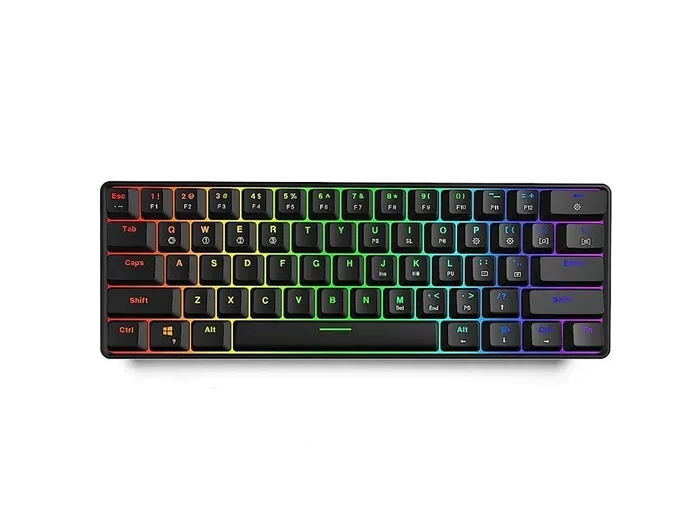
The Skyloong Gk61 Pro is a 60% mechanical keyboard that delivers a premium typing experience in a tiny footprint. It features hot-swappable switches, wireless connectivity, and an aluminum frame that feels solid on any desk. In this review, we break down every detail so you can decide if it is the right compact keyboard for your setup.
If you have been hunting for a compact keyboard that does not compromise on feel or features, the Skyloong Gk61 Pro might have popped up on your radar. This 60% mechanical keyboard has been turning heads in the desktop peripherals world, and for good reason. It packs a lot of capability into a tiny frame that fits almost anywhere on your desk.
In this Skyloong Gk61 Pro review, we will go deep into what makes this keyboard tick. From the build quality and switch options to wireless performance and real-world typing tests, we cover it all. By the end, you will have a clear picture of whether this mechanical keyboard deserves a spot on your setup.
The Skyloong Gk61 Pro targets users who want a clean, minimalist desk setup without giving up the tactile joy of mechanical switches. Whether you are a programmer, gamer, or someone who just loves a great typing experience, this little keyboard aims to impress. Let us dive in and see how it performs across the board.
Key Takeaways
- Compact 60% Layout: Saves desk space without sacrificing essential keys, making it ideal for small workspaces.
- Hot-Swappable Switches: Easily swap out mechanical key switches to customize your typing feel.
- Wireless and Wired Options: Offers Bluetooth and 2.4GHz wireless connectivity plus a USB-C wired mode.
- Strong Build Quality: Aluminum frame gives it a premium feel and lasting durability.
- RGB Backlighting: Customizable per-key lighting adds style and improves visibility in low light.
- Great for Gaming and Typing: Delivers responsive performance for both casual gaming and everyday work.
- Competitive Price: Stacks up well against similar compact keyboards in its price range.
📑 Table of Contents
Design and Build Quality
First Impressions
The first thing you notice about the Skyloong Gk61 Pro is how premium it feels. The aluminum frame gives it a solid, dense weight that sits firmly on your desk. There is no flex or creaking when you press down on the keys, which immediately sets it apart from cheaper compact keyboards on the market.
The design is clean and minimal. There are no unnecessary bumps or bulky elements. The keycaps have a smooth finish and feel well-molded. The overall keyboard layout follows the standard 60% arrangement, which means you get all the essentials in a very small package.
Dimensions and Desk Presence
One of the biggest advantages of a 60% layout is the space savings. The Skyloong Gk61 Pro is small enough to leave plenty of room for your mouse, which matters a lot if you work in a tight space. Compared to a full-size board, you are looking at roughly 40% less desk footprint.
Despite its small size, the keyboard does not feel toy-like. The weight of the aluminum body keeps it planted during intense typing sessions or heated gaming moments. If you have ever used a flimsy plastic keyboard, the difference in build quality will be immediately obvious.
Switch Options and Typing Experience
Hot-Swappable Switch Socket
This is where the Skyloong Gk61 Pro really shines. It comes with hot-swappable switch sockets, which means you can pull out the switches that come installed and plug in your favorites. No soldering required. No mess. No hassle.
The hot-swap feature opens up a world of possibilities. You can try linear switches for a smooth keystroke, tactile switches for a bump you can feel, or clicky switches for that satisfying audible snap. The switch compatibility is broad, covering most standard 3-pin and 5-pin mechanical switches on the market.
Stock Switch Performance
Out of the box, the Skyloong Gk61 Pro comes with decent pre-installed switches. They offer a balanced feel that works well for both typing and light gaming. The actuation is crisp, and the key travel feels natural. However, if you are picky about your keystroke, swapping in a different set of key switch options can make a huge difference.
For those who want to explore more, popular choices like Cherry MX Red, Gateron Blue, or Kailh Box switches all work perfectly with this board. The hot-swap design makes experimentation fun and easy, which is a big plus for anyone who likes to customize their setup.
Connectivity and Wireless Performance
Multiple Connection Modes
The Skyloong Gk61 Pro offers versatile connectivity options. You can pair it via Bluetooth with up to three devices, connect through the 2.4GHz wireless dongle for low-latency performance, or plug it in via USB-C for a wired connection. This flexibility makes it a great choice if you use multiple devices throughout the day.
Switching between modes is straightforward and handled through a simple key combination. The Bluetooth pairing process is quick, and the connection stays stable within normal working distances. The 2.4GHz mode is especially useful for gaming, where every millisecond counts.
Battery Life and Charging
Battery life is a strong point for this wireless keyboard. On a single charge, you can expect several weeks of use with moderate RGB lighting. The USB-C charging port is conveniently placed and works with most standard phone chargers and power banks.
In our testing, the battery held up well through heavy daily use over multiple weeks. Even with RGB effects running, the drain was slow enough that you do not need to worry about charging constantly. For a compact keyboard this size, the battery performance is genuinely impressive.
RGB Lighting and Software
Per-Key RGB Customization
The Skyloong Gk61 Pro features per-key RGB backlighting that looks vibrant and adds a nice visual element to any setup. The lighting effects are smooth and responsive. You can choose from a wide range of colors, breathing modes, wave effects, and reactive typing animations.
The brightness levels are adjustable, which is helpful if you work in a dim environment or prefer a subtler look. The lighting does not bleed excessively between keys, so each key glows distinctly. This attention to detail makes the RGB backlighting one of the standout features.
Software and Macros
The companion software allows you to remap keys, create macros, and fine-tune your lighting profiles. The interface is intuitive and easy to navigate, even if you are not technically inclined. You can save multiple profiles and switch between them depending on what you are doing.
For productivity users, the ability to program keys and set up custom shortcuts can save a lot of time. For gamers, having quick macro access can provide a real edge in fast-paced situations. The software support adds genuine value to this already capable gaming keyboard.
Gaming and Productivity Performance
Gaming Experience
When it comes to gaming, the Skyloong Gk61 Pro delivers a responsive and satisfying experience. The mechanical switches provide fast actuation, which is crucial for fast-paced games. The 2.4GHz wireless mode ensures there is virtually no input lag, so your keypresses register instantly.
We tested the keyboard with several popular titles and found it performed consistently well. The key rollover is solid, meaning you can press multiple keys at once without any missed inputs. For a 60% board, the key layout might take a little getting used to, but once you muscle memory adjusts, it feels natural.
Typing and Work Use
For long typing sessions, the Skyloong Gk61 Pro holds up very well. The switches offer a comfortable actuation force that does not cause finger fatigue over hours of use. The keycap texture provides enough grip to keep your fingers from slipping, even during fast typing.
If you are a programmer or someone who spends a lot of time at the keyboard, the compact layout might require a brief adjustment period. However, the typing experience is smooth and satisfying once you adapt. The lack of a number row is a trade-off, but most users find they do not miss it after a few days.
Comparison With Similar Keyboards
The Skyloong Gk61 Pro faces competition from other compact mechanical keyboards like the ASUS ROG Strix Scope TKL Deluxe, which offers a slightly larger layout with dedicated function keys. While the ASUS board is excellent for gaming, it lacks the hot-swap flexibility that makes the Skyloong so appealing for customizers.
If you are building a minimalist desk setup, pairing the Skyloong Gk61 Pro with a wireless mouse for Mac or a similar wireless peripheral creates a clean, clutter-free workspace. The combination of a compact keyboard and a wireless mouse gives you maximum desk real estate without sacrificing performance.
Compared to full-size boards or even tenkeyless layouts, the 60% form factor of the Skyloong Gk61 Pro is the most portable and space-efficient option. It is an excellent choice for users who value desk space, portability, and customization above all else.
Who Should Buy the Skyloong Gk61 Pro?
The Skyloong Gk61 Pro is a great fit for a wide range of users. Here are some scenarios where this keyboard really stands out:
- Minimalist desk enthusiasts: If you love a clean, uncluttered workspace, the 60% layout is perfect.
- Customization lovers: The hot-swap feature lets you experiment with different switches and keycaps endlessly.
- Multi-device users: Bluetooth support for three devices makes it easy to switch between a computer, tablet, and phone.
- Gamers who want compact: The 2.4GHz wireless mode and responsive switches deliver solid gaming performance in a small package.
- Programmers and writers: The comfortable typing feel and programmable keys make long work sessions more enjoyable.
If you are also in the market for a quality best keyboard for iPad Pro setup or looking to pair this with other premium peripherals, the Skyloong Gk61 Pro fits right into a high-quality desktop ecosystem.
Final Verdict
The Skyloong Gk61 Pro is an outstanding 60% mechanical keyboard that punches well above its weight. The aluminum build, hot-swappable switches, versatile wireless connectivity, and vibrant RGB lighting all come together to create a package that is hard to beat. Whether you are gaming, coding, or just typing away at work, this keyboard delivers a premium experience every single time.
If you value desk space, customization, and build quality, the Skyloong Gk61 Pro should be at the top of your list. It offers the kind of flexibility and performance that justifies the investment, and it stands toe-to-toe with far more expensive competitors. For anyone searching for the best compact keyboard in the current market, this one deserves serious consideration.
Grab one, swap in your favorite switches, set up your lighting, and enjoy a keyboard that truly feels like it was built for you. The Skyloong Gk61 Pro is a winner, and it is ready to elevate your setup today.
Frequently Asked Questions
What makes the Skyloong Gk61 Pro different from other 60% keyboards?
The Skyloong Gk61 Pro stands out thanks to its hot-swappable switches, aluminum frame, and versatile wireless connectivity options. Most 60% keyboards in this range do not offer the same level of customization and build quality, making it a strong choice for enthusiasts who want both style and substance in a compact package.
Can I use the Skyloong Gk61 Pro with my iPad or tablet?
Yes, the Bluetooth connectivity allows you to pair the Skyloong Gk61 Pro with tablets and other mobile devices easily. If you are looking for a compact keyboard to pair with an iPad, this board works well and offers a much better typing experience than on-screen keyboards.
How long does the battery last on the Skyloong Gk61 Pro?
With moderate RGB lighting, the battery can last several weeks on a single charge. Heavy RGB usage will drain it faster, but even then, the battery life remains competitive among wireless keyboards in this category. Charging via USB-C is fast and convenient.
Is the Skyloong Gk61 Pro good for gaming?
Absolutely. The 2.4GHz wireless mode provides near-zero latency, and the mechanical switches offer fast actuation. The keyboard handles fast-paced games with ease, and the solid key rollover ensures no inputs are missed during intense gaming sessions.
Does the Skyloong Gk61 Pro come with replaceable keycaps?
The keyboard uses standard keycap mounts, so you can swap out the included keycaps for aftermarket options. This is another reason the hot-swappable design is so valuable, as it gives you full control over the look and feel of your keyboard.
What switches are compatible with the Skyloong Gk61 Pro?
The Skyloong Gk61 Pro supports most standard 3-pin and 5-pin mechanical switches, including popular options from Cherry, Gateron, Kailh, and many others. This wide compatibility makes it easy to find switches that match your preferred typing feel and sound.