How To Fix A Broken Mouse Wire Without Buying A New One
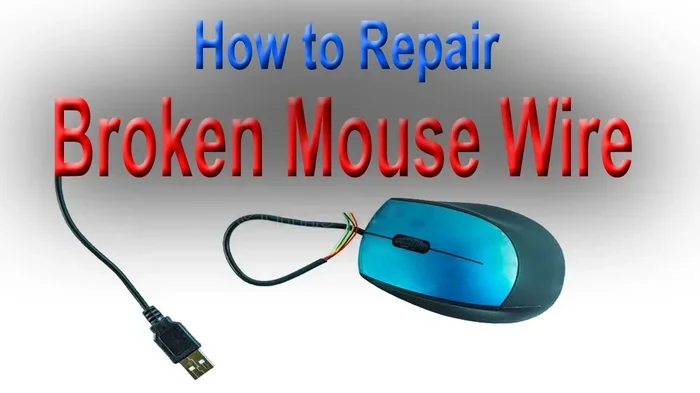
A broken mouse wire does not mean you need to throw your mouse away or spend money on a replacement. You can fix a damaged mouse cable at home with basic tools and a little patience. This guide walks you through every step, from finding the break to soldering the wire back together.
There is nothing more frustrating than sitting down to work and discovering your mouse is not responding. You move it back and forth, but nothing happens on the screen. Often, the problem is a broken mouse wire right near the connector or somewhere along the cable. Before you rush out to buy a new one, let us look at how to fix a broken mouse wire and bring your trusty device back to life.
A damaged mouse wire is one of the most common computer mouse troubleshooting issues people face. Whether the wire is frayed, cut, or has internal breaks, the good news is that most fixes are simple. You do not need to be a tech expert. With the right tools and a calm approach, you can repair the cable yourself in under half an hour.
This guide covers everything you need to know. We will talk about what causes wire damage, the tools you need, step-by-step repair methods, and how to prevent future problems. By the end, you will feel confident tackling this fix on your own.
Key Takeaways
- Save Money: Fixing a broken mouse wire costs almost nothing compared to buying a new mouse.
- Easy Tools Needed: You only need a few basic items like a soldering iron, electrical tape, and wire stripper.
- Quick Repair: Most wire fixes take less than 30 minutes to complete.
- Prevent Future Damage: Simple habits can stop your mouse wire from breaking again.
- Multiple Fix Methods: You can splice, solder, or use heat shrink tubing depending on the damage.
- Wireless Alternative: If the wire is beyond repair, switching to a wireless mouse is a great backup plan.
📑 Table of Contents
Why Mouse Wires Break
Understanding why a wire breaks helps you fix it better and avoid the same problem later. Most mouse wire damage happens for a few common reasons. Let us look at each one so you can spot the cause of your issue.
Frequent Bending and Twisting
Every time you move your mouse, the cable flexes. Over weeks and months, this repeated bending weakens the internal wires. The outer insulation may look fine, but inside, the thin copper strands are fraying. This is called a hairline break, and it is the most sneaky type of damage because the wire looks okay from the outside.
Pet Chewing and Physical Damage
If you have pets at home, they love to chew on cables. A mouse wire is small and easy to reach. Even without pets, sitting on the cable or catching it on a desk edge can cause a sudden break. The damage might be right at the base of the connector or somewhere in the middle of the cord.
Wear and Tear Over Time
All cables age. The rubber or plastic covering becomes brittle. Tiny cracks form, and eventually the inner wires break. This is normal wear and tear, especially if you have used the same mouse for several years. A wired mouse problem from old age is very common and easy to spot because the cable often looks cracked or discolored.
Manufacturing Defects
Sometimes the wire breaks because of a factory flaw. The internal strands are too thin or the insulation is too weak. This happens more often with cheap mice. If your mouse wire broke within a few months of purchase, this might be the cause.
Tools You Need to Fix a Broken Mouse Wire
You do not need fancy equipment. Here is a simple list of everything you will need before you start the repair. Most of these items are already in your home or easy to find at any hardware store.
- Soldering Iron: A small, basic soldering iron works best. It melts solder to join wires together securely.
- Solder Wire: Get a thin solder wire meant for electronics. Lead-free solder is safer, but leaded solder is easier to work with.
- Wire Stripper: This tool removes insulation from the wire ends without cutting the copper inside. A small pair of scissors can work in a pinch.
- Electrical Tape: You will use this to wrap and insulate the repaired section. Masking tape is not strong enough.
- Heat Shrink Tubing: This thin plastic tube shrinks when heated and creates a clean, professional seal over the repair.
- Multimeter: This tool checks if electricity flows through the wire. It helps you find exactly where the break is.
- Scissors or Wire Cutters: You need these to cut away damaged sections cleanly.
- Rubbing Alcohol and Cotton Swabs: These clean the area before you start soldering.
How to Find the Broken Spot
Before you can fix the wire, you need to find exactly where it is broken. A wire can break inside the insulation, making it invisible to the eye. Here are two reliable methods to locate the damage.
Method 1: The Flex Test
Plug your mouse into the computer and gently bend the cable at different points. Move the mouse and watch the cursor. If the cursor jumps or stops when you bend the cable at a certain spot, you found the break. Mark that spot with a piece of tape so you do not forget.
Method 2: The Multimeter Test
Unplug the mouse first. Set your multimeter to the continuity setting. Touch one probe to one end of the wire and the other probe to the other end. If there is no beep or reading, the wire is broken somewhere in between. Move the probes along the cable slowly until the reading drops out. That is your break point.
Once you find the damaged area, cut the cable about half an inch past the break on both sides. This ensures you are working with healthy wire.
Step-by-Step Repair Methods
There are several ways to fix a broken mouse wire. The best method depends on the type and location of the damage. Here are the three most effective approaches.
Method 1: Wire Splicing with Electrical Tape
This is the simplest method. It works well for a small break in the middle of the wire.
- Cut the damaged section out completely. You want two clean ends of healthy wire.
- Strip about half an inch of insulation from each end using your wire stripper.
- Twist the exposed copper strands on each end together tightly.
- Wrap the joined section with electrical tape. Start from below the splice and wind up and over.
- Test the mouse by plugging it in and moving it around.
This method is fast and works for temporary fixes. However, the splice may not be very strong. If you bend the cable at that spot too much, it could break again.
Method 2: Soldering the Wire
Soldering gives you a much stronger and more reliable connection. This is the best method for a permanent fix.
- Cut out the damaged section as described above.
- Strip the insulation from both ends.
- If the mouse has multiple wires inside the cable, identify which wire goes where. Usually, the colors match: red is positive, black is negative, and other colors are data lines.
- Heat up your soldering iron and apply a small amount of solder to each wire end.
- Twist the matching wires together and touch the soldering iron to the joint until the solder flows smoothly.
- Let the joint cool for a few seconds before moving on.
- Cover each joint with heat shrink tubing or electrical tape.
- Wrap the entire repaired section with tape for extra protection.
Soldering takes a little practice, but it is not hard. If you have never soldered before, this is a great beginner project. The connection will be strong and last a long time.
Method 3: Using a Connector Replacement
If the wire broke right at the USB plug or the PS/2 connector, you can replace just the connector. You can buy replacement USB plugs for a few dollars online. This method is best when the wire is intact but the plug is damaged.
When to Consider a Wireless Mouse Instead
Sometimes the wire damage is too extensive, or the mouse is already old. In these cases, switching to a wireless mouse might be the smarter choice. A wireless mouse eliminates the wire problem completely. You never have to worry about a frayed cable again.
Many people worry that wireless mice are less responsive than wired ones. That used to be true, but modern wireless mice are just as fast. If you want to switch, you can connect a wireless mouse to a laptop in just a few minutes. The process is simple and does not require any technical skills.
Before you buy a new mouse, though, try the repair methods above. You might be surprised how well they work. A repaired wired mouse can last just as long as a new one.
Preventing Future Mouse Wire Damage
The best repair is the one that never needs to happen again. Here are some simple habits that will keep your mouse wire healthy for years.
- Do not wrap the cable tightly. Loose loops are much better for the wire than tight coils.
- Avoid pulling the mouse by the cable. Always pick it up by the body.
- Keep pets away from the cable. If your pet chews cords, use a cable protector or keep the mouse out of reach.
- Do not run the cable under heavy furniture. The pressure weakens the wire over time.
- Store the mouse properly. When not in use, place it in a drawer or a cable bag.
- Check the cable regularly. Look for fraying or cracks early. Catching small damage early prevents a total break.
These small habits make a big difference. A little care goes a long way in extending the life of your mouse and any other cables around your desk.
Common Mistakes to Avoid
When fixing a broken mouse wire, people often make mistakes that make the problem worse. Here is what to watch out for.
- Using regular tape instead of electrical tape. Regular tape loses its stickiness and does not insulate well. Always use proper electrical tape or heat shrink tubing.
- Soldering without cleaning the wire first. Dirty wire does not solder well. Always wipe the wire with rubbing alcohol before you start.
- Cutting too much wire. Only remove the damaged section. You want as much healthy wire as possible on each side.
- Ignoring the wire colors. If you mix up the wires inside the cable, the mouse will not work correctly. Take a photo before you cut so you remember the order.
- Rushing the soldering process. Hold the wire steady until the solder cools completely. A wobbly joint will break again quickly.
Avoiding these mistakes will save you time and frustration. Take your time and do the job right the first time.
Final Thoughts on Fixing a Broken Mouse Wire
Fixing a broken mouse wire is one of the easiest and most satisfying DIY repairs you can do. It saves you money, keeps electronic waste out of the landfill, and gives you a sense of accomplishment. Whether you use the splicing method or the soldering method, the repair is straightforward and doable for anyone.
If your mouse wire is beyond repair, remember that you can always explore other options. You might want to learn more about how to use a mouse on a laptop or consider switching to a wireless setup. The choice is yours, and now you have the knowledge to make it.
Take a look at your mouse today. If the wire is damaged, grab your tools and give it a try. You will be surprised how easy it is to bring your mouse back to life. A little effort now can save you money and keep your mouse working for months or even years to come.
Frequently Asked Questions
Can I fix a broken mouse wire without soldering?
Yes, you can. The wire splicing method with electrical tape does not require any soldering. Simply cut out the damaged section, twist the wires together, and wrap with tape. It is not as strong as soldering, but it works well for temporary repairs.
How long does a mouse wire repair last?
A soldered repair can last for years if done correctly. A tape-only splice might last a few months. The key is to protect the repair with heat shrink tubing or extra tape. Avoid bending the repaired spot too much.
What causes a mouse wire to break inside the insulation?
Repeated bending is the most common cause. Over time, the thin copper wires inside the cable fatigue and snap. This is called a fatigue break. It happens even if the outer insulation looks perfectly fine.
Is it cheaper to fix a mouse wire or buy a new mouse?
Fixing the wire is almost always cheaper. A soldering iron and solder cost a few dollars, and you probably already have electrical tape at home. A new mouse costs anywhere from $10 to $50 or more. Repairing saves money and reduces waste.
Can a broken mouse wire damage my computer?
No, a broken mouse wire will not damage your computer. The worst that happens is the mouse stops working. You will not lose any data or harm your laptop. Simply unplug the mouse until you can fix or replace it.
Should I replace the whole cable or just fix the break?
Fix the break if the rest of the cable is in good condition. If the wire is damaged in multiple spots or the cable is very old, replacing the whole cable or the mouse might be the better option. A new wireless mouse is also a great alternative if you are tired of wire problems.