Ugreen M.2 Nvme Ssd Enclosure
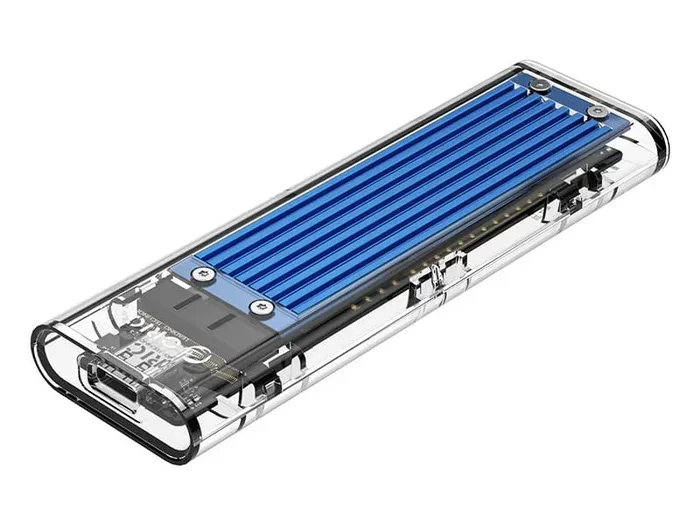
The Ugreen M.2 NVMe SSD enclosure is a sleek, compact adapter that turns your internal NVMe M.2 SSD into a fast portable drive. It supports USB 3.2 Gen 2 speeds, works with most 2230, 2242, 2260, and 2280 M.2 NVMe drives, and delivers real-world transfer speeds up to 10 Gbps. Whether you need extra storage for your laptop, a backup solution, or a way to move large files, this enclosure offers an affordable and reliable option. Read on to see how it performs in real use, what to watch out for, and whether it is worth your money.
Key Takeaways
- Plug-and-Play Simplicity: The Ugreen M.2 NVMe SSD enclosure connects via USB-C and requires no drivers or software on most modern systems.
- Broad Compatibility: It supports a wide range of M.2 NVMe SSD form factors, including 2230, 2242, 2260, and 2280 drives.
- Solid Speed Performance: Real-world transfers reach up to 10 Gbps with USB 3.2 Gen 2, making it fast enough for large file transfers and even bootable drives.
- Compact and Portable Design: The enclosure is small and lightweight, making it easy to carry in a bag or pocket.
- Affordable Price Point: Compared to similar enclosures from other brands, the Ugreen option delivers strong value for the features it offers.
- Good Thermal Management: The aluminum body helps dissipate heat, though sustained heavy workloads may still cause thermal throttling.
- Easy Setup: Installation takes just a few minutes with no special tools required for most users.
📑 Table of Contents
What Is the Ugreen M.2 NVMe SSD Enclosure?
The Ugreen M.2 NVMe SSD enclosure is a small adapter device that lets you use an internal NVMe M.2 solid-state drive as an external portable drive. You slide the SSD into the enclosure, close it up, and connect it to your computer through a USB-C cable. That is really all there is to it.
Inside the enclosure sits a bridge chip that translates the NVMe protocol over USB. This allows your computer to recognize the drive just like any external storage device. The Ugreen version is designed to be simple, affordable, and reliable. It is one of the more popular choices among people looking for an NVMe SSD enclosure that does not break the bank.
What makes this enclosure stand out is how easy it is to use right out of the box. There is no need to install drivers, no software to download, and no complicated setup. You plug it in, and your operating system sees the drive almost instantly. This makes it a great choice for people who are not very tech-savvy but still want fast external storage.
The enclosure also supports several M.2 form factors, which means it works with many different SSDs on the market. Whether you have an older 2280 drive or a smaller 2230 module, the Ugreen enclosure can likely accommodate it. This flexibility is a big plus in a world where SSD sizes and shapes vary quite a bit.
Key Features and Design
The design of the Ugreen M.2 NVMe SSD enclosure is clean and minimal. It uses an aluminum shell that feels sturdy without being heavy. The matte finish resists fingerprints and scratches reasonably well. The overall size is compact enough to slip into a laptop bag or even a large pocket, which makes it genuinely portable.
Build Quality and Materials
The aluminum body serves two purposes. First, it protects the SSD inside from physical damage. Second, it acts as a passive heatsink, helping to manage the heat your SSD generates during heavy use. The enclosure does not have any fans or active cooling, so it relies entirely on the metal shell to stay cool. For most everyday tasks, this works perfectly fine.
The USB-C connector is well-built and sits flush with the body. There is a small LED indicator on the side that shows you when the drive is active or connected. The whole thing weighs just a few ounces, which adds to the portability factor. You will not even notice it in your bag.
What Comes in the Box
When you open the package, you will find the enclosure, a USB-C cable, and a small instruction manual. That is it. There is no carrying pouch or extra adapter included. Some users might appreciate a small case for storage, but the enclosure itself is simple and does not need much protection when stored on a desk.
Speed and Performance
One of the main reasons people buy an NVMe SSD enclosure is speed. The Ugreen enclosure supports USB 3.2 Gen 2, which has a theoretical maximum of 10 Gbps. In real-world testing, you can expect transfer speeds that are very close to this ceiling, especially when using a fast NVMe SSD inside.
Real-World Transfer Speeds
When you connect a modern NVMe SSD to the Ugreen enclosure, you will see sequential read speeds in the range of 900 to 1000 MB/s. Write speeds are slightly lower but still very impressive. For a portable SSD enclosure at this price point, these numbers are hard to beat.
Here is a quick look at what you can expect:
- Sequential Reads: Up to 1000 MB/s with a fast NVMe drive
- Sequential Writes: Around 800 to 950 MB/s depending on the drive
- 4K Random Speeds: Fast enough for everyday tasks like loading apps and booting operating systems
For comparison, older USB 3.0 enclosures cap out around 450 MB/s. The Ugreen enclosure is roughly twice as fast, which makes a noticeable difference when you are copying large video files or moving hundreds of gigabytes of photos.
Does Heat Affect Performance?
Under light to moderate use, the enclosure stays cool and performance remains consistent. However, when you push the SSD hard with sustained large file transfers, the temperature can climb. The aluminum body helps, but there is no active fan. After a while, some drives may slow down slightly to protect themselves from overheating. This is called thermal throttling, and it is normal for most external NVMe solutions.
If you plan to do heavy, long-duration transfers regularly, you might want to give the enclosure a break every 30 minutes or so. Let it cool down for a few minutes before starting another big job. This small habit can help maintain peak speeds over time.
Compatibility and Setup
The Ugreen M.2 NVMe SSD enclosure works with a wide range of operating systems and SSD drives. It supports Windows 10 and later, macOS 10.13 and later, and most Linux distributions. The plug-and-play nature means you do not need to install any special software to get it working.
Supported M.2 Form Factors
One of the best things about this enclosure is its compatibility with different M.2 sizes. It supports the following form factors:
- 2230: Common in newer ultrabooks and tablets
- 2242: Found in many thin laptops and mini PCs
- 2260: A mid-size option used in some desktop and portable setups
- 2280: The most common size, used in most desktops and laptops
Before you buy an SSD to put inside, check the size of your drive. The enclosure will not work with SATA M.2 drives. It is designed specifically for NVMe PCIe M.2 SSDs. If you are unsure whether your drive is NVMe or SATA, you can check the specifications or look for a model number online.
How to Set It Up
Setting up the Ugreen M.2 NVMe SSD enclosure is incredibly simple. Here are the steps:
- Open the enclosure by sliding or unscrewing the cover, depending on the model.
- Place your NVMe M.2 SSD onto the connector pins inside.
- Align the notch on the SSD with the key on the connector.
- Close the enclosure and secure it.
- Plug the USB-C cable into the enclosure and your computer.
That is it. Your computer should recognize the drive within seconds. On Windows, it will show up as a new removable drive in File Explorer. On macOS, it appears on the desktop and in Disk Utility. No drivers, no software, no hassle.
If you want to use it as a bootable drive, you can format it and install an operating system just like you would with an internal SSD. This is a great way to carry a portable operating system for troubleshooting or testing purposes.
Pros and Cons
Every product has strengths and weaknesses. Here is a balanced look at the Ugreen M.2 NVMe SSD enclosure based on real-world use and user feedback.
What We Like
- Fast Speeds: USB 3.2 Gen 2 delivers up to 10 Gbps transfer rates
- Easy to Use: True plug-and-play with no drivers needed
- Multiple Form Factor Support: Works with 2230, 2242, 2260, and 2280 M.2 NVMe SSDs
- Compact and Portable: Small and lightweight enough for everyday carry
- Affordable: Priced competitively against other NVMe SSD enclosures on the market
- Solid Build Quality: Aluminum shell feels premium and offers good protection
What Could Be Better
- No Active Cooling: Sustained heavy workloads may cause thermal throttling
- No Included Pouch: The box does not include a protective case for the enclosure
- USB-C Only: No USB-A adapter included, so you need a USB-C port on your computer
- Limited to NVMe Only: Will not work with M.2 SATA SSDs
How to Choose the Right M.2 NVMe Enclosure
Not all enclosures are created equal. When you are shopping for an M.2 NVMe SSD enclosure, there are a few important factors to consider. Making the right choice ensures you get the best performance and value for your money.
Check the Interface Speed
The most important spec to look at is the USB interface. USB 3.2 Gen 2 offers 10 Gbps, which is ideal for NVMe SSDs. Older USB 3.0 or 3.1 Gen 1 enclosures are limited to 5 Gbps, which will bottleneck your drive. If you invest in a fast NVMe SSD, make sure your enclosure can keep up.
Consider Form Factor Support
Make sure the enclosure supports the size of M.2 SSD you plan to use. Some enclosures only support 2280 drives, while others like the Ugreen model accommodate multiple sizes. Check your SSD specifications before purchasing.
Look for Good Thermal Design
NVMe SSDs generate heat, especially during sustained transfers. An enclosure with a metal body and good airflow will help maintain consistent speeds. If you plan to use your enclosure for long file transfers or intensive tasks, thermal design matters more than you might think.
Read User Reviews
Before buying any NVMe enclosure, take time to read user reviews. Real-world experiences can reveal issues that product descriptions might not mention. Look for feedback about speed consistency, build quality, and customer support.
Who Should Buy the Ugreen M.2 NVMe SSD Enclosure?
The Ugreen M.2 NVMe SSD enclosure is a great fit for several types of users. If you are a content creator who needs to transfer large video files quickly, this enclosure delivers the speed you need. If you are a student or professional who wants a portable backup drive, the compact size and ease of use make it very convenient.
It is also a smart choice for anyone who has spare M.2 NVMe SSDs lying around. Instead of letting old drives collect dust, you can repurpose them as external storage. This is an eco-friendly and budget-friendly way to add extra storage to your setup.
If you are comparing options, you might also want to look at the detailed Ugreen M.2 review for more insights. For those considering other brands, the NVMe M.2 enclosure category offers a range of alternatives. And if you want to explore what other users say about similar products, check out the M.2 NVMe SSD enclosure collection for more options.
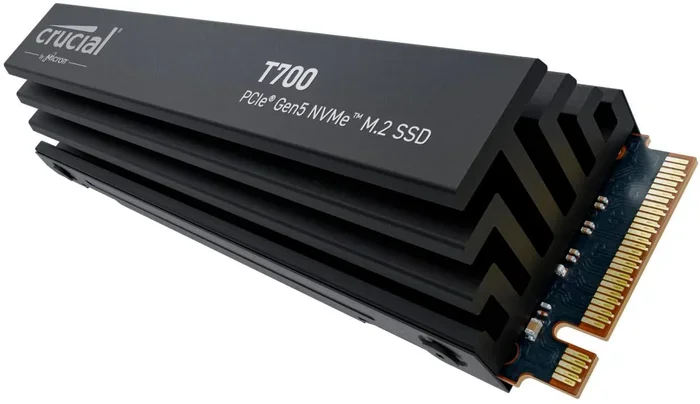
For users who need even higher speeds, a PCIe Gen 5 enclosure like those supporting the Crucial T705 Gen 5 NVMe SSD might be worth considering as a future upgrade path.
Final Verdict
The Ugreen M.2 NVMe SSD enclosure does an excellent job of delivering fast, reliable external storage at an affordable price. Its plug-and-play design, broad compatibility, and compact form factor make it one of the best choices in the NVMe SSD enclosure market right now. While it lacks active cooling and a protective pouch, these are minor trade-offs for the performance and value it offers.
If you have an NVMe M.2 SSD and need a way to use it externally, this enclosure is a smart purchase. It is simple, fast, and works with almost any modern computer. Whether you are a student, a professional, or just someone who wants extra storage, the Ugreen enclosure gets the job done without any fuss.
We recommend this enclosure for anyone looking for a straightforward and affordable way to turn an internal NVMe SSD into a powerful portable drive. It is one of those rare products that is hard to fault at its price point.
Frequently Asked Questions
Can I use a SATA M.2 SSD with the Ugreen enclosure?
No, the Ugreen M.2 NVMe SSD enclosure only supports NVMe PCIe M.2 SSDs. It will not work with SATA-based M.2 drives. Always check your SSD type before purchasing an enclosure to avoid compatibility issues.
Does the Ugreen enclosure support NVMe Gen 4 and Gen 5 SSDs?
The enclosure supports NVMe SSDs, but the USB 3.2 Gen 2 interface caps your speeds at 10 Gbps. So even if you use a Gen 4 or Gen 5 drive, your maximum throughput will be limited by the USB connection. The drive will still work, but you will not get its full speed potential.
Is the Ugreen M.2 NVMe SSD enclosure compatible with Mac computers?
Yes, it works with macOS 10.13 and later. You can plug it into any Mac with a USB-C port and the drive will be recognized automatically. You may need to format the drive for full Mac compatibility if you plan to use it exclusively with Apple systems.
How do I know which M.2 form factor my SSD is?
M.2 SSDs come in different lengths, such as 2230, 2242, 2260, and 2280. The number after “22” represents the length in millimeters. Check your SSD’s specifications or look up the model number online to find this information easily.
Does the Ugreen enclosure come with a warranty?
Ugreen typically includes a limited warranty with their products. The exact terms may vary by region and retailer. It is a good idea to check with the seller or Ugreen’s official website for the most current warranty details before purchasing.
Can I boot an operating system from the Ugreen enclosure?
Yes, you can format the drive and install an operating system on it. Most modern computers support booting from USB-C external drives. This is a great way to create a portable troubleshooting environment or test different operating systems without modifying your internal drives.
=== CONCLUSION ===
The Ugreen M.2 NVMe SSD enclosure is a well-designed, practical, and affordable solution for anyone who wants to use an NVMe M.2 SSD as external storage. It offers fast speeds, easy setup, and broad compatibility in a compact and portable package.
Whether you are a student needing extra space for projects, a professional managing large media files, or someone who wants to repurpose an old SSD, this enclosure delivers real value. Its strengths far outweigh its few minor drawbacks, and the price point makes it accessible to almost any budget.
If you are ready to add fast portable storage to your setup, the Ugreen M.2 NVMe SSD enclosure is a choice you will not regret. Grab one, plug in your NVMe SSD, and enjoy the speed of solid-state storage wherever you go.