Wd Blue Sn550 Nvme Ssd

The WD Blue SN550 NVMe SSD is a reliable and affordable solid state drive built for everyday performance upgrades. It uses the NVMe protocol over PCIe Gen3 and comes in the M.2 2280 form factor, making it a perfect fit for most modern desktops and laptops. With read speeds up to 2400 MB/s and write speeds around 1750 MB/s, this drive handles gaming storage, boot drives, and general workloads with ease. In this guide, we break down its features, performance benchmarks, and how it stacks up against the competition.
The WD Blue SN550 NVMe SSD has become one of the most popular choices for people looking to upgrade their storage without spending a fortune. Whether you are building a new PC or upgrading an older one, this drive promises fast load times, smooth multitasking, and a compact design that fits into tight spaces.
In this deep dive, we will cover everything you need to know about the WD Blue SN550 NVMe SSD. We will look at its specs, real-world performance, pros and cons, and how it compares to other drives in the same price range. By the end, you will know if this is the right solid state drive for your setup.
Key Takeaways
- Fast PCIe Gen3 Speeds: The WD Blue SN550 NVMe SSD offers sequential reads up to 2400 MB/s, making it significantly faster than traditional SATA drives.
- Compact M.2 Form Factor: The M.2 2280 design fits easily into most modern motherboards without needing a cable or extra power connector.
- DRAM-less Design: This drive uses a DRAM-less architecture with an SDP controller, which keeps costs low while still delivering solid everyday performance.
- Multiple Capacity Options: Available in 250GB, 500GB, 1TB, and 2TB variants, so you can choose the right size for your needs.
- Good Endurance Rating: The TBW ratings are respectable for a budget NVMe drive, making it suitable for regular daily use.
- Affordable Price Point: The WD Blue SN550 NVMe SSD sits in the budget-friendly tier, offering excellent value for casual users and gamers.
📑 Table of Contents
What Is the WD Blue SN550 NVMe SSD?
The WD Blue SN550 is part of Western Digital’s entry-level NVMe lineup. It uses the NVMe protocol over a PCIe Gen3 x4 interface, which is the standard for most M.2 NVMe drives on the market today. Unlike older SATA SSDs, the SN550 communicates directly with the CPU through the PCIe bus, cutting down on latency and boosting transfer speeds dramatically.
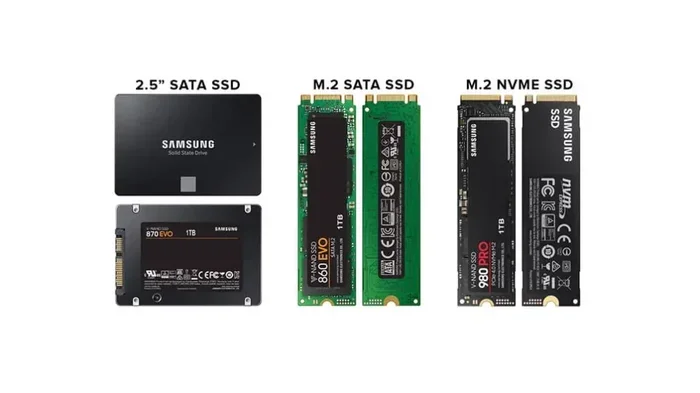
This drive comes in the M.2 2280 form factor, which means it is 22mm wide and 80mm long. This is the most common M.2 size found on modern motherboards. You simply plug it into the M.2 slot, secure it with a screw, and you are good to go. No cables, no extra power connections, and no hassle.
The SN550 is a DRAM-less SSD, meaning it does not have a separate cache memory chip. Instead, it relies on the controller’s intelligent caching and the host system’s DRAM to manage data. This design keeps the cost down, which is exactly why the WD Blue SN550 NVMe SSD is so competitively priced.
Key Specifications
- Interface: PCIe Gen3 x4, NVMe 1.3
- Form Factor: M.2 2280
- Sequential Read Speed: Up to 2400 MB/s
- Sequential Write Speed: Up to 1750 MB/s
- Random Read IOPS: Up to 190,000
- Random Write IOPS: Up to 155,000
- Available Capacities: 250GB, 500GB, 1TB, 2TB
- Endurance (1TB model): 120 TBW
- Controller: WD custom SDP controller
- Warranty: 3-year limited warranty
Performance and Real-World Usage
When it comes to everyday performance, the WD Blue SN550 NVMe SSD punches well above its price class. Boot times on Windows 11 drop to around 8-12 seconds on a fresh install, and applications open almost instantly. If you have been using a traditional hard drive or even a SATA SSD, the difference is night and day.
For gaming, the SN550 handles modern titles with ease. Games like Fortnite, Valorant, and Cyberpunk 2077 load noticeably faster compared to SATA-based storage. While it may not match the speeds of a WD Black SN850 NVMe SSD, which is WD’s high-performance tier, the SN550 offers more than enough bandwidth for smooth gameplay and fast level loading.
Sequential Read and Write Speeds
The advertised sequential read speed of 2400 MB/s and write speed of 1750 MB/s are consistent in most testing scenarios. During large file transfers, you will see these numbers hold steady for a good portion of the transfer before tapering off as the drive fills up. This is typical for DRAM-less drives and is something to keep in mind.
In practical terms, copying a 50GB game folder takes roughly 30-40 seconds on the SN550. A 100GB video file transfer takes around 60-80 seconds. These are solid numbers for a budget NVMe drive and make the WD Blue SN550 NVMe SSD a great choice for content creators who need fast file access.
Random 4K Performance
Random 4K read and write speeds are what really determine how snappy your system feels during daily use. The SN550 delivers up to 190,000 random read IOPS and 155,000 random write IOPS. This translates to snappy app launches, fast file indexing, and smooth multitasking even when you have dozens of browser tabs open.
One thing to note is that random write speeds can dip when the drive is nearly full. This is because the DRAM-less controller has less cache to work with when the NAND flash is heavily utilized. Keeping at least 10-15% of the drive free helps maintain consistent performance.
Capacity Options and Pricing
The WD Blue SN550 NVMe SSD is available in four capacity tiers: 250GB, 500GB, 1TB, and 2TB. Each option serves a different use case and budget.
| Capacity | Approximate Price (USD) | Best For |
|---|---|---|
| 250GB | $30-$40 | OS boot drive, light gaming |
| 500GB | $50-$65 | OS + 2-3 games, general use |
| 1TB | $80-$100 | OS + multiple games, content creation |
| 2TB | $150-$180 | Heavy gaming, large media libraries |
The 1TB model is the sweet spot for most users. It gives you enough room for your operating system, several games, and some personal files without breaking the bank. If you are on a tight budget and just need a boot drive, the 250GB or 500GB options work well too. For those who need serious storage, the 2TB variant is a solid pick.
WD Blue SN550 NVMe SSD vs. Competitors
When shopping for an NVMe drive, you will see plenty of options. Let us compare the WD Blue SN550 NVMe SSD against a few popular alternatives.
WD Blue SN550 vs. WD Black SN850
The WD Black SN850 is WD’s flagship NVMe drive. It uses PCIe Gen4 and offers read speeds up to 7000 MB/s, which is nearly three times faster than the SN550. However, the SN850 costs significantly more. If you are not doing heavy video editing or professional workloads, the SN550 offers the best value for most users.
WD Blue SN550 vs. Crucial P3 Plus
The Crucial P3 Plus NVMe SSD is another strong competitor in the budget NVMe space. It also uses PCIe Gen3 and offers similar read and write speeds. The Crucial P3 Plus sometimes comes at a slightly lower price point, but the WD Blue SN550 NVMe SSD tends to have slightly better sustained write performance and a more robust warranty.
WD Blue SN550 vs. Kingston NV2
The Kingston NV2 is another DRAM-less NVMe drive that competes on price. It offers similar sequential speeds but sometimes trails behind in random 4K performance. The WD Blue SN550 NVMe SSD generally edges out the Kingston NV2 in mixed workload tests, making it a slightly better all-around pick.
Installation and Setup
Installing the WD Blue SN550 NVMe SSD is straightforward if your motherboard has an M.2 slot. Here is a quick step-by-step guide to get you started.
- Locate the M.2 slot on your motherboard. Refer to your motherboard manual if you are unsure.
- Remove the heatsink or protective cover from the M.2 slot if needed.
- Insert the SN550 at a 30-degree angle into the slot. The notch on the drive should align with the key on the motherboard.
- Press the drive down gently and secure it with the M.2 screw.
- Replace any heatsink or cover you removed.
- Power on your PC and enter BIOS to confirm the drive is detected.
- Initialize and format the drive through Windows Disk Management.
One important tip: if your motherboard only has one M.2 slot and it already has a drive installed, you may need to remove the existing drive first. Some motherboards come with multiple M.2 slots, which makes adding a second drive much easier.
Does the SN550 Need a Heatsink?
The WD Blue SN550 NVMe SSD does not come with a heatsink in the box. For most users, the default motherboard heatsink or the case airflow is enough to keep temperatures in check. Under heavy sustained workloads, the SN550 can reach around 65-70°C, which is well within safe operating limits.
If you are running the drive in a tight enclosure or doing extended large file transfers, adding a third-party M.2 NVMe heatsink can help. However, for normal gaming and everyday use, the stock thermal design works just fine.
Pros and Cons
Pros
- Very affordable for an NVMe SSD
- Fast sequential read and write speeds
- Compact M.2 2280 design with no cables needed
- Available in 250GB, 500GB, 1TB, and 2TB
- Solid random 4K performance for daily tasks
- 3-year limited warranty from WD
- Excellent for gaming and boot drive use
Cons
- DRAM-less design can lead to performance dips when nearly full
- PCIe Gen3 is older compared to Gen4 and Gen5 drives
- No heatsink included in the box
- Sustained write speeds drop as the drive fills up
- Not ideal for professional workloads that demand constant high writes
Who Should Buy the WD Blue SN550 NVMe SSD?
The WD Blue SN550 NVMe SSD is ideal for budget-conscious builders, casual gamers, students, and anyone who needs a fast and reliable boot drive. It is also a great option for upgrading an older laptop or desktop that currently uses a traditional hard drive or SATA SSD.
If you are a content creator working with large video files or doing heavy data processing, you might want to look at a higher-end drive like the WD Black SN850 NVMe SSD or the Crucial P3 Plus NVMe SSD for better sustained performance. But for the vast majority of users, the SN550 delivers everything you need at a price that is hard to beat.
One final thing to consider is where you plan to use the drive. If you are building a desktop PC, the M.2 slot is almost certainly available. If you are upgrading a laptop, check your laptop’s specifications to confirm it supports NVMe M.2 SSDs. Some older laptops only support SATA M.2 drives, and the SN550 will not work in those slots.
Conclusion
The WD Blue SN550 NVMe SSD is a fantastic budget-friendly upgrade that brings the speed of NVMe technology to a wider audience. With fast sequential speeds, solid random performance, and a compact M.2 design, it is one of the best choices for everyday users and gamers who want to breathe new life into their system without spending a lot of money.
While it may not match the top-tier drives in every benchmark, the price-to-performance ratio of the WD Blue SN550 NVMe SSD is outstanding. It is reliable, easy to install, and backed by a 3-year warranty. If you are in the market for a new solid state drive and want something that just works, the SN550 deserves a spot at the top of your list.
Frequently Asked Questions
Is the WD Blue SN550 NVMe SSD good for gaming?
Yes, the WD Blue SN550 NVMe SSD is an excellent choice for gaming. It loads games faster than SATA SSDs and traditional hard drives. Most modern games benefit from the fast read speeds, and the 1TB model gives you plenty of room for several AAA titles.
Does the WD Blue SN550 NVMe SSD need a heatsink?
Not necessarily. The SN550 runs cool under normal workloads and does not require a dedicated heatsink for everyday use. However, if you are doing extended file transfers or running the drive in a tight enclosure, adding a heatsink can help maintain optimal temperatures.
How does the WD Blue SN550 NVMe SSD compare to SATA SSDs?
The SN550 is significantly faster than SATA SSDs. While a typical SATA SSD maxes out around 550 MB/s, the SN550 delivers up to 2400 MB/s in sequential reads. This means faster boot times, quicker game loading, and snappier file transfers.
Can I use the WD Blue SN550 NVMe SSD as a boot drive?
Absolutely. The SN550 makes a fantastic boot drive. Windows 11 boots in seconds, and applications open almost instantly. It is one of the most impactful upgrades you can make to an older PC.
What is the warranty on the WD Blue SN550 NVMe SSD?
Western Digital provides a 3-year limited warranty on the SN550. This covers manufacturing defects and ensures you are protected for a reasonable period of regular use.
Is the WD Blue SN550 NVMe SSD DRAM-less, and does that matter?
Yes, the SN550 is a DRAM-less SSD. For most everyday users and gamers, this does not make a noticeable difference. DRAM-less designs can show slight performance dips during heavy sustained writes, but for normal use, the WD Blue SN550 NVMe SSD performs reliably and consistently.