What Are the Differences Between Pci E Pci Video Graphics Cards
PCIe and PCI are two different types of slots used for video graphics cards in desktop computers. PCIe is the modern standard that offers faster data transfer speeds and better performance, while PCI is an older legacy interface found in older systems. Understanding the difference helps you choose the right graphics card and motherboard for your needs.
Building or upgrading a PC can feel overwhelming. One question that comes up a lot is the difference between PCIe and PCI video graphics cards. These two types of slots serve the same basic purpose. They connect a graphics card to your motherboard. But they work very differently. And understanding those differences can save you time, money, and a lot of frustration.
If you are looking at best graphics cards for the price, knowing which slot your system supports is step one. A great graphics card is useless if your motherboard does not have the right slot. This guide breaks down everything you need to know about PCIe and PCI graphics cards in simple terms.
Key Takeaways
- PCIe is the modern standard: PCI Express slots provide much faster data transfer speeds compared to older PCI slots.
- PCI is outdated but still exists: PCI video cards are legacy hardware found in older computers and specific niche uses.
- Compatibility matters: Your motherboard determines which slot type you can use for your graphics card.
- Performance differs greatly: PCIe offers higher bandwidth, which directly impacts graphics card performance.
- Upgrading is easier with PCIe: Modern GPUs require PCIe slots to function properly.
📑 Table of Contents
- What Is a PCI Slot for Video Graphics Cards?
- What Is a PCIe Slot for Video Graphics Cards?
- PCIe vs PCI: Key Differences Explained
- Can You Still Use a PCI Graphics Card Today?
- How to Know Which Slot You Have
- Quick Tips for Choosing the Right Graphics Card Slot
- Common Mistakes People Make
- Expert Insights: The Future of Graphics Card Slots
- Conclusion
What Is a PCI Slot for Video Graphics Cards?
PCI stands for Peripheral Component Interconnect. It is an older standard for connecting expansion cards to a computer’s motherboard. PCI slots have been around since the 1990s. They were the go-to way to add graphics cards, sound cards, and network cards to desktop PCs.
A PCI video card plugs directly into a PCI slot on the motherboard. The data transfer rate is limited compared to newer standards. PCI slots typically run at 32-bit or 64-bit bus widths. The clock speed is also much lower than what modern systems use. This means PCI graphics cards simply cannot keep up with today’s demands.
How PCI Slots Work
PCI slots communicate with the motherboard through a shared bus. This means multiple devices compete for the same data pathway. When a PCI graphics card sends data, it shares the bandwidth with other PCI devices. This creates a bottleneck. The result is slower performance and lower frame rates.
Most PCI slots operate at 33 MHz. The maximum theoretical bandwidth is around 133 MB/s for a 32-bit slot. For basic office tasks or very old games, this was enough. But for modern gaming or video editing, it falls way short. If you are considering a PCI graphics card, you likely have an older system or a very specific use case.
What Is a PCIe Slot for Video Graphics Cards?
PCIe stands for Peripheral Component Interconnect Express. It is the modern replacement for PCI. PCIe has been the standard since around 2004. Today, virtually all new desktop motherboards come with PCIe slots. These slots are designed specifically for high-speed devices like graphics cards.
A PCIe graphics card uses a point-to-point connection. This means the graphics card gets its own dedicated data lane. There is no sharing bandwidth with other devices. This design dramatically improves speed and performance.
How PCIe Slots Work
PCIe slots come in different sizes. The most common are PCIe x1, x4, x8, and x16. The x16 slot is the one you use for graphics cards. It has 16 data lanes. This provides a massive bandwidth advantage over PCI.
The actual speed depends on the PCIe generation. Here is a quick look:
- PCIe 3.0 x16: About 15.75 GB/s of bandwidth
- PCIe 4.0 x16: About 31.5 GB/s of bandwidth
- PCIe 5.0 x16: About 63 GB/s of bandwidth
Compare that to the 133 MB/s of a standard PCI slot. The difference is enormous. This is why modern dedicated graphics cards require PCIe slots. The bandwidth allows the GPU to handle massive amounts of data in real time.
PCIe vs PCI: Key Differences Explained
Now let us look at the main differences side by side. This comparison covers the most important factors when choosing between PCI and PCIe graphics cards.
Speed and Bandwidth
This is the biggest difference by far. PCIe slots offer exponentially higher speeds. A PCIe x16 slot in the latest generation can move data at over 60 GB/s. A PCI slot maxes out at around 133 MB/s. That is roughly a 450x difference in bandwidth.
For gaming, video editing, or any graphics-heavy work, this speed difference is critical. A PCIe video graphics card can render complex scenes, process shaders, and handle high-resolution textures without breaking a sweat. A PCI graphics card would struggle with the same tasks.
Compatibility
PCIe and PCI slots are not interchangeable. A PCIe card will not fit in a PCI slot. And a PCI card will not work in a PCIe slot. The physical connectors are completely different. The pin configurations, slot lengths, and signaling methods all differ.
If you have an older computer with only PCI slots, you are limited to older graphics cards. These cards will not support modern games or applications. On the other hand, if your motherboard has PCIe slots, you can use modern GPUs from NVIDIA or AMD. This is why checking your motherboard specifications before buying a graphics card is so important.
Power Delivery
Modern PCIe graphics cards often require additional power connectors from the power supply. High-end GPUs can draw 300 watts or more. PCI slots simply cannot provide enough power. They were never designed for power-hungry modern GPUs.
PCIe slots provide power through the slot itself, and many also include dedicated power cables. This ensures the graphics card gets stable, consistent power. Older PCI slots have very limited power delivery, which is another reason they are not suitable for modern graphics cards.
Driver Support and Features
GPU manufacturers like NVIDIA and AMD focus their driver support on PCIe graphics cards. These cards receive regular updates, performance optimizations, and new features. Older PCI graphics cards are essentially unsupported. You will not get security patches or feature updates for them.
Modern PCIe cards also support advanced features like ray tracing, DLSS (Deep Learning Super Sampling), and HDMI 2.1 output. These technologies simply do not exist on PCI-era hardware. If you want the best visual experience, a PCIe video card is the only realistic option.
Can You Still Use a PCI Graphics Card Today?
The short answer is yes, but with major limitations. PCI graphics cards still have a few niche uses. Some very old industrial systems or embedded computers still use PCI slots. In these cases, a basic PCI graphics card might be sufficient for display output.
Some people also use PCI graphics cards in retro gaming setups. If you are trying to recreate a classic computing experience, an older PCI card can add authenticity. But for any modern use case, a PCIe graphics card is the clear choice. Even budget-friendly options like those found in best graphics cards for the money lists will outperform any PCI card by a wide margin.
If you are upgrading an older system, consider replacing the motherboard as well. A modern motherboard with PCIe slots opens up a world of possibilities. You can install a capable graphics card without breaking the bank. This is a much better long-term investment than trying to squeeze performance out of a PCI slot.
How to Know Which Slot You Have
Not sure what slots your computer has? Checking is easy. Here are a few simple steps you can follow.
- Check your motherboard manual. It will list all expansion slots and their types.
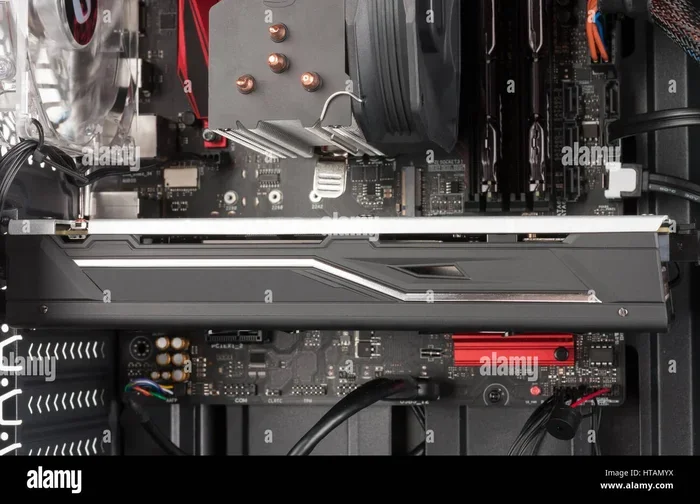
- Open your PC case and look. PCIe x16 slots are the longest slots on the motherboard. PCI slots are shorter and usually white or beige.
- Use system information software. Tools like CPU-Z or Speccy can detect your slots automatically.
- Check your PC model online. Search for your desktop or motherboard model number to find the specifications.
Once you know what slots you have, you can make an informed decision. If you only have PCI slots, you know you are working with legacy hardware. If you have PCIe slots, you can access the full range of modern graphics cards. For those looking for affordable options, check out best buy video graphics cards guides to find the best match for your setup.
Quick Tips for Choosing the Right Graphics Card Slot
- Always check your motherboard manual before buying a graphics card.
- PCIe x16 is the standard slot for dedicated GPUs.
- Do not force a card into a slot it does not fit.
- Make sure your power supply can handle the graphics card’s wattage requirements.
- Consider future upgrades when choosing a motherboard. PCIe 4.0 or 5.0 slots offer the best longevity.
- If you are on a tight budget, look at best graphics cards for video editing options that balance cost and performance.
Common Mistakes People Make
One common mistake is buying a graphics card without checking slot compatibility. You might end up with a card that physically does not fit. Another mistake is assuming a PCI slot can handle modern GPUs. It simply cannot. The bandwidth and power limitations make it impossible.
People also sometimes confuse PCIe x1 and PCIe x16 slots. A PCIe x1 slot is much shorter and has fewer data lanes. It works fine for network cards or sound cards. But it is not suitable for a dedicated graphics card. Always use the x16 slot for your GPU.
Finally, some users ignore the PCIe generation. A PCIe 3.0 x16 slot works fine with a PCIe 4.0 graphics card. The card will simply run at the slower PCIe 3.0 speed. This is called backward compatibility. It means your card will still work, just not at its full potential. For the best experience, match or exceed the PCIe generation of your card with your motherboard.
Expert Insights: The Future of Graphics Card Slots
The industry has clearly moved on from PCI. PCIe is the present and the future. Newer generations of PCIe continue to push bandwidth higher. PCIe 6.0 is already on the horizon, promising even faster speeds. This means graphics cards will only get more powerful over time.
If you are building a new PC or doing a major upgrade, there is no reason to consider PCI. Go with PCIe. Choose a motherboard with the latest PCIe generation you can afford. Pair it with a solid graphics card from a reputable brand. This setup will serve you well for years to come.
For those interested in high-performance builds, exploring best graphics cards for the price options in PCIe format is the smart move. You get modern features, driver support, and excellent performance. It is a win-win situation.
Conclusion
The differences between PCIe and PCI video graphics cards come down to speed, compatibility, and modern features. PCIe is the clear winner in every meaningful category. It offers vastly superior bandwidth, better power delivery, and support for the latest GPU technologies. PCI slots are legacy hardware that serve very few practical purposes today.
If you are building a new PC or upgrading an existing one, always choose a PCIe slot for your graphics card. Check your motherboard for PCIe x16 slots. Make sure the generation matches or exceeds your GPU’s requirements. This simple step ensures you get the best performance possible from your investment.
Understanding the difference between PCIe and PCI graphics cards empowers you to make smarter buying decisions. You will avoid costly mistakes. You will get the performance you need. And your system will be ready for whatever comes next. PCIe video graphics cards are the standard for a reason. Embrace them, and your PC will thank you.
Frequently Asked Questions
Can a PCIe graphics card work in a PCI slot?
No, PCIe and PCI slots have different physical connectors and signaling methods. A PCIe card simply will not fit into a PCI slot. They are not compatible with each other at all. You need the correct slot type for your graphics card to work.
What is the main advantage of PCIe over PCI for graphics cards?
The main advantage is bandwidth. PCIe slots offer dramatically higher data transfer speeds than PCI slots. This means faster rendering, smoother frame rates, and better overall graphics performance. Modern GPUs simply cannot function well on the limited bandwidth of a PCI slot.
Are PCI graphics cards completely obsolete?
For most users, yes. PCI graphics cards are outdated and lack support for modern games and applications. However, they may still have niche uses in retro computing or legacy industrial systems. For any modern use, a PCIe card is the right choice.
Do I need a PCIe x16 slot specifically for a graphics card?
Yes, dedicated graphics cards are designed to fit into PCIe x16 slots. This slot provides 16 data lanes for maximum bandwidth. Using a smaller slot like x1 or x4 will limit performance significantly and may not fit physically.
Will a PCIe 4.0 graphics card work in a PCIe 3.0 slot?
Yes, PCIe is backward compatible. A PCIe 4.0 card will work in a PCIe 3.0 slot, but it will run at the slower PCIe 3.0 speed. The difference is usually small for most users, but for maximum performance, matching the generation is ideal.
Can I use a PCI slot for anything useful today?
PCI slots are very limited in modern use. They can still work for basic expansion cards like simple network adapters or older sound cards. But for anything performance-intensive like a graphics card, PCIe is the only viable option. Investing in a motherboard with PCIe slots is always the better choice.