What Is the Difference Between a Microcomputer a Minicomputer
A microcomputer is a small, affordable computer designed for personal use, while a minicomputer is a larger, more powerful system built for multiple users and businesses. The main differences come down to size, processing power, cost, and who uses them. Understanding these distinctions helps you choose the right computing solution for your needs.
Key Takeaways
- Microcomputers are personal devices: They are small, affordable, and built for individual use at home or in offices.
- Minicomputers serve multiple users: These mid-range systems support several users at once and handle heavier workloads.
- Size and cost differ greatly: Microcomputers are compact and budget-friendly, while minicomputers take up more space and cost more.
- Processing power varies: Minicomputers offer stronger central processing units and greater memory capacity than microcomputers.
- Use cases are very different: Microcomputers suit everyday tasks, while minicomcomputers handle business applications, data processing, and server tasks.
- Both remain relevant today: Even with modern tech, understanding these computer types helps you make informed buying decisions.
- Hardware architecture matters: Each system type uses different hardware architecture to match its intended purpose.
📑 Table of Contents
- What Is the Difference Between a Microcomputer and a Minicomputer?
- What Is a Microcomputer?
- What Is a Minicomputer?
- Microcomputer vs Minicomputer: Head-to-Head Comparison
- The Role of RAM and Memory in Each System
- How Microcomputers and Minicomputers Are Used Today
- Understanding the Hardware Architecture
- Common Mistakes People Make When Comparing These Systems
- Expert Insights: Why This Distinction Still Matters
- Conclusion
What Is the Difference Between a Microcomputer and a Minicomputer?
When people talk about computers, they usually think of the device sitting on their desk. But the world of computing is much bigger than that. A microcomputer and a minicomputer are two very different things, even though they share the word “computer” in their names.
A microcomputer is the device you likely use every day. It could be a laptop, a desktop, or even a tablet. These machines are small, affordable, and designed for one person at a time. A minicomputer, on the other hand, is a bigger and more powerful system. It was built in the past to serve many users at the same time. Think of it as a bridge between a personal computer and a full-size mainframe.
In this guide, we will break down everything you need to know. We will compare their size, power, cost, and real-world uses. By the end, you will have a clear picture of how these two computer types stack up against each other.
What Is a Microcomputer?
A microcomputer is a small, low-cost computer with a central processing unit built on a single chip. The term became popular in the 1970s when personal computing took off. These machines were a huge step forward because they made computing available to regular people, not just large organizations.
Key Features of a Microcomputer
- Small size: A microcomputer takes up very little desk space. A desktop fits in a small office, and a laptop is even more portable.
- Single-user design: One person typically uses a microcomputer at a time. It is built for individual tasks like browsing, writing, or gaming.
- Affordable price: These systems are budget-friendly. You can get a solid microcomputer for a few hundred dollars.
- Low power consumption: Microcomputers use less electricity compared to larger systems. This makes them energy-efficient for home and office use.
- Built-in components: The central processing unit, memory, and storage are all packed into one compact unit.
Common Examples of Microcomputers
You probably own a microcomputer right now. Desktop PCs, laptops, and even smart TVs fall into this category. Gaming consoles and embedded systems in devices like washing machines and car dashboards are also microcomputers. They all share one thing in common: they handle data processing for a single user or a small group.
Modern microcomputers are incredibly powerful. A basic laptop today has more computing power than the systems that landed astronauts on the moon. This shows how far small-scale computing has come in just a few decades.
What Is a Minicomputer?
A minicomputer is a mid-sized computer that falls between a microcomputer and a mainframe. The word “mini” might sound small, but these machines were anything but. They were introduced in the 1960s and became popular because they offered mainframe-level power at a much lower price.
Key Features of a Minicomputer
- Multi-user support: A minicomputer can serve several users at the same time. Teams in a company could all access it simultaneously.
- Greater processing power: These systems have stronger processors and more memory capacity than microcomputers.
- Larger physical size: A minicomputer takes up significant floor space. It is not something you would set on a desk.
- Higher cost: Minicomputers are more expensive than microcomputers. They are a business investment, not a personal purchase.
- Reliability and uptime: Minicomputers were built to run continuously. They handle heavy workloads without breaking down easily.
Common Examples of Minicomputers
In the past, companies used minicomputers for tasks like data processing, running databases, and managing networks. DEC PDP and VAX systems are famous examples. Today, the line between minicomputers and servers has blurred. Many modern server computers do what minicomputers once did. However, the term still applies to certain mid-range systems used in labs, engineering firms, and small businesses.
A minicomputer is not something you would find in a home. It belongs in offices, research labs, and industrial settings. Its job is to handle complex tasks that a single personal computer cannot manage alone.
Microcomputer vs Minicomputer: Head-to-Head Comparison
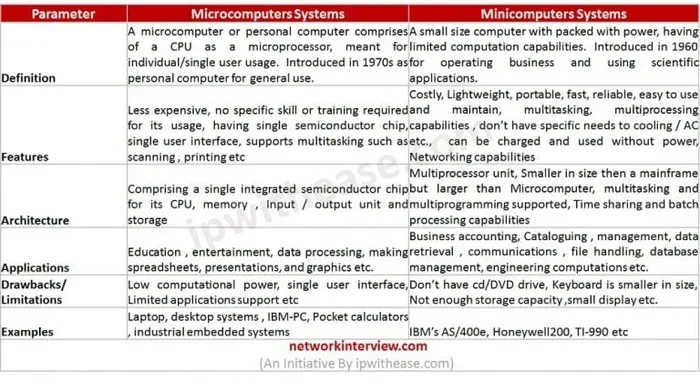
Let us put the two side by side. This comparison table makes the differences easy to spot at a glance.
| Feature | Microcomputer | Minicomputer |
|---|---|---|
| Size | Small, fits on a desk | Large, needs dedicated space |
| Users | One person at a time | Multiple users simultaneously |
| Processing Power | Good for everyday tasks | Handles heavy workloads |
| Cost | Affordable | Expensive |
| Memory Capacity | Standard RAM (up to 64GB) | High RAM (128GB+) |
| Use Cases | Home, school, office work | Business servers, labs, data centers |
| Power Consumption | Low | Moderate to high |
| Hardware Architecture | Simple, integrated design | Complex, modular design |
As you can see, the differences are clear. A microcomputer is perfect for personal tasks, while a minicomputer shines in multi-user environments that need serious processing capability. The hardware architecture of each system is designed to match its specific role.
Quick Tips for Choosing Between Them
- Need a computer for home or personal use? Go with a microcomputer. It is cheaper, smaller, and easier to set up.
- Running a business that needs shared resources? Consider a minicomputer or a modern server.
- Check your RAM requirements before buying. A basic microcomputer with 8GB to 16GB of RAM handles most tasks. A minicomputer often starts at 32GB or more.
- Think about storage too. A microcomputer might use a standard SSD, while a minicomputer could use advanced difference between SSD and NVMe storage setups for faster data access.
- Consider cooling needs. Minicomputers generate more heat, so proper cooling is essential. Look into a What Is The Best Cpu Cooler if you are building a powerful system.
The Role of RAM and Memory in Each System
Memory plays a big role in how any computer performs. In a microcomputer, the amount of RAM directly affects how smoothly it runs. Most microcomputers come with 8GB to 16GB of RAM, which is plenty for everyday use. If you want to know more about what RAM does in a portable computer, check out What Is The Ram On A Laptop for a detailed guide.
Minicomputers need much more memory. They handle multiple users and heavy tasks at the same time. This means they require significantly higher memory capacity. The RAM in a minicomputer can range from 32GB all the way up to several terabytes in high-end setups.
If you are wondering what amount of memory is right for your setup, understanding your use case matters a lot. For a microcomputer, 8GB to 16GB works well for most people. For a minicomputer, you should plan for at least 32GB or more depending on your workload. To learn more about choosing the right amount, visit What Amount Of Ram Is Good On A Laptop.
How Memory Affects Performance
More memory means a computer can handle more tasks at once. A microcomputer with enough RAM will run web browsers, office apps, and light games without any lag. A minicomputer with large memory can run databases, host websites, and process complex scientific data.
Upgrading memory is also easier in a microcomputer. Many desktops let you swap out RAM sticks in minutes. Minicomputers have more complex memory setups, so upgrades require more technical knowledge.
How Microcomputers and Minicomputers Are Used Today
The way we use these two types of computers has changed a lot over the years. Let us look at how each fits into modern life and work.
Microcomputers in Everyday Life
Microcomputers are everywhere. Your smartphone is technically a microcomputer. So is your smart TV, your gaming console, and your home router. These devices handle digital computing tasks that would have seemed impossible a few decades ago.
For personal use, microcomputers handle:
- Web browsing and email
- Word processing and spreadsheets
- Streaming videos and music
- Light gaming and creative work
- Learning and online courses
The beauty of a microcomputer is its simplicity. You turn it on, and it is ready to go. You do not need a team of IT professionals to manage it. This is why microcomputers dominate the consumer market.
Minicomputers in Business and Industry
Minicomputers still hold an important place in the business world. They are used for tasks that require shared access and heavy processing. A small business might use a minicomputer as a central server. Engineering firms use them for complex simulations and modeling.
Common uses for minicomputers include:
- Hosting company networks and databases
- Running scientific and engineering applications
- Managing industrial automation systems
- Processing large datasets in research labs
- Serving as intermediate systems between personal computers and full mainframes
While many of these tasks can now be handled by cloud servers, minicomputers still offer a cost-effective solution for organizations that need on-premises data processing power without the extreme cost of a mainframe.
Understanding the Hardware Architecture
The hardware architecture of a microcomputer and a minicomputer is quite different. A microcomputer uses a simple, integrated design. All the main components — the processor, memory, storage, and input/output ports — are built into one compact unit. This design keeps costs low and makes the system easy to use.
A minicomputer uses a modular design. Different components are housed in separate units that connect together. This allows for easier upgrades and maintenance. It also means the system can be customized to handle specific workloads. The central processing unit in a minicomputer is typically more powerful and can handle multiple threads of execution at once.
Storage is another area where the two differ. A microcomputer usually has a single SSD or hard drive. A minicomputer might use multiple drives in a RAID configuration for better performance and reliability. Understanding the difference between SSD and NVMe storage options is also important when choosing either system type, as faster storage can significantly boost performance.
Common Mistakes People Make When Comparing These Systems
When learning about microcomputers and minicomputers, people often make a few common mistakes. Avoiding these pitfalls will help you understand the topic better.
- Thinking minicomputers are just small mainframes: They are a distinct category with their own history and purpose. They are not simply smaller versions of mainframes.
- Assuming microcomputers cannot handle business tasks: Modern microcomputers are surprisingly capable. Many small businesses run entirely on desktop and laptop microcomputers.
- Overlooking the role of networking: Minicomputers shine in networked environments. Their ability to serve multiple users is their biggest advantage.
- Ignoring cooling and power needs: Minicomputers need proper cooling and reliable power. A What Is The Best Cpu Cooler setup matters more for a minicomputer than for a microcomputer.
- Confusing size with capability: A minicomputer is not always better than a microcomputer. It depends on your specific needs. For everyday tasks, a microcomputer is the smarter choice.
Expert Insights: Why This Distinction Still Matters
Even though technology has changed so much, understanding the difference between a microcomputer and a minicomputer still matters. Here is why.
First, it helps you make better purchasing decisions. If you need a computer for home use, you know a microcomputer is the right choice. If you are setting up a small business network, a minicomputer might be worth the investment.
Second, it gives you a foundation for understanding larger computer systems. The concepts that separate microcomputers from minicomputers also apply to how we classify modern servers, workstations, and even cloud computing resources today.
Third, knowing this history gives you context for how far computing has come. The microcomputer revolution made computing personal. The minicomputer era made computing shared and collaborative. Both chapters are essential parts of the computing history that shaped the technology we use every day.
For anyone studying computer hardware or working in IT, this knowledge is foundational. It helps you understand why systems are designed the way they are and how to match the right tool to the right job.
Conclusion
The difference between a microcomputer and a minicomputer comes down to size, power, cost, and intended use. A microcomputer is a compact, affordable device built for personal use. A minicomputer is a larger, more powerful system designed to serve multiple users and handle heavy workloads.
Both types of computers have played important roles in the history of technology. Microcomputers brought computing into homes and schools. Minicomputers gave businesses the power they needed to process data and run networks. Today, the lines between these categories continue to blur as technology evolves.
Understanding these computer types helps you make smarter choices. Whether you are buying a personal laptop or planning a business setup, knowing what each system offers puts you ahead. Use this guide to compare your options and pick the system that fits your needs best.
Remember, the best computer is the one that matches your requirements. Consider your budget, your tasks, and how many people will use the system. With the right knowledge, you will always make the right call.
Frequently Asked Questions
Is a laptop considered a microcomputer?
Yes, a laptop is a type of microcomputer. It is small, affordable, and designed for individual use. Laptops pack all the essential components into a portable form factor, making them one of the most popular microcomputers today.
Can a minicomputer be used at home?
It is possible, but not practical. Minicomputers are expensive and designed for multi-user environments. For home use, a microcomputer like a desktop or laptop is a much better and more cost-effective choice.
What is the main advantage of a minicomputer over a microcomputer?
The main advantage is multi-user support and greater processing power. A minicomputer can handle heavy workloads and serve several users at the same time, which a microcomputer cannot do efficiently.
Are minicomputers still used in modern businesses?
Yes, minicomputers are still used in certain business and industrial settings. They serve as mid-range servers, handle data processing tasks, and support network operations where a full mainframe is not needed.
How much RAM does a typical microcomputer have?
A typical microcomputer has 8GB to 16GB of RAM, which is enough for everyday tasks. For heavier workloads like video editing or gaming, 32GB or more may be needed. To find the right amount for your needs, check out resources on What Is Ram Good For In A Laptop.
What comes between a microcomputer and a mainframe?
A minicomputer sits between a microcomputer and a mainframe in terms of size and power. It offers more capability than a microcomputer but is less powerful and less expensive than a full mainframe system.